
dbannerman
Systeminfo.exe output to host Information/Notes tab.
Im trying to remember the problem now, It left my memory bank.
I believe there was a problem with the WMI service. It wasnt loaded.
VNC Connections in Default mode do not close.
I have my computers setup with UltraVNC and that works fine, but I was getting some UltraVNC popups that were irritating and David recommended using VNC Default setting instead. Well that solved the popup error windows on bad connections, but now I can't close the tabs with the VNC connections. And cant close down RDM program without task manager shutdown. I am running latest version of RDM.
Spiceworks Integration
Looking forward to the day when RDM can import data from Spiceworks. Someone is working on that I hope.
Spiceworks Integration
Thank You for the help. That cleared up some questions I had. It works for me now.
Spiceworks Integration
Sorry. 7.3.00108.
Spiceworks Integration
Version 10.5.4.0
UltraVNC Error messages
I am noticing that if I have a vnc connection that has incorrect credentials or an unavailable server, the UltraVNC (VncViewer Message Box) pops under RDM. Then a RDM "Connection Refused" error box opens under RDM. These pop under error messages start stacking up and need to be manually closed. Any way to control the output of these error messages?
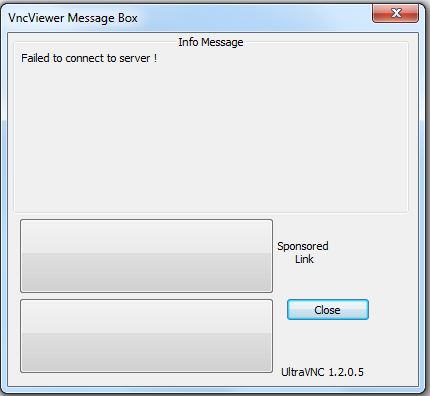

Also if you have these error pop unders stacked up, waiting to be closed and you click on the tree menu (rt click), it will stay open until you close the hidden error pop ups (under).
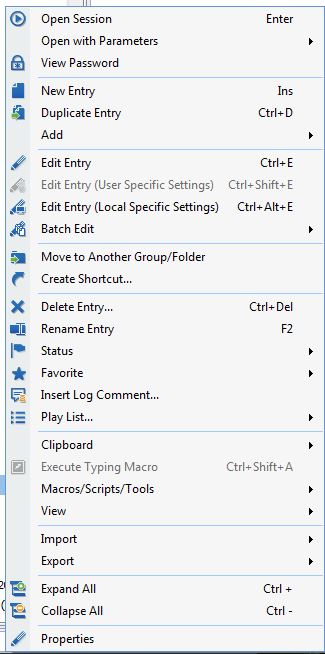

Thanks!
edited by dbannerman on 4/15/2015
edited by dbannerman on 4/15/2015
Spiceworks Integration
I need the correct way to login and avoid errors. I get invalid XML file. I have seen others in the forum with the same problems, but I don't see any solutions, instructions or FAQ. I have also posted in Spiceworks forums for help.
Spiceworks Integration
Still waiting for a reply. I am getting errors using Spiceworks integration, and need help.
Spiceworks Integration
Is there a manual or write up that explains proper setup of Spiceworks integration? I see other people have had problems with this also.
Remote Registry feature does not show all items.
Running the latest 10.5.2.0 and the Remote Registry feature does not allow enough entries to show. Only shows so many entries, and will not allow you to scroll to view all.
RDM Beta 10.1.11.0 (Loaded 2/25/15) Has a problem!
I am sending email message to support with complete details. Forum back and forth is going to take to long. Thanks anyway.
RDM Beta 10.1.11.0 (Loaded 2/25/15) Has a problem!
After a reboot and deleting lyt files, the program looks like its not connecting to my data sources. Got 0 entries and I have no idea what went bad. Can I re-install software? I pay for the online database backup. Maybe I should stay away from the Beta releases.
RDM Beta 10.1.11.0 (Loaded 2/25/15) Has a problem!
The pop up window covers everything from ADMINISTRATOR tab left. I cant get to anything on left side.
RDM Beta 10.1.11.0 (Loaded 2/25/15) Has a problem!
Im getting a a strange window in top left screen witch covers up application. It appears to show programming data of some sort.

Something is wrong.....
Minor Design error - Port Scan Macro on VNC entries.
Opens in RDM.
Minor Design error - Port Scan Macro on VNC entries.
I use UltraVNC. Not sure if its embedded. How can I tell?
Minor Design error - Port Scan Macro on VNC entries.
Noticed the VNC port entry in latest version, but it does not work. Changing to say 5901, it will still try connecting to 5900. If I add " :5901 " to my host name it will connect.
Inventory macro shows incorrect BIOS info.
When running "Inventory" macro I get a Bios Version:DELL - 15
Systeminfo cmd gives correct BIOS Version: Dell Inc. A18, 8/06/2013
Running RDM version 10.1.3.0
Systeminfo.exe output to host Information/Notes tab.
Ok I got that WMI error figured out. The report works fine. Thanks.
Systeminfo.exe output to host Information/Notes tab.
I get errors every time. Unable to access Inventory report. Error getting WMI scope. I am connected to remote computer with RDC as domain administrator.
Magic Packet Sent! - Popup notification that auto closes without clicking ok.
All it needs in my opinion is about 5 seconds and auto close. Just long enough to see that packet was sent. Thx.
Magic Packet Sent! - Popup notification that auto closes without clicking ok.
Auto Closing popups would be nice! Especially when doing a batch.
Systeminfo.exe output to host Information/Notes tab.
Would really like to make this a batch macro, that would run systeminfo.exe and output text into the host RDC entry's Information/Notes tab. Or even better take the output text and auto fill some basic fields automatically. Memory, Operating System, Etc. ( Ex. SYSTEMINFO |find "Total Physical Memory:")
Minor Design error - Port Scan Macro on VNC entries.
Just a minor design error comment about the Port Scan macro. When I use the macro on a VNC entry that does not use standard 5900 port, it gets a bit confused by the extra "::5901" on the host name. Port scan then pulls up 5900 with a host of computer::5901. Best way to solve this would be to add a place on the VNC entry for the VNC Port to separate it from the host name.