
bmillernbs
SSH authentication agent for SSH Port Forward sessions
In the Windows version of RDM, if I go to the Advanced settings for my SSH Port Forward I can choose the option to "Use SSH authentication agent". This is not available in the settings for the Mac version. That setting does exist on Mac for the SSH Shell Session, but not the SSH Port Forward. See screenshots. I may be wrong, but I would think that if the functionality exists for one session type, it should be relatively trivial to extend that functionality to another session type.
I would like SSH authentication agent to be available to any SSH session on the Mac so I can load my private key via agent and no longer have to embed it into my private vault.
RDM for Mac - Add support for OpenSSH private keys
OpenSSH is a ubiquitous standard, and the default output of the ssh-keygen command is an OpenSSH formatted private key. This key cannot be used with RDM. I had to go find an old RedHat machine to generate a key in order to access my environment again. Request that the SSH port forward session be compatible with OpenSSH private keys.
131085 Issues
I was also having the same issues. Support directed me to this page. I just downloaded and installed the latest beta version and it seems to be fine so far.
Typing Macros and variables for Credential Entries
At this point, I have a suitable solution. Like I said, I think having a linked macro actually gives me more flexibility because if I ever need to change the macro itself for all those connections, I can do it in a single spot. I am happy with what I've got in place now and would prefer not to pursue this any further.
Thanks so much for your help!
Typing Macros and variables for Credential Entries
Yes, I apologize for the vague comment. Here's the full on rundown.
I have a simple Putty session for logging into a Cisco device. I want to enter enable mode automatically after login. Initially, I set this up with a typing macro defined within my Putty session. If I used $MACRO_PASSWORD$ and then entered the password into the Macro Password field on the Events tab, everything worked fine. However, I don't want to have to modify every single Putty session to update the Macro Password when I change my enable password.
So, I created a credential in my credential repository for my Enable password:
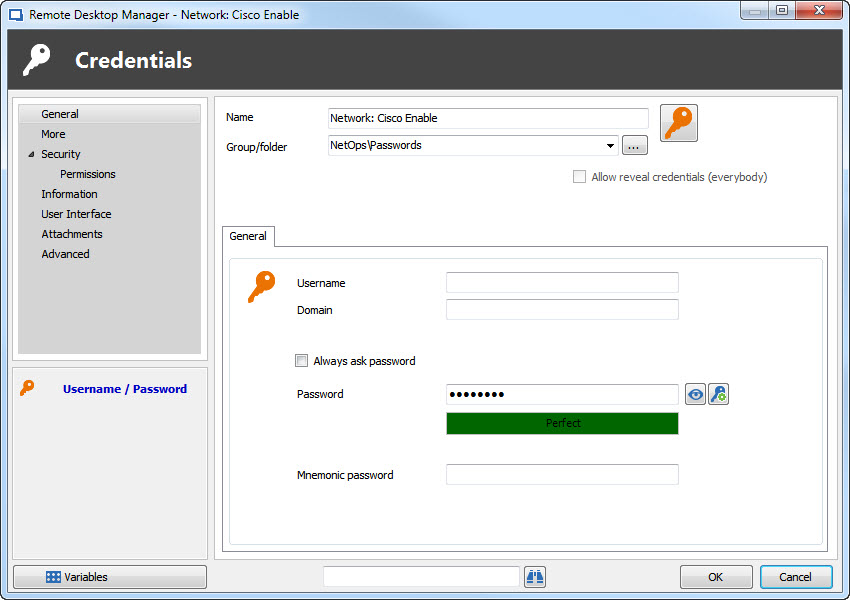
I then defined this credential in the Tools tab:
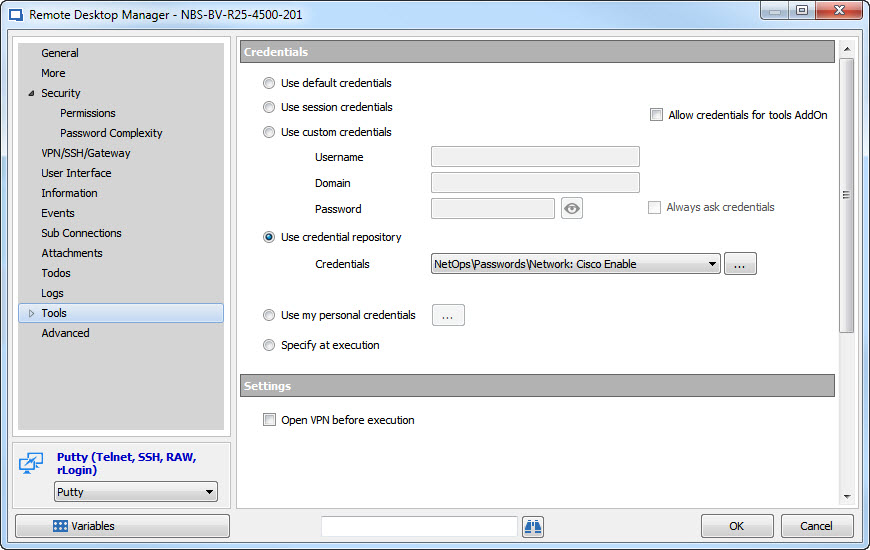
I then set the Security tab to allow password in variable:
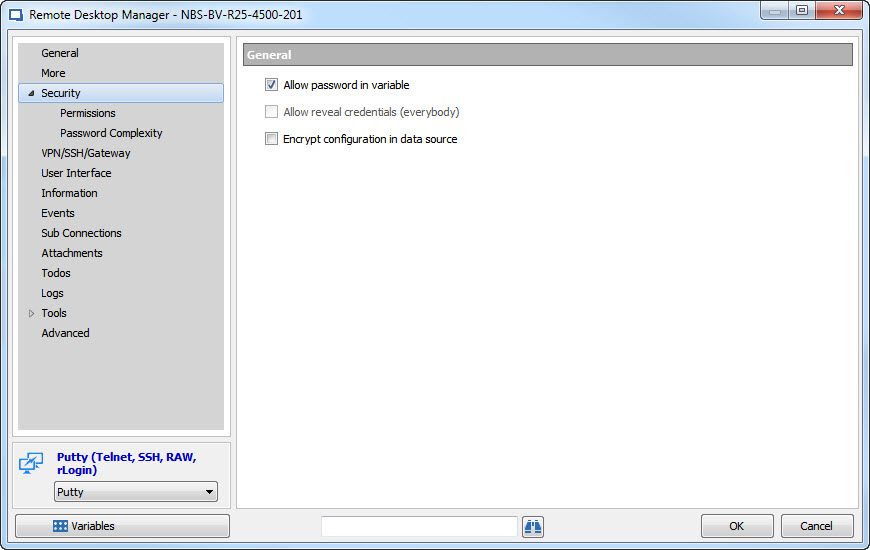
I then went to the Events tab and set my typing macro to use this credential:
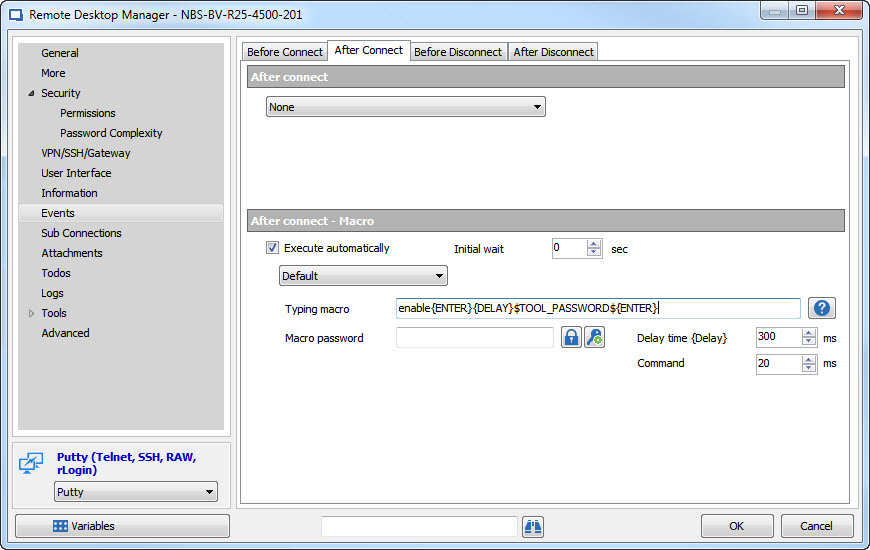
However, when I use this method, it seems that what is being sent across is not correct, because I get an error saying incorrect password. If I take off the whole command and simply put in $TOOL_PASSWORD$ without the enable{ENTER}{DELAY} etc, then the password would be displayed correctly. I cannot show you this, unfortunately, because I do not want to reveal the password.
What I've found is that if I create a new Macro entry and then link to that Macro in the events screen, everything works as expected:
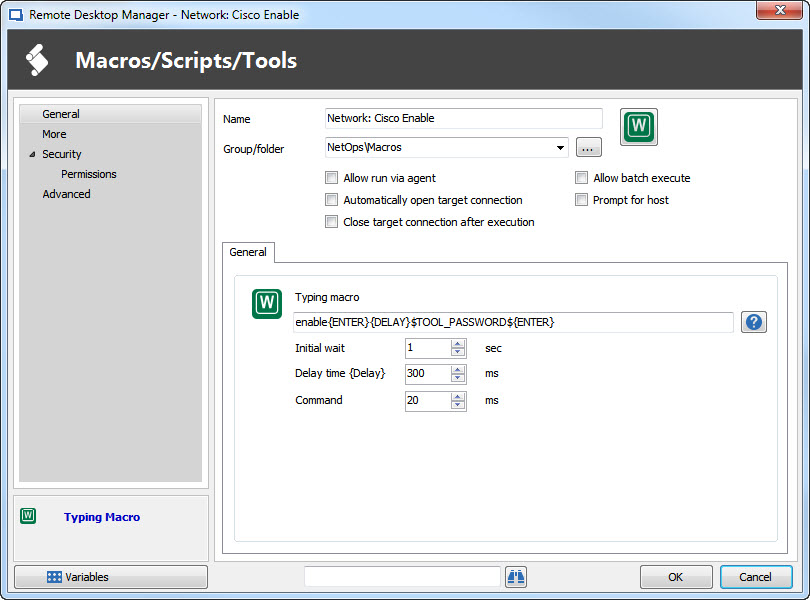
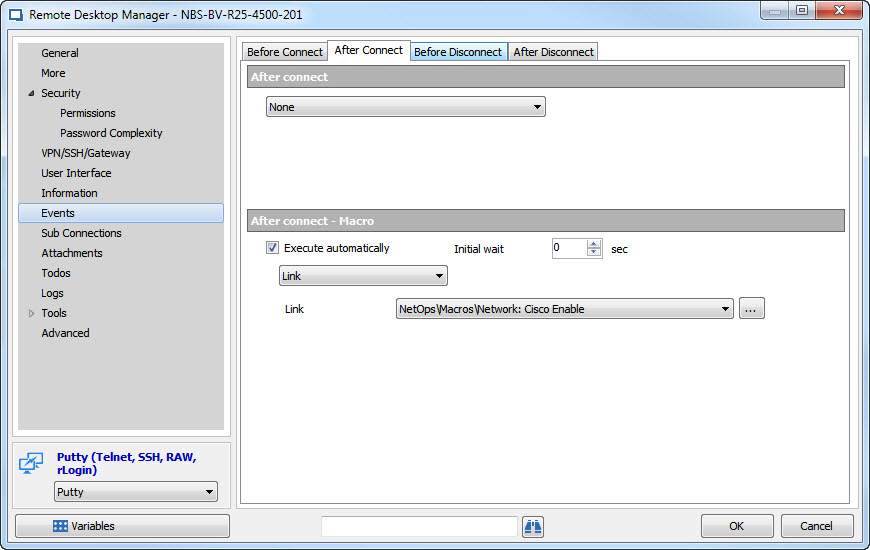
I'm fine with using this method, as it actually gives me a bit more flexibility, in case I ever needed to change the Macro itself. It was a bit of a frustrating journey to get to this point, but I'm happy with it for now. You might want to see if you can reproduce this behavior, though, because I imagine I'm not the only person who has come across this.
Typing Macros and variables for Credential Entries
Hubert I apologize for resurrecting an old thread, but I've just come back to this. I've done additional testing and here is what I have come up with.
To test this, I set the typing macro to simply be: $TOOL_PASSWORD$
When I execute the typing password, it spits out the password correctly, as I would expect. However, when I set the macro to do the full command, my device tells me incorrect password. Here is what I am sending: enable{ENTER}{DELAY}$TOOL_PASSWORD${ENTER}
Thoughts? How do I test this further to verify the macro is not somehow modifying the password as it's sent? I did also remove the final {ENTER} from the macro as well, thinking perhaps that could be causing issues, and manually pressed enter after the password was entered, but that did not do anything either.
For what it's worth, if I put this into a separate macro and run that, it seems to work fine. It's just the typing macro defined within the session itself does not work properly.
Typing Macros and variables for Credential Entries
I just checked that and still no luck. I also tried simply specifying the password in the tools section, instead of linking to a credential entry, but still it keeps saying invalid password. Is there a way I can debug and see what exactly is being sent across?
Typing Macros and variables for Credential Entries
Hector: $TOOL_PASSWORD$
Maurice, is there any update on this? I am now running 11.0.9 and I am still having the same issue. Do you know when the bug will be fixed?
Typing Macros and variables for Credential Entries
Can you also respond to my other question below?
Can I create my typing macro somewhere else? When I go to Macros/Scripts/Tools it doesn't seem to give me an option to do a simple typing macro, it's all PowerShell or command line, etc.
Also, is there a way to make the macro force the mouse/keyboard focus to the putty session? If I open a putty session and then click on another window (say a chat window, for instance) the macro will type into whatever window the current mouse focus is on, so I could inadvertently send a password to someone else. It would be nice if the macro would bring the session window to focus before typing...
Typing Macros and variables for Credential Entries
Thank you. Can you give any estimate on a timeline for bug resolution?
Typing Macros and variables for Credential Entries
Ok, so I have created a credential entry called Cisco Enable. In the tools section, I have selected "Use credential repository" and selected 'Cisco Enable' from the drop down.
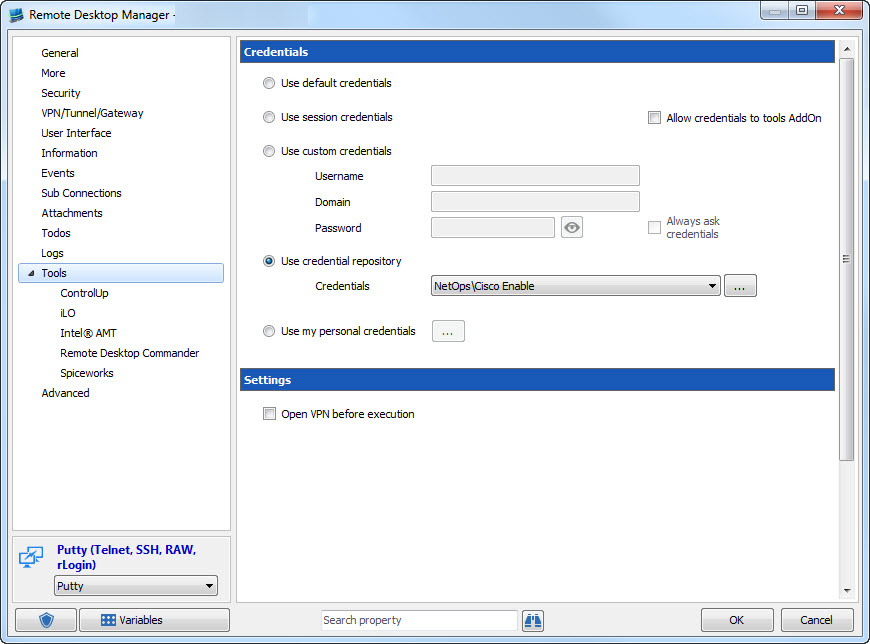
Then my macro
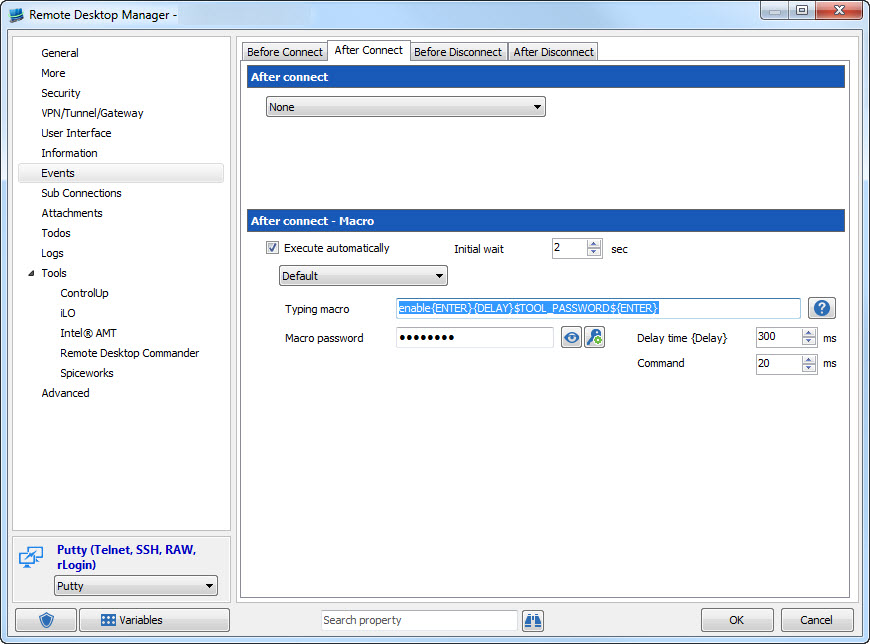
I used to have $MACRO_PASSWORD$ instead of $TOOL_PASSWORD$. Right now, when the macro is run, I'm getting an error from my network device that the password is invalid. Am I doing this correctly? Is there any way to see what is being typed for the password to verify it is correct?
Another question... Can I create my typing macro somewhere else? When I go to Macros/Scripts/Tools it doesn't seem to give me an option to do a simple typing macro. Also, is there a way to make the macro force the focus to the session? If I open a putty session and then click on another window (say a chat window, for instance) the macro will type into whatever window the current mouse focus is on, so I could inadvertently send a password to someone else. It would be nice if the macro would bring the session window to focus before typing...
Secret Server Integration
Just updated this morning to 11.0.2.0 and the issue no longer presents itself.
Secret Server Integration
Hello, I have recently integrated RDM with my company's Secret Server deployment, but I'm a bit confused about the credential selection list.
On a Remote Desktop session, I have chosen to use "Existing credential entry" and then selected the credential entry for our Secret Server. Then I click the link underneath the drop down box that says "Select from list". This brings me to the tree where I select the appropriate credential from within Secret Server. This is fine, but when I go to open that session, I am once again prompted to select my credential from the list. If I hit cancel, the dialog box goes away and I am logged in with the credential I selected when editing my RDP session.
I'm curious as to why I am getting prompted to select the credential again. Why give the option to select it when modifying a session if I will simply be prompted to select it once again? Am I missing something somewhere?
Typing Macros and variables for Credential Entries
I don't see where in the Tools tab I can set a credential... ?
Typing Macros and variables for Credential Entries
Is there a variable I can use in the Typing Macro to reference the password that exists within a credential entry?
I am wanting to see if there is a way that I can create a credential entry and put a password into it and then reference that password from a Typing macro in the After Connect Macro of a session.
Scenario: I have some PuTTY sessions that connect to Cisco equipment (switches, firewalls, routers, etc.) Once I connect to them, I need to enter my enable password to gain elevated privileges. To do this now, I have a typing macro set up on each of my PuTTY sessions. My enable password among the devices is the same, so I'd like to have it set in a single credential entry so that when I change it I don't have to modify 30+ sessions to update the password. I just need to know if I can somehow use a variable to pull the password from an existing credential entry and put that into my Typing Macro instead of using the $MACRO_PASSWORD$ variable and have to set that password on each of my sessions.
vCloud Director Browser Plugin..Not working.
I had the same issue. I have added links to my vCenter servers' Web Client URL. When I launch them directly within Internet Explorer, the client integration plug-in is loaded fine. When I launch from within RDM, I get the notice at the bottom of the screen to "Download the Client Integration Plug-in".
I tried setting the IE mode to IE 10 and IE 11, but neither one makes a difference.
The plug-in is a 32bit plug-in, so I decided to try and edit the URL session to force 32-bit. This seems to have allowed the plugin to load, but the rendering of vSphere page is extremely slow now. Any additional thoughts or suggestions to improve this?