
dcapilla
Object "Custom record": Copy name (not only value) to clipboard
Hello Hubert,
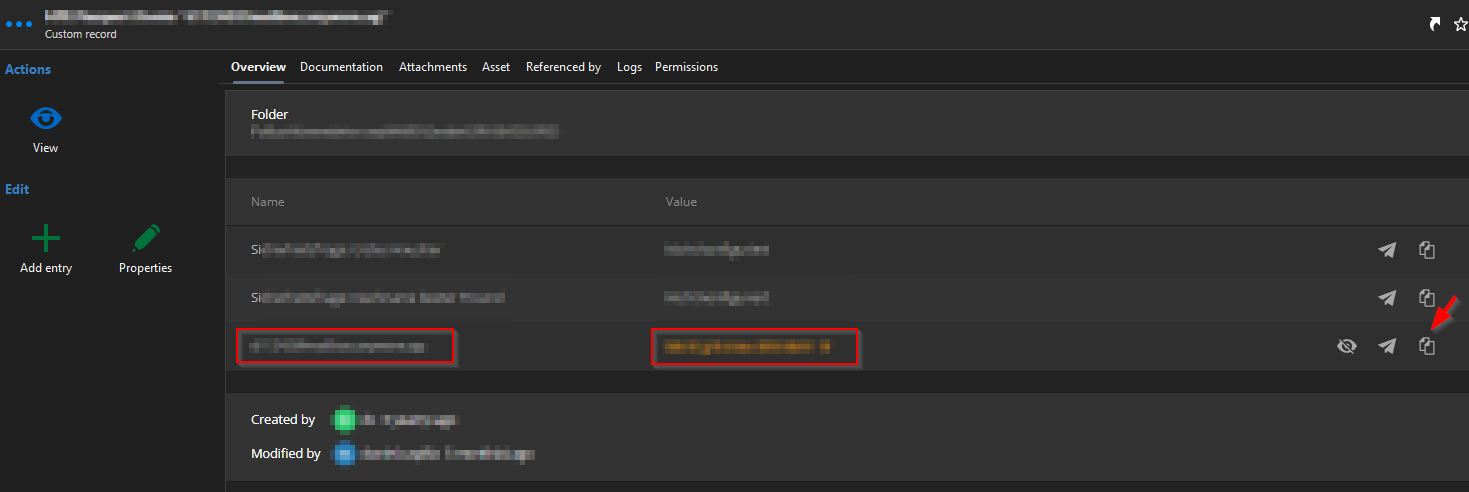
Add a "Copy name" button alongside the "Copy value"
Add a "Copy name and value" button. The first paste would be the name, and the second paste would be the value, same behavior as copy username+password
A single "Copy name" button would be the best minimal solution for me, because it reduces a lot of clicks and it's just one icon more.
A combination button (name/pw) would be just little more convenient, but in my opinion not necessary.
Best regards,
Daniel
Object "Custom record": Copy name (not only value) to clipboard
Hello,
it would be nice, if the "Name" (left) could be copied also - not just the value (right):
Best regards,
Daniel
Type Clipboard: Enhancements
Hello,
I got the feedback faster than expected. In short: It works!
Thanks again!
Daniel
Type Clipboard: Enhancements
@Richard Markiewicz
I will give you feedback, but it may take some time, as I do not work with VMware myself - my colleagues do.
It could take a few weeks, and I will be on vacation in August, but rest assured that I will post an update in this thread.
Best regards,
Daniel
Type Clipboard: Enhancements
@Hubert Mireault
Thanks for your feedback. Yes, RDM really is “Beauty and the Beast” all in one :D
Your documentation is great, but overall there is simply too much of everything. Not too complex—just too much. I completely understand that finding the right place for settings and documentation is a challenge. Often, there simply is no single right place.
With the help of (personalized) LLMs/AI, searching can at least be made much easier - at least in my experience.
Your bot has also been helpful before, it would just need to be less verbose for my taste. ;-)
@Richard Markiewicz
Thanks — it worked.
Some kind of setting in a future update would be great, even though this isn’t a frequently used feature, including in our case.
Best regards, and thank you as always for your kind support,
Daniel
Type Clipboard: Enhancements
Hello Hubert,
If I understand correctly, your goal is to easily type credentials into an opened entry, for an entry where the automatic filling of credentials doesn't work, for example with RDP lock screens, is this correct?
Yes, or at least into an external Windows console or shell.
It took me quite some time to find the relevant settings, as they are spread across different areas of the RDM configuration. In the future, an AI-powered search could be helpful—not just a standard settings search, but one that understands the context of a request.
I tried the RDM AI assistant, but it could not help. An external LLM also struggled and mainly pointed me toward using macros.
I may be mixing several feature requests here, but they are a logical consequence of the same issue: with the large number of settings in RDM, it can be difficult to find the right option without knowing its exact name or location.
If you're not satisfied with this solution, let me know and we'll see what other alternatives we might be able to find.
Back to topic:
In general, we are satisfied, but one problem still exists:
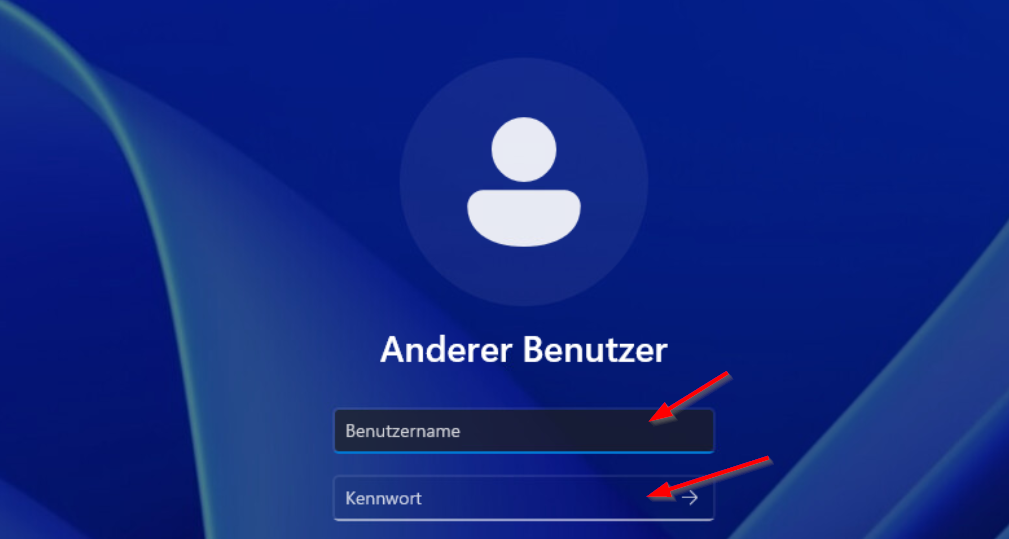
When opening a VMware console through web (browser), we see the VM embedded in the website.
It is still not possible, to let RDM type the clipboard/credentials. It works in nearly all other apps/notepad/websites, but not, when using a VMware console through web:
Do you have any ideas regarding this?
Regards,
Daniel
Type Clipboard: Enhancements
Well, I think a colleague already found the solution, so i'll post it here:
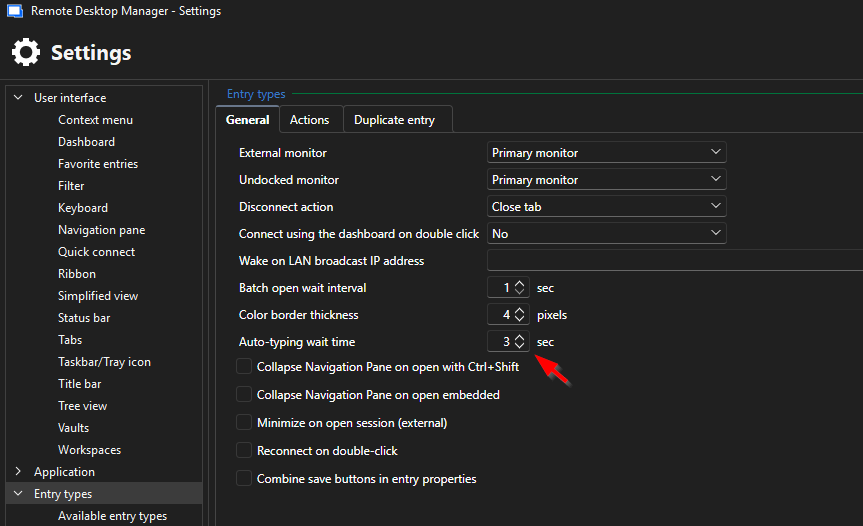
If I'm wrong, please correct me.
Regards,
Daniel
Type Clipboard: Enhancements
Hello,
not often, but every now and then, my colleagues need to type a username/password.
This is mainly needed in external applications/windows where Ctrl+V does not work.
I'm testing macros, especially:
File → Settings → User Interface → Keyboard → Shortcut macros
I want to avoid every user having to configure this in their own RDM. I would also like to avoid setting the Allow password in variable flag in every RDM entry for every user.
Is there a way to enhance the existing possibility of typing clipboard text by adding a configurable delay?
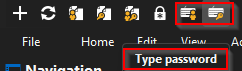
With a default delay, the RDM user could switch the focus to another application or shell, so RDM could type the text there.
Regards,
Daniel
SSL-VPN OpenVPN autofill does not transmit the caret character (^); it replaces it with an ampersand (&).
Hi,
datasource is: SQL
Regards,
Daniel
SSL-VPN OpenVPN autofill does not transmit the caret character (^); it replaces it with an ampersand (&).
Hello,
version: 2026.1.16.0 64-bit (JIT)
What do you mean with "the workspace involved"?
"could you confirm whether this issue started occurring after an update or a specific change, or if it began happening randomly?"
It did not happen "before", because we did not use passwords with the caret.
So the issue could have been there for a long time. We discovered this by "luck/accident", as the RDM password generater generated passwords with the caret.
Best regards,
Daniel
Fortinet IPSEC VPN without RDM as admin?
Hello,
my final feedback: I checked the workaround, but that's "too much workaround" for us, as our configurations must be minimal - especially to not trigger our security systems like EDR e.g.
Anyway, thanks again!
Regards,
Daniel
SSL-VPN OpenVPN autofill does not transmit the caret character (^); it replaces it with an ampersand (&).
Hello,
we use "autofill" to copy credentials into the OpenVPN credential-window.
Some passwords contain "^" (caret).
Only, when autofill is used into the OpenVPN credential-window, then it is pasted wrong.
"^" is substituted with a "&".
When using the “Clipboard > Type clipboard“ function the password will be typed as copied; only the Autofill function from the OpenVPN object does transmit it wrong.
Is this a bug?
Do we need to set a special setting?
Here is the configuration:
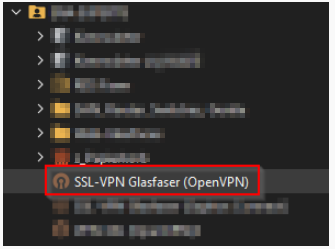
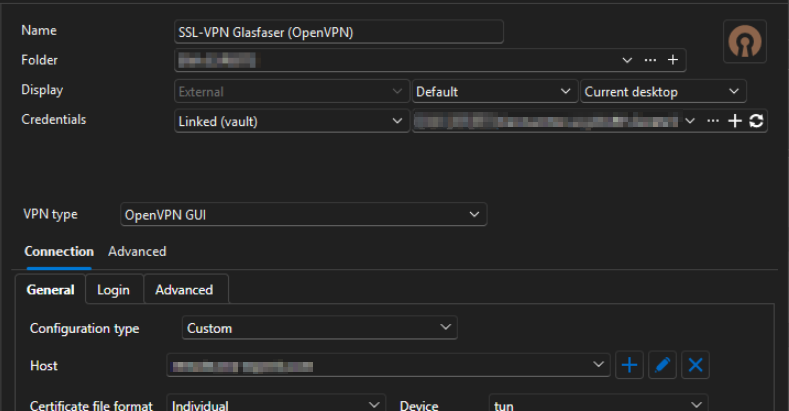
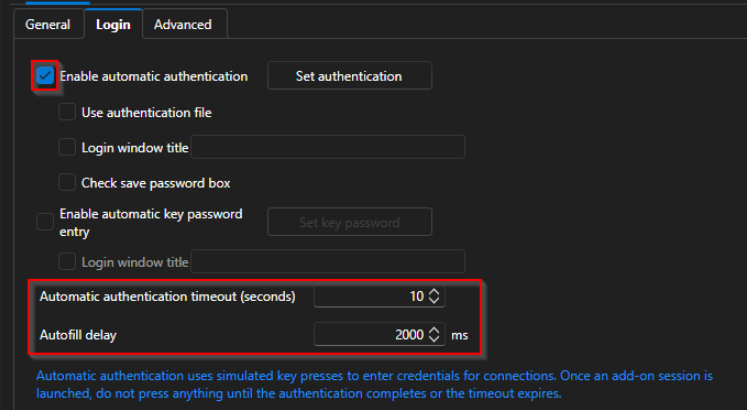
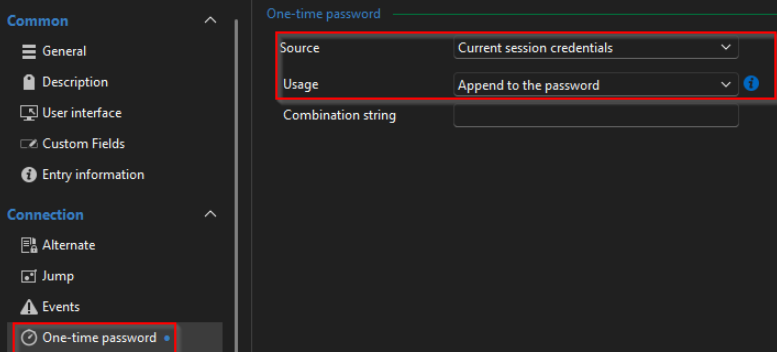
Thanks in advance.
Best regards,
Daniel
Rightclick / context menu: Missing items since update?
Hello David,
no worries. I was on vacation myself.
Thanks for the screenshot. That setting fixed it.
I would never have thought to use the full-text search options in this case, because I didn’t realize there was a dedicated setting for this.
Regards,
Daniel
Fortinet IPSEC VPN without RDM as admin?
Hello Stefano,
I appreciate it! I’ll take a closer look, when returning from vacation!
Regards,
Daniel
Fortinet IPSEC VPN without RDM as admin?
Hello together,
I was afraid of that. The FortiClient VPN/SSL indeed works good - no issues, but in this in this particular situation, we must use IPsec.
Thanks for your feedback. We already use RDM just for pw-credentials in this case - that's not nice, but OK for few situations.
@Iain We only need to use Fortinet Client/IPsec in very few situations. In most cases we do not use Fortinet anymore.
But: The Forti-SSL Client / CLI does work good so far with RDM.
Regards,
Daniel
Fortinet IPSEC VPN without RDM as admin?
Hello,
we need to integrate a Fortinet IPSEC VPN Connection through the regular Fortinet Client.
https://www.fortinet.com/de/support/product-downloads#vpn
I do not find a simple way, to configure it though RDM "seemless".
What I like to do: Enter user/pw/key and then just start the VPN-Connection throught the Fortinet Client.
I read through the forum articles and kb, but did not find a simple way to get it to work.
SSL VPN through the fortinelcli is no problem, but I can not get an IPSEC connection working through RDM.
The client/config itself does work.
Any tipps?
FortiClient IPsec must be the right object?
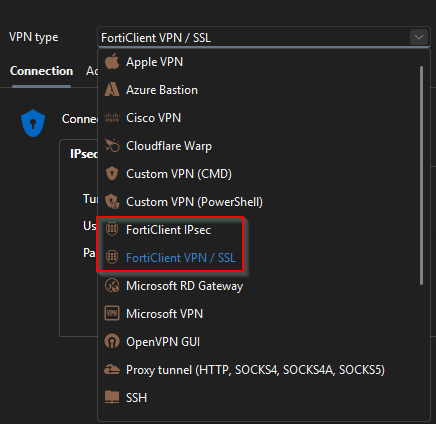
But: There's no Tunnel to chose:
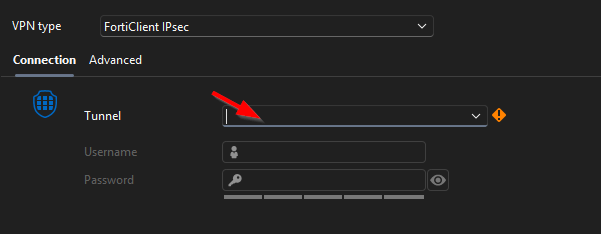
We do not have the possibility to start RDM as admin for security reasons, if this is one issue.
As said before, the connection through the Fortinet-Client itself does work without admin-rights.
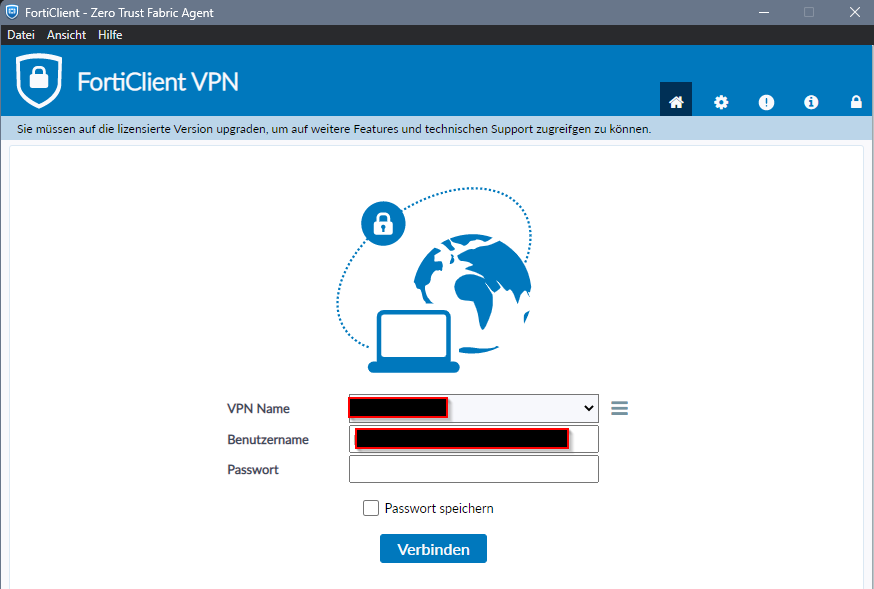
Best regards,
Daniel
Rightclick / context menu: Missing items since update?
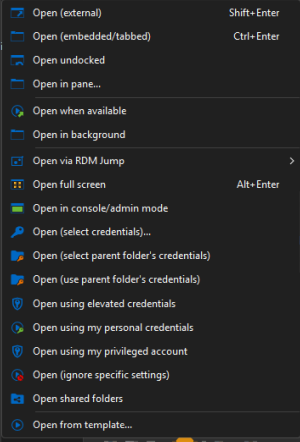
Here it is:
Regards,
Daniel
Rightclick / context menu: Missing items since update?
Hi,
no - I also tried disabling the setting/checkbox (saving) and reanabling (saving) -> no change - items still missing.
Regards
Daniel
Rightclick / context menu: Missing items since update?
Hi,
yes, it's a RDP object.
Update: Another colleague does have the entries still. Could there be some config file got corrupted?
We deploy RDM/RDM-Updates with our internal deployment-system.
Regards,
Daniel
Rightclick / context menu: Missing items since update?
Hello,
one of my colleagues told me, this (screenshot below) rightclick menu items disappeared since one of the last RDM updates.
Could this be?
I see these items (I am administrator).
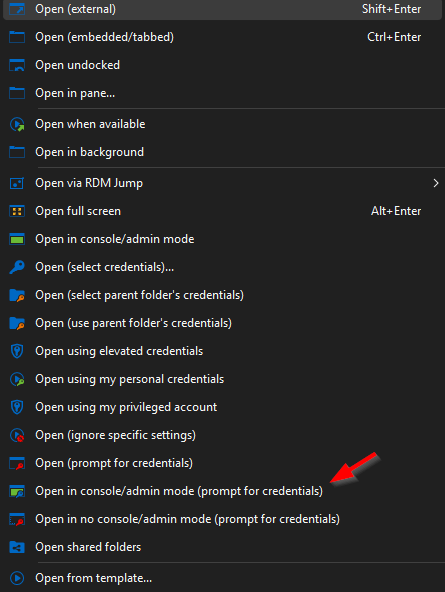
What could be the issue, where to look for?
I did not change anything regarding rights in the past weeks/months.
Thanks in advance!
Best regards,
Daniel
Automatic public/private vault export with activated MFA/2FA/TOTP?
Hello Patrick,
... just to be sure:
It's not about a direct automated export / out of RDM. It's about using the powershell module.
Goal: Automatic uservault export (e.g. scheduled PS script). Special challenge: With activated datasource MFA.
That's also not possible, when using the powershell module with RDM/SQL?
Only possible with DVLS or Hub Business (and Powershell)? If so, that unfortunately is no option for us in the next time.
Best regards,
Daniel
Automatic public/private vault export with activated MFA/2FA/TOTP?
Hello Erica,
thank you for your feedback. Yes – we have different full backups to various destinations, with revisions, etc.
It’s really about the worst-case scenario and minimizing the time needed to access information after a crash, fire, or similar event.
Now, the amount of time required to access, for example, RDM data means:
You need a Domain Controller, a SQL Server, a RDM Client, and must impersonate accounts if you want to access specific data or private vaults.
Also, if a user accidentally deletes data in their vault, the rollback can sometimes take a considerable amount of time.
Are there any other options, particularly for performing automated backups of user vaults (with MFA enabled)?
As far as I understand, not really – because the data is encrypted inside the SQL database?
So, it's not possible to regularly export, for example, specific tables containing user vaults?
Maybe I'm thinking in the wrong direction – do you have any suggestions or hints on how to solve this?
Best regards,
Daniel
Automatic public/private vault export with activated MFA/2FA/TOTP?
Hello,
we like to schedule the export of *all* public and/or private vaults to a share (.rdm, .html, .csv, etc.).
The task shoud be triggered by a central instance (server vm with installed RDM e.g.).
Is this possible, when MFA is activated on datasource level?
If not - any way to achieve this goal?
Especially the option to export vault-data (pubilc and all private user vaults) to a universal format, like the .html option with password-protected fields would be nice ... to have a fallback for a worst-case-scenario.
Best regards,
Daniel
Sophos Connect 2 - security concerns
Hi,
this is only possible, if I enter username/password directly into the connection mask, but not, when already a link to a vault-item exists.
When manually entering user/password and then switching to a vault-item back, it works.
Example - existing connection, linked to a user/password item - can not activate the checkbox "Use standard input for authentication":
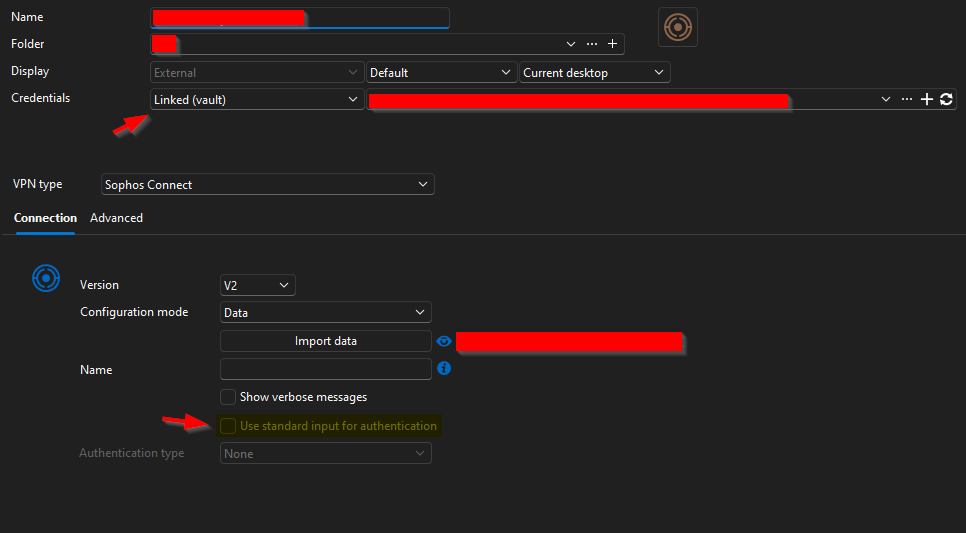
Example - when having the credentials in the mask itself:
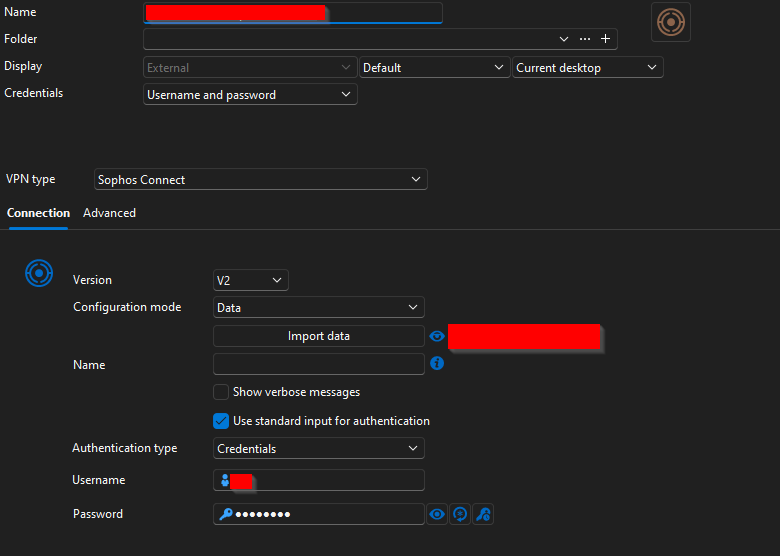
Additional, when entering the credentials directly into the mask and then afterwards switch to the user/password item in the vault, it works, even, if the data checkbox "Use standard input for the authentication is greyed out - the checkbox ist still marked:
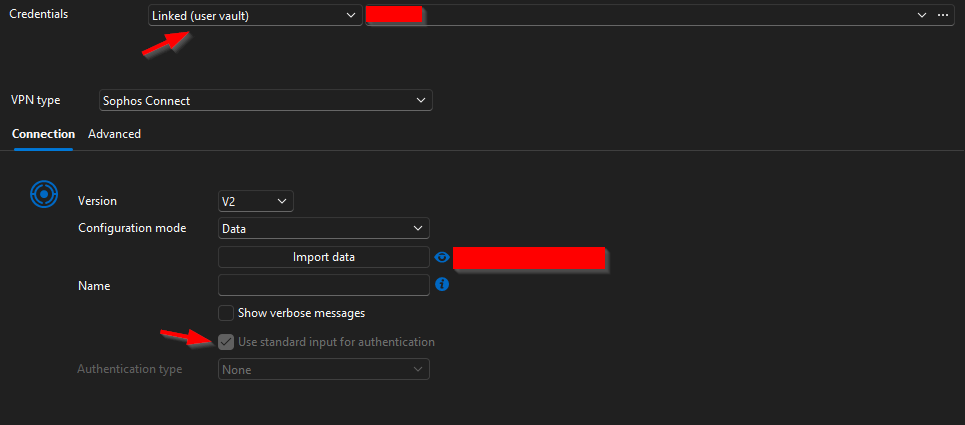
So, the checkbox is inactive, when allready a Linked user/password exists.
Best regards,
Daniel
Sophos Connect 2 - security concerns
Hello,
unfortunately I can see no difference:
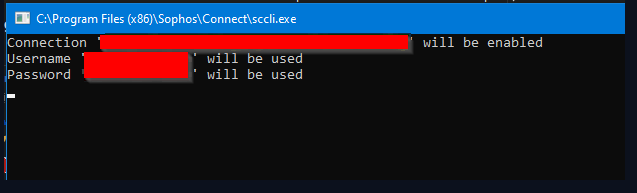
The username and password are still visible in cleartext.
Do we have to change something in the object-configuration?
Best regards,
Daniel