Fortinet IPSEC VPN without RDM as admin?

Hello,
we need to integrate a Fortinet IPSEC VPN Connection through the regular Fortinet Client.
https://www.fortinet.com/de/support/product-downloads#vpn
I do not find a simple way, to configure it though RDM "seemless".
What I like to do: Enter user/pw/key and then just start the VPN-Connection throught the Fortinet Client.
I read through the forum articles and kb, but did not find a simple way to get it to work.
SSL VPN through the fortinelcli is no problem, but I can not get an IPSEC connection working through RDM.
The client/config itself does work.
Any tipps?
FortiClient IPsec must be the right object?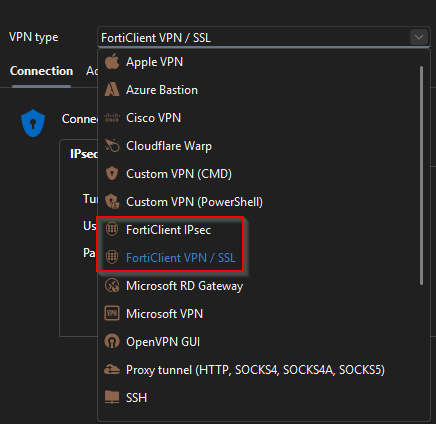
But: There's no Tunnel to chose: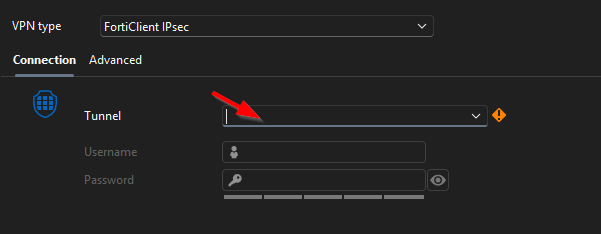
We do not have the possibility to start RDM as admin for security reasons, if this is one issue.
As said before, the connection through the Fortinet-Client itself does work without admin-rights.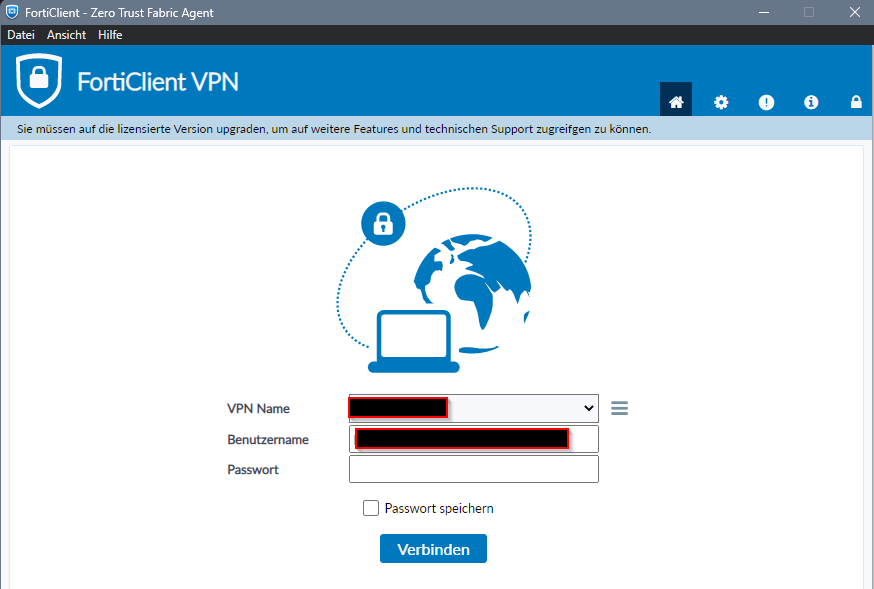
Best regards,
Daniel
c42ca7ed-0fa0-4f63-8c00-5712bcf6b7bf.png
216d4e68-5a05-4741-997a-0e3c15ccd9b9.png
c964b3d3-2e3f-41c8-a8a6-8f0e33d11204.png
All Comments (6)
Hello Daniel,
Thank you for the details and screenshots.
Based on what you are trying to do, I would not recommend treating the FortiClient IPsec entry as a generic front end for the regular FortiClient VPN interface. The empty Tunnel list means that RDM is not detecting a compatible FortiClient IPsec tunnel it can control through that integration.
The main limitation here does not appear to be that RDM is not running as administrator. The larger issue is that recent FortiClient versions no longer expose the same credential-injection behaviour for IPsec connections. In practice, the seamless username/password injection that works with FortiSSL does not currently translate cleanly to regular FortiClient IPsec.
The supported workaround we normally suggest is to use FortiClient VPN/SSL with the FortiSSL mode and the Fortinet tools package, when SSL VPN is an option. Since you mentioned that SSL VPN through the Fortinet CLI works, that is currently the best-supported path for a seamless RDM workflow.
If IPsec is mandatory, the realistic options are:
- Let FortiClient handle the VPN connection directly, including saved credentials or autoconnect if allowed by your FortiGate/FortiClient policy.
- Use a Custom VPN (CMD) or Custom VPN (PowerShell) entry only if Fortinet can provide a supported command line for your exact FortiClient Windows version.
- Launch FortiClient from RDM, but complete the IPsec authentication in FortiClient manually.
At this point, I would not expect RDM to inject the username/password/key into the regular FortiClient IPsec UI in the same way it can with FortiSSL.
Could you confirm the FortiClient version installed on the workstation and whether the VPN profile is locally configured or provisioned through FortiClient EMS? That will help us confirm whether there is any supported command-line option available for your specific setup.
Best regards,
Following thread for updates, as we have moved to the same VPN and I have been unable to configure it either.
Thanks
Iain
Version 2026.2.13.0 64-bit
Data Source SQL
Hello together,
I was afraid of that. The FortiClient VPN/SSL indeed works good - no issues, but in this in this particular situation, we must use IPsec.
Thanks for your feedback. We already use RDM just for pw-credentials in this case - that's not nice, but OK for few situations.
@Iain We only need to use Fortinet Client/IPsec in very few situations. In most cases we do not use Fortinet anymore.
But: The Forti-SSL Client / CLI does work good so far with RDM.
Regards,
Daniel
Hi, i find this workarond and work for me, i don't know if it's work also in "non admin" mode
https://forum.devolutions.net/topics/44914/forticlient-ipsec?message=225852#225852
Regards,
Stefano
Hello Stefano,
I appreciate it! I’ll take a closer look, when returning from vacation!
Regards,
Daniel
Hello,
my final feedback: I checked the workaround, but that's "too much workaround" for us, as our configurations must be minimal - especially to not trigger our security systems like EDR e.g.
Anyway, thanks again!
Regards,
Daniel