
mad
RDM 2026.3.8 / Synology Menus not working anymore
Hi
Version..9 is out but I could not find it in the release notes as a fix. Is it fixed in this version?
Best regards
Patrick
Searchfilter not working after opening a session (2026.3.8)
When we use the searchfilter to filter for an entry. Open it. Try to write again in the search filter, the cursor blinks there, but we can't enter anything. We need to hit on the "down arrow" right neht to the search field two times, and after that we can write in it again.
After we close and open the RDP session again, it works for some time again, until the error occurs again.
RDM 2026.3.8 / Synology Menus not working anymore
Hello
Since we updated to the new version 2026.3 we can't click on menus on synologies anymore:
If we open a menu, and try to click something it imeediatly closes when we try to get to the menu entry.
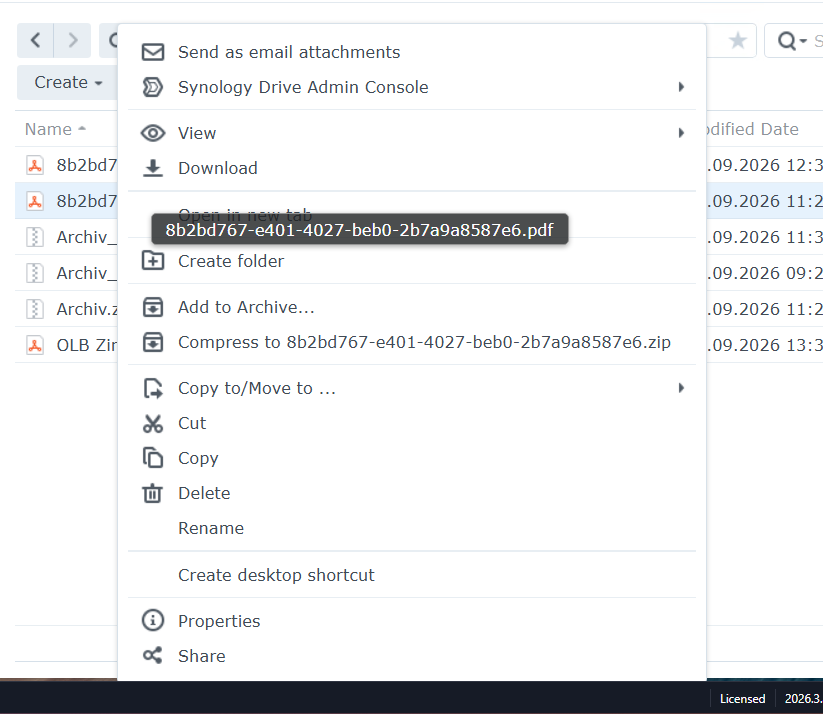
We are using RDM via an RDS server, if that makes any difference.
Thanks for fixing.
Best regards
Patrick
"Treat space as and" in the search options
Hi
Did it make it into the new release?
Best regards
Patrick
Moving credentials to another vault, not losing their ID/Reference
Hi Hubert
I just wanted to ask, how it is looking. As we have a lot of entries to move in DVLS.
Thanks and best regards
Patrick
Auto-Fill Fortigate Firewalls
Hi Carl
So you are saying, in your enviroment it works and fills the password on a fortigate with OS 7.6.x?
Do you also use DVLS as a data source? And we are running RDM via our RDS Server as a remote-app. But again this was and is still no problem for all other sites or Fortigate with Version 7.2 for example.
If you tested it like that and it works for you, we can do a remote session to find out what is different...
Best regards
Patrick
Auto-Fill Fortigate Firewalls
Hi Carl
I added the 1000ms delay, but it sitll does not fill it.
Best regards
Patrick
Auto-Fill Fortigate Firewalls
Hello Carl
Do you mean like that:
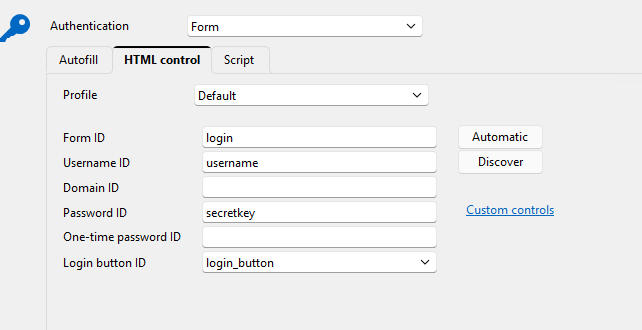
I tried that, and it still does not fill the password...
If you mean something else, please send me a screenshot or name the exact steps.
Best regards
Patrick
"Treat space as and" in the search options
Can you please add the "treat space as AND" option like in RDM and the Chrome Plugin Devolutions password manager, also in DVLS:
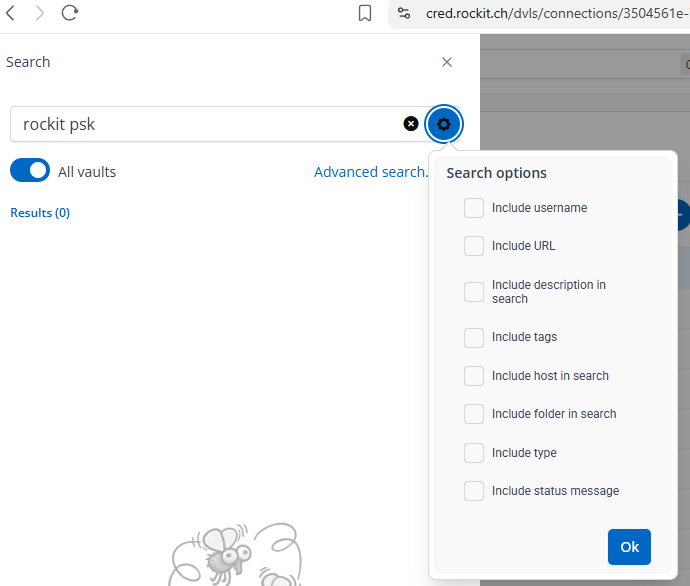
Thanks!
Auto-Fill Fortigate Firewalls
Of course we tried that already but it did not change anything. That's why we opened the ticket.
Please try for yourself. Thanks!
Auto-Fill Fortigate Firewalls
Hi Carl
It's a Website entry type.
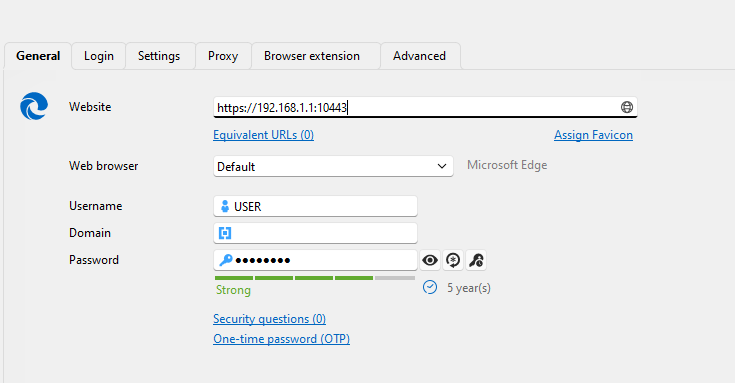
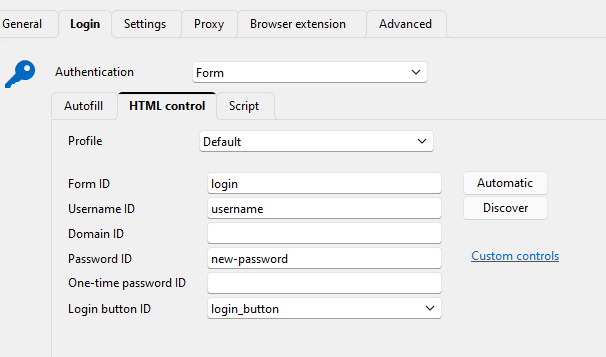
It still works on all older Firmwares.
Best regards
Patrick
Auto-Fill Fortigate Firewalls
Since FortiOS 7.6 and OS 8.0 RDM does not fill the password automatically anymore, only the Username.
Could you take a look if that can be fixed, as we have a lot of firewalls which will be updated in the next months.
Thanks a lot!
Devolutions Password Manager (Webbrowser) - Filter for Credentials
Hello Olivier
It also shows all archived entries. Please also add an option to only show the active entries and no archived ones in the browser and ios app.
Thanks!
Devolutions Password Manager (Webbrowser) - Filter for Credentials
Hi Olivier
Great, thanks a lot.
Can you please add this option also to the IOS Devolutions app please.
Thanks!
Devolutions Password Manager (Webbrowser) - Filter for Credentials
When we search for a Website to login in the webbrowser plugin, it not only shows Websites, but also credentials which have no website to login at all.
Credential entries can't be used at all in the Webbrowser, so I wonder if they can be filtered as default, or an option to only show Web-Entries and nothing else from the DVLS/RDM database.
Moving credentials to another vault, not losing their ID/Reference
Hi Hubert
If we move the credentials from Vault A to Vault B, will the "referenced by" to the entry in Vault A be preserved as well with the new version?
Best regards
Patrick
Moving credentials to another vault, not losing their ID/Reference
Hello Hubert
Thank you. Ok so we hope for a fast implementation trough the DVLS team.
One more thing, the search of Vaults with the "treat spaces as and" option, is also something we need to be able to connect entries from one vault to the credentials vault easily.
Thanks for checking if that's coming soon as well.
Best regards
Patrick
Moving credentials to another vault, not losing their ID/Reference
Hello Hubert
Thanks a lot! Which parts will be available in this update? (And after DVLS integrated their changes)
And will some be working without the DVLS changes?
Thanks and best regards
Patrick
Moving credentials to another vault, not losing their ID/Reference
Hi Hubert
Thanks for your reply. I can understand that and it's not a gamestopper, if thats coming in the future. As at the moment we need to love all the entries, so most of them will keep their reference.
The real important change for us, is that we can move the credentials without losing the connection to the entries. (Along with the search function for credentials in the separate ticket)
We are very thankful for that and your work on this.
You always give your best to find a solution, great work.
Best regards
Patrick
Won't search entries in the fifth level (RDM)
Hi Hubert
One other thing we just recognized, when we try to move a sub-entry to somewhere else, that command is greyed out. Why ist that and could that be enabled?
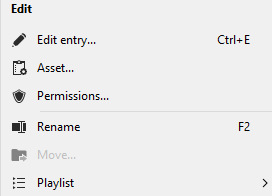
If you need to manually drag and drop such an entry in a list with thousands of entries, it takes a lot of time to scroll and find the right folder.
Best regards
Patrick
Moving credentials to another vault, not losing their ID/Reference
Hi Jafran
Thanks a lot. I understand that this is really difficult because of the architecture. I'm very thankful, that you help us to fix this specific issue, so we can work with two Vaults. We just have to many entries, that one vault, can handle it, thats why we need to separate them.
When I understand you correctly, with your change that will be live in one of the next versions, if we move the credential from Vault X to Vault C, we will still see the correct references in the credential. As we only have two Vaults which are linked togehter that's fine.
But one thing we do, we also link credentials, which are in Vault C, to entries which are in Vault X. So when we select a credential from an external Vault in the entry of Vault X, it should also add the reference to the credential it just mapped into. Would this be possible as well, as it's not doing that at the moment, but if I understand you correctly, as long as only two Vaults are involved, this should be possible.
We still will only link credentials from Vault C to Vault X and not to a second Vault. But not by moving the entry, but within a normal entry, where we map the credentials here:

Would that be something you can add as well?
Best regards
Patrick
Moving credentials to another vault, not losing their ID/Reference
Hi Jafran
If we move a credential which is already mapped to an entry in the normal VAult to the Credentials Vault, will it be preserved are will this be lost.
Is there any other way at the moment to see where credentials from Vault A ist used in Vault B? We need to know if a credential is used somehwere or not.
Thanks and best regards
Patrick
Won't search entries in the fifth level (RDM)
Hi Hubert
Oh I did not know about this filter, yes it was disabled. I enabled it and now it works! Thanks a lot!
And what are exactly the limits of Folder Levels. How many folders and subfolders can be created.
I saw that a sub-entry, can't have another sub-entry, is that by design?
Thanks and best regards
Patrick
Won't search entries in the fifth level (RDM)
Hello
When we search for a term, it won't be found if it's on the 5ht level of the tree, as a subentry:
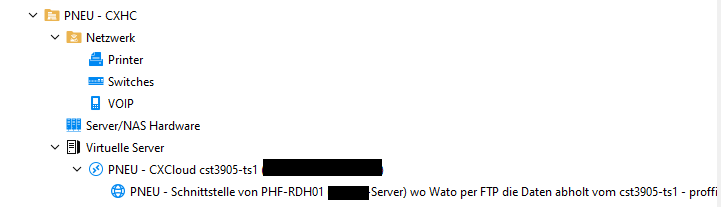
In this example, it won't find any words in the last subentry, like "Wato".
Can this be changed that it searches all entry levels.
Best regards
Patrick
Moving credentials to another vault, not losing their ID/Reference
Hello Jafran
One more thing, we just recognized. When we use credentials from another vault. When we check this credential in the credential vault to see where it is used in other vaults, the referenced by field is empty.
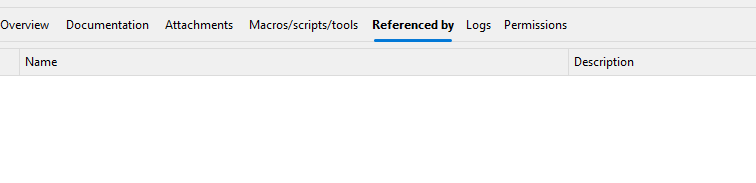
So we don't know where these credentials are used in other vaults. Would be good if that would show it also.
Best regards
Patrick