Moving credentials to another vault, not losing their ID/Reference
Moving credentials to another vault, not losing their ID/Reference
1 vote

At the moment when a credential entry is moved to another Vault, it gets a new ID and all references where it was used in other entries are no longer working.
It would be great if when credential entries are moved, they keep their IDs and are still connected to any entries they were used in the source Vault.
At the moment, they lose thwir connection and the entries can's use the credentials anymore, but you don't see it on the entry until you try to use or edit it. (Then is a pop-up the credentials have been deleted)
All Comments (28)
Hello,
From what I can see from my tests, the IDs don't change, but I think I understand what you mean.
If you have a structure where in VaultA, your WebsiteA points to CredentialA, and your WebsiteB points to CredentialB, if you move WebsiteA and CredentialB to VaultB, you will get two issues:
- The WebsiteA which is now in VaultB, will not be able to find CredentialA, which is still located in VaultA
- The WebsiteB which is still in VaultA, will not be able to find CredentialB, as it's now located in VaultB
The issue here is we're not leveraging the cross-vault credential linking, so while it's still referencing the ID of the entry, it doesn't know in what vault to look into, so it fails.
I will open a ticket so we can address this.
Regards,
Hubert Mireault
Hello Hubert
Yes tha'ts right. We only did the second example, where we hade WebsiteB and CredentialB in in Vault a, an had to move the credential to Vault B. After that, we were not able to login to the entry anymore, as it could not find the credential in Vault-B, excatly.
As we need to move a lot of credential entries in the future, what you do you think about the time frame this can be addressed? I asks, just to know if we should do that know, and link them manually again, or just wait until this gets fixed.
And one other question, is there a way to convert a web-entry to a credentials entry, or just create a credentials entry from it? I though I saw this option sometime, but I could not find it anymore.
Best regards
Patrick
As we need to move a lot of credential entries in the future, what you do you think about the time frame this can be addressed? I asks, just to know if we should do that know, and link them manually again, or just wait until this gets fixed.
I checked with the dev team and we're hoping we can address this within the next 2 weeks. It depends on whether other higher priority tickets are completed on time or not.
And one other question, is there a way to convert a web-entry to a credentials entry, or just create a credentials entry from it? I though I saw this option sometime, but I could not find it anymore.
Depending on your needs, you can convert using a template, or extract the credential entry. Converting to a username/password entry will lose the URL, while extracting the credential entry will create a new credential entry and link the website to it.
You can access this by selecting your website, and right click > edit > quick actions > convert with template or extract credential entry.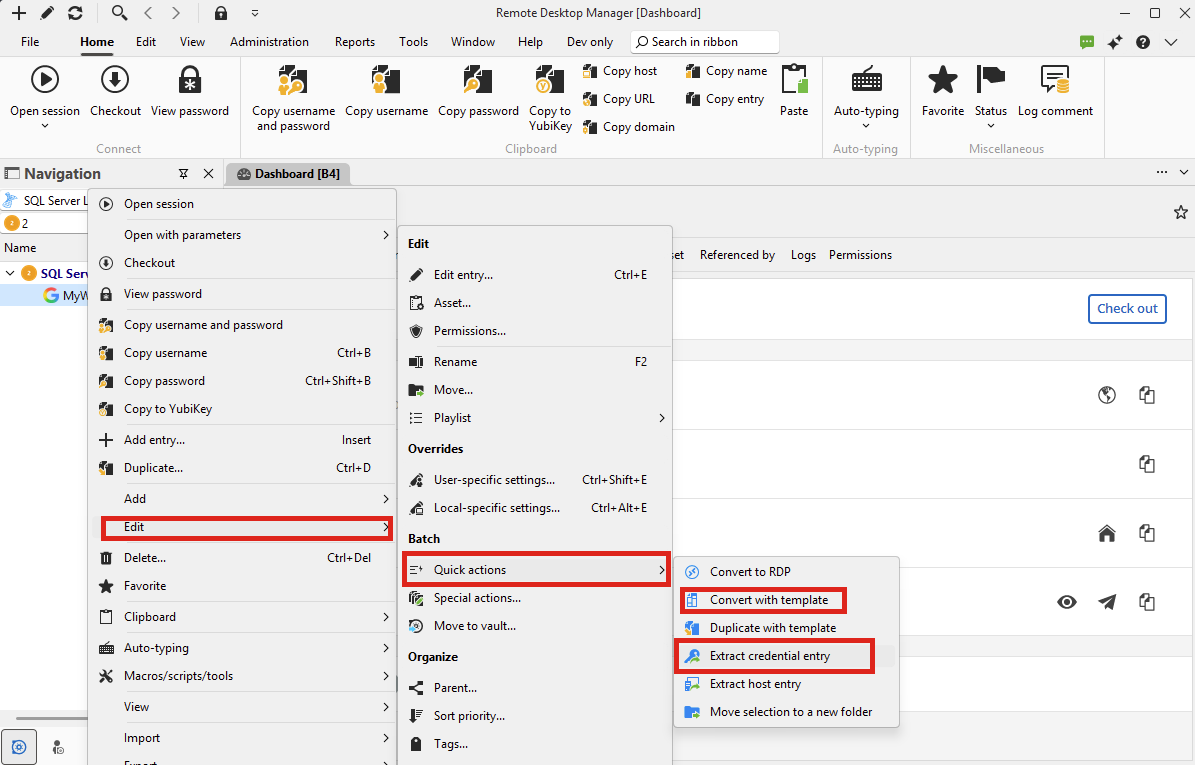
Regards,
Hubert Mireault
1178458a-f04b-49f4-b8f4-e56f0fe90822.png
Hello,
We've added support for transfering entries from one vault to another. When transfering entries with linked credentials that are not transfered, this link will be preserved as a Linked (cross vault) state. Note that this is only supported for the "Main credentials" (at the top of an entry's properties), and no other credentials are currently preserved in such a way for now. (If the credentials are transfered along with the entries using them, everything is preserved as before)
You can expect this to take effect with the upcomcing 2026.3 version.
Regards,
Jafran Majeau
Hi Jafran
Wow, great news! Thanks a lot.
Just one more question. We have a lot of credentials mapped to a folder. And the entries in the folder are getting the credentials via recurring from the folder above. This will still work as well, when the credential is moved to another folder?
Cheers
Patrick
Hello,
I might need more information to be sure I'm catching your particular setup. If I understand correctly, your session type entries are set to "Inherited", and then one of parent folder has its credential linked to an entry.
And when moving the entries, neither the folder nor the credential are being migrated? If you are also moving the folders in question, then the fix I've implemented should work. But if the folder don't follow, then my current changes won't help you. Resolving inherited connections (credentials in this case) can take a lot more involvement and that wasn't taken into account.
Regards,
Jafran Majeau
Hi Jafran
We don't move the server entries or the folder. We only move the credential which is linked to the folder to another vault. So all credentials are separated from the main vault.
The rest is exactly as you said, that the folder inherits the credential to the entries beneath it.
But the folder and entries will stay in the same folder. Only the credentials are moved.
Best regards
Patrick
Hello,
I understand, you are moving the credential entries themselves. My current changes do not take this into acccount. This might be trickier than it seems, but I will see what I can do.
Regards,
Jafran Majeau
Hi Jafran
Great, thanks a lot! If you have any other questions or if I should test something, just let me know.
Best regards
Patrick
Hello,
I have implemented the functionality you requested. However, there is one limitation that is unavoidable, so I wanted to make sure you're aware of it. Hopefully, it won't affect your current setup.
When a credential is moved to another vault, all entries in the source vault that were linked to that credential will automatically be updated to use Linked (cross vault) and point to the credential in its new vault.
However, this update only applies to the vault the credential is being moved from.
If there are entries in other vaults that are already configured as Linked (cross vault) to the credential being moved, those links will not be updated to point to the credential's new location. Due to our current architecture, this is not something we can support.
To summarize:
- Entries in the source vault will be updated automatically.
- Entries in other vaults that already reference the credential will continue pointing to its previous location and will need to be updated manually, if applicable.
Please let me know if this behavior works for your use case.
Regards,
Jafran Majeau
Hello Jafran
Great news!
At the moment, we only have one Main vault and one other vault for the credentials. So this problem does not affect us at the moment.
It's great if we can move credentials to another vault and it will update all entries from the Vault it was moved from.
If we can test it in a beta, we would love to do that.
Thanks a lot!
Best regards
Patrick
Hello,
I am trying to endeavor so that you don't have to, and have these changes reach the next available version. It would help to know what datasource/workspace you're using (SQL Server, DVLS, etc).
Knowing this will help me focus the efforts to ensure you get this as fast as possible
Regards,
Jafran Majeau
Hello Jafran
Thanks a lot!
We are using DVLS as the datasource out from RDM (Installed version).
If you need anyhting else, just let me know.
Also to select in which folder we want to move the credentials (my other ticket) would be necessary, so we can start moving them to the correct places.
Thanks and best regards
Patrick
Hello Jafran
One more thing, we just recognized. When we use credentials from another vault. When we check this credential in the credential vault to see where it is used in other vaults, the referenced by field is empty.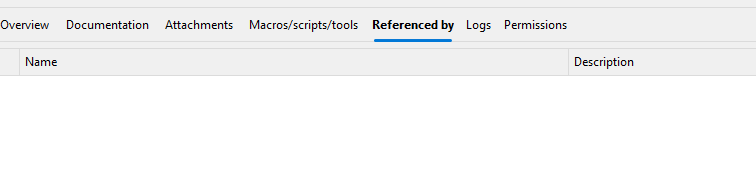
So we don't know where these credentials are used in other vaults. Would be good if that would show it also.
Best regards
Patrick
a4b4ad3f-94d6-41ee-947b-86eff823443f.png
Hello,
We are aware of this limitation, but this isn't currently really possible with our current structure. We're working on a solution for this, but there is currently no ETA for this.
Regards,
Jafran Majeau
Hi Jafran
If we move a credential which is already mapped to an entry in the normal VAult to the Credentials Vault, will it be preserved are will this be lost.
Is there any other way at the moment to see where credentials from Vault A ist used in Vault B? We need to know if a credential is used somehwere or not.
Thanks and best regards
Patrick
Hello,
With our changes (so this isn't live yet) if you have the following setup:
In Vault A:
Credential A
Entry - A (Linked to Credential - A)
In Vault B:
Entry B - (Linked to credential -A)
If you move Credential A to a new vault (say Vault C)
Entry - A will correctly update its linked to the cross vault C
Entry - B will not update its linked to the cross vault C
I'll spare you the details but this is something that isn't as simple at it looks without substantial performance issues for now. (Again, it is something we are working on).
It's important to note that the "Move to vault" feature wasn't built with these features in mind, still we're working to add the support we can to help with your specific case where possible.
Essentially we can handle the links in the vault that the "source" of the "Move to vault" is, but changing things in other vaults is a lot more involved.
Regards,
Jafran Majeau
Hi Jafran
Thanks a lot. I understand that this is really difficult because of the architecture. I'm very thankful, that you help us to fix this specific issue, so we can work with two Vaults. We just have to many entries, that one vault, can handle it, thats why we need to separate them.
When I understand you correctly, with your change that will be live in one of the next versions, if we move the credential from Vault X to Vault C, we will still see the correct references in the credential. As we only have two Vaults which are linked togehter that's fine.
But one thing we do, we also link credentials, which are in Vault C, to entries which are in Vault X. So when we select a credential from an external Vault in the entry of Vault X, it should also add the reference to the credential it just mapped into. Would this be possible as well, as it's not doing that at the moment, but if I understand you correctly, as long as only two Vaults are involved, this should be possible.
We still will only link credentials from Vault C to Vault X and not to a second Vault. But not by moving the entry, but within a normal entry, where we map the credentials here:
Would that be something you can add as well?
Best regards
Patrick
9e19ed7a-22cb-4241-ba29-8664f2740f37.png
Hello Patrick,
Answering in Jafran's place here. We have plans to rework the linking feature to have just one "linked" setting, rather than three (linked vault, linked external vault, linked user vault). This will help simplify configurations for users and ensure the links don't have to be redone or changed when moving entries, as best as our architecture can support it.
When we'll do this, we'll also implement some fallback measures: if the credential is not found in the selected vault, check in the current vault, and if it's not found there, we could see about prompting to re-select the appropriate vault or allow searching in other vaults to do the link automatically.
Unfortunately, for the "move to vault" feature, it would make the code more difficult to maintain, and it would add an "exception" to its behavior (working in this specific scenario but not others). At this point in time I would rather we wait to rework the "linked credential" feature so it's more robust than patch the "move to vault" code to add these exceptions. I know it's not what you wanted to hear, I apologize for that, but hopefully knowing we're working on improving this flow is a silver lining you can look forward to.
Regards,
Hubert Mireault
Hi Hubert
Thanks for your reply. I can understand that and it's not a gamestopper, if thats coming in the future. As at the moment we need to love all the entries, so most of them will keep their reference.
The real important change for us, is that we can move the credentials without losing the connection to the entries. (Along with the search function for credentials in the separate ticket)
We are very thankful for that and your work on this.
You always give your best to find a solution, great work.
Best regards
Patrick
I'm glad to know the changes we are making will cover most of your scenario here. For your information, we've made the changes in RDM (version 2026.2.17.0 which will be available next week), but there are still changes that need to be done on the DVLS side to fully support these changes. At the moment it's tough to know when the DVLS changes will be available as a part of the team is on vacation and the rest of the team is focusing on maintaining stability and fixing bugs. Improvements aren't at the top of the list but the team will hopefully be able to find a bit of time to make the necessary changes here.
Regards,
Hubert Mireault
Hello Hubert
Thanks a lot! Which parts will be available in this update? (And after DVLS integrated their changes)
And will some be working without the DVLS changes?
Thanks and best regards
Patrick
Hello,
Unfortunately, since you're using DVLS, it will require changes on the server before any of the improvements take effect. This is because the server is the one to perform the move, edition of entries, etc. The client (RDM) is not in charge when using the DVLS workspace. The changes on the RDM side currently work on SQL Server, and once DVLS implements this, the necessary windows will already be available in RDM (meaning it really will just take a DVLS update).
As for what will be available once DVLS makes the required changes:
- If you migrate a credential but not its linked entries, the linked entries will be updated.
- If you migrate the linked entries but not the credential, they will still be updated as well.
- You can choose a destination folder for the entries.
- All of these changes only affect the source vault.
- This only works for the "main" credentials section of the entries that are moved.
Regards,
Hubert Mireault
Hello Hubert
Thank you. Ok so we hope for a fast implementation trough the DVLS team.
One more thing, the search of Vaults with the "treat spaces as and" option, is also something we need to be able to connect entries from one vault to the credentials vault easily.
It's here: https://forum.devolutions.net/topics/55515/credential-lists-are-not-filtered-with-spaces-as-and#239534
Thanks for checking if that's coming soon as well.
Best regards
Patrick
Hi Hubert
If we move the credentials from Vault A to Vault B, will the "referenced by" to the entry in Vault A be preserved as well with the new version?
Best regards
Patrick
Hello,
For the "Treat space as AND", it's in high priority in our backlog, but I know a lot of the devs are hard at work fixing issues and finishing their larger projects. We're currently winding down our development cycle for 2026.3 in the next few weeks we'll hopefully be able to tackle smaller improvements like this one. It's tough for me to give you a more accurate estimate because of that.
If we move the credentials from Vault A to Vault B, will the "referenced by" to the entry in Vault A be preserved as well with the new version?
The entries shown in the "referenced by" are "calculated", meaning that they're resolved dynamically and aren't saved directly in the entry. I believe at the moment, the "referenced by" does not work when using the "linked (external vault)" feature, so unfortunately at the moment you would not see it's being referenced through another vault. We would have to improve this behavior but there are performance challenges we need to address (we can't check in a thousand vaults to find all possible references to an entry, for example). So this is something we want to improve but at the moment we don't have the perfect solution. I hope this clarifies the behavior here.
Regards,
Hubert Mireault
Hi Hubert
I just wanted to ask, how it is looking. As we have a lot of entries to move in DVLS.
Thanks and best regards
Patrick
Hello Patrick,
For the "Treat spaces as AND" ticket, it's a candidate for our upcoming 2027.1 development cycle (but we should be able to backport that change to 2026.3.X whenever we implement this feature).
For the move to vault, from what I can see from our internal tickets, it should be available and working if you're using both RDM and DVLS versions 2026.3, as the change did not make it into DVLS 2026.2. One thing to note is that we did a major rework of our UI framework in 2026.3 and we're still ironing out issues, so I would probably advise waiting a week or two especially if you're on DVLS as it's more difficult to roll back changes if you end up encountering bugs in your daily work.
Regards,
Hubert Mireault