Auto-Fill Fortigate Firewalls

Since FortiOS 7.6 and OS 8.0 RDM does not fill the password automatically anymore, only the Username.
Could you take a look if that can be fixed, as we have a lot of firewalls which will be updated in the next months.
Thanks a lot!
All Comments (12)
Hi,
Thank you for reaching out.
Could you please confirm the exact type of entry you are using in Remote Desktop Manager to connect to your FortiGate devices?
This will help us reproduce the behavior with FortiOS 7.6/8.0 and investigate why the password is no longer being filled automatically.
Best regards,
Carl Marien
Hi Carl
It's a Website entry type. 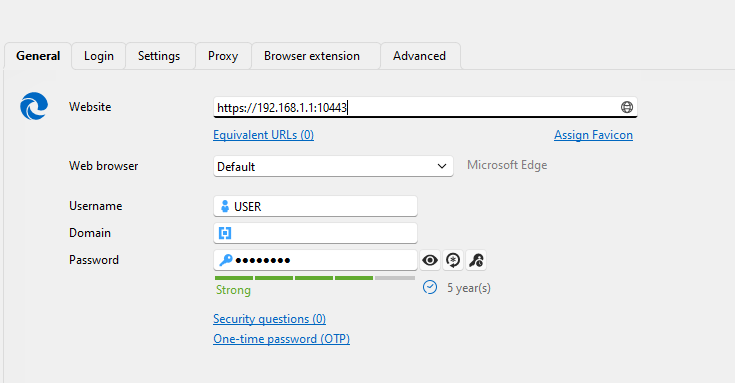
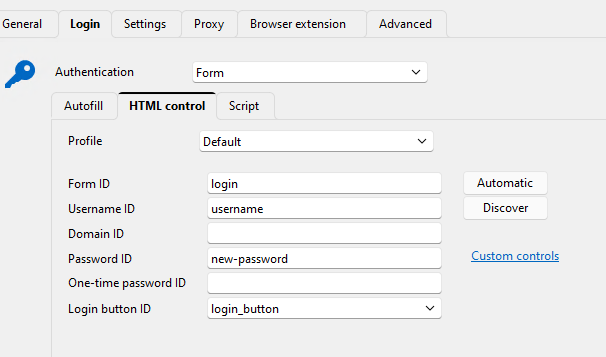
It still works on all older Firmwares.
Best regards
Patrick
edfdbaad-9cb4-4154-944d-5beca53db54d.png
6f43ab9b-ddeb-4dfb-a829-a7ba5fe4f12a.png
Hello,
In that case, you may simply need to recreate the Credential HTML Control ID manually. Please follow these steps:
- Open the website in your browser and navigate to the page containing the credential field.
- Right-click the credential field and select Inspect.
- In the Elements window, locate the HTML ID associated with the credential field and copy its value.
- In Remote Desktop Manager, enter the copied ID in the appropriate HTML Control ID field for the Website entry.
- Click OK to save the changes.
Best regards,
Carl Marien
Of course we tried that already but it did not change anything. That's why we opened the ticket.
Please try for yourself. Thanks!
Hello,
I was able to reproduce and test this on my end. The issue appears to be related to the HTML Control ID configured for the password field.
Using new-password did not work, but after changing the password HTML Control ID to secretkey, the password was filled correctly.
Could you please try using secretkey as the password HTML Control ID and let me know if it also resolves the issue on your side?
Best regards,
Carl Marien
Hello Carl
Do you mean like that: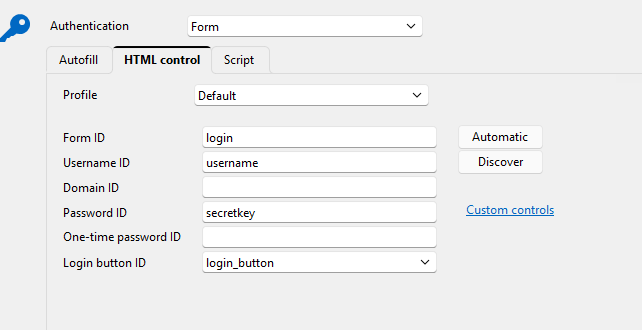 I tried that, and it still does not fill the password...
If you mean something else, please send me a screenshot or name the exact steps.
Best regards
Patrick
6b078dc3-0f52-4bb1-8b75-a0d8218a9e28.png
Hello Patrick,
Yes, that is exactly what I wanted you to try.
Could you please perform one additional quick test? In the Website entry settings, go to Auto Fill, add an Auto Fill delay for example, 1,000 ms and then try the connection again.
Please let me know whether the password is filled after adding the delay.
Best regards,
Carl Marien
Hi Carl
I added the 1000ms delay, but it sitll does not fill it.
Best regards
Patrick
Hello,
Thank you for testing that.
Since the password is still not being filled after updating the HTML Control ID and adding a delay, I would like to investigate the behavior directly in your environment.
Would you be available for a remote support session so we can review the configuration and reproduce the issue together? If so, please let me know.
Best regards,
Carl Marien
Hi Carl
So you are saying, in your enviroment it works and fills the password on a fortigate with OS 7.6.x?
Do you also use DVLS as a data source? And we are running RDM via our RDS Server as a remote-app. But again this was and is still no problem for all other sites or Fortigate with Version 7.2 for example.
If you tested it like that and it works for you, we can do a remote session to find out what is different...
Best regards
Patrick
Hello,
Yes, I tested this with a similar setup using DVLS as the data source and did not encounter the issue with FortiOS 7.6.x.
I’ll create a support case and contact you by email with a link to schedule a remote session. We can then compare our configurations and determine what is different in your environment.
Best regards,
Carl Marien
Hello everyone,
We wanted to share an update for anyone using a Website entry in Remote Desktop Manager to connect to FortiGate devices.
We've confirmed a known issue affecting FortiOS 7.6.x and 8.0: the username still autofills correctly, but the password field no longer fills in automatically. This does not affect earlier firmware versions (7.2 and below), where autofill continues to work as expected.
What we found:
Fortinet changed how the login page for these newer FortiOS versions is built. On older versions, the password field has a fixed HTML identifier (secretkey) that Remote Desktop Manager can target. On FortiOS 7.6.x/8.0, the login page no longer exposes a stable ID or name for the password field, which means the HTML Control ID configuration in the Website entry has nothing consistent to match against. Changing the HTML Control ID value (including back to "secretkey", or trying alternatives) and adding an Auto Fill delay do not resolve it, since the underlying field simply isn't identifiable the same way anymore.
Current status:
This has been escalated internally to our development team, who are reviewing whether a workaround or product change can support this newer FortiOS login page structure.
Workaround in the meantime:
The password will need to be entered manually after the username autofills.
We know a number of you will be upgrading FortiGate firmware in the coming months, so we wanted to flag this proactively. We'll post another update here as soon as we have more information from the development team.
Thanks for your patience.
Best regards,
Carl Marien