
rricciardi
Too fast for OpenVPN add-on
Hi David,
now it looks good but, as the previous times, I'll do further tests in the coming days
Too fast for OpenVPN add-on
As I said before it doesn't always happen...
I'm amazed that you can't reproduce the same problem in your laboratories!
Too fast for OpenVPN add-on
I spoke too early, same problem as before
Too fast for OpenVPN add-on
It seems to be ok with 5.1.2.0 (64bit) with OpenVPN 2.4.6 and his add-on 2.8.0.0 on Windows 10 Pro 1809
Too fast for OpenVPN add-on
14...? I don't have the enterprise edition.
However I'll try the latest free edition: 5.1.2.0 (64bit) with OpenVPN add-on 2.8.0.0 on Windows 10 Pro 1809
Too fast for OpenVPN add-on
Hi, David,
I saw your email and I followed the bread crumbs...as you can see I confirmed for Friday.
...but I would like to take more time for testing because today they (RDM, OpenVPN and add-on) didn't give any problems. Can you cancel the appointment?
I'll show up
Too fast for OpenVPN add-on
What do you mean with "I could not reproduce the same problem"? I tried RDM 4.6.0.0, 5.0.0.0, 5.0.3.0 and 5.0.4.0 with OpenVPN 2.3.18 and 2.4.6 on Windows 10 1809 and 1803...(in bold the versions I'm using right now).
I seemed to understand that you use RDM 5.0.4.0 with OpenVPN 2.4.6...I have the problem even on these versions.
Same version of OpenVPN add-on: 2.7.0.0
Too fast for OpenVPN add-on
I tried OpenVPN 2.4.6 with the ovpn configuration of one firewall (which I know has overcome the incompatibility issue with OpenVPN 2.4.x) but remains the problem I reported in this thread:
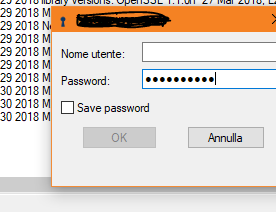
Too fast for OpenVPN add-on
This is the my latest configuration: https://forum.devolutions.net/messages.aspx?TopicID=30642#post122920
Anyway, I'm using OpenVPN 2.3.18-I602 for an incompatibility issue with the ovpn configuration released by various firewalls...let me try using the new one...
PS: in this version there isn't Save Password option
Too fast for OpenVPN add-on
As you can see RDM continues to fill the OpenVPN fields too quickly:
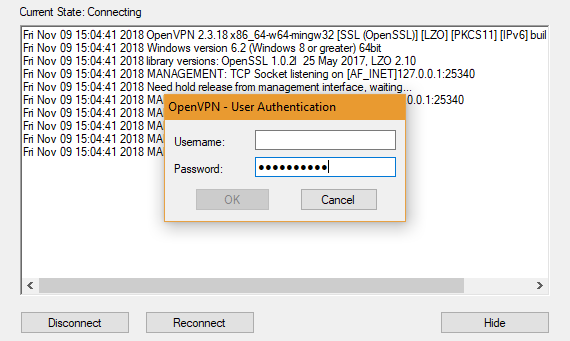
Too fast for OpenVPN add-on
From a post to a post we arrived at this configuration:
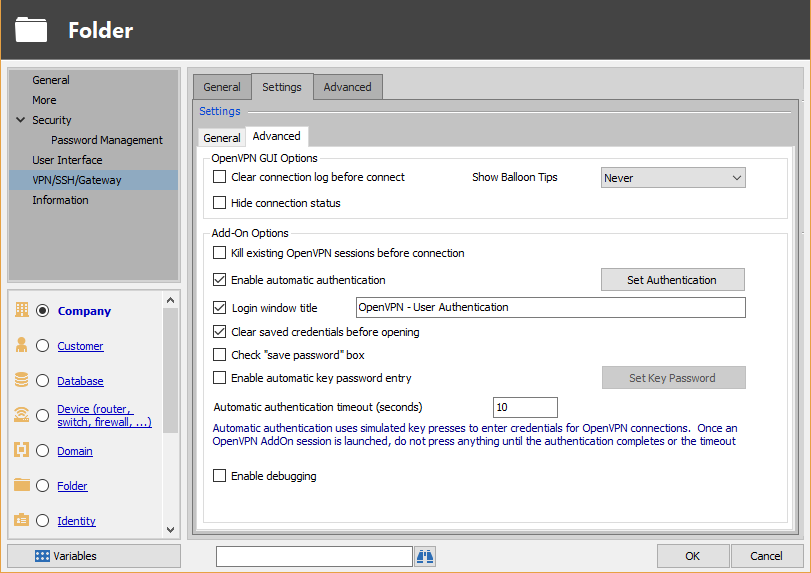
Too fast for OpenVPN add-on
Yes sure, as you told me in the previous post
Too fast for OpenVPN add-on
Sorry for the late reply but it doesn't always happen...
...it happened again, so I'll try with RDM and OpenVPN set in English, I'll let you know...
If it can help you, I had to reinstall the PC with a clean installation of Windows 10 Pro 64bit (before 1809, now 1803) and RDM updated to 5.0.3.0.
It still happens
Too fast for OpenVPN add-on
I'm sorry...but the problem still remains
Too fast for OpenVPN add-on
It seems to work, I will test it.
Thank you
Too fast for OpenVPN add-on
Nothing
Too fast for OpenVPN add-on
Yes, I running RDM 4.6.0.0 64bit with elevated privileges and active UAC.
I saw that RDM 5.0.0.0 came out, I can even replicate the problem with this version
Too fast for OpenVPN add-on
I have configured the OpenVPN settings at the folder level, after which I have configured the individual items to inherit the settings.
My problem is that the automatic insertion of credentials happens so quickly that the window that requires them has not yet opened so the fields are only partially completed ... wrong credentials
I would need to delay the entry but the only setting I found is about the timeout
Error while sending retrieve credential request. Error code : 400
I noticed that if I restart the PC and manually execute (no automatic startup) RDM the error still remains, while if I restart only RDM the extension works fine.
P.S. I have 3 databases: 2 SQLite and 1 Devolutions Online Drive. The default source is Devolutions Online Drive and I don't change it when I launch RDM.
Error while sending retrieve credential request. Error code : 400
When I use RDM 4.6.0.0 64bit with local data source (SQLite) I have no problem with automatically fill username and password in Chrome 67.0.3396.62 64bit but when I use RDM with Devolutions Online Drive I have this error message "Error while sending retrieve credential request. Error code : 400" in RDM Chrome Extension 6.0.2.0
OpenVPN language mistake
Hi,
thanks for the tip, problem solved!
Regards
OpenVPN language mistake
here they are
edited by rricciardi on 7/21/2014
OpenVPN language mistake
Hi,
ok now it works without error...but the feature "automatic authentication" no: it doesn't fill the username and password fields automatically.
Regards
OpenVPN language mistake
Hi,
Those two translations "Benutzer Authentifizierung" and "Autenticazione dell'utente" are already supported in v1.4.4.2
Best regards,
Now I'm using RDM9.2.10.0, OpenVPN add-on 1.4.4.2 and OpenVPN 2.3.4-I002 but the problem persist with same error message.
OpenVPN language mistake
I'm using RDM9.2.6.0 with OpenVPN add-on 1.4.4.1 and with OpenVPN 2.3.3-I001.
The credentials are stored within the item and "Enable automatic authentication" is activated, but RDM not fill the dialogue box.
If I type user name and password manually the process goes on and the VPN is established.
I think the problem is the different language of OS because I receive this message:
Unable to send the credentials.
Can't find the window name: OpenVPN - User Authentication
But in my case the window name is OpenVPN - Autenticazione dell'utente