Too fast for OpenVPN add-on

I have configured the OpenVPN settings at the folder level, after which I have configured the individual items to inherit the settings.
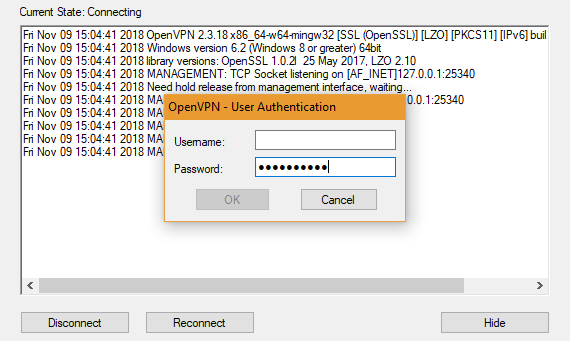
My problem is that the automatic insertion of credentials happens so quickly that the window that requires them has not yet opened so the fields are only partially completed ... wrong credentials
I would need to delay the entry but the only setting I found is about the timeout
All Comments (45)
Hello,
You are the first one reporting this issue.
Are you running RDM with elevated privileges?
What version of RDM are you running?
Best regards,
Jeff Dagenais
Yes, I running RDM 4.6.0.0 64bit with elevated privileges and active UAC.
I saw that RDM 5.0.0.0 came out, I can even replicate the problem with this version
Hello,
We don't have any option to inrease/decrease this delay.
I have opened a ticket to our QA department so that we can try to reproduce.
The ticket number is DEVO-752.
Best regards,
Jeff Dagenais
Hello again,
Sorry, I forgot to ask you something in my last post.
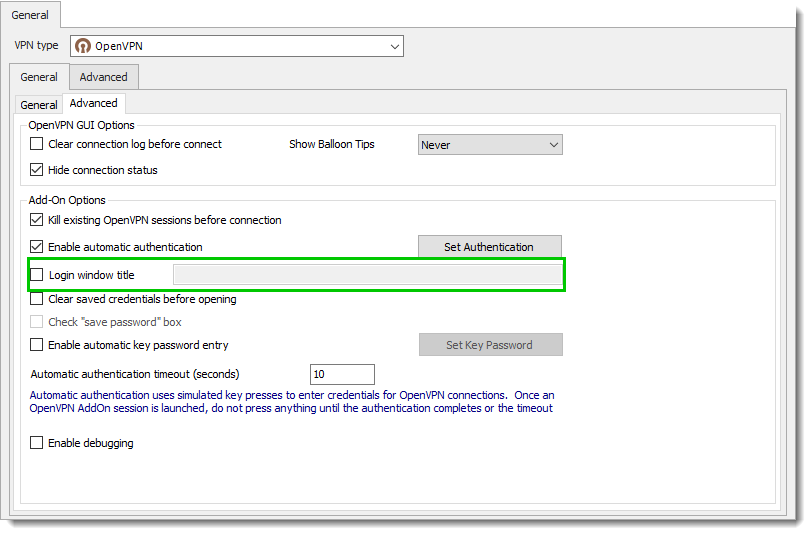
Could you let us know which information's it's in that section?
Best regards,
Jeff Dagenais
image032.png
Nothing
Immagine.png
Hello,
Is it possible for you to retrieve the authentication window name and enter it in the Login window title to see if that help.
Best regards,
Jeff Dagenais
It seems to work, I will test it.
Thank you
I'm sorry...but the problem still remains
Hello,
no problem!
A ticket has been opened to our engineering department regarding this.
The ticket number is RDMW-1288.
Best regards,
Jeff Dagenais
Hello,
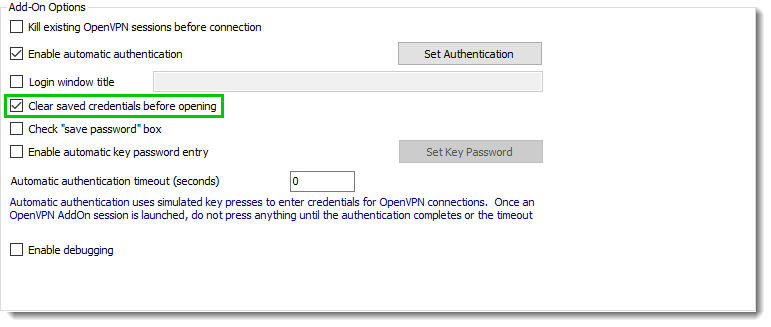
I had a chat with the engineering department and base on our tests could you check the box for Clear saved credentials before opening.
Our theory is that the username is already filled in and when we process the username and password the windows isn't correctly manage by RDM.
Please be sure when you use this feature that RDMis run as Administrator.
Best regards,
David Grandolfo
OpenVPN_clear.png
Sorry for the late reply but it doesn't always happen...
...it happened again, so I'll try with RDM and OpenVPN set in English, I'll let you know...
If it can help you, I had to reinstall the PC with a clean installation of Windows 10 Pro 64bit (before 1809, now 1803) and RDM updated to 5.0.3.0.
It still happens
I'm not sure about the test but, have you tested the session with Clear saved credentials before opening?
Regards,
David Grandolfo
Yes sure, as you told me in the previous post
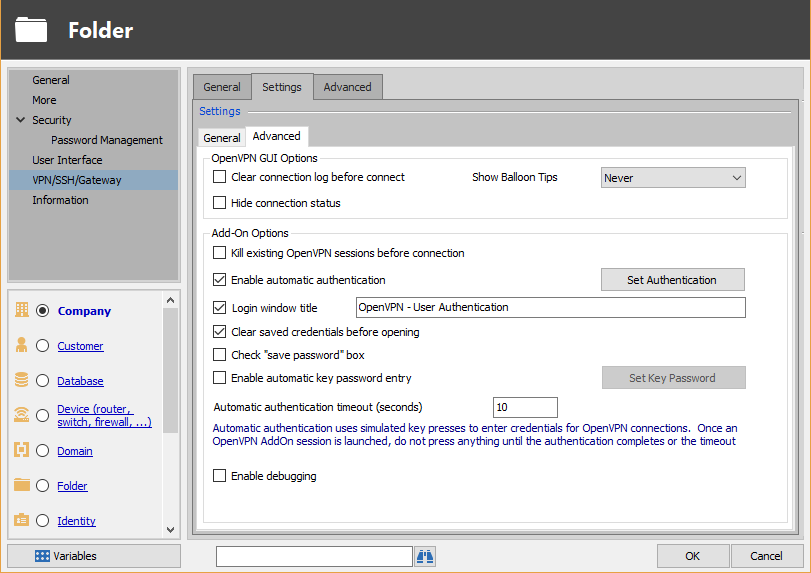
From a post to a post we arrived at this configuration:
screenshot.png
As you can see RDM continues to fill the OpenVPN fields too quickly:
screenshot.png
Hello,
Sorry for the delay, we are currently working on this issue. The engineering department might know where the issue can come from.
But I could also see that in your OpenVPN Window you do not have the Save Password option. Which means we aren't using the same version of OpenVPN or the same configuration.
Could you update OpenVPN local installation to the latest version please? I think the latest version is 2.4.6.
Best regards,
David Grandolfo
This is the my latest configuration: https://forum.devolutions.net/messages.aspx?TopicID=30642#post122920
Anyway, I'm using OpenVPN 2.3.18-I602 for an incompatibility issue with the ovpn configuration released by various firewalls...let me try using the new one...
PS: in this version there isn't Save Password option
I tried OpenVPN 2.4.6 with the ovpn configuration of one firewall (which I know has overcome the incompatibility issue with OpenVPN 2.4.x) but remains the problem I reported in this thread:
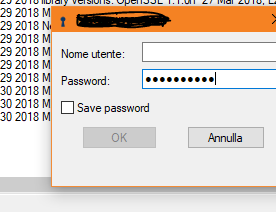
Cattura.PNG
Hi,
Thanks for the details, unfortunately I was not able to reproduce the same issue.
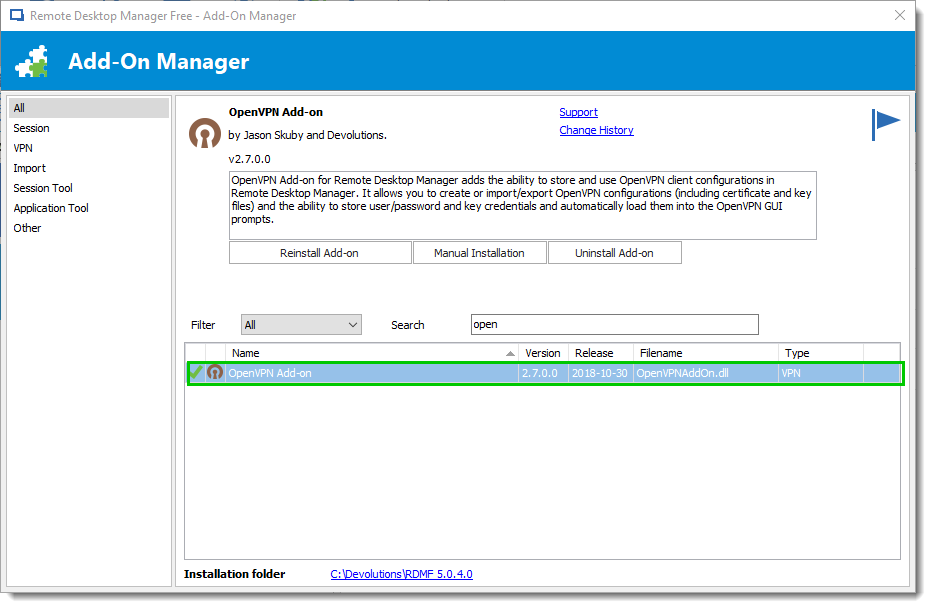
Latest question which version of OpenVPN Add-on is installed?
Best regards,
David Grandolfo
OpenVpn_Addon.png
What do you mean with "I could not reproduce the same problem"? I tried RDM 4.6.0.0, 5.0.0.0, 5.0.3.0 and 5.0.4.0 with OpenVPN 2.3.18 and 2.4.6 on Windows 10 1809 and 1803...(in bold the versions I'm using right now).
I seemed to understand that you use RDM 5.0.4.0 with OpenVPN 2.4.6...I have the problem even on these versions.
Same version of OpenVPN add-on: 2.7.0.0
Hi,
I mean we currently have opened issues for OpenVPN disconnect automatically and doesn't properly fill the password. I would like to work with you for the username issue.
I will send you an email if you could please look at your mailbox.
Best regards,
David Grandolfo
Hi, David,
I saw your email and I followed the bread crumbs...as you can see I confirmed for Friday.
...but I would like to take more time for testing because today they (RDM, OpenVPN and add-on) didn't give any problems. Can you cancel the appointment?
I'll show up
Hi,
Thanks for the feedback, we just cancel the session. If you would like to schedule a new one, please send us an email at ticket@devolutions.net and we will send you a new calendar invite.
Best regards,
David Grandolfo
Hello,
We recently made some changes within Remote Desktop Manager, would you be able to test the latest version (14.1.0.0) and make sure that the Add-on is up to date?
Best Regards,
Etienne Lord
14...? I don't have the enterprise edition.
However I'll try the latest free edition: 5.1.2.0 (64bit) with OpenVPN add-on 2.8.0.0 on Windows 10 Pro 1809
It seems to be ok with 5.1.2.0 (64bit) with OpenVPN 2.4.6 and his add-on 2.8.0.0 on Windows 10 Pro 1809
I spoke too early, same problem as before
Hello,
I'm curious was it working once and then stopped working?
Best regards,
David Grandolfo
As I said before it doesn't always happen...
I'm amazed that you can't reproduce the same problem in your laboratories!
Hi,
Previous tests we perform with the new version of OpenVPN's Add-on seem to solve the issue on our side. I will have a chat with the QA department and we update you soon. The ticket number is DEVO-1460.
Best regards,
David Grandolfo
Hi,
I have the same issue with the OpenVPN Client.
For testing i have installed:
the latest Remote Desktop Version: 14.1.1.0 (64-bit)
the latest OpenVPN Addon: 2.8.0.0
OpenVPN GUI v11.10.0.0 (included with OpenVPN 2.4.6-l601).
Windows 10 Pro.
I think the problem is maybe easy to solve to add an additional second after the login window to enter the credentials.
Hi,
I performed other tests with the same version as both of you without success.
I create a ticket for sdnihd (Devo-1478) and link it with Ricardo ticket issue. I also send additional information to our QA department.
Best regards,
David Grandolfo
@everyone,
We release a new version of OpenVPN Add-on in "Add-on Manager" under Tools section of RDM.
The version 2.9.0.0 offer a new option: Use Authentication file. This option remove the filling windows and increase the login process.
We test it with OpenVPN 2.4.6 and above.
Please inform us if this solution work fine.
Best regards,
David Grandolfo
Unfortunately not, the connection is not established, then it switches to reconnecting and the connection failed again.
During the process there is a *.pwd file created, in the file the password is encrypted.
If i change to password to plain text during the reconnect proces, the login will continue without issues.
It seems like the password must not be encrypt during the login process.
Hi,
Which version of OpenVPN are you testing with? It might be related to this.
Best regards,
David Grandolfo
Hi,
Please forget my previous question, after feedback we found an issue in the Add-on. We overwrite the current Add-on.
DeleteOpenVPNAddOn.dll at %localappdata%\Devolutions\RemoteDesktopManager.
And download the version 2.9.0.0, in this version the password is in clear text and the delay before deleting the pwd file is increase.
Best regards,
David Grandolfo
Hi David,
now it looks good but, as the previous times, I'll do further tests in the coming days
Thanks, we will wait your feedback.
David Grandolfo
Thanks the new version works well, so far no more problems.
I can not reproduce the problem, the problem has been solved for me!
Hello,
I have the same issue: the password is beeing filled in incompletely what results in "Wrong password. Try again" error.
Tried the tips from above but it didn't help.
I have RDM Enterprise Edition 2022.1.23.0
And OpenVPN GUI v11.9.0.0.
What else can I try to fix this?
Thanks in advance.
Regards
Kseniia
Hello,
The best way would be to check the "use authentication file" option:
This makes RDM temporarily create a file on disk with the credentials to connect with, then deletes them once they're done being used. This is the most reliable way to send OpenVPN GUI the credentials, as its command line takes the path of the authentication file and authenticates with the information contained within it.
Regards,
Hubert Mireault
Hello,
The best way would be to check the "use authentication file" option:
This makes RDM temporarily create a file on disk with the credentials to connect with, then deletes them once they're done being used. This is the most reliable way to send OpenVPN GUI the credentials, as its command line takes the path of the authentication file and authenticates with the information contained within it.
Regards,
Hi, I'm experiencing the same problem. After one login OpenVPN Gui remembers the username. At the next attempt this field is ignored and the username is filled in the password field.
I have enabled automatic authentication and used the .ovpn filename als the login window title.
Using the Authentication file option results in the username/pass prompt popping up and then nothing happening.
Using latest Enterprise version and also latest OpenVPN GUI version.
I already tried adding the auth-nocache option in the ovpn file, without result.
P.S. I couldn't find any documentation on how to setup an OpenVPN GUI connection.
Hello,
I got a case open regarding your issue : 000023463
I will send you a link to schedule a remote session so we can have a look at the problem!
Best Regards,
Etienne Lord
Thx Etienne for the invite. I really appreciate you guys for making an effort in resolving this.
I've worked my way around this by not using a config file, but pasting all the info in RDM itself.
But I'm currently tight for time and will not be able to fit in a remote session.
Hello,
Not a problem, you can still use the link or reply back to the email I sent you if you want to investigate further!
Best Regards,
Etienne Lord