
pmeinzer
After License expiration RDM not usable anymore
Hi Gab,
thanks for clarifying this situation so fast and in a customer satisfying way. Have a nice Christmas and a healthy 2021.
Best Regards,
Pascal
After License expiration RDM not usable anymore
Dear RDM Support,
I am using RDM since about 6 years. I bought a license right in the beginning to use the Enterprise Features. Then the license expired and I used that Version about 4 years without problems. Last year I thought that it would be nice to get an up to date version, so I bought again a License. Since the subscription ended on 1. December, I can only export my database and can't use the Software anymore at all. Is it not possible to use the Software after the Subscription, and don't update it anymore?
For my opinion I bought a License and should be able to use all features even when the subscription ended.
If I buy a MS Office License, I can use it without limitations and don't need to buy a software subscription, if its sufficient for me to stay on that Version for a couple of years.
I tried RDM Versions:
2019.2.19.0
2020.3.14.0
2020.3.19.0
2020.3.20.0
On all the same issue.
Regards,
Pascal
Assign Favicon to session not working on all websites
Hi,
I've tested it with the new version. It is working better now, but if I click "Assign Favicon to session, and change the Web browser application, then the icon is removed again.
Regards,
Pascal
Assign Favicon to session not working on all websites
Hi,
the Function "Assign Favicon to session" is not working on all webpages:

It dosen't work for:
Open session with Parameters and the highlight credentials
On version 11.6.1.0 its working as expected.
Thanks for fast implementation.
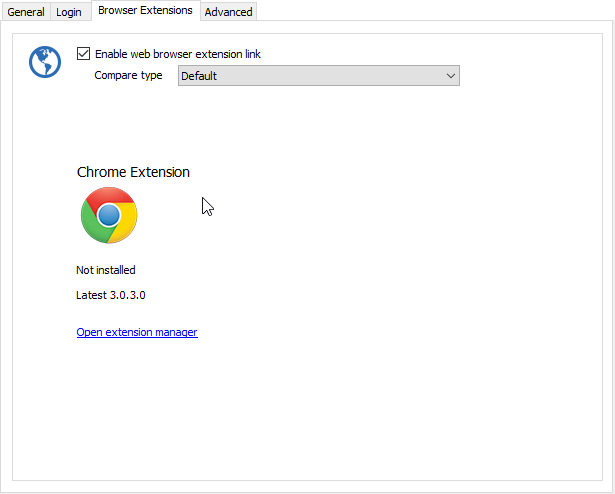
Enable web browser extension link
Hi,
yes, its checked.
Open session with Parameters and the highlight credentials
Hello Hubert,
yes, it works. That's great. But the highlighter is staying on the root, so please update it so, that it's visible which credentials will be used.
Regards,
Pascal
Enable web browser extension link
No, if the Database connection is getting lost, or the cache of the db connection is cleared.
Open session with Parameters and the highlight credentials
Hi,
open Session with Parameters -> Select Credential Entry

If I enter something in the search field, the entry with the best match should be highlighted, so that if I press enter, it will open the connection with the highlighted credential.

Regards,
Pascal
Enable web browser extension link
Hi,
for web browser connections some settings are getting lost if working on Devolutions Online Drive.
I experienced that following settings are getting lost:
- Enable web browser extension link
- Ignore certificate errors
The issue occurs if the offline cache is cleared, or sometimes, if the connection get lost, and a kind of re-sync is done.
Tree view group (bottom)
Hi,
between version 11.0.1.0 and 10.9.10.0 Tree view group (bottom) setting was inverted. Now <ShowTreeViewGroupLast>true</ShowTreeViewGroupLast> will list the items from uppest to lowest. Before <ShowTreeViewGroupLast>false</ShowTreeViewGroupLast> listed items from uppest to lowest if a search filter was entered.
Regards,
Pascal
Remote Desktop Manager 10.1 Beta
Hi David,
When will be Google Drive supported as database source?
Regards,
Pascal
Rights Managment
Hi,
it looks like "Password Safe 7" (we evaluated that one too - compared to password vault).
The rights management in RDM realy is a pain - but we also look forward to an improvement.
Regards
Daniel
It's from Password Safe 5.5, but 7 looks probably the same. We will decide in the next 2 weeks if we upgrade to Password Safe 7, or buy RDM Enterprise.
@dheriveux
Can you give me a guess, how long it will take to implement the feature in RDM?
Regards,
Pascal
Rights Managment
Hi,
I'm comparing for our Company the RDM Server with a other product. The features provided with RDM are Enterprise like. But the features in the RDM Server for Rights Managment on the connections are only Basic and not intuitive to handle.
Please consider to give this part a huge update. I suggest to change the feature to set permissions within RDM on Folders and connections, and Add there the Permissions for AD Groups and Users, to make changes, to view passwords etc.
Right now I'm only able to set one Security Group for Folders or Connections. If I wan't to give permissions to 2 teams, I have to create a new Role, where both Teams have access. Way to complicate and a unclear way to handle this. Miss configurations are easily made.
Here a screenshot of the permission setting of the other product. This settings can be made on Folders and Entries:

We see no Benefit for us, buying the RDM Server right now. Please consider to change the rights management into an enterprise solution.
Regards,
Pascal
Remote Desktop Manager 9.5 Beta
@pmeinzer
I made a mistake in my previous message. I can't reproduce the filter issue
@David
There was a setting in the config file:
<ShowTreeViewGroupLast>true</ShowTreeViewGroupLast>
After deleting it, it's all fine. Don't know where in the Settings this option is set.
Add PasswordSafe.de (MATESO GmbH) for Credentials
Hi Pascal,
We already know this credential management tool but unfortunately they don't seem to have an API to access the data. Could you contact them and make a request? I'm sure that as a customer you will have more impact than us. All we need is a way to read securely the credentials to use them with a connection.
We have no active subscription on the product anymore. And we are now evaluating to get a new subscription or to change to RDM with the Enterprise server.
Is data traffic between RDM and RDM Server encrypted? And how is the Password Vault data stored on the RDM Server?
Personal Credentials Repository
Ok, I have no personal vault, as a sql server or RDM Server is required. But good to know, that it has this Feature.
Add PasswordSafe.de (MATESO GmbH) for Credentials
Hi,
Please add passwordsafe.de (Different Product then Password Safe) as Credentials Source.
Regards,
Pascal
Personal Credentials Repository
Hi,
please add a Feature like the Credential Repository for the Personal Credentials. I have more then one Personal Credential (User and Admin account)
Regards,
Pascal
Remote Desktop Manager 9.5 Beta
@pmeinzer
I'm unable to reproduce it. Could you create a small Xml data source with some fake data and send it to me? Just make sure to specify the filter you use.
Enter '1' in the search field, and the Company's will be listed in bottom to top order.
Remote Desktop Manager 9.5 Beta
Search results are still in bottom to top order. When will this be fixed?
Remote Desktop Manager 9.5 Beta
Hi,
found a new smal bug. If I enter a search term in the Navigation search box, the search results are displayed from bottom to top of all sessions. In my sessions list I have sorted them with the most important at the top going down to less important.
Please change it back, that the search will display the results in the same sorting order, as it is in the sessions list.
Before the beta I could enter the search term and hit enter to connect. Right now I have to enter search term and select the connection and press enter.
Regards,
Pascal
Remote Desktop Manager 9.5 Beta
David Hervieux wrote:
For #1, could you post a print screen since I'm not sure to understand the request.
For #2 this option is in the Refactoring and it's call parent/unparent
Hi Dave,
sorry for the false posts.
I've attached the printscreen.

Remote Desktop Manager 9.5 Beta
%255Bquote%253DDavid%2520Hervieux%255DFor%2520%25231%252C%2520could%2520you%2520post%2520a%2520print%2520screen%2520since%2520I%2527m%2520not%2520sure%2520to%2520understand%2520the%2520request.%253Cbr%253E%253Cbr%253EFor%2520%25232%2520this%2520option%2520is%2520in%2520the%2520Refactoring%2520and%2520it%2527s%2520call%2520parent/unparent%255B/quote%255D%253Cbr%253E%253Cbr%253E%253Cdiv%253E%253Cbr%253E%253C/div%253E
Remote Desktop Manager 9.5 Beta
For #1, could you post a print screen since I'm not sure to understand the request.
For #2 this option is in the Refactoring and it's call parent/unparent