Remote Desktop Manager 10.1 Beta
Hi guys,
We are really happy to release RDM 10.1 beta. The first version is 10.0.6.0 but the final version will be labelled 10.1.0.0. There is no database upgrade in this release and you can use it even with stable RDM version. Please post any issue in a separate thread if possible since it's much easier for us to answer
== Download ==
http://download.devolutions.net/Devolutions.RemoteDesktopManager.Bin.10.0.21.0.zip
http://download.devolutions.net/Setup.RemoteDesktopManager.10.0.21.0.exe
== Highlights ==
New type integrations
- Scorpion AuthAnvil credentials
- Spiceworks
- DeskRoll
- Remote Management
- Applications
- Events
- Printers
- Processes
- Services
- Intel AMT improvements
- Embedded web console
- TLS support
- Digest authentication
- UI improvements
Search setting in the option dialog
Enhanced session dashboard
Export to Excel in every grids
Updated the group icons
- Batch actions to migrate or update the selected entries
- PowerShell addhoc
- Putty session
- Web connection html field
- New duplicate report
- New importer
- RDCMan 2.7
- RDTabs
- Screen Connect 5 support
- Software group type
- Updated all the web browser extensions
- Internet Explorer
- Firefox
- Google Chrome
- Performance improvement and memory usage optimization
- Many fixes and minor improvements
edited by dhervieux on 12/9/2014
David Hervieux
All Comments (95)
Amazing work. Been waiting for a Apple Remote Desktop thing for RDM. Can't get it to work though (Comes up saying it cannot connect). Still getting the same issue with SSH to a Cisco Switch (Unsupported Packet 60). Good work thought :)
I will ask Joe to jump in the conversation next week as soon as he gets back. He is the one that is currently working on our own Apple Remote Desktop implementation.
David Hervieux
Hi Karl,
The setup I had while testing was :
Screen sharing activated under Preferences/Sharing.
In the advanced options, "Anyone may request permission to control screen" was checked. Any other options were left unchecked.
Does this match your current setup?
Jonathan Lafontaine
So glad to see OS X Screen Sharing! Thank you!
Were you able to test it lat?
Jonathan Lafontaine
Yep, that matches my settings perfectly. We are using OSX 10.10 on the server.
We have a new version available:
http://download.devolutions.net/Devolutions.RemoteDesktopManager.Bin.10.0.7.0.zip
http://download.devolutions.net/Setup.RemoteDesktopManager.10.0.7.0.exe
== Change History ==
- Fixed an issue with the default TeamViewer executable name
- Improved the Roboform group import
- Minor UI fixes
David Hervieux

Been on a travel last days and I come back home to great news.
Keep up the good work guys.
Regards,
Ingvar Orn Ingolfsson
System Engineer
Axdata AS - Norway
Hi,
Looking for the new option "Added a default type path in the data source settings", but cannot find it. Is it available for SQL data source?
Thanks and regards
Michael
Yes it is in Adminstration->Data Source Settings
David Hervieux
Please ignore my last post. Just found it within administration menu.
I can't get the Apple Remote Desktop functionality to work, it just says "cannot connect to host" although I can ping it just fine.
lat and Karl,
Unfortunately, I have not been able to reproduce your particular connection issue so far.
I can successfully connect to a 10.9.5 and 10.10 host with ARD authentication.
Are you able to connect with other VNC clients?
Jonathan Lafontaine
The Apple Remote Desktop client isn't the same as VNC... I turned on Remote Management under sharing, clicked Anyone may request permission to control screen. Firewall is off. If I do a port scan of the Mac from my Windows PC, it sees that port 5900 is responding.
OS X version is 10.9.5.
We do not support guest connection through "ask permission" right now.
I have to add my user to the "only these users" list to be able to connect.
Jonathan Lafontaine
I added my user to those users and still "unable to connect to host". The OS X machine has an IP address registered on the network and like I said, I can see that port responds.
Just to make sure we have the same settings, have you granted permission to Observe and Control the screen in your user security options?
Jonathan Lafontaine
Yes, every checkbox possible for the user is checked off.
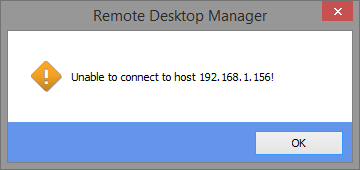
Is this the error message you have?
Jonathan Lafontaine
Unable_to_connect_to_host.png
Yep, that is the error I am getting. If I use VNC, it works fine.
The beta version that will be released later tonight will contain more debug information for this particular error.
If possible, could you please attach RDM's log file after getting the error? You can also email it to jlafontaine@devolutions.net if you don't want to share it publicly.
The log should be located inside the application's folder.
Jonathan Lafontaine
That is exactly it Jonathan.
I can't find the log in C:\Program Files (x86)\Devolutions\Remote Desktop Manager, what's the file name?
We have a new version available:
http://download.devolutions.net/Devolutions.RemoteDesktopManager.Bin.10.0.8.0.zip
http://download.devolutions.net/Setup.RemoteDesktopManager.10.0.8.0.exe
== Change History ==
- Added a close tile in the session dashboard
- Added a custom VPN similar to the generic VPN add-on
- Added Digest authentication support for embedded Chrome
- Added full credential repository support for the Intel AMT Web Management
- Added the new Spiceworks session type
- Added the VPN specific image support in the tree
- Intel AMT digest authentication works embedded (auto login)
- Intl AMT Web Management now opens embedded by default (using Chrome)
- Minor UI tweaks
David Hervieux
Jonathan,
I updated to the latest version and noticed that this appears in the RemoteDesktopManager.log:
[5/11/2014 12:53:53 PM]ERROR SILENT System.IO.FileNotFoundException: Could not load file or assembly 'zlib.net, Version=1.0.3.0, Culture=neutral, PublicKeyToken=47d7877cb3620160' or one of its dependencies. The system cannot find the file specified.
File name: 'zlib.net, Version=1.0.3.0, Culture=neutral, PublicKeyToken=47d7877cb3620160'
at Devolutions.Vnc.ZRLECompressedReader..ctor(Stream uncompressedStream)
at Devolutions.Vnc.RfbProtocol.Connect(String host, Int32 port)
at Devolutions.Vnc.VncClient.Connect(String host, Int32 port)
at Devolutions.Vnc.VncCustomControl.Connect(String host, Int32 port)
at Devolutions.Vnc.VncCustomControl.Connect(String host)
at Devolutions.RemoteDesktopManager.Frames.Embedded.FreEmbeddedAppleRemoteDesktop.Connect()
Possibly related?
Thanks,
Karl
Hi,
Yes it could be related. I haved added file as an attachment
David Hervieux
zlib.net.zip
That got it working. Is Input supported or is it sill In Preview only?
Thanks,
Karl
Input is supported. Are you experiencing any problems?
Note that there is a known issue with cursor position when the host desktop is scaled down on the client.
Jonathan Lafontaine
I have been using Remote Desktop Manager for a long time and this morning I upgraded to Beta version 10.0.8.0 and now I lost the Navigation Pane. I tried to revert back to version 10.0.7.0 and I get the same thing. I looked through all of the menu and option and nothing works. How do I get it back?
Hi,
Could you try to do a Window -> Reset Layout.
Best regards,
Jeff Dagenais
I updated to 10.0.0.8. When I tried to open my ARD connection, the whole app froze, white screen. I closed it and tried again, recreated the ARD connection. Same thing. So I rebooted. Then I double clicked and could see the Mac's screen!
But I couldn't type my password in or click on anything.
So I closed the connection, tried again, came up with a black screen.
Closed that connection, tried again, saw the Mac's screen, couldn't do input.
If you tell me where the log is I can send it to you...
If I remember correctly, you are connecting to Mac OS X 10.10.
The VNC support in 10.10 is instable on almost all clients I tried.
The log is located in the application's folder. It is named RemoteDesktopManager.log.
In the help section of RDM's ribbon, you can view the application log.
Jonathan Lafontaine
Nope, connecting to 10.9.5.
The log doesn't exist in the app folder that I can see. If I access it from the Help ribbon, it doesn't show any errors from today. Is there a way to turn on verbose logging?
It might that the code path used isn't logging debug information.
I will add more debug information to our vnc client to hopefully better understand what is causing you issues.
It will be available in the next beta release.
Jonathan Lafontaine
That did not work the first couple of times. But after retrying I was able to get it back. Thanks.
We have a new version available:
http://download.devolutions.net/Devolutions.RemoteDesktopManager.Bin.10.0.9.0.zip
http://download.devolutions.net/Setup.RemoteDesktopManager.10.0.9.0.exe
== Change History ==
- Added a Use passcode setting for the Citrix web connection
- Added remote process management
- Fixed a possible issue with the PowerShell Cmdlet and RDMS
- Fixed an issue with the conflicted host and the AD synchronizer
- Fixed an issue with the network scan
- Insert log comment now support a custom start date time and end date time
David Hervieux
Progress! I can connect to my mac and enter my password, but the enter key isn't working.
Ok, after the latest update I could type in my password but, like the user quotes, cannot press enter. Doing some testing, I have found:
- Mouse scroll wheel doesn't work in either direction (Not major)
- Tab and enter (Both numpad and main) do not work
Good work though :) You have done an amazing job.
Thanks,
Karl
What keyboard layout are you using lat and Karl?
Testing was done primarily with a US keyboard layout.
Jonathan Lafontaine
Yep, using US.
We have a new version available:
http://download.devolutions.net/Devolutions.RemoteDesktopManager.Bin.10.0.10.0.zip
http://download.devolutions.net/Setup.RemoteDesktopManager.10.0.10.0.exe
== Change History ==
- Added the dynamic credential support in the batch edit
- Fixed a possible dispose problem with the SSH Shell connection
- Fixed an issue with a private connection linked to a private VPN
- Fixed an issue with the export in the usage log
- Fixed an issue with the import Csv and the url
- Fixed some potential issue with the VNC embedded
- Improved the remote process management with the open connection and more columns
David Hervieux
How do I submit a bug report for 10.0.10.0 beta? SSH / Telnet , parent/ & sub connections are now passing the variable names ($USERNAME$ for instance) instead of the variable contents in typing Macros. It worked properly in 10.0.4.0.
edited by phillipj on 11/12/2014
You can post here but I'm not sure to understand. Do you mean that it does not use the parent username? I don't remember any change related to the variable after the version 10.0.4.0.
David Hervieux
no, typing macro variables are not working at all. Instead of typing the contents of the variable, it's literally typing the name of the variables themselves..
so like instead of my username getting filled in, the typing macro enters $username$ .. make sense?
This is for anywhere you use a typing macro.. does no matter if parent or child.
We have a new version available:
http://download.devolutions.net/Devolutions.RemoteDesktopManager.Bin.10.0.11.0.zip
http://download.devolutions.net/Setup.RemoteDesktopManager.10.0.11.0.exe
== Change History ==
- Added remote service management
- Added Spiceworks as a tool
- Fixed a possible issue with the SSH and the keep alive
- Fixed an issue with the macro script and some unresolved variables
- Minor UI tweaks
David Hervieux
Thanks for all your hard work and quick responses!
FYI, Unresolved variable issue was fixed. SSH bug that crashes RDM after SSH session timeout when "close window on disconnect" box is checked still present.
edited by phillipj on 11/14/2014
Mac connection is back to making the program hang completely. I rebooted and recreated the Apple Remote Desktop Connection.
A new build including many improvements will be released later today.
Could you please validate that your issue wasn't fixed?
Jonathan Lafontaine
Hi,
I won't be able to release it today. I will try to release it during the week end. We have a new build machine (old one died) and we need to complete setup.
Sorry about that.
David Hervieux
We have a new version available:
http://download.devolutions.net/Devolutions.RemoteDesktopManager.Bin.10.0.12.0.zip
http://download.devolutions.net/Setup.RemoteDesktopManager.10.0.12.0.exe
== Change History ==
- Added a move confirmation when drag and dropping an entry in the tree view
- Added a new PowerShell cmdlet (New-RDMLogComment) to insert a log comment
- Added an auto-refresh option in the Aws EC2 console
- Added Intel AMT KVM support for embedded UltraVNC
- Added remote installed application management
- Added remote printer management
- Added the iLO custom credentials and display mode
- Added the parameters support for the command line macro script tool
- Added the RDP version in the embedded tab page tooltip
- Fixed a synchronization duplication issue with the cnf
- Fixed an issue with the quick connect in the Aws EC2 console
- Fixed an issue with the sub connection display in the group dashboard
- Fixed an issue with the tray icon and the ampersand char in a group
David Hervieux
Ok, for me, the ARD enter problem has vanished. It is working like gold :)
Question though:
Does RDM Agent run as 32bit or 64bit?
Glad to hear ARD is working fine for you.
If anything else comes up, let us know.
Jonathan Lafontaine
@Karl Hakkinen - RDM Agent is AnyCPU. It will run both: 32-bit on an x86 system/OS, 64-bit on an x64 system/OS.
Stéfane Lavergne
Thanks for finally getting AMT TLS KVM working! Works great in the current beta. The "manageability" actions on the other hand are not working for TLS AMT devices. Here is what is showing up in the log file:
System.UriFormatException: Invalid URI: Invalid port specified.
at System.Uri.CreateThis(String uri, Boolean dontEscape, UriKind uriKind)
at System.Uri..ctor(String uriString)
at System.Web.Services.Protocols.WebClientProtocol.set_Url(String value)
at SecurityAdministrationService..ctor(String hostname)
at ManageabilityStack.AmtSystem.TryConnect(Boolean tls, X509Certificate2 cert, AmtSecurityAdmin& secadmin, AmtGeneralInfo& geninfo, AMT_GeneralSettings& genSettings, Boolean& local)
at ManageabilityStack.AmtSystem.ConnectEx(Object parameter)
at System.Threading.ThreadHelper.ThreadStart_Context(Object state)
at System.Threading.ExecutionContext.RunInternal(ExecutionContext executionContext, ContextCallback callback, Object state, Boolean preserveSyncCtx)
at System.Threading.ExecutionContext.Run(ExecutionContext executionContext, ContextCallback callback, Object state, Boolean preserveSyncCtx)
at System.Threading.ExecutionContext.Run(ExecutionContext executionContext, ContextCallback callback, Object state)
at System.Threading.ThreadHelper.ThreadStart(Object obj)
Also the web interface chrome embed does not work. First thing that is wrong is the url in the address bar is wrong. It should be https and port 16993 for TLS. The url that is put into the embed is http://<hostname>:16993. Attempting to change the address by hand results in the following error.
System.Exception: This WebView has already been destroyed.
at EO.WebBrowser.WebView.r()
at EO.WebBrowser.WebView.LoadUrl(String url)
at EO.WebBrowser.WebView.set_Url(String value)
at Devolutions.RemoteDesktopManager.Frames.Embedded.FreEmbeddedChromeBrowserPage.Navigate()
at Devolutions.RemoteDesktopManager.Frames.Embedded.FreWebBrowserToolBar.ccb91607413845e67fa3b523adcf2b247(Object c19f185fd70cefc696ba148af1c4faf54, EventArgs cf1018bb83ec7debd818319fd3cb4844e)
at System.Windows.Forms.Control.OnClick(EventArgs e)
at DevExpress.XtraEditors.BaseButton.OnClick(EventArgs e)
at DevExpress.XtraEditors.BaseButton.OnMouseUp(MouseEventArgs e)
at System.Windows.Forms.Control.WmMouseUp(Message& m, MouseButtons button, Int32 clicks)
at System.Windows.Forms.Control.WndProc(Message& m)
at DevExpress.Utils.Controls.ControlBase.WndProc(Message& m)
at DevExpress.XtraEditors.BaseControl.WndProc(Message& msg)
at System.Windows.Forms.Control.ControlNativeWindow.OnMessage(Message& m)
at System.Windows.Forms.Control.ControlNativeWindow.WndProc(Message& m)
at System.Windows.Forms.NativeWindow.Callback(IntPtr hWnd, Int32 msg, IntPtr wparam, IntPtr lparam)
I hope this helps debug these issues.
edited by skeiffer on 11/17/2014
@skeiffer - Thank you for testing. :-) we don't have a TLS AMT machine in house for testing, so we had to go at it blindly.
I will modify the AMT web management stuff for TLS with what I believe/hope is the proper fix. Once the next beta build is release if you could test it again it would be very helpful.
Best regards,
Stéfane Lavergne
We have a new version available:
http://download.devolutions.net/Devolutions.RemoteDesktopManager.Bin.10.0.13.0.zip
http://download.devolutions.net/Setup.RemoteDesktopManager.10.0.13.0.exe
== Change History ==
- Added a batch action to convert the Putty session to embedded Putty session
- Added a typing macro help button in the Putty after connect script
- Added private vault support in the browser extension
- Added remote event management
- Added Select in Navigation button in the advanced search
- Added the private connection in the usage log (optional with a data source setting)
- Added the supplier linked to a contact in the entry information
- Added tls support the Intel AMT
- Fixed a possible issue with the embedded Office 2013 document
- Improved the Agent channel
David Hervieux
No changes in new version. Both errors still occur. In the webview the url in the address bar is correct but the screen is still bank and hitting the go button does nothing.
@skeiffer - We will need to add more debug information. Like I said, we don't have access to a TLS AMT machine. With more information and your help I'm hoping we can resolve this.
Regards,
Stéfane Lavergne
Let me know when the debugging info is added and I will get you the output.
We have a new version available:
http://download.devolutions.net/Devolutions.RemoteDesktopManager.Bin.10.0.14.0.zip
http://download.devolutions.net/Setup.RemoteDesktopManager.10.0.14.0.exe
== Change History ==
- Fixed a major issue with DropBox
- Fixed an issue with the RDP full reconnect setting save
- Improved the password analyser to by asynchrone
David Hervieux
@skeiffer
I've tested and observed the following (remember I only have a TCP machine):
- TCP + wrong password, it hangs, no feedback => unexpected, I will investigate
- TCP + no credential, web pages "Login failed..." => expected
- TLS, timeout "error code: -118" (but it takes 20+ seconds to respond) => expected but very slow response
I've attached a sample .rdm file that you can import for testing purposes.
Could you please perform "no credential" test against your TLS machine? Do you get to the login failed message? Does it take time? What about the bad password. Does that hang? Correct credential?
Note: the sessions I've sent you is exactly what the tree view (right-click -> Intel AMT -> Open Web Interface) does for you in the back ground.
I'm still looking into the Management issue
Regards,
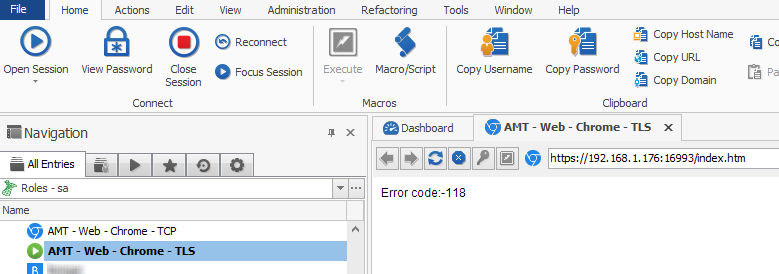
Stéfane Lavergne
AMT - Web - Chrome.rdm
11-19-2014 4-41-24 PM.png
I have tried it every way I can. No matter what I do there is absolutely no output in the embedded chrome window. There are also no errors in the log until I try to press the go button. I tried with credentials, no credentials, and wrong credentials. No change whatsoever no matter what i try to do or how long I wait.
@skeiffer - not having a AMT TLS machine for testing makes it difficult but we have an option. We configured in IIS a TLS website with digest authentication on port 16993 and we can connect (web) no problem using the previously attached session samples.
Could you please export your sessions (no credentials) for me to look at. You send them private message or email slavergne-at-devolutions.net.
If, using Chrome, you connect to the AMT machine what do you get? Are you prompted for the credentials? Are you getting a certificate error message? I'm assuming it works.
Thanks,
Stéfane Lavergne
I recommend setting up a test environment with AMT & TLS & Kerberos authentication if you can. The setup is quite evolved but most bigger organizations will have it configured this way.
Chrome by itself works but there are issues sometimes. Firefox has been the most reliable for the webUI. IE works if you enable kerberos authentication for websites in the registry.
I will send you the session via email though it is exactly the same as what you attached, just with the address changed.
We have a new version available:
http://download.devolutions.net/Devolutions.RemoteDesktopManager.Bin.10.0.15.0.zip
http://download.devolutions.net/Setup.RemoteDesktopManager.10.0.15.0.exe
== Change History ==
- Added a setting to disable the RDP UDP locally
- Added RDCMan 2.7 import support
- Improved the session dashboard with the remote management and the overview
David Hervieux
We have a new version available:
http://download.devolutions.net/Devolutions.RemoteDesktopManager.Bin.10.0.16.0.zip
http://download.devolutions.net/Setup.RemoteDesktopManager.10.0.16.0.exe
== Change History ==
- Added a department automatic group filter in the data source configuration
- Added an setting to hide the url in the embedded web session
- Added the IP field in the information tab
- Added the language property for embedded Chrome
- Added the possibility to have a status message even for the default status
- Fixed multiple group issues with the private vault
David Hervieux
Looking good guys :)
Is there any possibility of having a setting that sets the todo list to global instead of per group or per machine?
Hi Karl,
I don't think it's possible for now. I will double check and add a feature request if it's not implemented yet.
David Hervieux
We have a new version available:
http://download.devolutions.net/Devolutions.RemoteDesktopManager.Bin.10.0.17.0.zip
http://download.devolutions.net/Setup.RemoteDesktopManager.10.0.17.0.exe
== Change History ==
- Added a basic report to find the duplicates
- Added an option to add the status bar entry count
- Added Screen Connect 5 support
- Added the field ClearTextConnectionString to import a connection string
- Added the field ClearTextSecureNode to import a secure note
- Added the information tab page in the session dashboard
- Added the submit field for the data entry web
- Fixed an issue with the credential folder sort
- Updated the group icons
David Hervieux
When i try to use the new iLO setting in the tools section (Host>Tools>ILO) i keep getting a windows security authentication window even though my iLO is not authenticated with AD.
The credentials are populated in the browser window and if i click cancel on the windows security and just click the login button in the browser window i can connect successfully can you please fix this bug so i dont see the windows security authentication since its not needed in this context ?
Thanks !!
Edit: I've attached a screenshot of the issue.
edited by the_mentor on 12/2/2014
RDM - ilo authentication issue.PNG
Created a new root folder, I'm unable to right-click it... (v10.0.17.0 64Bit)
@Snir Hoffman - The issue has been resolved and will be in the next beta release.
More information (work around) here: http://forum.devolutions.net/topic17867-right-click-on-empty-folder-does-nothing.aspx#post70921
Regards,
Stéfane Lavergne
Not sure if I should throw this in bug reports or beta... but here goes:
Macros don't appear to work. I had previously (in 9.2.10.0) been able to go to Macro/Script (under actions) then run macros that send passwords, send usernames, etc. I also checked to make sure "Allow password in variable" is still checked per the session.
I use 3 macros.
$USERNAME$
$PASSWORD$
$USERNAME${DELAY}{TAB}{DELAY}$PASSWORD$
None of them seem to work after going to 10.0.17.0 (didn't work in 10.0.15.0 either).
@krude,
I made a fix Monday related to that. This should be fixed in the next beta release. Sorry about that.
David Hervieux
We have a new version available:
http://download.devolutions.net/Devolutions.RemoteDesktopManager.Bin.10.0.18.0.zip
http://download.devolutions.net/Setup.RemoteDesktopManager.10.0.18.0.exe
== Change History ==
- Added a setting to force the reconnect when switching to an RDP fullscreen session
- Changed the behavior for the RDP plugin to not load by default
- Fixed a possible issue with the macro execution
- Fixed an issue with the add in an empty folder
- Improved the AD sync to be able to check only in the destination group
- Integrated DeskRoll connection type
David Hervieux
Hi!
How is the Spiceworks integration supposed to work / what does it bring to the table? I've seen a checkbox to the affect that states Spiceworks integration but its not clear what its supposed to do.
The spiceworks integration let you link an entry to the inventory item in spiceworks. Once it's linked you will be able to open the spiceworks page directly in the item.
David Hervieux
How does it get linked? I'm only getting a faulty URL (wrong IP with /dashboard appended to it. Cant find anywhere to edit the link, or fill in our Spiceworks server IP.
/Kaj
Hi Kaj,
You're right it seems that in the refactoring we removed some fields. This will be fixed soon. You can give a try with the new spiceworks session type.
David Hervieux
We have a new version available:
http://download.devolutions.net/Devolutions.RemoteDesktopManager.Bin.10.0.19.0.zip
http://download.devolutions.net/Setup.RemoteDesktopManager.10.0.19.0.exe
== Change History ==
- Added a setting to completely disable Jump
- Added regular expression support for the web site auto fill matching
- Fixed a delete connection issue with DropBox
- Improved the duplicate report
- Improved the Spiceworks integration
David Hervieux
Hi,
With version 10.0.19.0 (and 18.0), in macro/scripts/tools pane, the Remote - Server Management (ilo) option has totally disappeared.
In options, tools, availability, it is enabled.
Also, in the session, I have enabled Ilo and entered an ip address.
It's just not in the list.
I use the classic interface.
Edit: the same for: Server start page, Terminal Sessions.
So, in options I have enabled all 14, in the macro/scripts/tools pane I find 11.
edited by Rayman on 12/5/2014
Hi Raymond,
Yes the ilo has moved in the new dashboard. I will fix the classic dashboard.
David Hervieux
This is now fixed internally.
David Hervieux
I'm on version 10.0.19.0 and when trying to use the spiceworks integration i get "unable to retrieve the groups"
Also the implementation doesnt seem to make much sense since it seem to require me to configure the spiceworks host and login info in each session rather then just have one session for spiceworks and link to that session.
Also it seems no one addressed my issue with iLO a few pages back with the windows authentication popup that doesnt seem to do anything.
Thanks.
You create a specific credentials and re-use in all you entries. It's true that you will have to enter the host for all your entry. We are about to release a new build with one fix but I'm not sure it's related. Does it open the web page when you click on the button next to the host field?
For the iLo could you try to create a separate web connection and try it to see if it works? Start a a new thread with a print screen if it does work.
David Hervieux
We have a new version available. This is now the RC for Remote Desktop Manager 10.1
http://download.devolutions.net/Devolutions.RemoteDesktopManager.Bin.10.0.20.0.zip
http://download.devolutions.net/Setup.RemoteDesktopManager.10.0.20.0.exe
== Change History ==
- Added a search menu in the filter menu list
- Added a search setting in the option dialog
- Added the Apple Script session tool for Mac compatibility
- Added the web management actions in the classic dashboard
- Fixed an issue the user specific RDP drives
- Improved the duplicate report
David Hervieux
Ok so i think I found out why it comes up with the windows credential popup.
When i created a web browser session and used the discover to find the form information it found "ID_SPNEGO" for the logon button ID.
When i used chrome to examine the logon button element it has the following ID "ID_LOGON" so when I changed the logon button ID to "ID_LOGON" it logs in perfectly and i dont see the annoying windows popup.
Could you fix it in in the RDM to use the "ID_LOGON" id for the logon button?
Thanks!!
Hi,
We will have to add a field to specify the field ID since it's does not seem possible to detect the right field.
David Hervieux
We have a new version available. We will release RDM 10.1 tomorrow.
http://download.devolutions.net/Devolutions.RemoteDesktopManager.Bin.10.0.21.0.zip
http://download.devolutions.net/Setup.RemoteDesktopManager.10.0.21.0.exe
== Change History ==
- Added a /CloseOnDisconnect command line switch to use with the sync
- Added RDTabs import
David Hervieux
Having major issue downloading 10.1.8 Beta. Either EXE or MSI gets about 30MB then errors out.
Chris,
Odd, it works from here, could you try this link to see if it works:
http://webdevolutions.blob.core.windows.net/download/Setup.RemoteDesktopManager.10.1.8.0.exe
Regards,
Stéfane Lavergne
Must be my internet connection or something. Will keep trying.
Does it work now?
David Hervieux
Yeah I just rebooted the router and was then able to download it. Thanks.
Hi David,
When will be Google Drive supported as database source?
Regards,
Pascal
Hi,
It still on our todo list but it's not implemented yet.
David Hervieux