
Pilly170
Auto log off on disconnect
Did anything come of this?
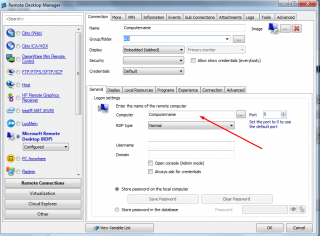
New Session > Computername
is there any way to automatically populate this field with a resolved ip address?
what im trying to get at is that i use this on my lan if i am unable to contact a dns server, ill need the ip address.
New Session > Computername
Hi,
I would like to be able to enter a Name for a server, but instead of it automatically populating the computer field with the Name input, I have the choice of computername or IP address (so it resolves the name to an IP)
This possible or is it already available?
thanks
Windows Remote Assistance
Hi,
I did a search on this but didn't find anything that suited.
When you get a remote assistance request it comes as an attachment within an email.
Is it possible to have RDM as the default application to this, and if so can it open up as a tabbed window in RDM?
Thanks
ILO - Web access crash
I was accessing an HP ILO2 server, in RDM is is configured as a tabbed web url.
Within the ILO, I went to integrated remote console.
I then got:


It then crashed the RDM
[27/11/2013 10:30:04]ERROR System.ObjectDisposedException: Cannot access a disposed object.
Object name: 'FrmMainRibbon'.
at System.Windows.Forms.Control.CreateHandle()
at System.Windows.Forms.Form.CreateHandle()
at DevExpress.XtraEditors.XtraForm.CreateHandle()
at DevExpress.XtraBars.Ribbon.RibbonForm.CreateHandle()
at System.Windows.Forms.Control.get_Handle()
at Devolutions.RemoteDesktopManager.Managers.UIManager.RestoreApplication(IMainForm mainForm, Boolean forceMaximize)
at Devolutions.RemoteDesktopManager.Managers.RemoteDesktopManagerProxy.DoRun()
at Devolutions.RemoteDesktopManager.Managers.ThreadManager.Invoke(MethodInvoker invoker)
[27/11/2013 10:32:59]ERROR System.ObjectDisposedException: Cannot access a disposed object.
Object name: 'FrmMainRibbon'.
at System.Windows.Forms.Control.CreateHandle()
at System.Windows.Forms.Form.CreateHandle()
at DevExpress.XtraEditors.XtraForm.CreateHandle()
at DevExpress.XtraBars.Ribbon.RibbonForm.CreateHandle()
at System.Windows.Forms.Control.get_Handle()
at Devolutions.RemoteDesktopManager.Managers.UIManager.RestoreApplication(IMainForm mainForm, Boolean forceMaximize)
at Devolutions.RemoteDesktopManager.Managers.RemoteDesktopManagerProxy.DoRun()
at Devolutions.RemoteDesktopManager.Managers.ThreadManager.Invoke(MethodInvoker invoker)
[27/11/2013 10:33:55]ERROR System.ObjectDisposedException: Cannot access a disposed object.
Object name: 'FrmMainRibbon'.
at System.Windows.Forms.Control.CreateHandle()
at System.Windows.Forms.Form.CreateHandle()
at DevExpress.XtraEditors.XtraForm.CreateHandle()
at DevExpress.XtraBars.Ribbon.RibbonForm.CreateHandle()
at System.Windows.Forms.Control.get_Handle()
at Devolutions.RemoteDesktopManager.Managers.UIManager.RestoreApplication(IMainForm mainForm, Boolean forceMaximize)
at Devolutions.RemoteDesktopManager.Managers.RemoteDesktopManagerProxy.DoRun()
at Devolutions.RemoteDesktopManager.Managers.ThreadManager.Invoke(MethodInvoker invoker)
Macros etc
Yeah, I was hoping that once logged in I could click the macro button and it could perform a certain task on this remote server.
Macros etc
ok, but there are ones built in such as get process? shouldnt that be available?
I'm unsure what I have to do to populate the macros box as above.
Macros etc
yep no problem
Macros etc
9.0.7.0
Macros etc
Macros etc
Thank you for your reply.
I have done this. For example I just created an entry that runs cmd.exe
Now if I goto a tabbed server, then hit the Scripts/macros/tools, then it is blank.
If I run it in the dashboard then I get my local cmd prompt
Macros etc
Hi,
Bit new to the manager as I am a convert from the VisionApp software.
Am I missing something to do with the macros? Whenever I look at them in the top ribbon they are blank, how can I create a script/macro that I can use on a server or all servers?
Thanks
Phil