Macros etc

Hi,
Bit new to the manager as I am a convert from the VisionApp software.
Am I missing something to do with the macros? Whenever I look at them in the top ribbon they are blank, how can I create a script/macro that I can use on a server or all servers?
Thanks
Phil
All Comments (13)
Hi,
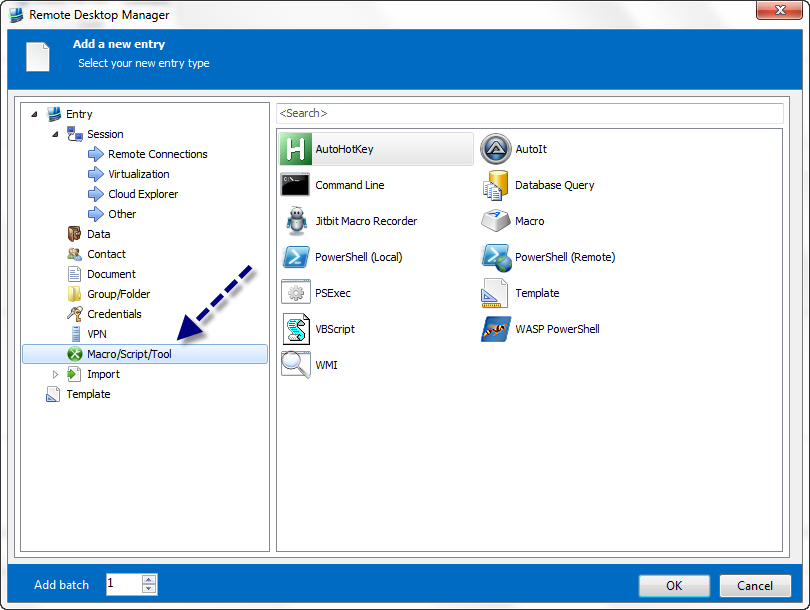
Just Create a new Entry with the context menu or the quick toolbar and select Macro/Script/Tool
David Hervieux
macro.png
Thank you for your reply.
I have done this. For example I just created an entry that runs cmd.exe
Now if I goto a tabbed server, then hit the Scripts/macros/tools, then it is blank.
If I run it in the dashboard then I get my local cmd prompt
I'm not able to reproduce it. Could you post a print screen of the blank dialog you get?
David Hervieux
What version do you use?
David Hervieux
9.0.7.0
Are you available today if I send you a special build with some debug info?
David Hervieux
yep no problem
Hi,
I've just found that the Cmd is not considered as Macro/Script but only as a tool. I can add an option to include it.
David Hervieux
ok, but there are ones built in such as get process? shouldnt that be available?
I'm unsure what I have to do to populate the macros box as above.
I could add it but this will be executed locally and not on the remote computer? Is this what you want?
David Hervieux
Yeah, I was hoping that once logged in I could click the macro button and it could perform a certain task on this remote server.
Unfortunately RDM can't send a remote command to the server.
David Hervieux