
axelitus
Specify fingerprint of key to use for SSH agent
Hi Carl, thanks for your answer. That would work (I would have a copy of the SSH key in RDM, and that certainly works, I tried it). I also did not know (I looked further) that the Free version does not have integration with 1Password (which may have been another option).
I still think it would be a nice feature if we could add which key should the SSH agent use for authentication.
Specify fingerprint of key to use for SSH agent
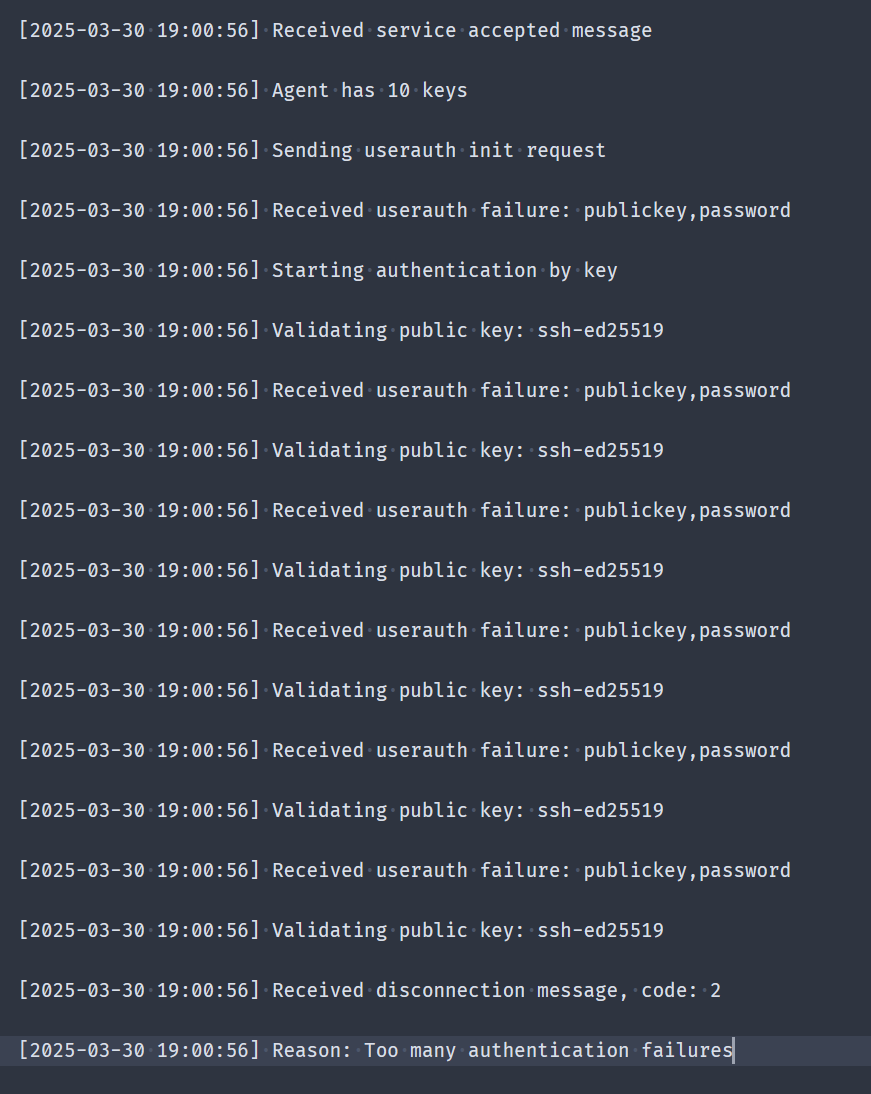
I am using SSH agent (OpenSSH) to configure my SSH authentication. I already have the configuration "working". The issue is that I have multiple SSH keys in my SSH agent as I manage multiple servers and each one of them has a different key. When trying to connect now that I configured multiple connections, I am getting the error "Too many authentication failures", as RDM tries every single SSH key for the SSH agent.
I have managed this for the ssh.exe command by using a config file and specifying the public key for the SSH connection, that way the ssh.exe command just tries the key that matches to the public key configured for the connection.
We need something similar for RDM, as right now I cannot specify the keys, and the thing is I am forwarding the key management (SSH key agent) to 1Password so that the keys remain safe.
Major Security Overhaul
Yes I could, but we need to give them the flexibility to Add/Edit/Delete remote connections in their personal folder.
The way I see is that their personal connections (and by personal I mean defined by them, because they are work related) should live in another data source apart from the restricted one.
Good to know security is being addressed! I think the option is a little misleading (I thought it applied only to the security where the role had permissions but later I discovered everyone could see the password).
I think we can managed to get this working with a a bit of workarounds, but I think RDM could benefit from a new security model, maybe for release 12? ;)
Major Security Overhaul
I think the security model used by RDM must have a major overhaul. We bought 5 license to use RDM with our IT staff. Our use case is that we want certain people to have remote access to certain servers, but without handing them the password. My configuration was having a Security Group "Credentials" assigned to the Credentials folder where people don't have access, so they don't see the credential entries. Our remote configuration entries are organized in folders along with their own security group (as not all users should have access to all remote connections). Also, every user has it'w own "user folder" where they can create entries and store credentials where no other has access to them.
As an admin everything works fine, but when trying to get access to the remote connection, the credentials are not being used so no access is given. This sounds logical as the user doesn't have access to those credentials (no "View" permission). If I give them View access to the Credentials folder, then the remote entries work as expected. But giving them View access introduces a new risk: the users can create a remote connection entry to a server they should not have access and use those credentials, even if they cannot see the password, they gain access and this is a security issue.
So, for our purposes, the security model used by RDM isn't secure at all, and I haven't even begun talking ab out the "Allow reveal password" checkbox. The use of this checkboxes (which appear in two places: User Privileges and Role Privileges) is global when it should be a Security Group<->User or Security Group<->Role feature (what I mean with this is that the reveal password should only apply to a given security group, so only passwords in that security group can be disclosed).
RDM is a great tool, but in a IT Staff day to day operation it lacks on the side of security with multiple users. I hope this can be considered for future updates to give flexibility for secure IT workflows.
Cannot create Dropbox Data Source
It worked with that version, thanks!
Cannot create Dropbox Data Source
I tried linking RDM to Dropbox without luck. First I tried authentication with the current session (client v3.0.3) and then I tried with the setting "Manual authentication" but no screen to enter the password is shown.
I have Windows 8.1, RDM v10.0.4.0 and Dropbox v3.0.3 and this happens on both 32bit and 64bit executables.
SSH Shell - Some key combos do not work
I have downloaded v9.0.4.0 today and the Ctrl + <Left Arrow> and Ctrl + <Right Arrow> work like a charm using Linux Function Keys in Keyboard configuration! :)
As said before the Ctrl + Shift + V key combo does not work and I don't know what code is sent. But what does work in Remote Desktop Manager and is what is expected hitting the key combo is Shift + Insert.
"Random" Notification Popups hang
I happily announce that I've tested v9.0.4.0 just yet and this issue seems to be gone. :D
"Random" Notification Popups hang
Ok did some more testing. First to clarify: I'm using a simple XML file inside my local Dropbox Folder.
I realized though that the file did not get updated when a connection is established, I think it seemed that way because there were some file updates pending in Dropbox (although I tried to have a clean Dropbox status when connecting, maybe there were network issues that prevented the file to be updated "that fast").
With that being said, I disabled the use of private key and enter old fashion username/password and the notification popup didn't appear. I then changed to using private key and the popup re-appeared and it does not close automatically. So I can confirm that this happens only when using a pre-configured ppk private key file.
SSH Shell - Some key combos do not work
Alright! :)
SSH Shell - Some key combos do not work
Mmmmmm I don't know... can't seem to get the code because when pressing Ctrl+V, Shift+Ctrl+V instead of getting the code I get the pasted text.
Don't know what code it is sent, but it should be the same as Shift+Insert (which is working on RDM).
SSH Shell - Some key combos do not work
Great to hear! :D I hop this includes (and pardon me for not bringing it up earlier) the Ctrl+Shift+V combo to paste into cursor? :D
Great support for a great tool! :D
"Random" Notification Popups hang
I'm sure because my XML configuration is stored in my Dropbox folder. So every time I entered the private key a notification would raise in my other computer about the file being updated.
I've attached the XML configuration (I have only one session configured in that file). I have only changed usernames/paths/host.
I hope it would help because it's really annoying to have that notification every time :D
Version 9.0.3.0 Won't Install on Win8.1 x86
Maybe Windows 8.1 x86 wasn't selected as a possible installation OS while updating the installer. Windows 8.1 Pro x64 does allow to install with the 9.0.3.0 installer downloaded from http://remotedesktopmanager.com/Home/ThankYou?f=RDMsetup
Version 9.0.3.0 Won't Install on Win8.1 x86
I can confirm that it installs on Windows 8.1 Pro 64bit without any problems. (Both versions are running well on it: 32bit and 64bit).
SSH Shell - Some key combos do not work
By the way, I'm using latest version 9.0.3 in enterprise trial mode on Windows 8.1 Pro 64bit
"Random" Notification Popups hang
I have configured an SSH Shell connection with a private key authentication. When I hit "Open Session" I get asked for the private key password correctly, but when I hit OK I get a Popup Notification that says: "Loading sessions from data source axelitus". It hangs and the only way I can get rid of it is right-clicking the popup and selecting the option "Visible" (my guess is to hide the notification).
I also noticed that the data source XML file gets saved every time I connect this way (which is dumb as I'm not modifying any configuration). I'm not sure if this happens when not using private keys though.
Using latest version 9.0.3 in enterprise trial mode on Windows 8.1 Pro 64bit (this happens running 32bit and 64bit Remote Desktop Manager).
SSH Shell - Some key combos do not work
In a Linux shell the key combos Ctrl+<Left Arrow> and Ctrl+<Right Arrow> are used to move between words in the command line. Using Remote Desktop Manager to connect to a remote shell does not send those key combination correctly (I've tried all Function keys profiles on the Keyboard tab).
If I hit Ctrl+V, <Left Arrow> I get the following output: ^[[D
If I hit Ctrl+V, Ctrl+<Left Arrow> I get the following output again: ^[[D but the output should be: ^[[1;5D
If I hit Ctrl+V, <RightArrow> I get the following output: ^[[C
If I hit Ctrl+V, Ctrl+<RightArrow> I get the following output again: ^[[D but the output should be: ^[[1;5C