Version 9.0.3.0 Won't Install on Win8.1 x86

Hi,
Just downloaded the newly released 9.0.3.0 and tried to install on my Windows 8.1 x86 laptop, and have been told by the installer that I can't install on this platform.
Any workaround to get it installed (at my own risk obviously).
All Comments (5)
Hi,
This is strange because we have updated our installer to support Windows 8.1. We are pretty sure that RDM works well on Windows 8.1. In the meantime you can download the zip directly and unzip it. RDM does not really need an installer.
David Hervieux
I can confirm that it installs on Windows 8.1 Pro 64bit without any problems. (Both versions are running well on it: 32bit and 64bit).
For completeness, the exact text of the error when using the Setup installer is:
"Remote Desktop Manager cannot be installed on the following Windows versions: Windows 2000, Windows 2000 Service Pack 1, Windows 2000 Service Pack 2, Windows 2000 Service Pack 3, Windows 2000 Service Pack 4, Windows 8.1 x86."
I've downloaded the .zip file and extracted it over the top of the previous version (9.0.2.0) and it starts fine. About box confirms that I am now on 9.0.3.0.
Maybe Windows 8.1 x86 wasn't selected as a possible installation OS while updating the installer. Windows 8.1 Pro x64 does allow to install with the 9.0.3.0 installer downloaded from http://remotedesktopmanager.com/Home/ThankYou?f=RDMsetup
Just to be sure I have double checked the current installer configuration and it checked.
I will verify if they have an update
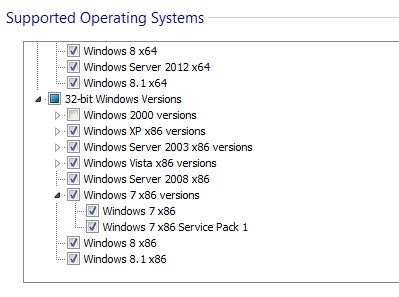
David Hervieux
Win81.png