
marky_towers
Remote Powershell Basics
Oh my word that's crazy!!!
OK, so I removed the spaces out of the path (so last decade), and I removed the quotes around the path name, then the script worked.
Thanks Peter!!!
Devolutions dudes - please can you put that in the online help? It was quite painful for something so silly. Helps us newbies.
Remote Powershell Basics
I'm still struggling on this topic. I attempted to take a step back and just do something really simple with a local powershell script.
I added it under the Macros/Scripts/Tools as a Powershell Local and put the script name in the command line.
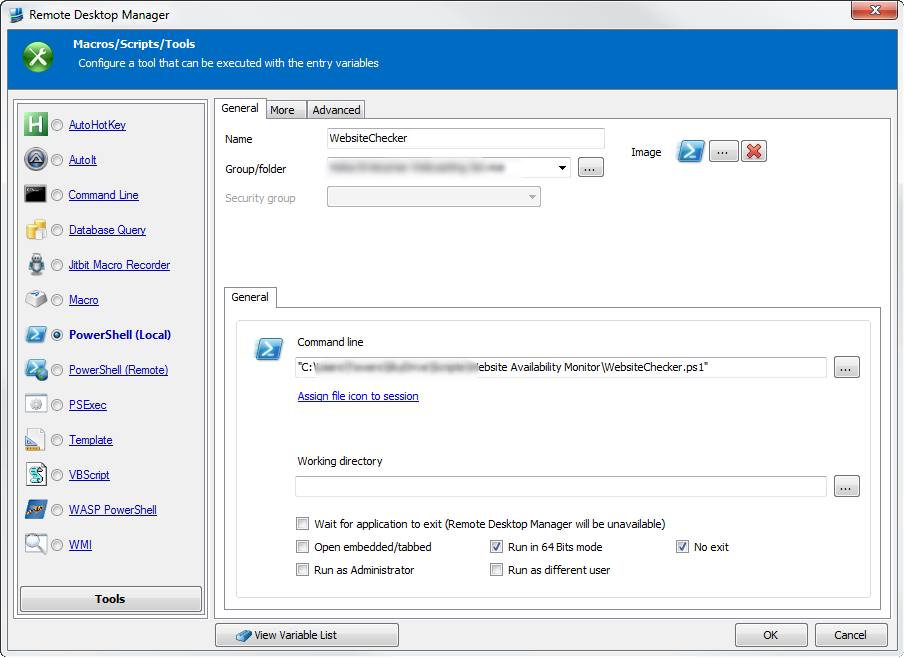
When I execute the script by selecting it from the options on one of my connections all I get is a powershell window that opens rather than the script running?
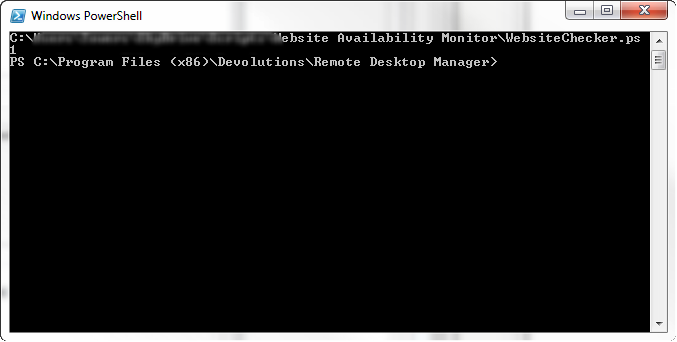
The online help is pretty useless as it doesn't show any examples and purely shows a screenshot of the dialog. Please can you give me some pointers?
Remote Powershell Basics
I'm definitely tuned!!!! Fingers and toes crossed as well :)
Remote Powershell Basics
This is proving rather taxing to say the least.
It would be easier if all servers and support machines were in the same domain, but we have support machines outside of the organisation we are supporting.
RDM would be extremely powerful if we could get this working with Powershell but it's an uphill battle understanding this.
Inventory report and populating "Information" tab
Was there any update on pulling the inventory report information into the Information tab automatically?
Remote Powershell Basics
I need a bit of help. Are there any basic instructions for getting Powershell remoting working through RDM?
I want to be able to run powershell commands, and scripts from RDM on my remote servers. This would be a massive time saving advantage to administering systems.
I've logged into the servers, launched powershell, and configured the ability to run scripts and remoting with the following commands:
Set-ExecutionPolicy Unrestricted
Enable-PSRemoting
From my local machine I can verify that I can remote into the servers, and check the processes by doing the following:
Enter-PSSession -Computername [SERVERNAME]
get-process
What I don't understand is when I try the RDM get-process command I get the following error:
New-PSSession : [172.26.33.29] Connecting to remote server 172.26.33.29 failed
with the following error message : The WinRM client cannot process the
request. Default authentication may be used with an IP address under the
following conditions: the transport is HTTPS or the destination is in the
TrustedHosts list, and explicit credentials are provided. Use winrm.cmd to
configure TrustedHosts. Note that computers in the TrustedHosts list might not
be authenticated. For more information on how to set TrustedHosts run the
following command: winrm help config. For more information, see the
about_Remote_Troubleshooting Help topic.
At line:1 char:22
+ & { $rdm_pssession = New-PSSession -ComputerName '172.26.33.29';
Invoke-Command ...
+ ~~~~~~~~~~~~~~~~~~~~~~~~~~~~~~~~~~~~~~~~~~
+ CategoryInfo : OpenError: (System.Manageme....RemoteRunspace:Re
moteRunspace) [New-PSSession], PSRemotingTransportException
+ FullyQualifiedErrorId : CannotUseIPAddress,PSSessionOpenFailed
Invoke-Command : Cannot validate argument on parameter 'Session'. The argument
is null or empty. Supply an argument that is not null or empty and then try
the command again.
At line:1 char:90
+ ... mmand -Session $rdm_pssession -ScriptBlock { get-process -computername
172.26.33 ...
+ ~~~~~~~~~~~~~~
+ CategoryInfo : InvalidData: (:) [Invoke-Command], ParameterBind
ingValidationException
+ FullyQualifiedErrorId : ParameterArgumentValidationError,Microsoft.Power
Shell.Commands.InvokeCommandCommand
Enter-PSSession : Cannot validate argument on parameter 'Session'. The
argument is null or empty. Supply an argument that is not null or empty and
then try the command again.
At line:1 char:217
+ ... ssion -Session $rdm_pssession; }
+ ~~~~~~~~~~~~~~
+ CategoryInfo : InvalidData: (:) [Enter-PSSession], ParameterBin
dingValidationException
+ FullyQualifiedErrorId : ParameterArgumentValidationError,Microsoft.Power
Shell.Commands.EnterPSSessionCommand
Any clue where I'm going wrong? I'd love to get this working but I'm struggling to find the information on how to do it or what's going wrong.
Hardware Tab (Additional Information) or Asset Tab
I was wondering if it's possible to use a powershell script to get this info into RDM.
Would be awesome when taking on new customers to support from our point of view if we could grab the system details into RDM via a quick script rather than doing this manually. Automatically adding to a Hardware tab would be awesome.
Data Source for team
Thanks for the reply Maurice. I've just purchased the licences for our team.
I'd like to get my head around the configuration. We already have about 70 connections in the tool but stored locally on each team members PC. Of course the information is getting very out of sync.
I'd like to set up the correct viewer / editor permissions for the data source, and I'd like to centralise the data source so we can access it when in the offline mode (connected to the corp vpn). It would also be good to understand if we can store any common powershell scripts in a central location as well.
Any guides you could point me to on this would be really helpful.
Licence Upgrade
Purchase made - we like this product :)
Data Source for team
Another quick question. We have an enterprise licence for a team of 5.
I'm looking for the best way to share data connection information for the systems we support, in the most cost effective solution.
I have an SQL server in Azure which I put the connection information into. Works fine until I connect over VPN to the customers network. Then we loose the data connection. I guess it's firewall related but we are not able to request they make changes for us.
What's the best way of structuring this so that we all use the same copy of the data connections, we limit a couple of people to just view and use the connections, and they key people can update them, and it's available all the time. We are using version 8.0, does the offline data source in version 9 work around this issue, and does it copy offline chances back to the server once the connection is restored?
Licence Upgrade
Thanks David :)
Licence Upgrade
I'm after some info on an upgrade path. We purchased a 5 user enterprise licence when it was version 7.3 of remote desktop manager and have upgrades up to 8.0.12.
If we want to upgrade to the latest version is there a discounted upgrade path or do we need to purchase the enterprise team licence again?
Thanks.
Import your TechNet Subscription (via XML)
I'm not having much luck importing my first powershell script. I'm guessing this should be added as a local powershell script?
I get the following error running this:
At line:1 char:60
+ & { 'C:\Users\Towers\SkyDrive\Scripts\Technet\Technet.ps1'
'C:\Users\Towers\SkyD ...
+
~~~~~~~~~~~~~~~~~~~~~
Unexpected token ''C:\Users\Towers\SkyDrive\Scripts\Technet\KeysExport.xml''
in expression or statement.
+ CategoryInfo : ParserError: (:) [], ParentContainsErrorRecordEx
ception
+ FullyQualifiedErrorId : UnexpectedToken
I'm not entirely sure what's going wrong. Any ideas?
VPN using Certificates
I need to use the CheckPoint VPN software to access a corporate network. The company only uses certificates and not username / password connections. Is it possible to configure RDM to connect in this way? We are using 8.0.12 of RDM.