Remote Powershell Basics

I need a bit of help. Are there any basic instructions for getting Powershell remoting working through RDM?
I want to be able to run powershell commands, and scripts from RDM on my remote servers. This would be a massive time saving advantage to administering systems.
I've logged into the servers, launched powershell, and configured the ability to run scripts and remoting with the following commands:
From my local machine I can verify that I can remote into the servers, and check the processes by doing the following:
What I don't understand is when I try the RDM get-process command I get the following error:
Any clue where I'm going wrong? I'd love to get this working but I'm struggling to find the information on how to do it or what's going wrong.
All Comments (8)
Does it work if, in RDM, you use the computer name instead of the IP?
The other way around if in a normal powershell window if you try with the IP does it work?
Enter-PSSession -Computername 172.26.33.29
get-process
According to this thread:
http://stackoverflow.com/questions/6587426/powershell-remoting-with-ip-address-as-target
You would need to specify -UseSSL when calling Enter-PSSession or New-PSSession. You would also need to make sure that SSL is enabled properly.
Stéfane Lavergne
This is proving rather taxing to say the least.
It would be easier if all servers and support machines were in the same domain, but we have support machines outside of the organisation we are supporting.
RDM would be extremely powerful if we could get this working with Powershell but it's an uphill battle understanding this.
Hi Mark,
We have something coming soon that might help you execute remote Powershell without all the domain problem. Stay tuned.
David Hervieux
I'm definitely tuned!!!! Fingers and toes crossed as well :)
I'm still struggling on this topic. I attempted to take a step back and just do something really simple with a local powershell script.
I added it under the Macros/Scripts/Tools as a Powershell Local and put the script name in the command line.
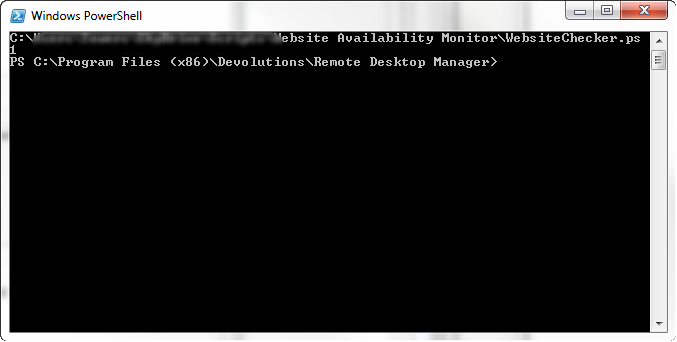
When I execute the script by selecting it from the options on one of my connections all I get is a powershell window that opens rather than the script running?
The online help is pretty useless as it doesn't show any examples and purely shows a screenshot of the dialog. Please can you give me some pointers?
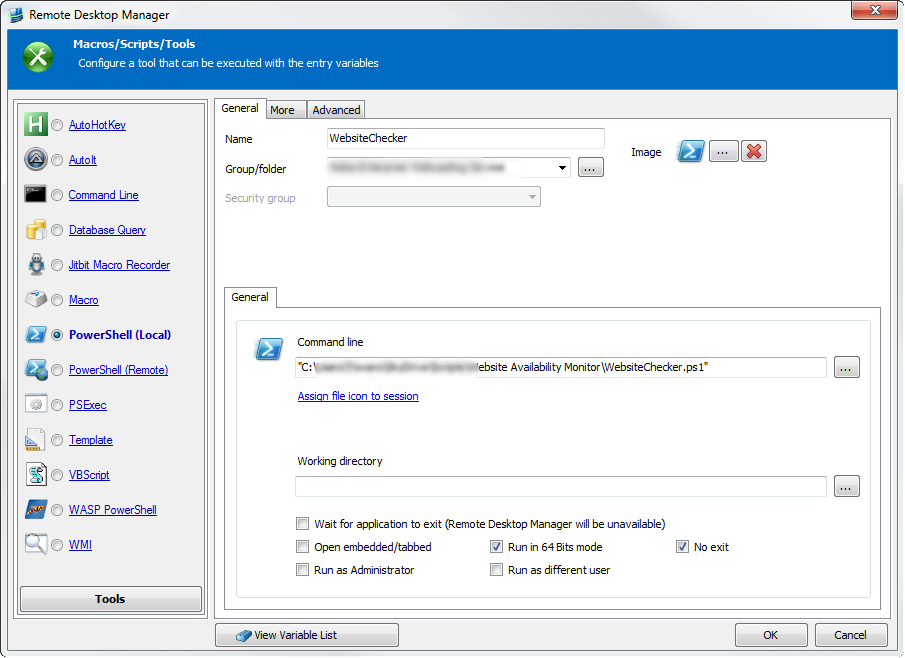
Snap_2014.03.07_10h02m34s_005_Remote Desktop Manager.png
RDM_PowershellLocal.png
You are executing a String here ;-) Namely the path to the Powershell script - this is what the function returns: the String.
I use either relative paths or in general paths without spaces (so you can forget about quoting which is still a inconvienient topic) or use the Powershell Conncection-Session type to execute a Script with Parameters.
Like the macro where you can use Session Variables .\Data\ConnectAfterReboot.ps1 -strHost $HOST$ -OpenRDMSession
Or the Session where i can specify a Filename and arguments:.\data\New-RDM-Data.ps1-AddNewOnly
Oh my word that's crazy!!!
OK, so I removed the spaces out of the path (so last decade), and I removed the quotes around the path name, then the script worked.
Thanks Peter!!!
Devolutions dudes - please can you put that in the online help? It was quite painful for something so silly. Helps us newbies.
We will add this for sure. Peter is our RDM Powershell guru!
David Hervieux