
jaroslavhin
Subject: macOS: Sidebar width resets when exiting fullscreen mode with collapsed toolbar
Hello,
Thank you for the versions and details, they make the behaviour clear.
We will test this on a Mac running 2026.3.2.3 so we can pass it to our developer team with exact steps.
One detail would help them: if you expand the ribbon, then enter and leave full screen without closing RDM, does the sidebar keep its width? Your reply describes what happens while the ribbon stays collapsed, so we want to confirm whether keeping the ribbon expanded avoids it.
Thank you in advance!
Best regards,
@Sam Moynihan
If you expand the panel to the desired size in fullscreen mode and then exit fullscreen mode, the panel does not retain its width (it reverts to what is shown in the screenshots above).
If you expand the panel to the desired size in windowed mode and then enter fullscreen mode, the panel retains its width (it does not change).
Subject: macOS: Sidebar width resets when exiting fullscreen mode with collapsed toolbar
Hello,
Thank you for the detailed steps and the screenshot.
To reproduce this on our side, could you please tell us:
Your Remote Desktop Manager version and your macOS version
Which workspace type you use (Devolutions Server, Devolutions Cloud, local file, SQL Server or other)
Whether the width also resets if you quit while in full screen with the ribbon expanded
Thank you in advance!
Best regards,
@Sam Moynihan
Thank you for following up. Here are the requested details:
Remote Desktop Manager version: 2026.3.2.3 (.NET 10.0.14)
macOS version: macOS 27.2 (Build 26B123)
Data source / Workspace type: [Local file (SQLite) / Devolutions Server / SQL Server] (Data source name: "dewqe")
Ribbon & Fullscreen behavior:
The issue is persistent: the sidebar width resets to an extremely narrow size both when exiting full screen mode and whenever the application is reopened.
This happens consistently whenever the ribbon/toolbar is kept collapsed/hidden. The custom sidebar width simply does not persist in this state.

Subject: macOS: Sidebar width resets when exiting fullscreen mode with collapsed toolbar
Hi Support Team,
I noticed a specific UI issue on macOS where the navigation sidebar width is not preserved.
The issue occurs specifically when using the app in fullscreen mode (Control+Command+F / full screen):
I resize the left navigation sidebar to a comfortable width.
The toolbar/panel is collapsed or hidden.
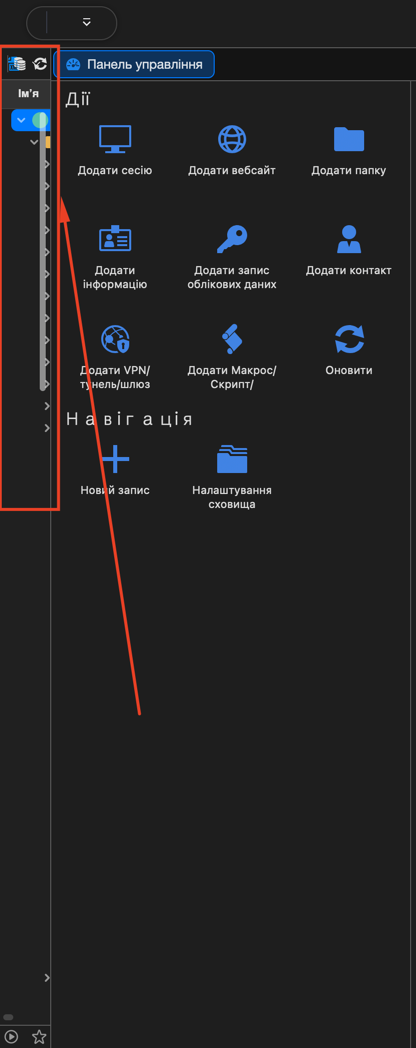
If the application is closed or exited while in this state (fullscreen with the toolbar hidden), reopening it causes the sidebar width to reset back to an extremely narrow, minimalist size (as shown in the attached screenshot).
image_fd957d.png
Even if I expand it again, it continues to revert to the minimal width whenever the app is closed in fullscreen with the panel collapsed.
Could you please look into fixing this so that the configured sidebar width is remembered properly regardless of fullscreen or toolbar visibility state?
Thank you!
RDM macOS Freezes When Copying Content from RDP Sessions
Thanks, updated. So far the problem does not occur
RDM macOS Freezes When Copying Content from RDP Sessions
Hello
Thanks for the feedback. Yes, as written, I hope this problem is finally squashed in 2026.2.2.
In the meantime - one thing that might help - are you copying on the server with the mouse (right-click > Copy)? I suspect things might be better if you just use the keyboard (Ctrl+C).
Thanks and kind regards,
@Richard Markiewicz
I copy from using Ctrl+C constantly
RDM macOS Freezes When Copying Content from RDP Sessions
Good morning.
MacOS, very often the program freezes when I copy a text value on a remote PC. It freezes for 30 seconds and then continues to work.