RDM macOS Freezes When Copying Content from RDP Sessions

HI, I am experiencing frequent issues with RDP sessions in Remote Desktop Manager, where the application becomes unresponsive when attempting to copy content from an active RDP session. This issue occurs consistently in approximately two out of every three attempts. When it happens, the application remains unresponsive for a couple of minutes before recovering and functioning normally again.
I am currently running the latest version (2026.1.10.3) on an M5 MacBook Pro with the latest version of macOS.
Please note that this is a new setup on this MacBook, and the .rdm configuration file was imported from my previous MacBook.
All Comments (35)
Hello
That sounds strange. Would you mind enabling session logs (described here); then when the issue occurs next time you can send me the log either by PM (as a zipped attachment) or to service@devolutions.net (mention this thread in the message). Afterwards you can turn the session logs back off again. Once you send it I will take a look.
Thanks and kind regards,
Richard Markievicz
Hello
That sounds strange. Would you mind enabling session logs (described here); then when the issue occurs next time you can send me the log either by PM (as a zipped attachment) or to service@devolutions.net (mention this thread in the message). Afterwards you can turn the session logs back off again. Once you send it I will take a look.
Thanks and kind regards,
@Richard Markiewicz
Please find the zip attachment. Thank you!
Hello
Thanks for that, there's a clear issue here but I'm not sure the precise cause yet.
Can you confirm - this happens in the case you copy a file or folder on the local (macOS) system, right?
Kind regards,
Richard Markievicz
Hi,
This issue primarily occurs when copying text within the RDP session. When copying text from a file, the macOS spinning wheel appears, causing the entire application to freeze temporarily.
Hello
Something strange is going on here. I found precisely in your logs where the freeze happens.
For background, you need to understand how the RDP clipboard works. When you copy something on the server, the server tells the client "here is the types of data I have in my clipboard". It doesn't send the actual data, that would be too heavy for every copy that might not need a corresponding paste on the client side. So, now the client knows what kinds of data are in the clipboard but doesn't have the actual data yet. Now, on client side, if you paste somewhere, the system picks the most suitable type of data that's advertised on the clipboard, and only now do we ask the server "send us the data for that type!". Ok, so now the client needs to wait for the server to actually send the data. At this point we must block the UI thread because macOS pasteboard has to happen on the main thread. We wait for the data - usually pretty quick, can be slow depending on what the server does or what the data is; but we have a maximum wait of 30 seconds in our code.
When I see the freeze case in your log, here is what I see:
18:33:39:290 - Server announces unicode text available on the clipboard
18:33:39:322 - macOS side requests the text data
18:34:09:327 - 30 seconds past; the server never sent the data. macOS side immediately request the data again
18:34:39:375 - 30 seconds past; the server never sent the data. macOS side immediately request the data again
18:35:09:405 - 30 seconds past; now all three queued responses arrive in a burst
18:35:10:459 - second and third responses arrive
Do you see why it's strange from the timestamp? You copied on the server, but then the client asked for the data 30ms later. I can't believe you switched back to macOS and initiated a paste in just 30ms! So, something running on your Mac is proactively reading new data from the clipboard as soon as it's copied. Furthermore, if it's not available, it retries two more times. I can't say what that might be - perhaps a clipboard monitor/history application or maybe something else that does clipboard virtualization like VMWare, something like that? Note that this same pattern is happening in the cases you copy on the server and it doesn't freeze - it's just that the server is providing the data very quickly. Every time you copy in RDP, something on your Mac immediately tries to read the clipboard within 15-30 milliseconds.
So the next part of the problem is, why is it taking so long to get the data in the freezing case? In this case that's on the server - it's just not answering in a timely way, although the data does eventually arrive. What are the application(s) you are copying from? Are you copying really big chunks of data, perhaps with images and other heavy content? Are the files in question sitting on slow I/O (network drive, maybe)?
In summary: something on your local machine is aggressively trying to read all the data that gets put into the clipboard. If the RDP server cannot serve that data quickly enough (30 seconds timeout), whatever that is retries a further 2 times, causing an additional 60 seconds timeout. In those timeout periods we're frozen, but it's unavoidable because clipboard interaction is UI thread bound.
Please let me know if you have some questions or something isn't clear
Richard Markievicz
Hello again
One thing occurred to me: this could be related to the Universal Clipboard feature in macOS. You said it's a new setup - maybe you didn't have that enabled before, and you do now?
It's in (System) Settings > General > Airdrop and Continuity > Continuity.> "Allow Handoff between this Mac and your iCloud devices".
If you have it enabled, please try turning it off and tell me if the issue persists. If it works around the problem, we might be able to fix that on our side. Note that without that, we could still hang for up to 30 seconds if the server can't deliver the clipboard data in a timely fashion, but that would only be when you actually paste the information on the client.
Let me know if you have some questions
Kind regards,
Richard Markievicz
Hi Richard,
Thank you for your deep analysis of the logs, I have tried disabling the "Allow Handoff between this Mac and your iCloud devices" option and the issue still persists.
I can confirm that clipboard data is being read immediately on the macOS side without user paste interaction. I’m investigating background applications and security/virtualization agents that may be aggressively reading the pasteboard. I will share findings once the process is identified.
Hello
Yes, please share your findings because it's useful data if anyone else hits this problem.
That being said - I think we can do better here. My idea is that, if the pasteboard is ready extremely quickly after copying on the server (say, within 100ms, faster than a human could initiate a paste on the client side) we should reduce the timeout to wait for the data accordingly. We can assume that something is trying to take the pasteboard contents in an automated fashion and not wait the full 30 seconds; maybe just half a second or so. There would still be a short freeze but it would be much more usable. What do you think?
Kind regards,
Richard Markievicz
Hi Richard,
RDP is unusable on macOS, even with Handoff disabled and no other programs running. For context, the Mac I’m using is only a few days old and has almost nothing installed on it.
The clipboard freezes for 30 seconds at seemingly random intervals; sometimes it works fine for dozens of minutes, and other times it hangs three or four times in a row. If the root cause isn't clear and the freeze is being triggered by a timeout, the user should at least be able to lower that limit manually. This is especially frustrating because, more often than not, the clipboard is only needed within the RDP session itself rather than for transferring data between the Mac and the remote desktop.
Thanks,
Simone
Hello
Yes, I see that's super frustrating and want to do better here. Broadly I'm not sure a user-configurable timeout is the proper solution.
If this is caused by something on your Mac proactively reading new clipboard data as soon as it's promised, I think the fix is actually to lower the timeout deterministically (to something very low but reasonable for small data - e.g. 250ms) if the data request comes so quickly that it surely wasn't a user-triggered action.
I need to understand - does the hang occur when you copy on the remote machine?
Thanks and kind regards,
Richard Markievicz
Hello again
I've realized the macOS Tahoe has a new native clipboard history tool that is likely the cause of this.
I wonder if either of you can confirm - I didn't realize on my side because it seems to be opt-in. I enabled it on my machine by bringing up Spotlight and pressing [Cmd]+4 and then allowing the feature.
It's also in System Settings > Spotlight > "Results from Clipboard" (all the way at the bottom of the window).
Do you have it enabled?
Thanks and kind regards,
Richard Markievicz
Hi Richard, I tried disabling Clipboard in Spotlight, but the issue persists. The hang occurs also copying with the remote session: for example copying and paste in the same remote Notepad.
Thank you
Simone
Hello Simone
Ok that's interesting.
So, in the first case, I've integrated a fix that generally should stop this behaviour when something is automatically reading the clipboard. I'm afraid that came too late for 2026.1.11 which is being built now, but it will be in 2026.1.12. It's quite possible that this will just fix the problem on your side (I'm quite sure it will fix things for @yashaskumar).
If you want, you can follow the steps in my first post on this thread to generate a session log and send it to me. I would be able to tell if the fix applies in your case too, or if further work is needed.
Finally, if you're mainly just using the pasteboard within the RDP session you can disable the clipboard redirection in the "Local Resources" tab of the session settings. That could be a workaround in the meantime (although not very convenient, I understand).
Thanks and kind regards,
Richard Markievicz
Hi @Richard Markiewicz - I have the same issue, I updated my application today to version 2026.1.11.4 and the issue seems to be worsening. In the previous version I had there were a setting that I changed RE the clipboard copy method and that was working. After I updated to the version today, the retting was reset but it does not matter on what option I select it to be on, the Test Copy Issue persists inside the RDP session.
I saw that you mentioned there will be a fix in the next version, however, I thought you might need this information.
Hi, also for me there is the same issue. Maybe the lock time is lesser than before. Thank you, Simone
Hello
Thanks for the feedback. Broadly this all sounds like the same problem. I can confirm if you follow the directions in my last post to submit a session log.
Let me know any questions
Kind regards,
Richard Markievicz
Good Day,
I emailed my session log files as requested.
Something I picked up, the issue is not so much on the Copy (Command + C) function, the issue is on the CUT function (Command + X)
I am using a Macbook Pro 5 and connecting to a Windows Server 2022 Standard server.
As soon as I CUT text inside the server, the beach ball appears and the session freezes.
Hello, nothing interesting in my log, only 30 seconds of delay during paste operation (client was freezed).
Simone[12:08:25:281] [1447:faa858c1] [DEBUG][com.freerdp.channels.cliprdr.client] - [cliprdr_client_format_data_request]: ClientFormatDataRequest(0x0000000d [CF_UNICODETEXT])[12:08:25:281] [1447:faa858c1] [DEBUG][com.freerdp.channels.cliprdr.client] - [cliprdr_packet_send]: Cliprdr Sending (12 bytes)[12:08:55:284] [1447:729b3001] [DEBUG][com.freerdp.channels.cliprdr.client] - [cliprdr_order_recv]: msgType: CB_FORMAT_DATA_RESPONSE [0x0005] (5), msgFlags: CB_RESPONSE_OK|[0x0001] dataLen: 3572[12:08:55:287] [1447:72acb001] [DEBUG][com.freerdp.channels.rdpgfx.client] - [logSurfaceCommand]: Got GFX RDPGFX_CODECID_CLEARCODEC[12:08:55:287] [1447:729b3001] [DEBUG][com.freerdp.channels.cliprdr.client] - [cliprdr_process_format_data_response]: ServerFormatDataResponse: msgFlags=0x00000001, dataLen=3572[12:08:55:296] [1447:72acb001] [DEBUG][com.freerdp.channels.rdpgfx.client] - [logSurfaceCommand]: Got GFX RDPGFX_CODECID_CLEARCODEC[12:08:55:297] [1447:72acb001] [DEBUG][com.freerdp.channels.rdpgfx.client] - [logSurfaceCommand]: Got GFX RDPGFX_CODECID_CLEARCODEC[12:08:55:318] [1447:729b3001] [DEBUG][com.freerdp.channels.cliprdr.client] - [cliprdr_order_recv]: msgType: CB_FORMAT_DATA_RESPONSE [0x0005] (5), msgFlags: CB_RESPONSE_OK|[0x0001] dataLen: 3572[12:08:55:318] [1447:729b3001] [DEBUG][com.freerdp.channels.cliprdr.client] - [cliprdr_process_format_data_response]: ServerFormatDataResponse: msgFlags=0x00000001, dataLen=3572
Hello
@jacoroos101 Your log clearly shows something reading the client pasteboard in an automated fashion. I'm confident that my fix covers this scenario.
That being said, I wonder if we have a further issue here. Because, it should not be common for the server to deliver pasteboard data so slowly but here we have a handful of users experiencing it somewhat regularly. It can happen but it wouldn't be the norm and from @sgiordy comments above, in that case we're dealing with 3572 bytes (which is ~1700 characters of text - not small, but also something that should be delivered very quickly).
The implication is that there is a data race on our side where we're somehow blocking the clipboard thread at the wrong time. I wonder if this is a side effect of the "paste" coming very quickly after the copy. It may be that the fix already covers this, but I want to confirm it. @sgiordy The snippet you posted starts with the first client data request, but I don't see the copy which comes before. Can you please share the full log file with me? You can send it to me by PM if that's convenient (may need to zip the file to be able to attach it).
Thanks and kind regards,
Richard Markievicz
Hello again
Ok I did spend some more time thinking about this issue. What I realize is:
- There is more to this than the server being slow and triggering a timeout, even for "auto pasted" data on the client side. The server taking 30s to deliver the data is not unheard of, but should not happen in normal practice.
- I'm actually not able to reproduce the problem on my side. I can see the automated pasteboard reads but not recreate the issue.
Both of those things make me realize that the automated pasteboard reads are triggering a race condition on our side. So, with my last update, things will be better but not fixed (the hang will simply be reduced to up to 1.5s instead of 1m 30s). I do believe I've identified a further fix and that is rolled into the 2026.1.12 update also. Once that's released, I'll depend on user feedback to know if the issue is truly remediated because as I said, I can't reproduce it here. If I'm right that's actually expected - this is a race condition where the automated pasteboard read falls inside a very small timing window (probably in the order of a few milliseconds). These kind of bugs will never happen for the majority of users, and always happen for a subset of users which makes it hard to validate the fix. But with a good understanding of the code, I have high confidence.
Please let me know if you have any questions
Kind regards,
Richard Markievicz
@Richard Markiewicz - I just want to check, when are you releasing Version 2026.1.12. with the Copy Fix in?
Hello
The release should be next week. Thanks for your patience on that.
Kind regards,
Richard Markievicz
Hello
The release should be next week. Thanks for your patience on that.
Kind regards,
@Richard Markiewicz latest version works like a charm!
Hi @sgiordy
Thanks for your patience and feedback. I'm glad it's working well for you now. Please don't hesitate with other questions or comments.
Kind regards,
Richard Markievicz
Hi all,
I'm having same issue on the newest version too, I tried all points in this thread, checking for update etc. and it is still happening. Granted that not that much after I turned off hands-off and turned on option in Spotlight but still :/
Hello @simonzuska
Which version of RDM are you running? The major 2026.2 was released earlier this week.
The most helpful thing would be to generate a session log. If you're on 2026.1 still, the instructions are here. For 2026.2 this procedure is slightly different and we're waiting on the documentation to be updated:
- If RDM is running, close it
- Open RDM and before opening any session, go to Help > Session Logs and "Enable" the logging
- Now use RDM until you reproduce the issue
- Once you reproduced it, send me the RDP session log
- You can send by PM but you may need to .zip the file to attach it
- The next time you restart RDM, session logging will be automatically disabled again
Please let me know if something isn't clear
Thanks and kind regards,
Richard Markievicz
Hello,
I am on the 2026.2.1.2, I will generate the logs tomorrow and PM them to you in ZIP. Thank you for a quick reply!
BR
Simon
Okay I probably found the culprit, I had some issues logging to this server waaay back when MacOS version had some troubles. What fixed that at that time was setting here 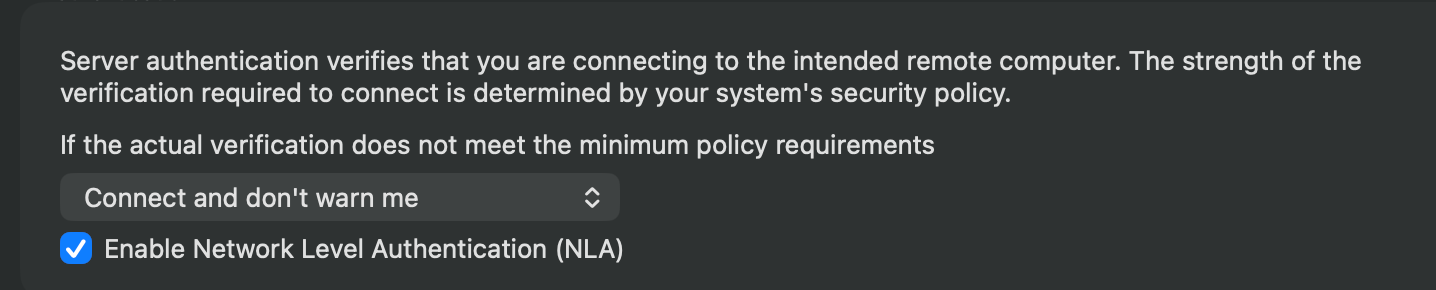 Where I set "Warn me" and turn off NLA. But as that issue is solved for a long time I don't know why I kept that settings ON. I changed it into settings in the picture and everything is good and much faster than before.
Sorry for the confusion and thanks for the help :)
8be33a84-4f40-40ab-a53d-f5629aba3c78.png
Hello @simonzuska and others in this thread
First, apologies for the slow reply @simonzuska I have had some vacation last week. I'm not sure why changing that setting would change something for you, but if it's working well that's good. In general it's preferable to use NLA where available.
Otherwise, I realize that my earlier fixes for this issue were addressing the symptoms of the problem but not the root cause. This was amplified with other third-party clipboard managers (e.g. Maccy) which use a longer delay to detect local pasteboard changes.
I do believe I've now hit on the core of the issue and made further improvements for the upcoming 2026.2.2 release. On my side it's rock solid now, but please let me know if you still have issues after updating once that is available.
Thanks and kind regards,
Richard Markievicz
Good morning.
MacOS, very often the program freezes when I copy a text value on a remote PC. It freezes for 30 seconds and then continues to work.
Hello Richard and everyone on this thread,
I am experiencing the exact same issue and have reported it under RDM ticket 00121860.
I provided steps to reproduce the issue, screen recordings and logs, and it looks like you’ve already identified the root cause, nice!
Hopefully the upcoming x.2 release will fix this.
Thanks!
Hello
Thanks for the feedback. Yes, as written, I hope this problem is finally squashed in 2026.2.2.
In the meantime - one thing that might help - are you copying on the server with the mouse (right-click > Copy)? I suspect things might be better if you just use the keyboard (Ctrl+C).
Thanks and kind regards,
Richard Markievicz
Hello
Thanks for the feedback. Yes, as written, I hope this problem is finally squashed in 2026.2.2.
In the meantime - one thing that might help - are you copying on the server with the mouse (right-click > Copy)? I suspect things might be better if you just use the keyboard (Ctrl+C).
Thanks and kind regards,
@Richard Markiewicz
I copy from using Ctrl+C constantly
Hello
RDM Mac 2026.2.2.1 is available, please let me know if you still experience the problem after upgrading.
Thanks and kind regards,
Richard Markievicz
Thanks, updated. So far the problem does not occur