
btull
Issues with Roles/Permissions
Hi btull,
Thank you for the two screenshots. The difference between them shows where to look.
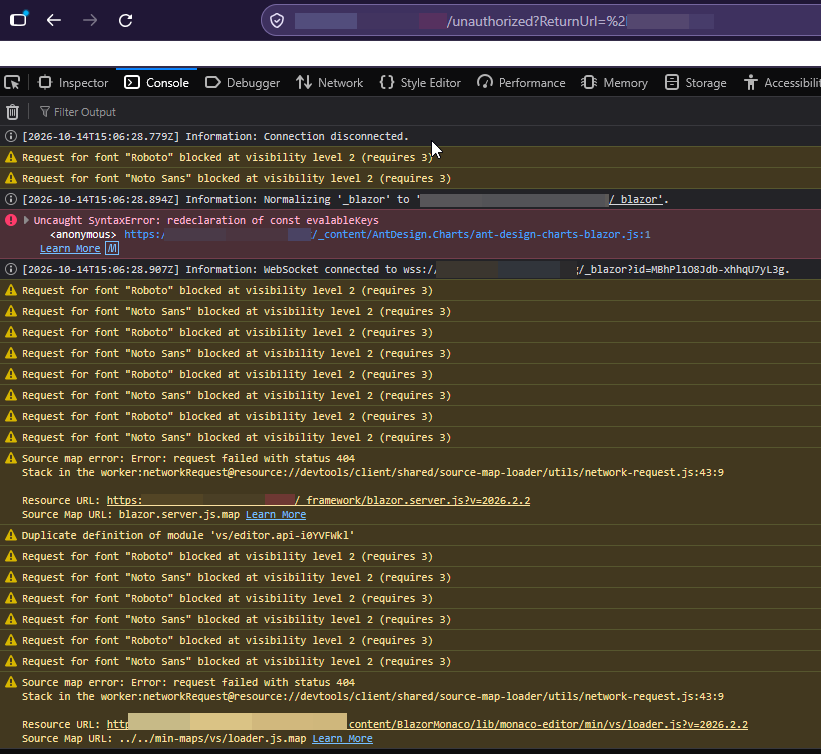
On the page they are not supposed to open, the address ends with ?ReturnUrl=..., which means the server refused the account before that page loaded; an app's Roles setting does this. On the main app, the address is a bare /unauthorized and the console shows "TypeError: can't access property "url", t is undefined". In 2026.2.2 that means the app let the account in but found no page available to it, so it sent the browser to /unauthorized. The TypeError is a side effect of that redirect, not a separate fault.
One setting that hides pages from some roles but not others is -Role: a page with a -Role list is hidden from an account holding none of those roles. Two points about this check:
1. It compares role names, not permissions. The permissions under My Identity are not used, so adding permissions cannot change the result; the account has to hold a role named in the page's -Role list.
2. The names must match exactly, including capital letters.
Page roles are set with the -Role parameter of New-UDPage, in the main app's code or in the code of a page on the app's Pages tab. Please compare this role's exact name with the -Role values of the main app's pages. If it is missing, add it to the pages it should see, or remove -Role from a page everyone may open.
If no page has a -Role, or the names already match, please send me the main app's code (with any passwords or keys removed) and the exact role name, and I will check why its page list comes back empty.
Page roles are described here: https://docs.devolutions.net/powershell-universal/apps/role-based-access/#pages-roles
Best regards,
Michel
@Michel Audi
Wow. I didn't even think of the case sensitivity. That was it (faceplam).
Issues with Roles/Permissions
Oddly enough, when navigating to a different page, using the same account, which they cannot access, the url gives a 'ReturnUrl' parameter.
Issues with Roles/Permissions
Version  BuildVersion
-------  ------------
2026.2.2 28618653519
I'm having an issue with a specific role in our PSU environment. I have several dashboards. 1 is the 'main' dashboard, and the others are subject matter dashboards specific to peoples roles; HR, Facilities, etc. A specific role cannot access the main dashboard even though it has the correct permissions. I created a test local user, gave it the permissions required and it doesn't work either, even though the permissions are listed in the '/admin > "My Identity"' area. The only error that I can see happens when I got to the page and us the inspect feature.
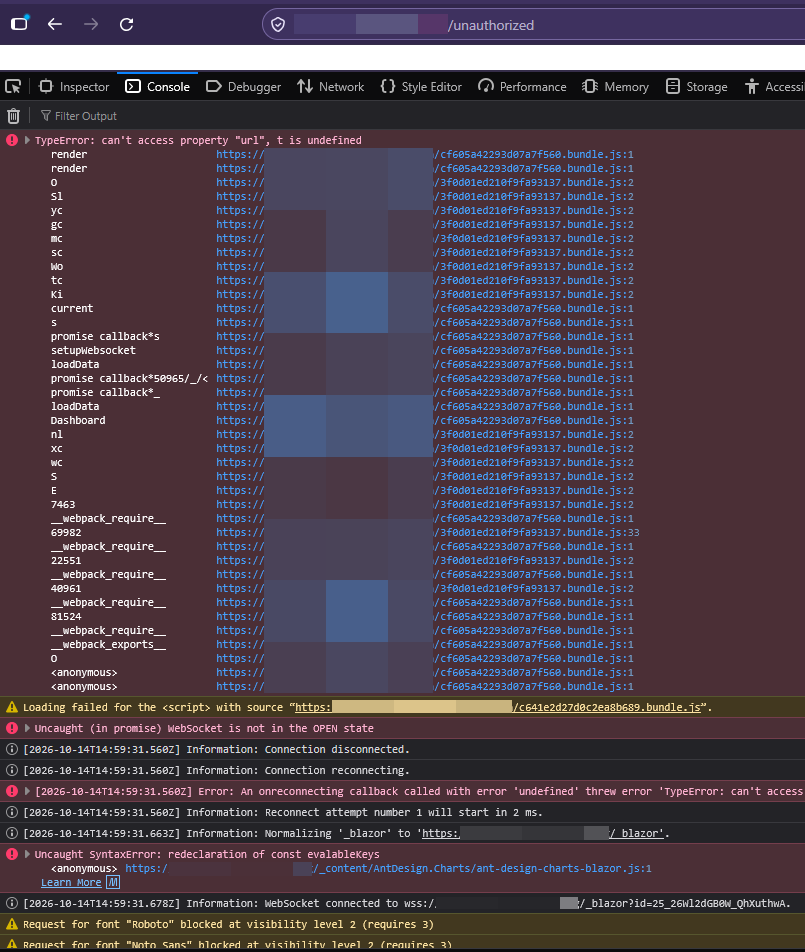
Everything up until 'Information: WebSocket connected to wss://{psuurl}/_blazor . . . ' shows up when they go to another page they aren't supposed to access, but they should be able to access this page. I have have some scripts tied to '/Portal' that they can see with no issues. I have done the typical 'Restart Service/Server' to no avail. I have also deleted the tag, as well as removed the tag from the Dashboard, and then readded it. I have not deleted the role and recreated it however.
Specific Branding Settings Not Applying
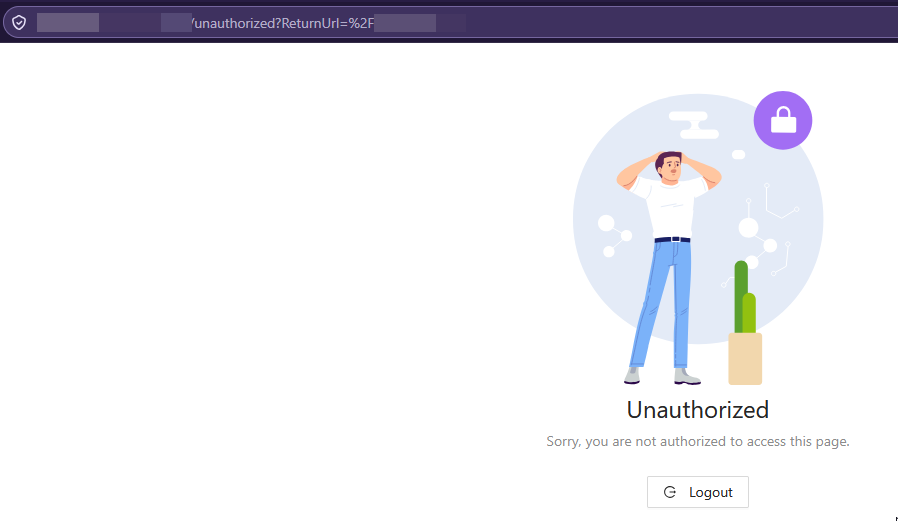
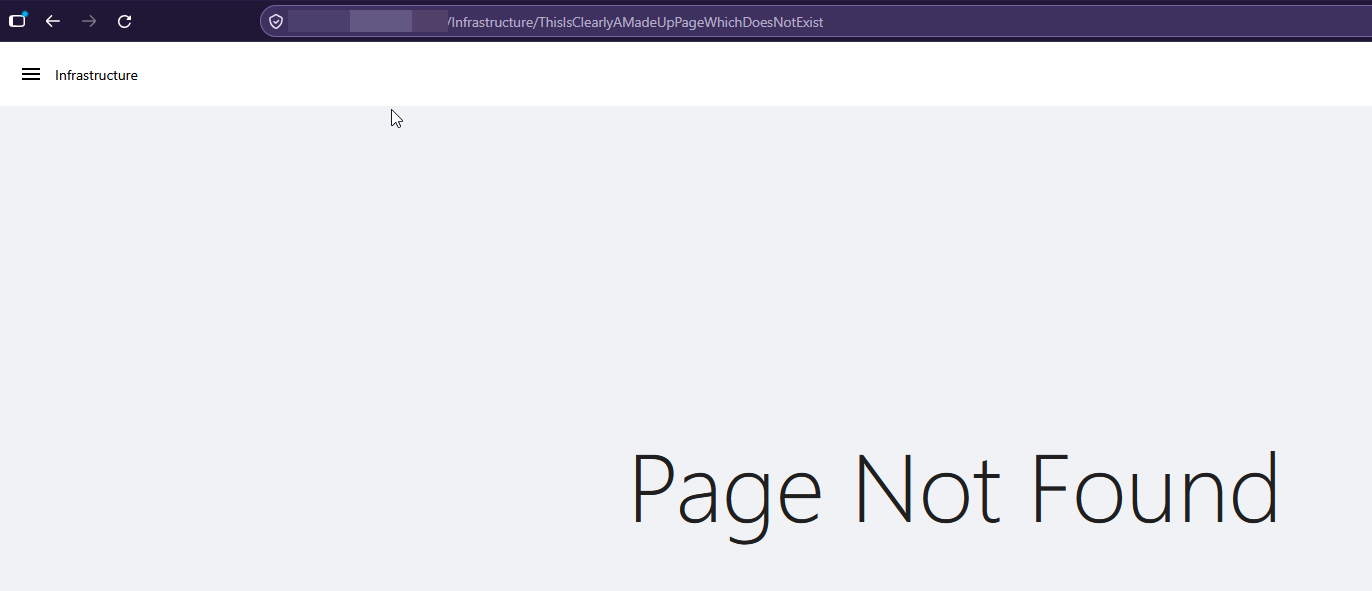
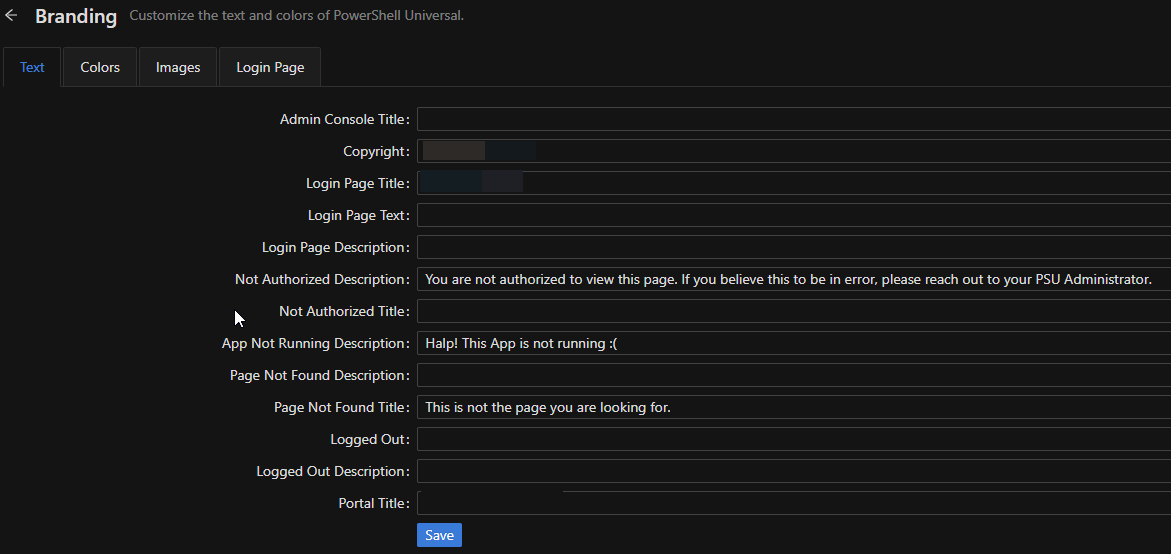
I tested the 'Not Authorized Title' after submitting this and that also does not work. Currently, the 'Copyright', 'Login Page Title', and 'Portal Title' are working. 'Admin Console Title' was working before, but I recently reset that back to the default setting.
Specific Branding Settings Not Applying
Get-PSUInformation

Version  BuildVersion
-------  ------------
2026.2.2 28618653519
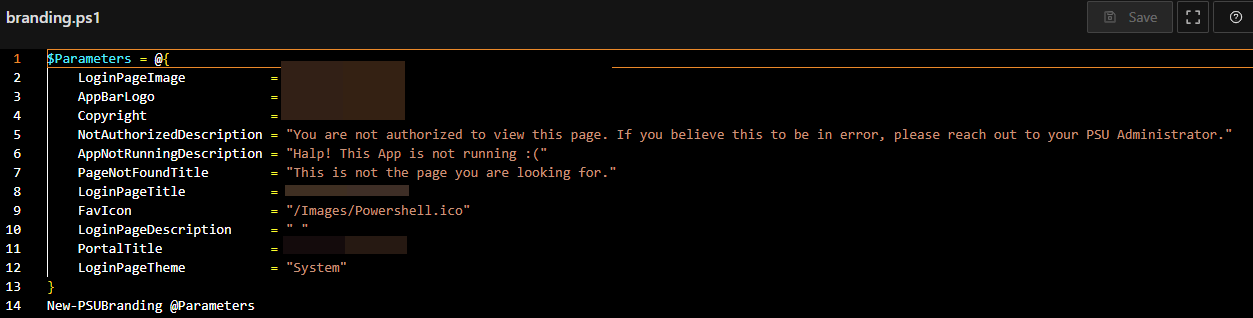
Certain Branding settings do not seem to be applying correctly, even after restarting the PSU service. All Branding configs are at the bottom for reference. I have these same settings on my 4.5.5. PSU which work without issue.
'Not Authorized'
'Not Running'


'Not Found'
Branding.ps1 Settings
Branding UI Settings
Incorrect Pester Scripts
Get-PSUInformation

Version  BuildVersion
-------  ------------
2026.2.2 28618653519
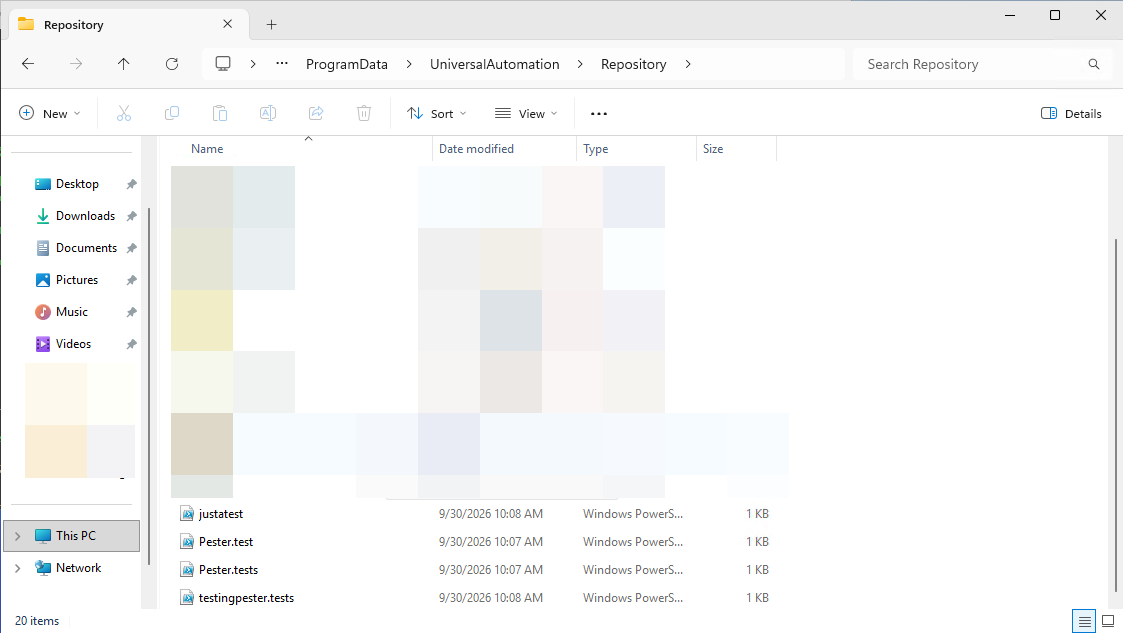
Incorrect scripts are showing in the Pester table. Based on documentation , only scripts with the name '*.tests.ps1' should be showing up. A little further down it also mentions '*.test.ps1'. I have a script called 'PCTest.ps1' that is showing in the Pester table. This would make me think that it's not '*.test.ps1' but rather '*test.ps1'.
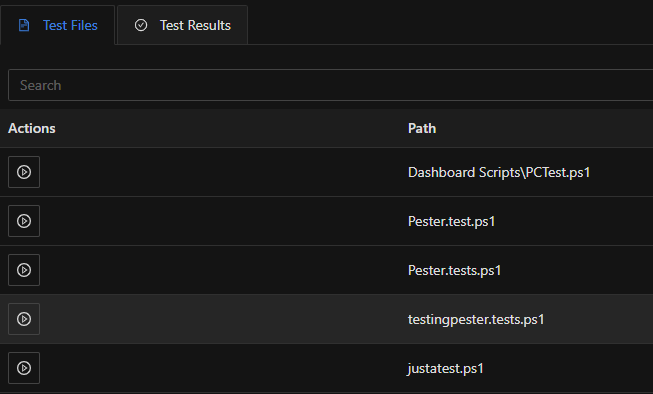
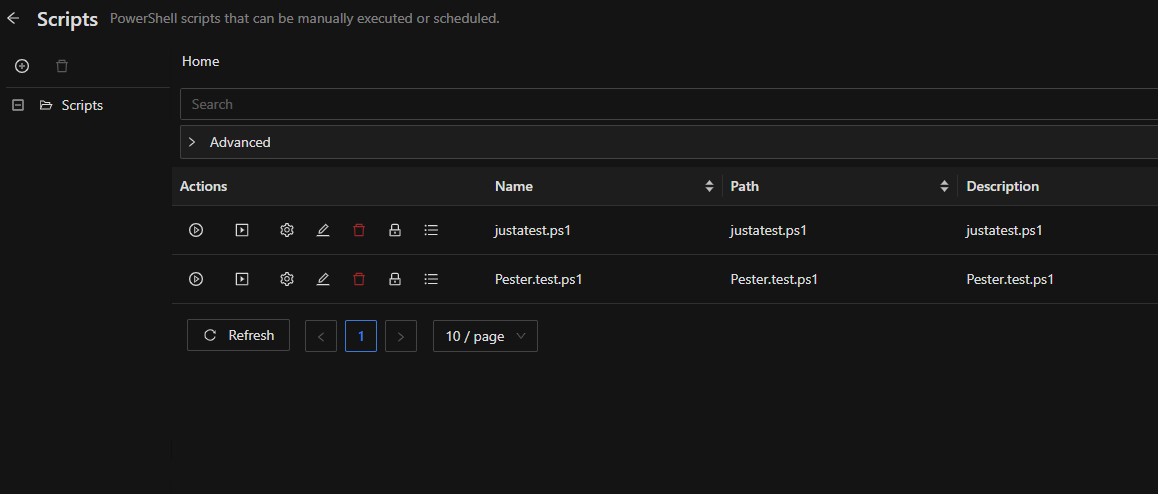
Furthermore, adding an 's' at the end of 'test' causes them not to appear in 'Automation > Scripts'.
AntDesign Issues
Hello @btull
Thank you for reporting this and for including the screenshots and PSU build information.
I can see the difference you are describing between the button colors shown under /Apps/Docs and the behavior you are getting with the AntDesign theme, particularly for the success and error colors and their hover states.
PowerShell Universal Apps use the MUI theme system, and the current documentation supports customizing palette values as well as component specific overrides. Before determining whether this is expected theme behavior or something specific to PSU 2026.2.2, I would like to compare the exact configuration being applied.
Could you please share:
• A minimal example of the New-UDButton commands used for the secondary, success, and error buttons.
• The relevant portion of your theme containing palette, MuiButton, or other button related overrides.
• Whether the same behavior occurs in a minimal App using the AntDesign theme without any custom overrides.
• Whether these colors behaved differently for you on an earlier PSU version, if applicable.
If possible, it would also be useful to inspect one affected button with the browser developer tools and confirm which CSS classes and computed background color / text color values are being applied in both the normal and hover states.
Because this is a public forum, please sanitize all evidence before posting. Remove credentials, tokens, license keys, cookies, private keys, full connection strings, email addresses, usernames, customer data, tenant or account identifiers, internal domains, hostnames, IP addresses, and private URLs. Please do not upload unredacted HAR files, memory dumps, database backups, or complete configuration files to this public thread.
References:
https://docs.devolutions.net/powershell-universal/apps/themes
Best regards,
Ruben Tapia
@rubentapia
Thanks, Ruben. I'm not using anything special for the UDButtons. Just the standard 'New-UDButton' with '-Icon' and '-Text' and mainly an 'OnClick'. I have a dev environment on 4.5.5 and I made a page solely with buttons to test. I copied the code to both my 4.5.5. environment and my 2026.2.2 environment.
New-UDButton -Text 'default/contained' -Color default -Variant contained
New-UDButton -Text 'default/outlined' -Color default -Variant outlined
New-UDButton -Text 'default/text' -Color default -Variant text
New-UDHtml -Markup '<br>'
New-UDButton -Text 'info/contained' -Color info -Variant contained
New-UDButton -Text 'info/outlined' -Color info -Variant outlined
New-UDButton -Text 'info/text' -Color info -Variant text
New-UDHtml -Markup '<br>'
New-UDButton -Text 'primary/contained' -Color primary -Variant contained
New-UDButton -Text 'primary/outlined' -Color primary -Variant outlined
New-UDButton -Text 'primary/text' -Color primary -Variant text
New-UDHtml -Markup '<br>'
New-UDButton -Text 'secondary/contained' -Color secondary -Variant contained
New-UDButton -Text 'secondary/outlined' -Color secondary -Variant outlined
New-UDButton -Text 'secondary/text' -Color secondary -Variant text
New-UDHtml -Markup '<br>'
New-UDButton -Text 'success/contained' -Color success -Variant contained
New-UDButton -Text 'success/outlined' -Color success -Variant outlined
New-UDButton -Text 'success/text' -Color success -Variant text
New-UDHtml -Markup '<br>'
New-UDButton -Text 'warning/contained' -Color warning -Variant contained
New-UDButton -Text 'warning/outlined' -Color warning -Variant outlined
New-UDButton -Text 'warning/text' -Color warning -Variant text
New-UDHtml -Markup '<br>'
New-UDButton -Text 'error/contained' -Color error -Variant contained
New-UDButton -Text 'error/outlined' -Color error -Variant outlined
New-UDButton -Text 'error/text' -Color error -Variant text
This is the only code on that page, which is part of a 'New-UDApp' with a navigation pane. Here is what that page looks like.
4.5.5
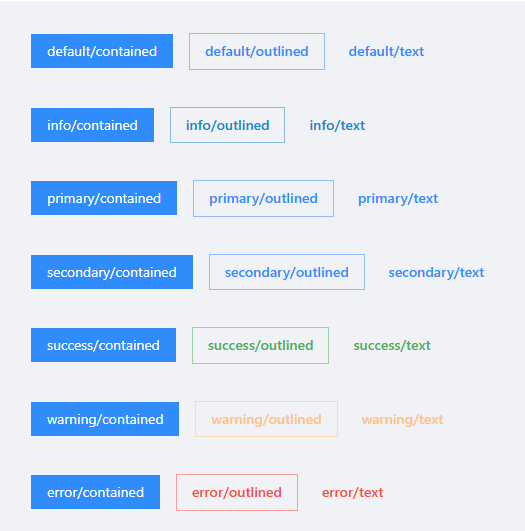
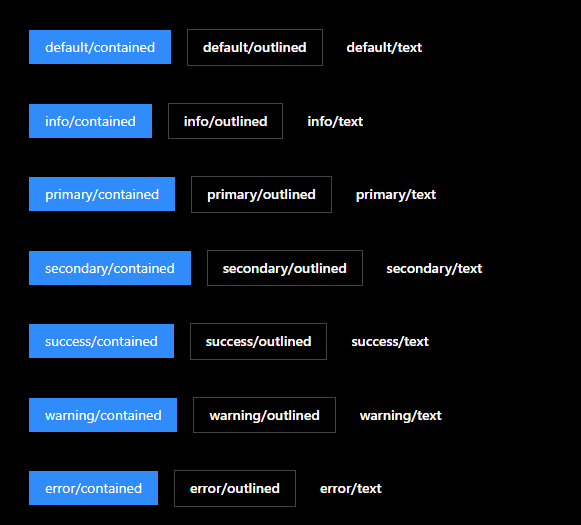
On this environment, I am running all dashboards using a 'custom' PS7 environment, running 7.5.4. No extra add-ins or anything just not using the Integrated PS7 environment.
Get-UDTheme -Name AntDesign | Convertto-Json -Depth 100
{
  "dark": {
    "typography": {
      "h6": {
        "fontSize": 14,
        "fontWeight": 400
      },
      "fontFamily": "-apple-system,BlinkMacSystemFont,'Segoe UI',Roboto,'Helvetica Neue',Arial,'Noto Sans',sans-serif,'Apple Color Emoji','Segoe UI Emoji','Segoe UI Symbol','Noto Color Emoji'",
      "body1": {
        "fontSize": 14
      }
    },
    "palette": {
      "error": {
        "xLight": "#ffebee",
        "dark": "#d32f2f",
        "main": "#f44336"
      },
      "primary": {
        "main": "rgb(31, 31, 31)"
      },
      "warning": {
        "main": "#ffc071",
        "dark": "#ffb25e"
      },
      "success": {
        "xLight": "#e8f5e9",
        "dark": "#388e3c",
        "main": "#4caf50"
      },
      "text": {
        "primary": "rgba(255, 255, 255, 0.85)",
        "secondary": "rgba(255, 255, 255, 0.38)",
        "disabled": "rgba(255, 255, 255, 0.38)"
      },
      "background": {
        "default": "#000"
      }
    },
    "overrides": {
      "MuiButton": {
        "outlined": {
          "borderRadius": 0,
          "border": "1px solid #434343",
          "&:hover": {
            "borderColor": "#165996",
            "color": "#165996"
          }
        },
        "root": {
          "&.Mui-disabled": {
            "color": "rgba(255, 255, 255, 0.50);"
          },
          "color": "#fff",
          "textTransform": "none"
        },
        "contained": {
          "transition": "all .3s cubic-bezier(.645,.045,.355,1)",
          "borderRadius": 0,
          "&:hover": {
            "borderColor": "#40a9ff",
            "color": "#fff",
            "backgroundColor": "#40a9ff",
            "boxShadow": null
          },
          "lineHeight": 1.5715,
          "fontWeight": 400,
          "backgroundColor": "#1890ff",
          "borderColor": "#1890ff",
          "boxShadow": null,
          "color": "#fff"
        }
      }
    }
  },
  "light": {
    "typography": {
      "h6": {
        "fontSize": 14,
        "fontWeight": 400
      },
      "fontFamily": "-apple-system,BlinkMacSystemFont,'Segoe UI',Roboto,'Helvetica Neue',Arial,'Noto Sans',sans-serif,'Apple Color Emoji','Segoe UI Emoji','Segoe UI Symbol','Noto Color Emoji'",
      "body1": {
        "fontSize": 14
      }
    },
    "palette": {
      "error": {
        "xLight": "#ffebee",
        "dark": "#d32f2f",
        "main": "#f44336"
      },
      "primary": {
        "main": "#1890ff",
        "dark": "#1e1e1f",
        "light": "#69696a"
      },
      "warning": {
        "main": "#ffc071",
        "dark": "#ffb25e"
      },
      "success": {
        "xLight": "#e8f5e9",
        "dark": "#388e3c",
        "main": "#4caf50"
      },
      "text": {
        "disabled": "rgba(0, 0, 0, 0.50)"
      },
      "secondary": {
        "main": "#1890ff",
        "dark": "#e62958",
        "light": "#1890ff"
      },
      "background": {
        "default": "#f0f2f5"
      }
    },
    "overrides": {
      "MuiListItemIcon": {
        "root": {
          "&:hover": {
            "color": "#1890ff"
          },
          "minWidth": "25px"
        }
      },
      "MuiButton": {
        "contained": {
          "backgroundColor": "#1890ff",
          "transition": "all .3s cubic-bezier(.645,.045,.355,1)",
          "lineHeight": 1.5715,
          "color": "#fff",
          "borderColor": "#1890ff",
          "fontWeight": 400
        },
        "root": {
          "borderRadius": 0,
          "&:hover": {
            "borderColor": "#40a9ff",
            "color": "#fff",
            "backgroundColor": "#40a9ff",
            "boxShadow": "none"
          },
          "textTransform": "none",
          "boxShadow": "none"
        }
      }
    }
  }
}
This is the standard AntDesign. I just removed all other MUI settings to shorten the codeblock.
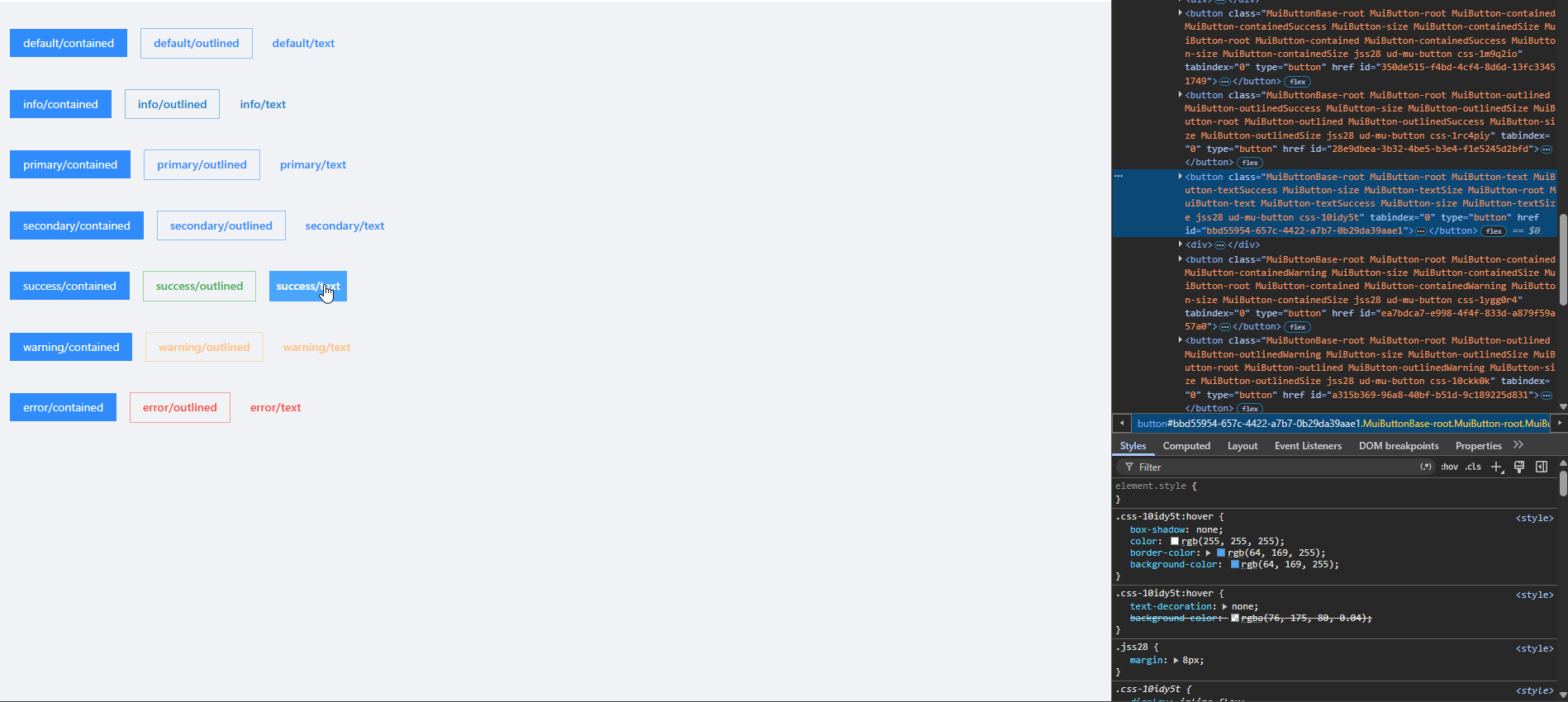
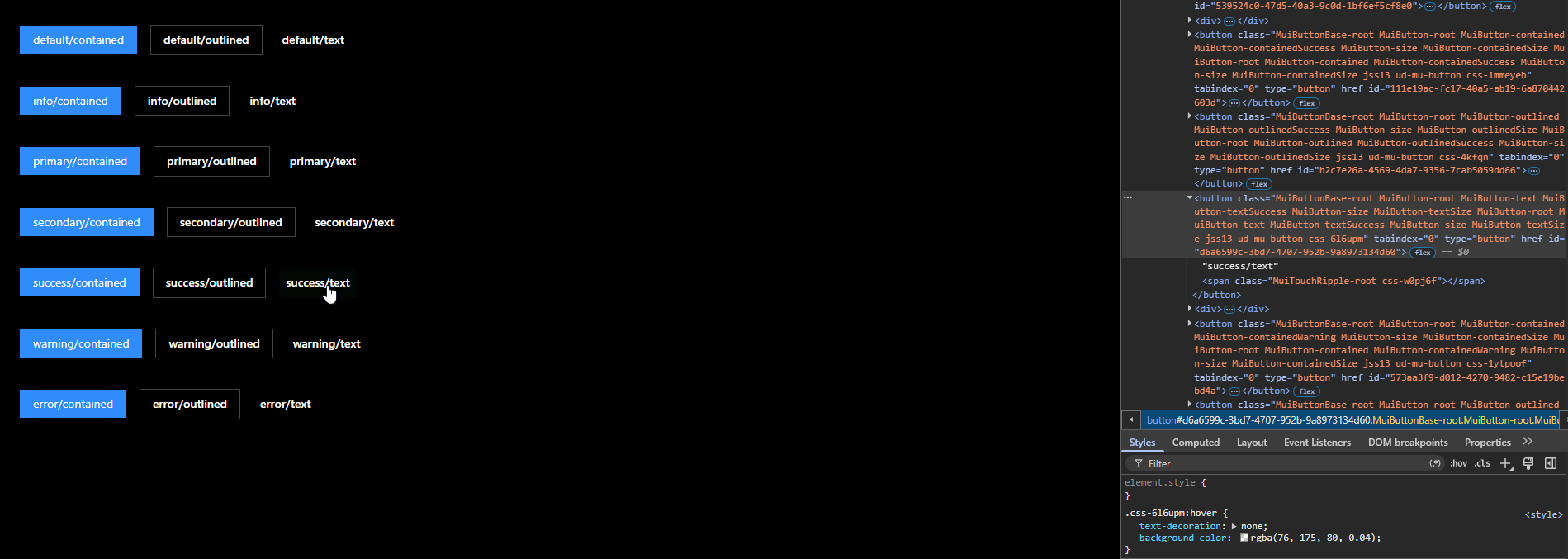
On the light theme, the 'hover' aspect on the 'text' variant just changes the entire button to blue, however on the dark theme, it uses an RGBA scale but the Alpha is set to such a low number that you can't see the color at all.
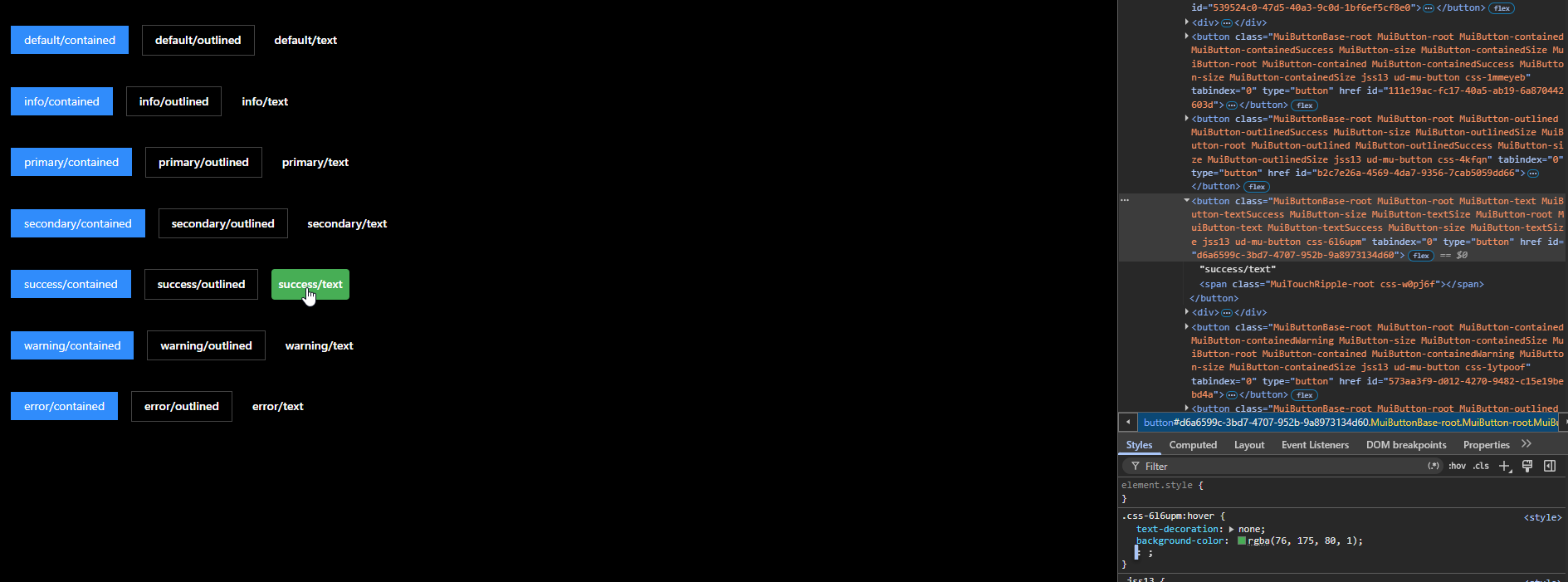
Changing the alpha to '1' vs '0.04', you can clearly see the color of the button. This is exactly the same with the 2026.2.2 version. The 'hover' for the other buttons ('contained' and 'outlined') just set the button to be a darker blue, or darker blue outline, respectively.
2026.2.2
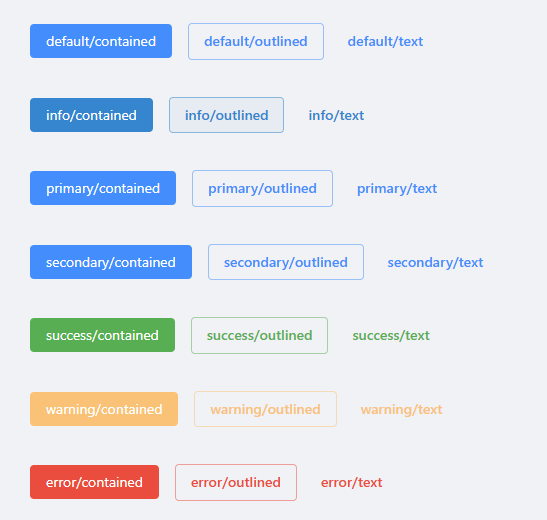
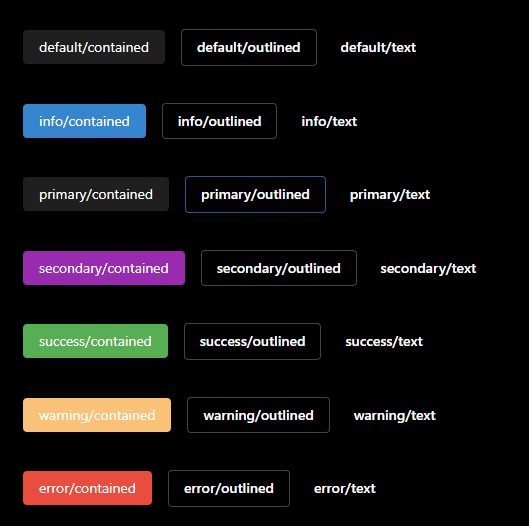
On this environment, I am running all dashboards using a 'custom' PS7 environment, running 7.6.5. No extra add-ins or anything just not using the Integrated PS7 environment.
Get-UDTheme -Name AntDesign | Convertto-Json -Depth 100
{
  "light": {
    "typography": {
      "fontFamily": "-apple-system,BlinkMacSystemFont,'Segoe UI',Roboto,'Helvetica Neue',Arial,'Noto Sans',sans-serif,'Apple Color Emoji','Segoe UI Emoji','Segoe UI Symbol','Noto Color Emoji'",
      "h6": {
        "fontWeight": 400,
        "fontSize": 14
      },
      "body1": {
        "fontSize": 14
      }
    },
    "overrides": {
      "MuiButton": {
        "root": {
          "boxShadow": "none",
          "borderRadius": 4,
          "&:hover": {
            "borderColor": "#2c75b0",
            "boxShadow": "none",
            "backgroundColor": "#2c75b0",
            "color": "#fff"
          },
          "textTransform": "none"
        },
        "contained": {
          "lineHeight": 1.5715,
          "color": "#fff",
          "transition": "all .3s cubic-bezier(.645,.045,.355,1)",
          "fontWeight": 400
        }
      }
    },
    "palette": {
      "background": {
        "default": "#f0f2f5"
      },
      "error": {
        "dark": "#d32f2f",
        "main": "#f44336",
        "xLight": "#ffebee"
      },
      "text": {
        "disabled": "rgba(0, 0, 0, 0.50)"
      },
      "secondary": {
        "dark": "#e62958",
        "main": "#1890ff",
        "light": "#1890ff"
      },
      "primary": {
        "dark": "#1e1e1f",
        "main": "#1890ff",
        "light": "#69696a"
      },
      "warning": {
        "main": "#ffc071",
        "dark": "#ffb25e"
      },
      "success": {
        "dark": "#388e3c",
        "main": "#4caf50",
        "xLight": "#e8f5e9"
      }
    }
  },
  "dark": {
    "typography": {
      "fontFamily": "-apple-system,BlinkMacSystemFont,'Segoe UI',Roboto,'Helvetica Neue',Arial,'Noto Sans',sans-serif,'Apple Color Emoji','Segoe UI Emoji','Segoe UI Symbol','Noto Color Emoji'",
      "h6": {
        "fontWeight": 400,
        "fontSize": 14
      },
      "body1": {
        "fontSize": 14
      }
    },
    "overrides": {
      "MuiButton": {
        "contained": {
          "lineHeight": 1.5715,
          "borderRadius": 4, #<------ Changed from standard of '0' to '4'
          "transition": "all .3s cubic-bezier(.645,.045,.355,1)",
          "fontWeight": 400,
          "boxShadow": null,
          "color": "#fff",
          "&:hover": {
            "borderColor": "#2c75b0",
            "boxShadow": null,
            "backgroundColor": "#2c75b0",
            "color": "#fff"
          }
        },
        "outlined": {
          "borderRadius": 4,
          "border": "1px solid #434343",
          "&:hover": {
            "color": "#165996",
            "borderColor": "#165996"
          }
        },
        "root": {
          "color": "#fff",
          "&.Mui-disabled": {
            "color": "rgba(255, 255, 255, 0.50);"
          },
          "textTransform": "none"
        }
      },
    },
    "palette": {
      "background": {
        "default": "#000"
      },
      "error": {
        "dark": "#d32f2f",
        "main": "#f44336",
        "xLight": "#ffebee"
      },
      "text": {
        "secondary": "rgba(255, 255, 255, 0.38)",
        "primary": "rgba(255, 255, 255, 0.85)",
        "disabled": "rgba(255, 255, 255, 0.38)"
      },
      "primary": {
        "main": "rgb(31, 31, 31)"
      },
      "warning": {
        "main": "#ffc071",
        "dark": "#ffb25e"
      },
      "success": {
        "dark": "#388e3c",
        "main": "#4caf50",
        "xLight": "#e8f5e9"
      }
    }
  }
}
This is the standard AntDesign. I just removed all other MUI settings to shorten the codeblock. The only custom settings is on the MUIButton, utilizing a custom 'borderRadius' to make the buttons round.
I don't believe 4.5.5 has a 'minimal' environment. I know this is a setting in 2026.2.2 but I'm not currently utilizing it.
AntDesign Issues
Get-PSUInformation

Version  BuildVersion
-------  ------------
2026.2.2 28618653519
Currently having some issues with styles/themes. While looking at the build in '/Apps/Docs' Buttons page the colors listed are very differently from the standard AntDesign theme. Currently trying to achieve the button colors from that page but I can't seem to find the best way in the MaterialUI file.


(The 'success' button is currently being hovered over and is slightly darker than normal)
Currently, in my setup, the 'success' and 'error' do not change font color, nor does the hover make the color darker, it actually uses the standard 'blue' color somehow.
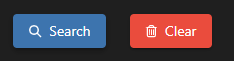
Has anyone found a good way to mimic this using AntDesign? I was able to edit the borderRadius in the MUI file to round the buttons to match.
LoginPageLogoSize Issue
Hello @btull
Thank you for your patience while I tested this further.
I was able to reproduce the behavior in PSU 2026.2.2. The LoginPageLogoSize value is not reflected in the rendered login page as expected. During testing, the login page continued to render the logo container with a fixed width of 128px even when different values were supplied through New-PSUBranding.
Based on the evidence collected, I am escalating this to the Development team for review.
At this point, you do not need to send the HAR or PSU logs unless we specifically need additional environment comparison later.
I will update this thread once we have additional information from Development.
Best regards,
Ruben Tapia
@rubentapia
I sent you the file last weekend, but thank you for the update.
LoginPageLogoSize Issue
Hello @btull
Thank you for the detailed report and screenshots.
From the browser inspection, I can see the logo is being rendered at approximately 128 px wide, with the image inheriting its dimensions from the surrounding element. That lines up with your observation that changing `LoginPageLogoSize` does not appear to affect the displayed size.
Since you have already tested several value formats, I would like to reproduce this specifically on PSU 2026.2.2 rather than have you continue trying different syntax without confirming the expected behavior first.
In the meantime, could you please confirm whether the same behavior occurs after a hard browser refresh or when opening the login page in a private browsing window? This will help rule out cached styling while I compare the behavior in a clean environment.
I will also check whether the parameter is being applied to the generated login page markup as expected.
Best regards,
Ruben Tapia
@rubentapia
Yes, it continues to happen in an Incognito/InPrivate window, as well as closing and reopening the browser.
LoginPageLogoSize Issue
Version 2026.2.2I'm having an issue with the 'LoginPageLogoSize' parameter with New-PSUBranding. I've tried integers, percentages, 'x' (times), 'X px, Y px'. Nothing seems to be changing the size of the logo. Using a test image right now for anonymity, but on our old 4.5.5 environment, the logo size is exactly the same size as the picture. This version seems to shrink it down but I can't seem to figure out the syntax. Has anyone got this to work? Thanks!
$Parameters = @{
    LoginPageImage           = "/Images/Powershell.jpg"
    LoginPageLogoSize        = "2x"
    LoginPageDescription     = ""
    AdminConsoleTitle        = "PSU Admin Console"
    Copyright                = " "
    AppNotRunningDescription = "HALP :( This dashboard is not running!"
    LoginPageTitle           = "Test"
    LoginPageTheme           = "System"
}
New-PSUBranding @Parameters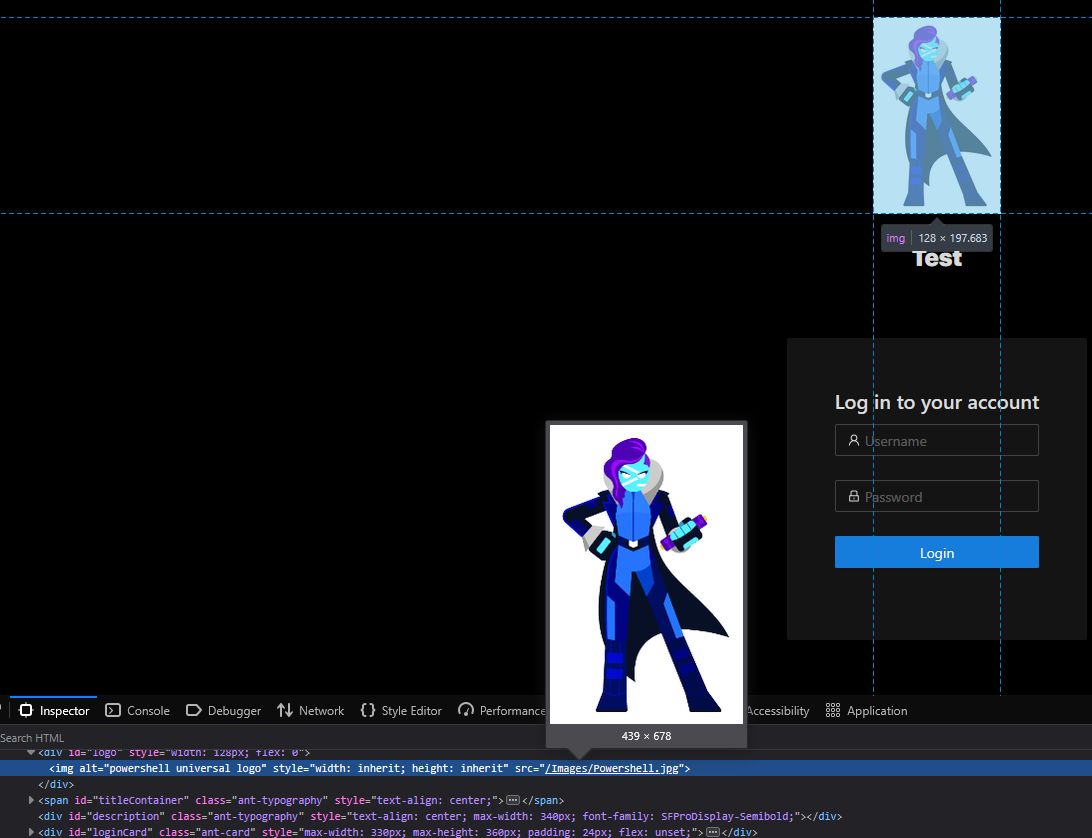
Script Execution from Dashboard
@Adam Driscoll Looks like that was the fix! I didn't even think to look there. Thanks a bunch!
Script Execution from Dashboard
@btull I believe that's the case in v4. You might be able to edit the variables.ps1 file and reload the configuration for it but it might be easier to just delete and re-add the secret. In 2026 you can edit the properties and value of secrets in the console.
@Adam Driscoll
Thanks! Checking that now, I'll update the ticket depending on the outcome.
Script Execution from Dashboard
@btull I would double check how the secret variable for the credential running the script is defined. If it has roles associated with it, and the user using the dashboard does not have that role, then they would see this error. You can either remove the roles from the variable or add one of the user's roles to that variable.
Thanks @Adam Driscoll . That looks spot on, based on the included photo! Even though the account running PU is set as an 'Administrator', does that not cover all roles? Secondly, since it's a secret, it looks like I can't edit it. So, I would need to remove it and re-add it using the correct role(s), or no roles at all?

Script Execution from Dashboard
Product: PowerShell Universal
Version: 4.5.5
I'm having an issue with a standard user execution a script from a Dashboard. I have 2 environments currently, both running 4.5.5 (yeah, I know it's older, looking to rebuild our 'prod' environment with 2026 but i need to have a 'dev' version for users to use while I rebuild it), but users are not able to run scripts from a dashboard. The error that I get in the admin portal is
Error executing job: The credential '************' can not be used for the roles '****,****'.Our old environment, which has been upgraded several times and was created using PUD version 2.X, is working perfectly fine. I've checked all the settings in the admin portal and everything looks mirrored. Has anyone encountered this issue or can direct me to look in some place? Thanks in advance!
New-UDAutocomplete and Icon Alignment
@Adam Driscoll Thanks for reaching back out! It is not a priority, just wanted to make sure that I was not going crazy.
New-UDAutocomplete and Icon Alignment
Tested by removing the custom UDIcon piece and used the base UserSecret icon. Same result.
New-UDAutocomplete and Icon Alignment
Product: PowerShell Universal
Version: 4.4.0
Currently having an issue with New-UDAutocomplete -Icon but only when changing between light and dark modes.
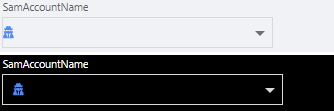
Looks like the box actually changes size, being a little shorter in Light mode which causes the icon to shift slightly to the left.
New-UDAutocomplete -Id "NewSearch" -Label "SamAccountName" -OnLoadOptions {
                                Get-ADUser -Filter "SamAccountName -like '*$Body*' -and SamAccountName -notlike '*$Body*XXXXX' -and UserPrincipalName -like '*$Body*@XXXXXX'" -SearchBase "XXXXXXXXXXXXX" | Select-Object -ExpandProperty SamAccountName | ConvertTo-Json
                        } -OnEnter {
                                Invoke-UDEndpoint -Id "btn_GetUser" -Session
                        }-OnChange {
                                $Session:NewTech=$Body
                        } -Icon (
                                New-UDIcon -Icon "UserSecret" -Color "#438EFF"
                        )