New-UDAutocomplete and Icon Alignment

Product: PowerShell Universal
Version: 4.4.0
Currently having an issue with New-UDAutocomplete -Icon but only when changing between light and dark modes.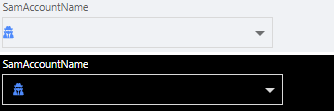
Looks like the box actually changes size, being a little shorter in Light mode which causes the icon to shift slightly to the left.
New-UDAutocomplete -Id "NewSearch" -Label "SamAccountName" -OnLoadOptions {
                                Get-ADUser -Filter "SamAccountName -like '*$Body*' -and SamAccountName -notlike '*$Body*XXXXX' -and UserPrincipalName -like '*$Body*@XXXXXX'" -SearchBase "XXXXXXXXXXXXX" | Select-Object -ExpandProperty SamAccountName | ConvertTo-Json
                        } -OnEnter {
                                Invoke-UDEndpoint -Id "btn_GetUser" -Session
                        }-OnChange {
                                $Session:NewTech=$Body
                        } -Icon (
                                New-UDIcon -Icon "UserSecret" -Color "#438EFF"
                        )
9384746c52414f91d47e91f8c5c400113fb10735.png
All Comments (3)
Tested by removing the custom UDIcon piece and used the base UserSecret icon. Same result.
This is likely just a theme issue. I opened an issue for it here: UDAutocomplete Icon Alignment Theme Issue · Issue #4256 · ironmansoftware/powershell-universal · GitHub
Based on the fact that it’s just visual, it will likely be rolled into a v5 release soon. If it’s high priority for you, we can see about rolling it into the next v4 release.
Adam Driscoll
PowerShell Expert and Software Architect at Devolutions
@Adam Driscoll Thanks for reaching back out! It is not a priority, just wanted to make sure that I was not going crazy.