
alonzohess
Service won't start after migrating to SQL Server
I apologize if I missed it, but it looks like sending an email to service@devolutions.net or calling are the two options to open a support ticket. Is that correct?
Thanks,
Alonzo
Service won't start after migrating to SQL Server
@Adam Driscoll thanks for the quick reply. The "__EFMigrationsHistory" table is blank.
Yes, I initially created the database with "-cd" and it completed without errors. Then service won't start as previously mentioned.
If I run the same command calling a newly created database then I get the following error:
info: PSUCLI.DataMigrator[0]
      [00:00:00] Moving identities.
.\psu : Unhandled exception: Microsoft.EntityFrameworkCore.DbUpdateException: An error occurred while saving the entity changes. See the inner exception for details.
At line:1 char:1
+ .\psu db migrate -scn 'Data Source=C:\ProgramData\UniversalAutomation ...
+ ~~~~~~~~~~~~~~~~~~~~~~~~~~~~~~~~~~~~~~~~~~~~~~~~~~~~~~~~~~~~~~~~~~~~~
    + CategoryInfo          : NotSpecified: (Unhandled excep...on for details.:String) [], RemoteException
+ FullyQualifiedErrorId : NativeCommandErrorService won't start after migrating to SQL Server
PSU 2026.1.5
I migrated from SQLite to SQL server 2017 CU31 with:
.\psu db migrate -scn 'Data Source=C:\ProgramData\UniversalAutomation\database.db' -tcn 'Data Source=SQLServer;Initial Catalog=PSU;Integrated Security=True;TrustServerCertificate=true' -tdt 'SQL'Data load seemed to go fine. I changed the Appsettings.json file to reflect:
  {
  "Kestrel": {
    "Endpoints": {
      "HTTP": {
        "Url": "http://*:5000"
      }
    }
  },
  "Plugins": [
    "SQL"
  ],
  "Data": {
    "RepositoryPath": "%ProgramData%\\UniversalAutomation\\Repository",
    "ConnectionString": "Data Source=SQLServer;Initial Catalog=PSU;Integrated Security=True;TrustServerCertificate=true"
  },
  "Mode": "Server",
  "PSUTelemetry": true
  }
Service won't start. Windows event log shows:
Faulting application name: Universal.Server.exe, version: 1.0.0.0, time stamp: 0x69970000
Faulting module name: KERNELBASE.dll, version: 10.0.17763.8755, time stamp: 0x44e2a81a
Exception code: 0xe0434352
Fault offset: 0x0000000000041b39
Faulting process id: 0x1d1c
Faulting application start time: 0x01dcef98f9e03c82
Faulting application path: C:\Program Files (x86)\Universal\Universal.Server.exe
Faulting module path: C:\WINDOWS\System32\KERNELBASE.dll
Report Id: 6eae0462-2c56-4aa6-b783-252bf3c31609
Faulting package full name:
Faulting package-relative application ID:

Application: Universal.Server.exe
CoreCLR Version: 9.0.1426.11910
.NET Version: 9.0.14
Description: The process was terminated due to an unhandled exception.
Exception Info: Microsoft.Data.SqlClient.SqlException (0x80131904): There is already an object named 'Computer' in the database.
   at Microsoft.Data.SqlClient.SqlConnection.OnError(SqlException exception, Boolean breakConnection, Action`1 wrapCloseInAction)
   at Microsoft.Data.SqlClient.SqlInternalConnection.OnError(SqlException exception, Boolean breakConnection, Action`1 wrapCloseInAction)
   at Microsoft.Data.SqlClient.TdsParser.ThrowExceptionAndWarning(TdsParserStateObject stateObj, SqlCommand command, Boolean callerHasConnectionLock, Boolean asyncClose)
   at Microsoft.Data.SqlClient.TdsParser.TryRun(RunBehavior runBehavior, SqlCommand cmdHandler, SqlDataReader dataStream, BulkCopySimpleResultSet bulkCopyHandler, TdsParserStateObject stateObj, Boolean& dataReady)
   at Microsoft.Data.SqlClient.SqlCommand.RunExecuteNonQueryTds(String methodName, Boolean isAsync, Int32 timeout, Boolean asyncWrite)
   at Microsoft.Data.SqlClient.SqlCommand.InternalExecuteNonQuery(TaskCompletionSource`1 completion, Boolean sendToPipe, Int32 timeout, Boolean& usedCache, Boolean asyncWrite, Boolean inRetry, String methodName)
   at Microsoft.Data.SqlClient.SqlCommand.ExecuteNonQuery()
   at Microsoft.EntityFrameworkCore.Storage.RelationalCommand.ExecuteNonQuery(RelationalCommandParameterObject parameterObject)
   at Microsoft.EntityFrameworkCore.Migrations.MigrationCommand.ExecuteNonQuery(IRelationalConnection connection, IReadOnlyDictionary`2 parameterValues)
   at Microsoft.EntityFrameworkCore.Migrations.Internal.MigrationCommandExecutor.Execute(IReadOnlyList`1 migrationCommands, IRelationalConnection connection, MigrationExecutionState executionState, Boolean beginTransaction, Boolean commitTransaction, Nullable`1 isolationLevel)
   at Microsoft.EntityFrameworkCore.Migrations.Internal.MigrationCommandExecutor.<>c.<ExecuteNonQuery>b__3_1(DbContext _, ValueTuple`6 s)
   at Microsoft.EntityFrameworkCore.Storage.ExecutionStrategy.Execute[TState,TResult](TState state, Func`3 operation, Func`3 verifySucceeded)
   at Microsoft.EntityFrameworkCore.Migrations.Internal.MigrationCommandExecutor.ExecuteNonQuery(IReadOnlyList`1 migrationCommands, IRelationalConnection connection, MigrationExecutionState executionState, Boolean commitTransaction, Nullable`1 isolationLevel)
   at Microsoft.EntityFrameworkCore.Migrations.Internal.Migrator.MigrateImplementation(DbContext context, String targetMigration, MigrationExecutionState state, Boolean useTransaction)
   at Microsoft.EntityFrameworkCore.Migrations.Internal.Migrator.<>c.<Migrate>b__20_1(DbContext c, ValueTuple`4 s)
   at Microsoft.EntityFrameworkCore.Storage.ExecutionStrategy.<>c__DisplayClass28_0`2.<Execute>b__0(DbContext context, TState state)
   at Microsoft.EntityFrameworkCore.Storage.ExecutionStrategy.ExecuteImplementation[TState,TResult](Func`3 operation, Func`3 verifySucceeded, TState state)
   at Microsoft.EntityFrameworkCore.Storage.ExecutionStrategy.Execute[TState,TResult](TState state, Func`3 operation, Func`3 verifySucceeded)
   at Microsoft.EntityFrameworkCore.Migrations.Internal.Migrator.Migrate(String targetMigration)
   at Microsoft.EntityFrameworkCore.RelationalDatabaseFacadeExtensions.Migrate(DatabaseFacade databaseFacade)
   at PowerShellUniversal.SQL.DatabaseFeature.InitializeDatabase(IConfiguration configuration, ILogger logger) in D:\a\powershell-universal\powershell-universal\src\PowerShellUniversal.SQL\Plugin.cs:line 117
   at Universal.Server.Services.SystemPluginService..ctor(IConfiguration configuration) in D:\a\powershell-universal\powershell-universal\src\Universal.Server\Services\SystemPluginService.cs:line 48
   at Universal.Server.Startup.ConfigureServices(IServiceCollection services) in D:\a\powershell-universal\powershell-universal\src\Universal.Server\Startup.cs:line 75
   at System.RuntimeMethodHandle.InvokeMethod(Object target, Void** arguments, Signature sig, Boolean isConstructor)
   at System.Reflection.MethodBaseInvoker.InvokeDirectByRefWithFewArgs(Object obj, Span`1 copyOfArgs, BindingFlags invokeAttr)
   at System.Reflection.MethodBaseInvoker.InvokeWithOneArg(Object obj, BindingFlags invokeAttr, Binder binder, Object[] parameters, CultureInfo culture)
   at System.Reflection.RuntimeMethodInfo.Invoke(Object obj, BindingFlags invokeAttr, Binder binder, Object[] parameters, CultureInfo culture)
   at Microsoft.AspNetCore.Hosting.ConfigureServicesBuilder.InvokeCore(Object instance, IServiceCollection services)
   at Microsoft.AspNetCore.Hosting.GenericWebHostBuilder.UseStartup(Type startupType, HostBuilderContext context, IServiceCollection services, Object instance)
   at Microsoft.AspNetCore.Hosting.GenericWebHostBuilder.<>c__DisplayClass7_0.<UseStartup>b__0(HostBuilderContext context, IServiceCollection services)
   at Microsoft.Extensions.Hosting.HostBuilder.InitializeServiceProvider()
   at Microsoft.Extensions.Hosting.HostBuilder.Build()
   at Universal.Server.Program.Main(String[] args) in D:\a\powershell-universal\powershell-universal\src\Universal.Server\Program.cs:line 43
ClientConnectionId:459dc18c-b5f3-462e-a418-db40f7d99c47
Error Number:2714,State:6,Class:16
I've search the old forum and unless I missed something, the post seem to be a couple of years old and reference the old DataMigration.exe.
Any ideas?
Thanks,
healthChecks.ps1 script missing
Yep, I saw that I could create a new one. But, there is one running from somewhere because of the warning that I’m seeing.
healthChecks.ps1 script missing
Product: PowerShell Universal
Version: 5.5.1
I want to change the disk space percentage warning on my PSU server but can’t find the healthChecks.ps1 script mentioned in the documentation. I’ve searched the entire drive with no luck. And it’s not listed under Settings → Files. Any ideas what it’s using?

Showing progress during app execution
Product: PowerShell Universal
Version: 5.5.1
Let me start by apologizing for the long post. I’m a Microsoft production DBA and a self professed PowerShell hack. I can do what I’ve needed in PowerShell to this point, but it’s normally very ugly (so please, no jabs at the code). I’ve created an app that works as expected, but I need something to show that it’s progressing. The script queries a set of SQL servers for a login. Depending on the time of day it can take from 3 secs up to 15 secs to run, but during that time there is no indication that it’s doing anything. I think that I need to run the main portion of the script in the background or a separate job maybe. Below is my “hack” code. Any help would be appreciated.
<#
    Date: 07-08-24
    Written By: Alonzo Hess
    Purpose: Check all known SQL servers for terminated logins


#>

Import-Module -name DbaTools
Set-DbatoolsInsecureConnection -SessionOnly

New-UDApp -Title 'Term Check' -Content {
New-UDHtml -Markup '<h1>SQL Term Check Check</h1>'

New-UDForm -Content {
    New-UDTextbox -Label "Enter PID" -Id 'PID'
} -onSubmit {
    $UPID = $EventData.PID
    New-UDTypography -Text "Checking on $UPID"

# Clearing file contents from previous run
clear-content -Path 'C:\esarftemp\All_SQL_Servers.txt'
clear-content -Path 'C:\esarftemp\All_SQL_Servers_1.txt'
clear-content -Path 'C:\esarftemp\All_SQL_Servers_Final.txt'
clear-content -Path 'C:\esarftemp\found_user.txt'

# Variables
$ScriptStart = (Get-Date) # used to determine the time it takes to complete the script
$Server_File = 'C:\esarftemp\All_SQL_Servers.txt'

# Get a list of all SQL servers from the central management instance and save to txt file.
Get-DbaRegServer -SQLInstance SQLCMS | Select-Object -Unique Servername | Out-File $Server_File

# The next 3 commands can be combined into one
# Stripping out the first 3 lines of the server list.
Get-Content $Server_File | Select-Object -Skip 3 | Set-Content 'c:\esarftemp\All_SQL_Servers_1.txt'

Get-Content -Path C:\esarftemp\All_SQL_Servers_1.txt | ForEach-Object { $_.TrimEnd() } | Set-Content C:\esarftemp\All_SQL_Servers_Final.txt

#Get the final "clean" list of servers (have to strip out the blank lines at the end of the file)
$SQLservers = Get-Content C:\esarftemp\All_SQL_Servers_Final.txt | Where-Object { $_.trim() -ne "" }
$SQLServerCount = $SQLservers.Count

#Loop through the server list, connect to each server and query for the PID
ForEach ($server in $SQLservers) {

    #Query that runs on each server
    $PIDSearch = "
    Use MASTER
    Select name from sys.server_principals where name LIKE '`%" + $UPID + "'"


    $QueryOutput = Invoke-Sqlcmd2 -Query $PIDSearch -ServerInstance $server
    if ($NULL -ne $QueryOutput) {

        Write-Output "$UPID found on server $Server;"  | Out-File -FilePath "C:\esarftemp\found_user.txt" -Append

    }


}

#checking if there are any results in the found_user file
$Results = (Get-Content C:\esarftemp\found_user.txt).Length

if ($Results -ne 0) {
    Write-Output "$UPID found on $Results server(s)"
    New-UDHtml -Markup '<br></br>'
    foreach ($line in Get-Content "C:\esarftemp\found_user.txt") {
        write-Output "$line`n"
    }

}
ELSE {
    New-UDHtml -Markup "**********************************************************"
    Write-Output "*                  Good News                             *"
    Write-Output "*  The PID $UPID was not found on any known SQL instance *"
    Write-Output "*               No action needed                         *"
    Write-Output "**********************************************************"
    New-UDHtml -Markup '<br></br>'

}


#not technically needed
$ScriptEnd = (Get-Date)
$TotalScriptTime = ($ScriptEnd - $ScriptStart)
New-UDHtml -Markup "Total time to check <b>$SQLServerCount</b> SQL servers $TotalScriptTime seconds"

}}Time Zone not found
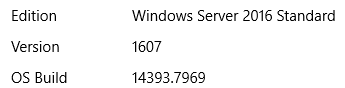
We upgraded the OS to Server 2019 and that resolved the issue. Thanks.
Time Zone not found
For me the issue was the version of the Windows Server OS that I was running (server 2016). Once we upgraded the OS to 2019, the time zone started working. I don’t think that’s the answer that you’re looking for, but I hope the info helps.
Time Zone not found
Time Zone not found
Product: PowerShell Universal
Version: 5.5.1
New install. When trying to setup a schedule for a script, the time zone defaults to “America/New_ York” which is great, that’s what I want. Except I get an error that the time zone “America/New_York” does not exist in the server. The OS is set to “Eastern”. After the error, I just get the spinning circles. And it stays that way until I restart the PowerShell Universal service. I’ve seen posts regarding this on older installs. If I remove the “America/New_York” entry and leave it blank it defaults to UTC. Any ideas?
Thanks,
Alonzo
Locked out of PSU
I was able to login to the server with another account that has admin rights to PSU. I deleted my normal account and recreated it. Now I’m able to login normally,
Locked out of PSU
I renamed the extension for the file in the error, restarted services and am getting the same error in the log and still locked out.
Locked out of PSU
2023-11-01 13:07:00.154 -04:00 [ERR] Startup: The term ‘Use’ is not recognized as a name of a cmdlet, function, script file, or executable program.
Check the spelling of the name, or if a path was included, verify that the path is correct and try again.
2023-11-01 13:07:00.154 -04:00 [ERR] Startup: at , C:\ProgramData\UniversalAutomation\Repository\dashboards\Alonzo\Alonzo.ps1: line 7
at , : line 1
Locked out of PSU
script ran for about 3 hours. Looks like it might have been caught in a loop. I killed it and restarted the services. Now the site won’t load.
Locked out of PSU
No change
Locked out of PSU
Product: PowerShell Universal
Version: 4.1.7
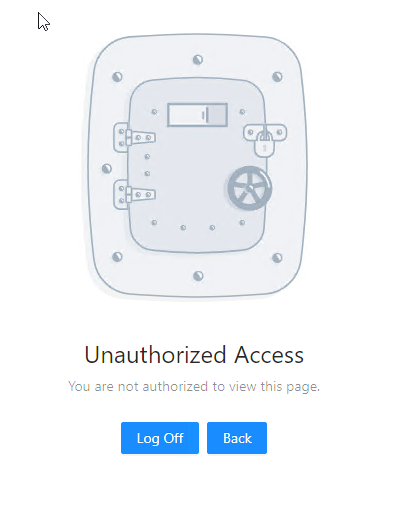
I’m locked out after upgrading to 4.1.7, and I’ve tried clearing my browser cache, restarting the service and server, etc. After scanning the forums, I see this was an issue with some in the past. I even tried the 4.1.8 update.
Thanks,
Alonzo