Time Zone not found
Product: PowerShell Universal
Version: 5.5.1
New install. When trying to setup a schedule for a script, the time zone defaults to “America/New_ York” which is great, that’s what I want. Except I get an error that the time zone “America/New_York” does not exist in the server. The OS is set to “Eastern”. After the error, I just get the spinning circles. And it stays that way until I restart the PowerShell Universal service. I’ve seen posts regarding this on older installs. If I remove the “America/New_York” entry and leave it blank it defaults to UTC. Any ideas?
Thanks,
Alonzo
Recommended Answer
This is likely the server version. I can open an issue for this but mainstream support for this version of Windows Server ended 3 years ago so likely will be low priority on our end. I can verify that Windows Server 2019 does work with 5.5.
Adam Driscoll
PowerShell Expert and Software Architect at Devolutions
All Comments (6)
I do recall this happening with the Hangfire scheduler that we are using. Can you let me know what version of Windows you have this installed on?
Adam Driscoll
PowerShell Expert and Software Architect at Devolutions
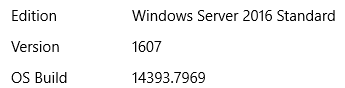
6bf5dce5ac143c6ed6a6dc8dd9021f3ff2fd4ce6.png
This is likely the server version. I can open an issue for this but mainstream support for this version of Windows Server ended 3 years ago so likely will be low priority on our end. I can verify that Windows Server 2019 does work with 5.5.
Adam Driscoll
PowerShell Expert and Software Architect at Devolutions

Hello,
I’m stuck with the same issue.
To which version should I downgrade the PSU installation to avoid these problems?
For me the issue was the version of the Windows Server OS that I was running (server 2016). Once we upgraded the OS to 2019, the time zone started working. I don’t think that’s the answer that you’re looking for, but I hope the info helps.
We upgraded the OS to Server 2019 and that resolved the issue. Thanks.