healthChecks.ps1 script missing

Product: PowerShell Universal
Version: 5.5.1
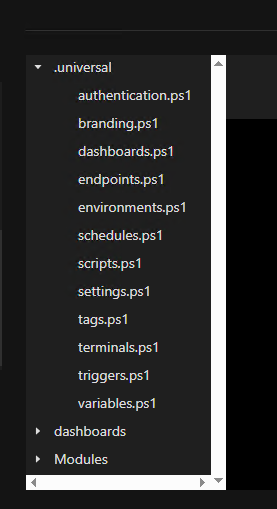
I want to change the disk space percentage warning on my PSU server but can’t find the healthChecks.ps1 script mentioned in the documentation. I’ve searched the entire drive with no luck. And it’s not listed under Settings → Files. Any ideas what it’s using?
3117ba418b2270e8996dfea071e784e7622dcef8.png
9233e215852d0ffc4d02008867e4746180522a05.png
All Comments (3)
I havent used this personally, but imagine it’s the same as all the other config files, it’s not created out of the box, only if it’s required. So if you want to use it just create it yourself and use the New-UDHealthCheck to define your custom checks: universal-docs/cmdlets/New-PSUHealthCheck.txt at v5 · ironmansoftware/universal-docs , on that note, I’m not sure if it’s possible to modify the pre-existing checks
Yep, I saw that I could create a new one. But, there is one running from somewhere because of the warning that I’m seeing.
Yeah though I don’t think the out of box health checks are configurable. I think they’re baked in. I’d raise it as a feature request on GitHub!