
jdavid1
I cannot run scheduled job on ALL computers
Product: PowerShell Universal
Version: 4.2.9
Yet again we faced weird issues with PSU.
We have several PSU servers in various Global Datacenters running as a service with SQL Persistence. I thought we use to be able to schedule jobs to run on ALL computers, but that is not the case anymore.
I did a test and created a script that outputs $Env:COMPUTERNAME and scheduled it for ALL completed that runs every 5 minutes. I am only getting one job showing in the PSU jobs page.
I guess I have a work around to create a schedule per computer.
If I run the script manually and select ALL computers that works.
I have checked Hangfire and the jobs seam like they are configured for all the servers. They claim to run according for Hangfire, but PSU does not show the job.
Troubleshooting is difficult as there are multiple PSU log files (which one to view?) and many other system jobs running.
I also noticed today that running a script with parameters does not propagate the parameter to ALL computers.
Is this a bug?
Simple operations requires edit mode enabled
Product: PowerShell Universal
Version: 4.2.9
Can the Run button be enabled for scheduled jobs page when NOT in Edit mode?
Can the Diagnostics button be enabled when NOT in Edit mode on the jobs page?
Apps reloads unexpectly
Product: PowerShell Universal
Version: 4.2.9
All our Apps reload when we update the Variables page.
This happens when re-setting secrets or creating new variables. Not sure if there are other changes that impact the apps, but is this be design? How can we stop this from happening?
We have started to make changes only after hours going forward.
Dashboard or App load time help
Product: PowerShell Universal
Version: 4.2.4
Is there any troubleshooting documentation to help understand what is happening when clicking on a PSU App link and the time it take for the App to render?
Seams like the blank screen stays a long time before the App even loads and sometimes when the Server has medium load opening any PSU App is very slow. There is no impact to the Admin website as it operates normally.
Possible bug in Data Grid
Product: PowerShell Universal
Version: 4.2.4
I am working on moving to Data Grid from tables and getting the error message ‘Cannot index into null array’, so I copied this code to troubleshoot from the documentation site https://docs.powershelluniversal.com/userinterfaces/components/data-display/data-grid#example-static-data
This happens when the column sort is clicked 3 times, so works, works, does not work on third click on sorting of any column.
When I look at $EventData in the LoadRows script block block of New-UDDataGrid I see the sort property is empty on the third click causing the error in the code.
Is this a bug or by design?
New-UDTable issue with Server side pagination and filtertype select
Product: PowerShell Universal
Version: 4.1.6
Are there any work arounds for using Server side paging and column Filter Type select?
The issue is the table only has the data of the current page, so the select items reflect the same. I ending up sending the data to the broswer via -Data as we have less than 3,000 rows. Just wondering if there is a solution for populating the column filter type select to reflect all the data and not just the current page data.
Search won't work when using -LoadData for tabel
I have been looking at the -LoadData parameter on tables and you have to do all the work on the data yourself. You would need to get the $EventData.search field in the -LoadData ScriptBLock , that includes what the user has typed into the search box, and use that to filter $Data. Every time I find that I am unable to get LoadData to work as I wanted and go back to using -Data $Data.
Error with icon editing in new designer mode
Product: PowerShell Universal
Version: 4.0.1
I am thinking of reverting our lab back to 3.x as I cannot do any dashboard aka app work without running into an issue. This time it is adding Icons.
When I add an Icon to say a button, I edit the button, edit the Icon and type the icon as ‘plus’.
Next time I edit the component and try to edit the Icon I get the below error message.
I really like the new UI and the other improvements, but thinking I will wait before moving forward with using Designer for now.

Scripts specified to run under pwsh 7.x error with Universal module error
We had the same issue in 3.8 and found we needed the Universal module version to be the same as the PSU Server. We were using Install-PSUServer and Update-PSUServer to upgrade and noted that we need to update Universal first going forward.
Trying out new apps
Product: PowerShell Universal
Version: 4.0.1
Is the latest version of PSU released or still Beta?
I am seeing strange issues with Apps:
Not able to get previous pages to work post upgrade as we get a blank page. Was using 3.8.12
Not able to create new pages as they too are blank (editor is disabled so I guess this is by design)
Installed locally to test further and app went blank once requiring a PSU restart after attempting to use designer to add a button
In designer, Code view not working (just shows 1 with blank line and black lower window). Not implemented?
Deleting an app and recreating with same name/URL shows duplication of pages including any previous designer pages.
Other issue
All the Database vault secret variables broke and had to be re-entered.
Restarting PSU service resolves some duplicate issues, but still seeing any designer page the was previously created.
Testing with: Windows 10
Installed PSU via: Install-PSUServer
I do not understand the jobs status codes
I really hope this is added as it would help seeing problems as a job operator that can quickly ID issues without having to look into each job for errors. Also it does not make sense IMO to create a script that looks for jobs with errors when the status makes more since. That way I also hope there would be a trigger that can be used to notify the job operator there were errors in the job.
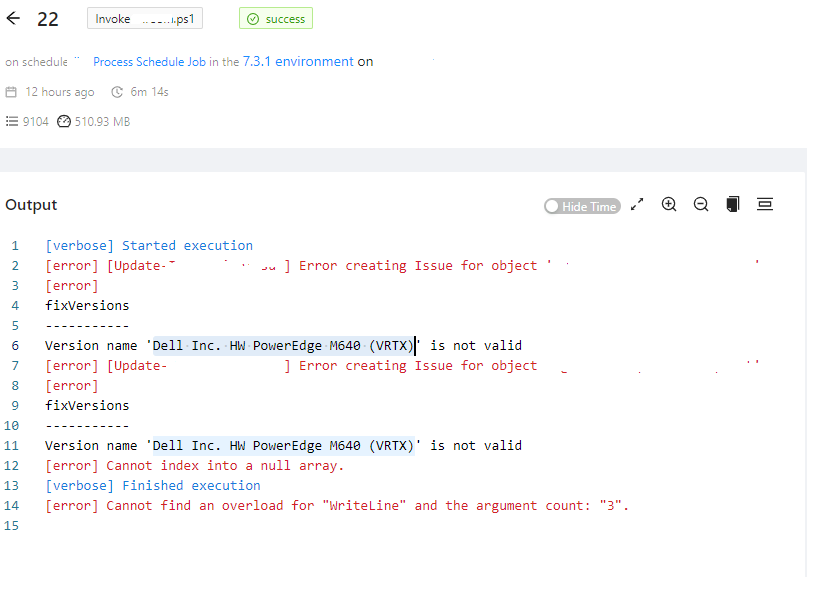
Today I was looking at a job and saw that is was green/success, but it did have errors. The only way I know was by opening the job and seeing the errors otherwise I would not be aware of any errors occurred in the job run.
I do not understand the jobs status codes
I would not mind the status of ‘error and red’ as technically the job did contain errors. Failed red is already there for stopping errors. Just not success and green if the job contains any errors IMO.
I do not understand the jobs status codes
Thanks Adam. Sure setting the ErrorActionPreference to stop will do that. To me that is normal stuff and we already do this in our existing scheduled tasks. We run connect/collect/disconnect jobs on hundred+ servers and the scheduled jobs before PSU that log any errored item and continues processing the others. Now with PSU I was hoping the job would indicate in the status there was an error, but the job itself does not stop as there are most likely more items to process.
So my nice to have request would be to have the job indicate there were errors in the completed job, so the operator can investigate or setup triggers to notify support. Having errors during a job and status of success make it hard for support to know when there was an issue with the job in PSU. Suggest like the warning message, show error for any exceptions and failed for any stopping error.
I do not understand the jobs status codes
Product: PowerShell Universal
Version: 3.7.7
I have jobs with PowerShell Exceptions that show green/success. It captures the pipeline error message and details under Errors.
I have jobs with a warning that shows yellow/warning
I have jobs with a warning and errors , but jobs shows as yellow/warning
I have jobs that are red/failed for system issue.
What is the proper way to have a job be red when there is any PowerShell error?
To me the job should show overall status of red if there were any errors.
"Run on" Automation Scripts option
Thanks. I tried the nightly build and it worked great as I was able to run a job on the other instance.
I know this is a nightly build, but should I reporting issue? like :
Settings > General sub menus do nothing
"Run on" Automation Scripts option
Product: PowerShell Universal
Version: 3.2.8
My setup is 2 windows 2019 servers. Each with PowerShell Universal installed via PowerShell, so the server is running as a service. Each are pointing to the same SQL Express 2019 database and Git is pointing to our GitLab instance using Project Access tokens. Got the setup working and trying out the licensed features. One feature I checked out is the “Run on” option.
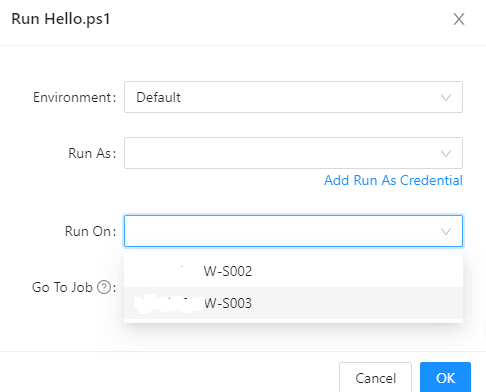
I do see both instances in the Run dialog, but when selecting the other instances in the Run dialog the jobs seams to only run on the local instance. Should jobs be able to run on the remote instance and if not, is this something that will be available in future releases?