
insomniacc
Job fails to run on PS5.1 after upgrade from 2026.2.4 to 2026.3.4
@insomniaccWhat is your Api__SecurityModel setting set to? I ask because I'm not sure if this is related to the proxy and may be a different issue.
@Adam Driscoll
Yeah it feels like a separate issue. It's set to strict and nothing has changed prior to the upgrade.
Job fails to run on PS5.1 after upgrade from 2026.2.4 to 2026.3.4
I saw the update on the otherthread about the switch to ipv6 and putting ::1,[::1] into NO_PROXY, which has resolved the immediate issue with non integrated working.
However I still have an issue on an integrated script that calls Get-PSUScript / Invoke-PSUScript with the -Integrated flag.
"18:26:55.225ERRORPermission denied. The role specified does not have access to this resource."
Now I'm running this as an administrator with full rights. There's no execution roles on the script, but just to double check I also gave it administrator execution role and retried but it's the same.
Job fails to run on PS5.1 after upgrade from 2026.2.4 to 2026.3.4
It feels very familar to issues we've had in the past, whereby for some bizarre reason the proxy we use was interfering with local GRPC calls.
The solution ended up being to set env vars for http_proxy, https_proxy and no_proxy being set to local addresses: 127.0.0.1, localhost, servername etc
We once had an issue with using anything other than the integrated enviroment for a similar reason - but this was resolved at one point too.
It's almost as though it's getting blocked by the proxy again for local calls, but no_proxy is not being honored.
PSU 2026.3.4 – PowerShell 7 handshake failures and internal gRPC connection errors
Having the same issue here after upgrading, relevant post: Job fails to run on PS5.1 after upgrade from 2026.2.4 to 2026.3.4 - Devolutions Forum
We use integrated env most and that works for PSCore, though I saw this error when using get-psuscript/invoke-psuscript, or if we use PS5.1 env, I'll test it on another env such as ps 7
Just tried on 'PowerShell Latest' and had the same issue, so it being an issue on 5.1 is not relevant, it seems any non integrated environment throws this for me, or internal psu commands within the integrated environement using the -integrated flag
Job fails to run on PS5.1 after upgrade from 2026.2.4 to 2026.3.4
Also getting this issue in existing PSCore scripts when running get-psuscript -intregrated / invoke-psuscript -intregrated, it seems to run the script, but then throw the error into the job output when these commands try to run.
I also can't paste that error here, it says "error failed to save changes"
Essentially it's the same 'failed to connect to all addresses' grpc.core.internal.CoreErrorDetailException, Failed to pick subchannel... message
For visibility this issue was raised by another user here: PSU 2026.3.4 – PowerShell 7 handshake failures and internal gRPC connection errors - Devolutions Forum
Seems the error occurs for me on any non - integrated environment, and for jobs on the integrated environment when using PSU commands such as those mentioned above.
Job fails to run on PS5.1 after upgrade from 2026.2.4 to 2026.3.4
@Adam Driscoll - Nothing in system, but I found this in PowerShellHost:
2026-11-05 08:23:49.656 +00:00 [ERR] Error checking module path
System.ArgumentException: The path is not of a legal form.
   at System.IO.Path.NormalizePath(String path, Boolean fullCheck, Int32 maxPathLength, Boolean expandShortPaths)
   at System.IO.Path.InternalGetDirectoryName(String path)
   at UniversalHost.AgentService.Initialize(IHostLogger logger) in D:\a\powershell-universal\powershell-universal\src\Host\AgentService.cs:line 48
2026-11-05 08:23:50.094 +00:00 [ERR] Failed to start server. Grpc.Core.RpcException: Status(StatusCode="Unavailable", Detail="failed to connect to all addresses", DebugException="Grpc.Core.Internal.CoreErrorDetailException: {"created":"@1793867030.089000000","description":"Failed to pick subchannel","file":"..\..\..\src\core\ext\filters\client_channel\client_channel.cc","file_line":3218,"referenced_errors":[{"created":"@1793867030.089000000","description":"failed to connect to all addresses","file":"..\..\..\src\core\lib\transport\error_utils.cc","file_line":165,"grpc_status":14}]}") ---> Grpc.Core.Internal.CoreErrorDetailException: {"created":"@1793867030.089000000","description":"Failed to pick subchannel","file":"..\..\..\src\core\ext\filters\client_channel\client_channel.cc","file_line":3218,"referenced_errors":[{"created":"@1793867030.089000000","description":"failed to connect to all addresses","file":"..\..\..\src\core\lib\transport\error_utils.cc","file_line":165,"grpc_status":14}]}
   --- End of inner exception stack trace ---
   at System.Runtime.ExceptionServices.ExceptionDispatchInfo.Throw()
   at System.Runtime.CompilerServices.TaskAwaiter.HandleNonSuccessAndDebuggerNotification(Task task)
   at Grpc.Core.Internal.AsyncCall`2.UnaryCall(TRequest msg)
   at Grpc.Core.DefaultCallInvoker.BlockingUnaryCall[TRequest,TResponse](Method`2 method, String host, CallOptions options, TRequest request)
   at Grpc.Core.Interceptors.InterceptingCallInvoker.<BlockingUnaryCall>b__3_0[TRequest,TResponse](TRequest req, ClientInterceptorContext`2 ctx)
   at Grpc.Core.ClientBase.ClientBaseConfiguration.ClientBaseConfigurationInterceptor.BlockingUnaryCall[TRequest,TResponse](TRequest request, ClientInterceptorContext`2 context, BlockingUnaryCallContinuation`2 continuation)
   at Grpc.Core.Interceptors.InterceptingCallInvoker.BlockingUnaryCall[TRequest,TResponse](Method`2 method, String host, CallOptions options, TRequest request)
   at ProtoBuf.Grpc.Internal.Reshape.UnarySyncVoid[TRequest,TResponse](CallContext& context, CallInvoker invoker, Method`2 method, TRequest request, String host) in /_/src/protobuf-net.Grpc/Internal/Reshape.cs:line 495
   at ProtoBuf.Grpc.Internal.Proxies.ClientBase.IJobAgent_Proxy_0.IJobAgent.SetAgentInformation(AgentInformation )
at UniversalAutomation.Host.EntryPoint.Start(Int32 parentProcessId, Int32 port, Int32 universalPort) in D:\a\powershell-universal\powershell-universal\src\Host\EntryPoint.cs:line 135Job fails to run on PS5.1 after upgrade from 2026.2.4 to 2026.3.4
Regardless of script - I've tried multiple and a simple ```Write-Output "hello world"``` type script, I just get failed jobs when attempting to run in a 5.1 environment after upgrading to 2026.3.4.
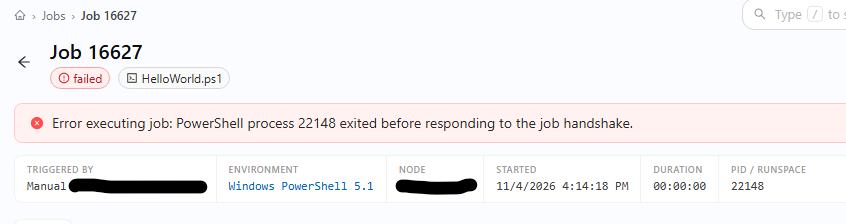
PSCore scripts all seem to work fine.
I've removed the existing 5.1 environment and auto re-discovered it, updated my script's environment to this, and retried but it's the same. Also tried rebooting the server to no effect. When switching the same script to use a PS Core environment, it works fine.
Is this a known issue with the latest update?
Environment details:
Installed as a service, running under a service account on windows.
Server sits behind squid proxy with limited outbound access.
Very long query times on MSSQL HA Cluster after updating to version 2026.2.5.0
Thanks, I've got 2026.2.4 in my HA prod environment, havent noticed any issues as of yet.
I have 2 persistant cache object but do not use Get-PSUCache -List.
Will hold off upgrading it to 2026.2.5 until it's been confirmed.
Very long query times on MSSQL HA Cluster after updating to version 2026.2.5.0
Hello nikopieper,
Thank you for confirming the cache usage details.
Our Development team has identified the issue and has a fix tracked internally. Based on the current Development plan, the correction is expected to be included in PSU 2026.3.0.
For now, since your environment has remained stable after returning to PSU 2026.2.3, I recommend keeping that version in place rather than moving back to 2026.2.5.
At this stage, we do not need any additional SQL Server, Event Viewer, or DBA diagnostics unless Development requests something specific.
We will continue tracking the fix and update this thread once we can confirm that the corrected version is available.
Best regards,
Ruben Tapia
@rubentapia
Hi Ruben, can you be a bit more specific on the root cause? I've been keeping an eye on this thread and holding off upgrading, is this something I'm also expected to encounter in my HA setup or is it specific to the users environment with their cache usage (something I dont really do much of, but have 2 persistant cached objects that are relatively small in size).
Whats New component
I wasnt sure if the client or the server was pulling this info when going to the home page, but it would be useful to know the domain from where this data comes from so I can run a port test.
I didnt see any errors in dev tools when accessing my instance from a client:
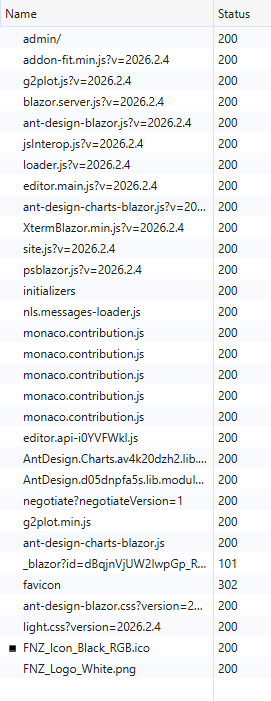
Though i'm not sure what the 101 blazor one is.
The server that hosts our PSU instance is restricted to outbound access via a whitelist, so we can just add anything that is required if needed.
I recently added cdn.devolutions.net and devolutions.net for updates so 443 to these is open currently.
Thanks
Whats New component
Hey!
I just upgraded to 2026.2.5, though the component has been broken for quite some time, the 'whats new' section on the admin home, shows old info and doesnt seem to update:
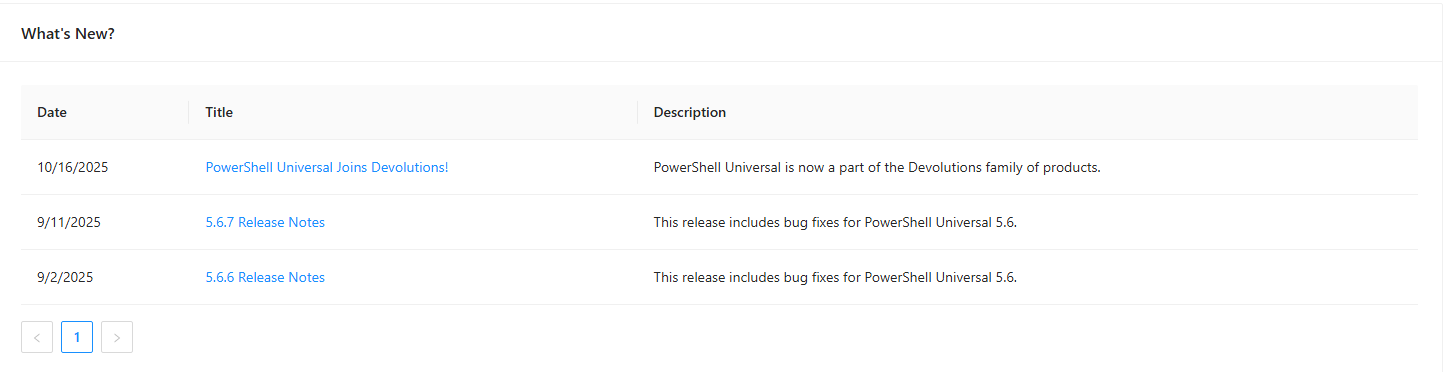
I'm not sure if this is because outbound access is restricted on my server, and maybe the location of this has been moved to devolutions which is why it's no longer updating, or if there's another issue?
I couldnt find any way to hide/disable the component in settings.
Obviously, this is causing no impact at all, but figured I'd get it raised anyway.
Thanks,
Tom
Child jobs list is truncated
Hi,
Running v2026.2.4.
I have a scheduler script, that spawns off instances of another script.
In a test run it spawned 76 child jobs.
However I noticed from the scheduler/parent job, under the 'child jobs' tab, only a maximum of 50 jobs is displayed with no pagination, it seems they're just truncated at the 50 mark. I had to go into the main job list to find them.
Thanks,
Tom
Invoke-PSUScript DontShow Parameters
Hi,
I've noticed the following behaviour when using DontShow as a parameter definition in scripts
example:
param(
[Parameter()]
$Test,
[Parameter(DontShow)]
$Test2
)
When running the script in the GUI 'Test2' does not show, which is expected and correct.
However, When using the following command in another script:
This works:
Invoke-PSUScript -Script "HelloWorld.ps1" -Integrated -Parameters @{Test="testString"}
This fails:
Invoke-PSUScript -Script "HelloWorld.ps1" -Integrated -Parameters @{Test="testString";Test2="asdsad"}
The error message is:
Unknown parameter Test2. Parameters for this script are Test
Expected behaviour for me is that DontShow is reflected in the admin menu run script popup, but still available as a parameter via Invoke-PSUScript. Is this a bug or is this intentional behaviour?
Thanks,
Tom
Devolutions PowerShell Universal Version 2026.2.4.0 (August 11, 2026)
I also upgraded from 2026.2.3 to 2026.2.4 via the msi (windows, running as a service) havent had any issues so far
docs: new-udhelmet
Head Element | Devolutions PowerShell Universal | Product guides & reference
The example for Styles above shows -Children, however this param doesnt exist in the latest PSU version and instead it should be -Content
Set-PSUCache Roles issue
You're welcome, thanks for continuing to improve the product!
Set-PSUCache Roles issue
Just wanted to note, that I've seen the following behavior with Get-PSUCache:
In the PSU Admin menu my cached item shows data on the datetime columns:

While using Get-PSUCachewith the -Detail param returned this object:

Set-PSUCache Roles issue
Sorry for the delay.
1.2026.2.3
2. SQL
3. Manually via admin console currently, but it will also be running on a schedule once i get it working.
4. Integrated. No Run As identity configured on the script, but my PSU instance runs as a service in the context of a domain service account.
I tried the example code in a new script.
I actually tested it with my administrators role which I have on my account, this should give full permissions to everything in my instance.
The output was as follows:
An exception: Grpc.Core.Internal.CoreErrorDetailException
and 'First'

Set-PSUCache Roles issue
Hey,
I just tried using Set-PSUCache for the first time.
The data im storing could be considered sensitive and I noticed that there's a -Roles param on this cmdlet, and a column in the database for roles (Though the roles dont show in the UI from the cache menu).
In my script I have the following command:
Set-PSUCache -Key "Keyname" -Value $Data -Persist -Role "RoleName" -IntegratedThis works the first run, when the cache doesnt exist, but if I rerun my script, it fails with:
Status(StatusCode="Unknown", Detail="Exception was thrown by handler.", DebugException="Grpc.Core.Internal.CoreErrorDetailException: {"created":"@1784817449.405000000","description":"Error received from peer ipv6:[::1]:58801","file":"..\..\..\src\core\lib\surface\call.cc","file_line":953,"grpc_message":"Exception was thrown by handler.","grpc_status":2}")
I've tried adding the role to the execution roles on the script (I also have the role on my account while running the script). I've tried with and without -Integrated but it's the same issue.
Removing the role entirely seems to work fine without issue.
Parameters do not show correctly when rerunning a job
Version: 2026.2.1
I went to rerun a job and the popup doesnt show any labels on my params, or any values as seen here:
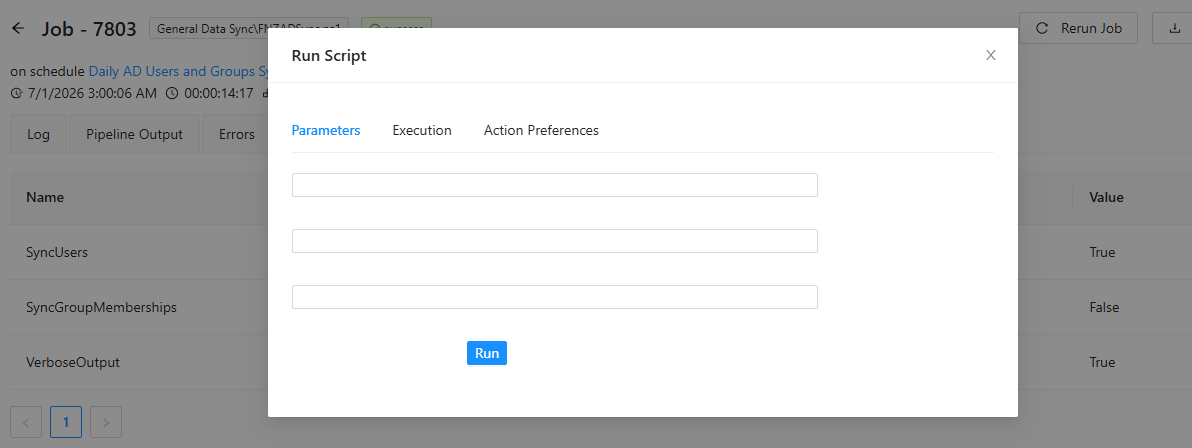
Notice the 3 params in the background, all are switches. (There's an additional parameter defined in the script - a string, but it was not supplied in the schedule that ran this.)
Move script not working
@insomniacc I will open an issue for this. One question, what is your base path set to? I ask because we had some other issues with scripts when the base path was set to .universal\scripts and I just want to make sure we cover your case as well.
@Adam Driscoll
'Scripts\' is my base, so basically it's a sub folder in my repo root
Move script not working
PSU Version: 2026.2.1
Custom script base path configured in settings
I'm trying to move this:
SubFolder1\ScriptName.ps1
into
SubFolder1\SubFolder2\ScriptName.ps1
I click edit properties on my existing script, choose the new folder from the drop down, then hit OK.
No errors, and I get a toast saying "Script Saved", but the script stays in the same location.
Explicit error feedback on tool failure
I just tested an AI prompt with a tool that I had access to, which obviously worked fine, I then restricted it to a role I didnt have and prompted 'run the hello world script and provide the output, on failure provide all possible exceptions, error messages and error properties' however the only response I ever get is 'Error: Function failed.'
I think it would be good, in the case of a failure due to authentication, such as a role, to have an explicit message so that the Agent can respond accordingly and report back to the user to indicate a lack of permissions or auth failure.
v2026.2.1
Double job entries in the jobs log
Not sure if this is expected behavior:

For jobs that execute child jobs, in this instance it's a AI agent job executing 'tool' scripts.
The child jobs show and I can close/expand from the parent, but the child jobs are also showing as their own separate entries too.
It feels like it would be much cleaner to have child jobs only show under the nested parent and hidden from the list in the job view, wasn't sure if this is expected or a bug?
Editing AI Tool fails
When attempting to edit the properties of an AI tool I always get the following toast popup:
Script file 'SubFolder1\SubFolder2\Get-MgUser.ps1' does not exist.
I have to delete the tool and re-add it (with the exact same script path).
I'm running 2026.2.0 on windows, as a service.
I have a custom script path configured in my settings (my hunch is it's to do with this, but havent been able to test without).