Parameters do not show correctly when rerunning a job

Version: 2026.2.1
I went to rerun a job and the popup doesnt show any labels on my params, or any values as seen here: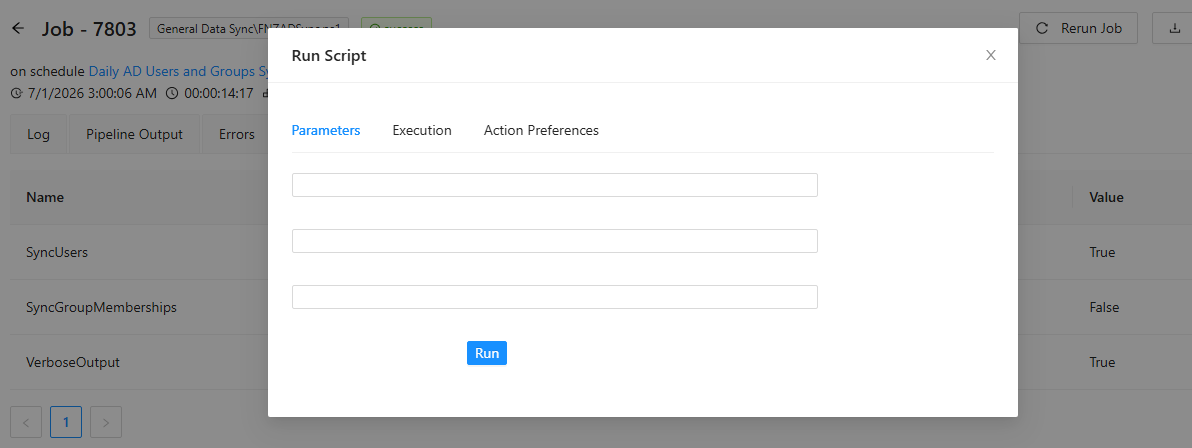
Notice the 3 params in the background, all are switches. (There's an additional parameter defined in the script - a string, but it was not supplied in the schedule that ran this.)
1ff3b65e-cffd-49cf-9426-e6c81376e3dc.png
All Comments (2)
Hi insomniacc,
Thank you for the report and the screenshot.
I confirmed the issue by tracing it in the source.
When a script is launched by a schedule, the display metadata (label and control type) is not carried over to the job's parameters.
The rerun dialog reads that metadata directly from the stored job, so it has nothing to render.
Switch parameters end up as empty text inputs with no label.
Any parameter that was not supplied by the schedule is added fresh from the script definition, so it displays correctly.
That matches what you are seeing.
Jobs launched directly are not affected.
The Run Script button and Invoke-PSUScript both write the display metadata to the job at submission time.
Only schedule-triggered jobs hit this.
As a workaround, launch the script from the Run Script button on the script page instead of Rerun.
That path presents the parameters with their labels and lets you supply the values fresh.
We already have an internal ticket tracking this behavior, and I am linking your forum post to it so the team keeps an eye on it.
Best regards,
Patrick Ouimet
Hello,
The fix has been implemented in the latest 2026.2.3.0.
Let us know if that works as expected.
Best regards,
Érica Poirier