
admirbehluli
macOS Website entry always uses Safari embedded mode (cannot change browser, no session isolation)
Hello,
Personally, I’m a big fan of RDM, really, and I can recommend it to everyone — unfortunately only on Windows. The macOS version is extremely limited compared to the Windows version, at least in my experience.
However, I’m quite surprised that you are able to use a different browser. Which version of RDM are you using? I’m asking because **Samuel Oliveira Martel** mentioned that this feature is planned to be implemented or at least evaluated in one of the upcoming versions.
macOS Website entry always uses Safari embedded mode (cannot change browser, no session isolation)
Hello,
I am using Remote Desktop Manager on Windows and macOS.
On Windows, Website entries can open in isolated browser sessions, which works correctly for multi-tenant environments.
On macOS, I cannot change the browser at all.
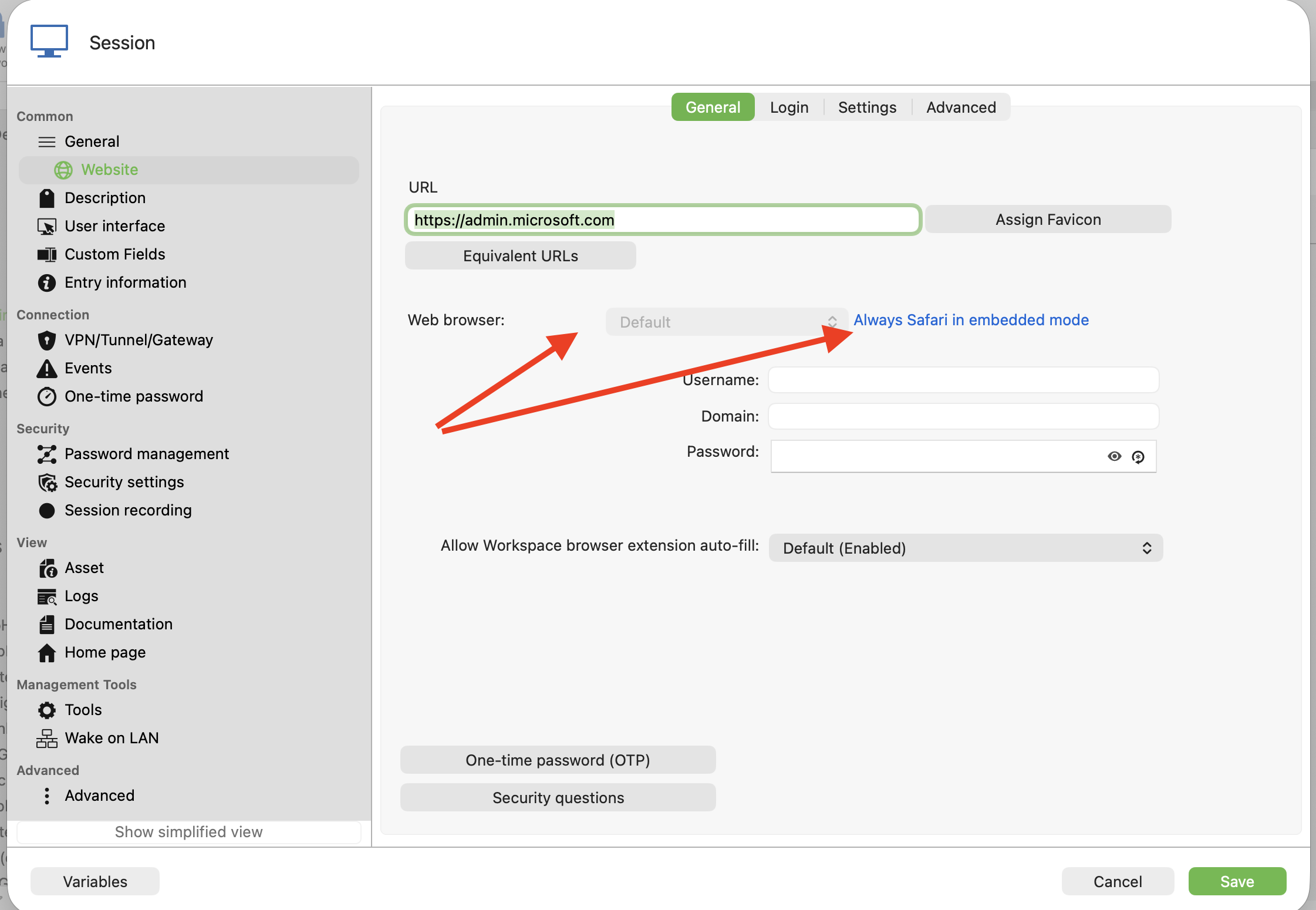
In the Website entry settings, the Web browser field is disabled and shows:
"Default (Always Safari in embedded mode)"
Because of this, all Website entries share the same cookies and cache.
Example:
Customer A → admin.microsoft.com → login
Customer B → admin.microsoft.com → login
Both sessions share cookies
I can see other customer accounts
This makes RDM on macOS unusable for MSP scenarios.
I also tried:
Embedded browser
External browser
Different entries
Clearing cache
Private mode
Different credentials
Nothing works because macOS always uses Safari embedded mode.
Question:
Is this a limitation of the macOS version?
Is there any way to use Chromium / Edge / external browser per entry?
Is session isolation not supported on macOS?
Screenshot attached showing the disabled browser setting.
Thanks.
Hudu Integration
Hallo @admirbehluli,
vielen Dank für Ihre Nachricht und die ausführliche Beschreibung.
Aktuell ist es leider noch nicht möglich, die 2FA-/OTP-Codes aus Hudu direkt in Remote Desktop Manager anzuzeigen oder zu verwenden. Das von Ihnen beobachtete Verhalten ist daher im Moment normal.
Es ist jedoch eine sehr interessante Idee und definitiv eine sinnvolle Verbesserung für die Integration. Damit unser Entwicklerteam diesen Anwendungsfall prüfen und berücksichtigen kann, würden wir Sie bitten, einen Feature Request in unserem Forum einzureichen:
https://forum.devolutions.net/forums/17/remote-desktop-manager--feature-request
So stellen Sie sicher, dass der Vorschlag direkt bei unseren Developern erfasst wird.
Vielen Dank nochmals für Ihr Feedback.
Mit freundlichen Grüßen
@Alexis Geller Peiro
Hallo Alexis
Vielen Dank für die Rückmeldung und die Klärung.
Schade dass die Anzeige der 2FA / OTP Codes aus Hudu im Remote Desktop Manager aktuell noch nicht unterstützt wird. Für unseren Einsatz wäre diese Funktion sehr hilfreich, da wir bei vielen Kundenkonten OTP hinterlegt haben und aktuell trotzdem zusätzlich Hudu öffnen müssen.
Ich werde wie vorgeschlagen einen Feature Request im Forum erstellen, damit dieser Anwendungsfall vom Entwicklerteam geprüft werden kann.
Vielen Dank für den Hinweis und die schnelle Antwort.
Freundliche Grüsse
Admir Behluli
Feature Request – Support OTP / 2FA codes from Hudu in Remote Desktop Manager
Hello,
I would like to request support for displaying and using OTP / 2FA codes from Hudu entries inside Remote Desktop Manager.
Current behavior:
The integration between Hudu and Remote Desktop Manager works for usernames and passwords without any issues. Credentials stored in Hudu are correctly shown and can be used in RDM.
However, if an entry in Hudu has a One-Time Password (OTP / TOTP / 2FA) configured, the generated code is not visible in Remote Desktop Manager.
Only username and password are available.
Use case:
Many of our customer credentials in Hudu also contain OTP secrets.
When connecting through RDM, we still have to open Hudu separately to read the 2FA code, which reduces the benefit of the integration.
Requested feature:
Please add support for reading and displaying OTP / 2FA / TOTP codes from Hudu entries inside Remote Desktop Manager, similar to how passwords are currently handled.
Optional improvements:
Show OTP code in credential view
Allow copy / auto-fill of OTP
Refresh OTP automatically
Support TOTP standard used by Hudu
This would greatly improve the Hudu integration for environments where MFA is required.
Thank you for considering this feature.
Hudu Integration
Hallo Richard
Bei mir funktioniert die Verbindung zu Hudu grundsätzlich.
Die Passwörter werden im Remote Desktop Manager korrekt angezeigt und können auch verwendet werden.
Was ich jedoch nicht sehe, sind die 2FA / OTP Codes der entsprechenden Passwörter.
In Hudu ist bei einigen Einträgen zusätzlich ein One-Time Password hinterlegt (z.B. bei einem Kunden für [verkauf@contoso.com](mailto:verkauf@contoso.com)), und dort wird der Code auch korrekt generiert.
Im RDM wird jedoch nur Benutzername und Passwort angezeigt, aber kein 2FA-Code.
Ist dieses Verhalten normal, oder habe ich bei der Konfiguration etwas falsch gemacht?
Aktuell muss ich für den 2FA-Code trotzdem zusätzlich Hudu öffnen, wodurch der Vorteil der Integration für mich teilweise verloren geht.
Freundliche Grüsse
Admir Behluli