macOS Website entry always uses Safari embedded mode (cannot change browser, no session isolation)
macOS Website entry always uses Safari embedded mode (cannot change browser, no session isolation)

Hello,
I am using Remote Desktop Manager on Windows and macOS.
On Windows, Website entries can open in isolated browser sessions, which works correctly for multi-tenant environments.
On macOS, I cannot change the browser at all.
In the Website entry settings, the Web browser field is disabled and shows:
"Default (Always Safari in embedded mode)"
Because of this, all Website entries share the same cookies and cache.
Example:
- Customer A → admin.microsoft.com → login
- Customer B → admin.microsoft.com → login
- Both sessions share cookies
- I can see other customer accounts
This makes RDM on macOS unusable for MSP scenarios.
I also tried:
- Embedded browser
- External browser
- Different entries
- Clearing cache
- Private mode
- Different credentials
Nothing works because macOS always uses Safari embedded mode.
Question:
Is this a limitation of the macOS version?
Is there any way to use Chromium / Edge / external browser per entry?
Is session isolation not supported on macOS?
Screenshot attached showing the disabled browser setting.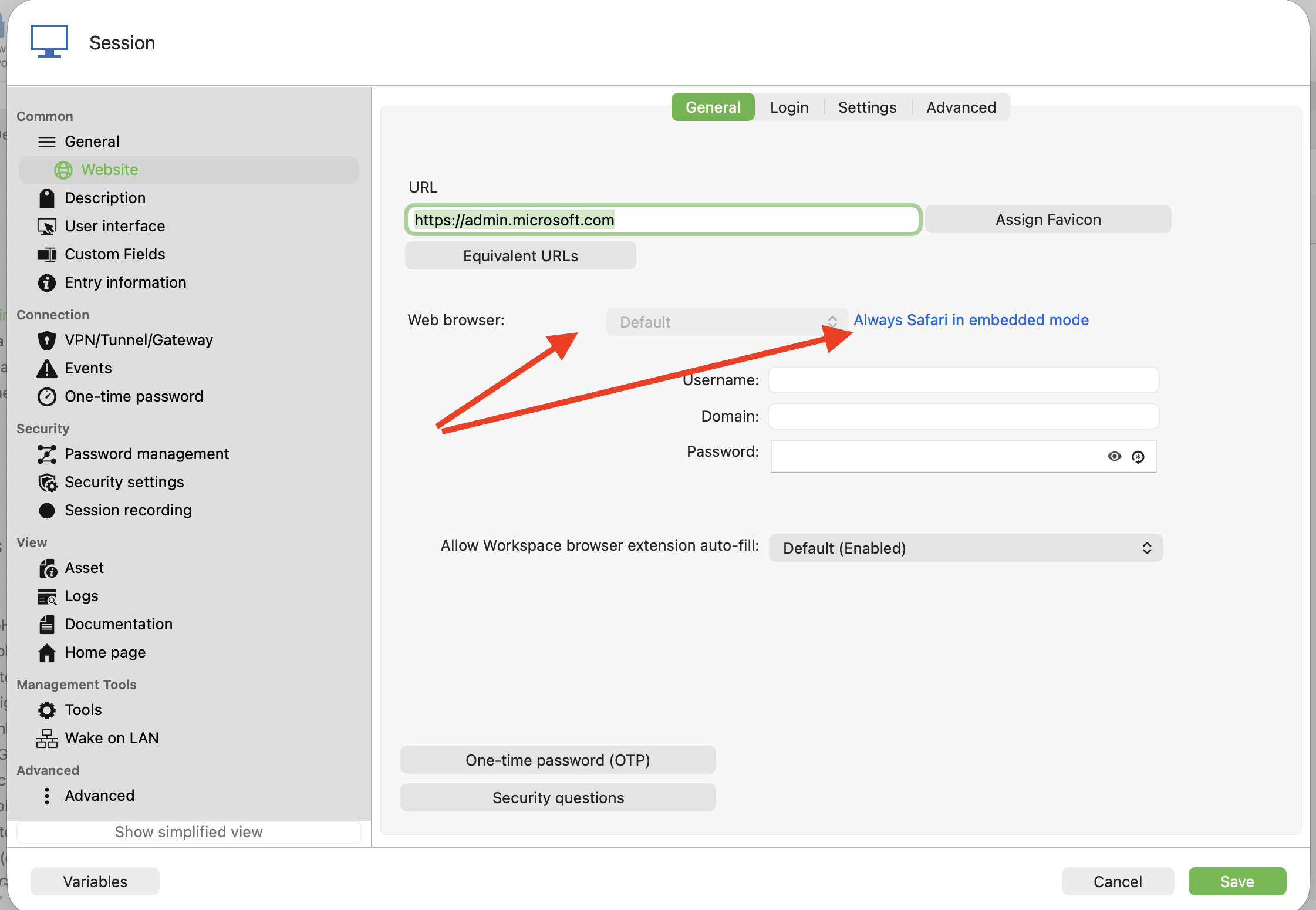 Thanks.
Bildschirmfoto 2026-03-19 um 10.50.33.png
All Comments (5)
Hello,
Thank you for reporting this.
A fix has been implemented and will be given to QA soon. It should be available in an upcoming release.
We’ll keep you updated once it’s released.
Best regards,
Samuel Oliveira Martel
If I select 'external' in the General section, I am able to use other browsers. My problem is Safari embedded mode just doesn't work, I just get a grey panel where the web page should be. I think it's because I'm on MacOs12.5.1. I can't upgrade this mac for other reasons.
Hello,
Personally, I’m a big fan of RDM, really, and I can recommend it to everyone — unfortunately only on Windows. The macOS version is extremely limited compared to the Windows version, at least in my experience.
However, I’m quite surprised that you are able to use a different browser. Which version of RDM are you using? I’m asking because **Samuel Oliveira Martel** mentioned that this feature is planned to be implemented or at least evaluated in one of the upcoming versions.
Hello,
Thank you for reaching out.
Unfortunately, we only support Safari as the embedded browser. Since you are using macOS 12.5.1 and cannot upgrade, this is likely the cause of the issue with the grey panel.
As a workaround, you will need to continue using web sessions in external mode with another browser.
Best regards,
Samuel Oliveira Martel
OK got it. I will use external Safari from now.
I am on version 2026.1.9.5
BTW @Samuel Oliveira Martel your text appears white in this forum, I only realised there was text there because I saw your response in my email. I then learnt if I select the text in the browser there is content there. I've tried in Brave and Safari and still see white text.