
epicnoob
AD Sync Module – Overlaps when synchronizing computer objects
Hello everyone,
I would like to use the AD Sync Module to synchronize computer objects from Active Directory into my DVLS vault. These include both Windows and Linux systems.
Since I want to handle the computer objects differently depending on the operating system, I need two separate sync modules. Both modules need to access the same AD OU and the same DVLS vault.
My problem is that the two sync modules overlap during synchronization. Unfortunately, I haven't been able to resolve the issue using the built-in filter.
**My question:** Is there a way to configure the synchronization so that each sync module processes only the specific computer objects intended for it—for example, separated by operating system—without the sync pointing to different locations?
Many thanks in advance for your help!
Automatically Disconnect Session`s
Hello,
Thanks for the information! I’ve already implemented the change.
However, the change won't take effect until the token is reissued.
Is there anywhere I can check the remaining validity period for individual user or device tokens?
According to the menu, the tokens should have a minimum validity of 30 days.
I’d like to reduce this to one week; is there any reason not to do that?
Best regards,
Automatically Disconnect Session`s
Is there a way to automatically disconnect sessions on the DVLS after a certain period of time? I want to control this centrally at the server, not when accessing it via the RDP manager.
I've seen that this question has been asked in the forum a few times, but it's never been addressed publicly! Instead, it's always been discussed in an internal ticket.
Kind Regards
2FA zurücksetzen
Hallo @Stephan Haupt die gruppenrichtlinie habe ich eingetragen und wird auch korrekt in die registry geschrieben.

Die User werden trotzdem noch immer aufgefordert den 2FA für die Application einzutragen.
2FA zurücksetzen
Hi @Min Destens ,
ich denke an dem wird es liegen.
Bei mir im Profil habe ich den haken entfernt, es kommt somit kein MFA Abfrage mehr. Bei meinen Kollegen sieht es anders aus, hier kommt sie noch, ich denke das liegt an der default.cfg?
Habt ihr einen Parameter den ich in dieser anpassen, kann ohne die default.cfg noch einmal zu exportieren?
2FA zurücksetzen
Hallo zusammen,
ich habe ein Problem beim zurücksetzen des 2FA(OTP) für meine User. Bei allen Usern, bei denen der 2FA im Devolutions Server zurückgesetzt wurde, kommt dennoch die 2FA Abfrage beim Anmelden am RDP Manager? Der hinterleget 2FA in der entsprechenden Auth App ist leider nicht mehr gültig.
Auch ein wiederholtes manuelles zurücksetzen auf dem DVLS Server + zurücksetzen des Profils bringt keinen Erfolg.
Gruß
Edit: Ich benutze die Version 2026.02.8.0 64-bit
RDP Manager Anmeldedaten via Template in anderen Vault vererben
Hallo zusammen,
ich habe ein Problem und werde leider nicht wirklich fündig. Die Links der DVLS Webseite gehen leider sehr sehr oft ins leere und sind daher wenig hilfreich.
Ich würde gerne realiesieren, dass meine User in ihrem Persönlichen Vault ihre Persönlichen Anmeldedaten speichern, diese sollten danach in ein anders Vault(Gemeinschaftsvault) vererbt werden.
Hierzu würde ich gerne Templates definieren, die dann automatisch die Credentials der User bekommen, wenn diese konfiguriert sind.
Wie kann ich das am besten umsetzen?
Gruß
Edit: Ich benutze bei allen Produkten(RDP Man, DVLS Server, DVLS Konsole) die aktuellste Version!
Nachtrag: Am liebsten wäre mir, wenn ich Ordner definieren könnte mit den entsprehenden Verweis auf die User Credentials und diese dann an z.B. RDP Verbindung vererbe.
Ordner wären dann nach Tier level aufgeteilt.
Devolutions HA bzw. Load-Balanced
@Min Destens vielen Dank für die Info´s :)
Was wäre hier der Praktikabelste Weg und welches Drittanbeter Tool wäre bei einem NodeA + NodeB HA Szenario zu empfehlen?
Wenn ich das DVLS Gateway vorschalte, könnte ich im Hintergrund beide Nodes betreiben und bei einem Ausfall von NodeA, dass NodeB aktivierun um dessen funktion zu übernehmen.
Gruß
Devolutions HA bzw. Load-Balanced
Hallo liebes Support Team,
ich habe einmal eine Frage zum Betrieb einer Load Balanced Devolutions Umgebung.
Ich habe eine NodeA und eine NodeB, dieses wird durch Load Balancing miteinander betrieben.
Was fungiert hier als Load Balancer? Das Dev. Gateway? Oder eine Zusätliche Node.
Aus den Artikeln der Dokumentation werde ich daraus nicht so recht schlau.
Gruß
upgrade to 2022.3.0 - with Web Error HTTP Error 500.30 - ASP.NET Core app failed to start
Some More Infos:
If I switch the authentication on IIS to Windows authentication, I can only enter a domain user, not the previously created Devolutions Admin.
When I switch the authentication to Basic, the following error occurs:
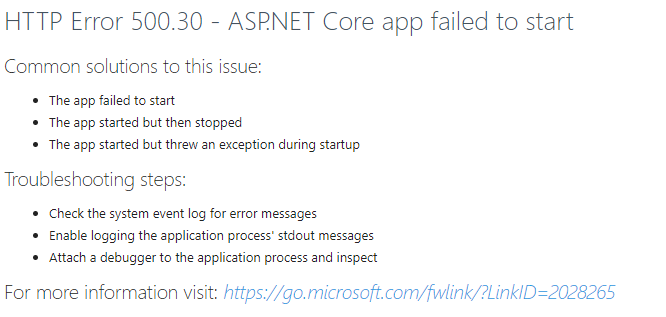
The Module is already Installed:

upgrade to 2022.3.0 - with Web Error HTTP Error 500.30 - ASP.NET Core app failed to start
HI @Erica Poirier
I have the same problem, but no solution has helped so far.
When I want to install the ancm module, PowerShell tells me that it is installed, but the IIS web server shows it as not installed.
Need some help.....