
danielstein
RDM - Jump Host - Agent not recognized
Hello,
I work in the same company as matthiasgruber and have the same problem as he has. I have installed the latest release of RDM (2026.2.18.0) and Agent (2026.2.4). I still run in the same Problem. Is there any way i can assist and push the topic?
Best Regards
Daniel
Webseite via Jumphost
Ok this morning i really got stuck:

As you can see, the Websites should be open, but on the Jumpserver there was no window/tab open. I just updated the Jumpstation to the latest RDM version. For now it works....we´ll see the next days if its stable.
Regards
Daniel
Webseite via Jumphost
Hello Stephan,
a little more context: this happens (when it happens) only in the morning when i fire up my system and start all the programs for the working day. Then Sometimes i cant see the websites in the embedded display. After i restart my RDM multiple times it may start working again. I am using the Version 2025.3.26.0 on my workstation ans 2025.3.23.0 on the jumpstation. This behavior showed in earlier versions too. External display is no problem at all. All configured websites show up.
Best Regards
Daniel
local ssh session logging via jump host
Hello,
I would like to store ssh session logs locally on my workstation. The ssh connections run via a jump host and I have specified a directory for the logs in the global settings
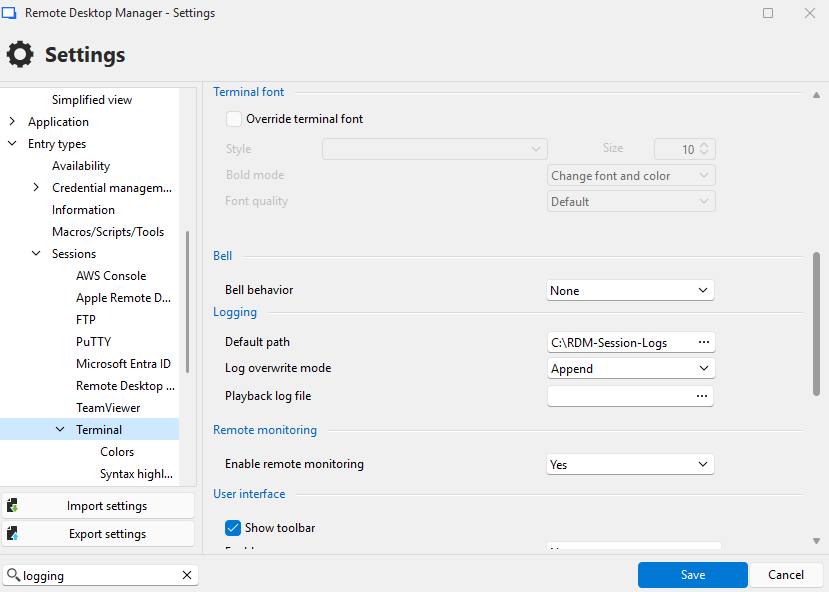
The following settings were made in the ssh session
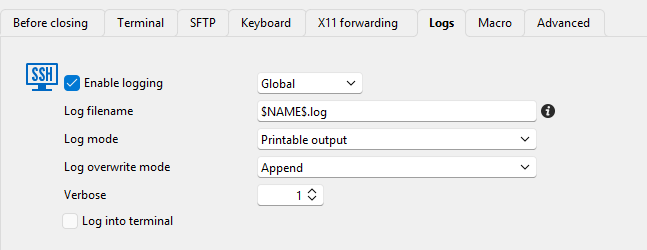
Unfortunately, I only get an error message
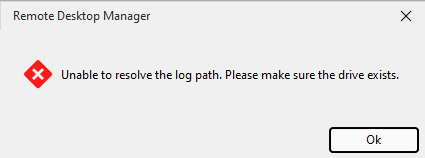
The directory exists on the jump host and on the local workstation.
When I change the setting from global to custom, logging works, but the log is stored on the jump host.
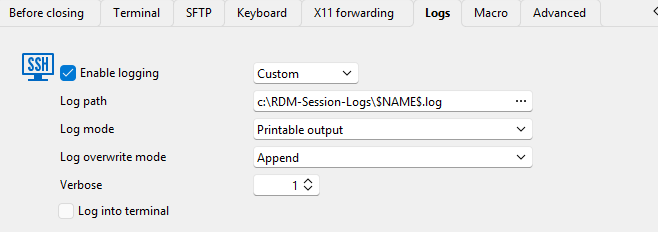
What am I doing wrong?
Best regards,
Daniel
Webseite via Jumphost
Hello,
I have configured websites via a jump host because they cannot be accessed from all VLANs. This works so far, but now I have the problem that the websites are not displayed correctly, if they are displayed embedded (tabbed):


As soon as I set the display to external, they are displayed normally again. Does anyone have any idea what could be causing this?
Regards
Daniel
VMWare Synchronizer via Jump Host
Hello Richard,
hello Hubert,
thank you for your reply.I will try out the Devolutions Gateway.
Best Regards
Daniel
VMWare Synchronizer via Jump Host
Hello,
I am facing the challenge of importing all virtual machines from our VMWare environment into the RDM. I would like to use the synchronizer for this. The vcenter is located in a VLAN that is not directly accessible. I have a jump host (bastion) for this, but I cannot specify it directly anywhere like in templates for example. Something like this would be nice:

Best Regards
Daniel