RDM - Jump Host - Agent not recognized

Hi!
I am using the 2026.1.22.0 on my W11 to connet via another Windows 11, which act since RDM 2025 as Jump Host to our Servers.
As stated the RDM Jump-App is deprecated an it is adviced to use the Devolution Agent, no problem. I installed the 2026.1.2 which is running, as the service and Tray-icon is telling me. In my RDM I switched the Jump-part of my Jump host to Devolutions Agent or Automatic and tried to connect to the designated Server as usual.
If I turn off the Jump Host app on the Jump host, I got no connect, RDM on my source machine tells me "no Agent running", If I switch the App on again, and do "Automatic" in my Jump Host config, It connects (as expected) but I get the "...deprecated..use... " - Popup-Box.
Any clues for me? Missed I anything?
Cheers
Matthias
All Comments (29)
Hi Matthias
Sorry this wasn't totally smooth for you. For your information, RDM Jump/Agent has a long deprecation window (it will keep working all the way until 2026.3 which will be after the summer). This gives us a chance to smooth out any problems so your feedback is really important and I appreciate your help here.
The first thing I'd ask you to check is on the server; if you hold [Control] while you right-click the tray icon for Devolutions Agent, that will add some extra information to the menu. What does it look like? For example this is what I have on my machine: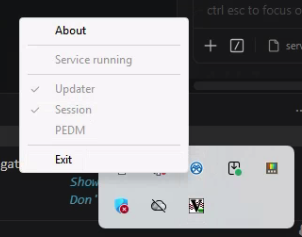
Another way to get the same information is to share the contents of %programdata%\Devolutions\Agent\agent.json. You can post it here (nothing sensitive in there) or send me a PM if you prefer.
Sorry for the inconvenience
Kind regards,
Richard Markievicz
Screenshot 2026-05-29 at 08.44.43.png
Hi Richard,
thanks for your reply,
Till 2026.3 that is quite a time, thanks for that.
Okay, here are some more hardcopy:
Just right-click on the Agent-Icon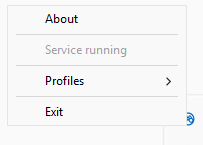 Now CTRL-right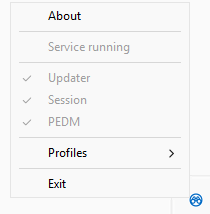
Interessting, that "service running" vanished
sc query tells something else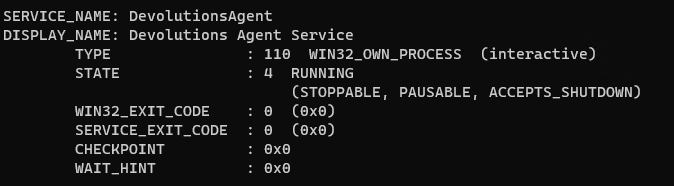
And the Agent.json
{"Updater":{"Enabled":true},"Session":{"Enabled":true},"Pedm":{"Enabled":true}}
cheers
Matthias
0f7cdc5d-4d6f-4c7e-99d9-346dea72d109.png
a8597c80-2bb7-4f35-993d-823c7f6c30d3.png
f10e9458-d656-45a7-9735-013925a43dd5.png
I believe I am experiencing a similar issue? The setup works fine with a single template, but struggles when a template selection prompt is involved.
Here are my environment details and steps to reproduce:
Environment:
- RDM Version: 2026.1.23
- Agent Version: 2026.1.2
- Agent Settings: Service is running, and only "Session" is checked.
My Configuration: I use one Host entry per server with multiple linked templates:
- RDP
- Command Line (External application) to open Windows Explorer with an admin share on the server.
Because of these multiple linked templates, I get prompted to choose which template to use whenever I double-click the Host entry.
The Issue: When the Jump Host setting is configured to Devolutions Agent or Automatic, the connection fails to launch after selecting a template from the prompt. Curiously, if I wait a few seconds and double-click the Host again, my previously selected command (RDP or Explorer) gets executed, and I am simultaneously prompted again to choose a template.
Observations & Workarounds:
- Single Template: For Hosts that only have a single linked template (e.g., just RDP) where no prompt appears, the Devolutions Agent establishes the connection instantly without any issues.
- Legacy Mode: When I change the Jump Host setting to Legacy, everything works normally even with the template prompt. However, this requires RDM to already be running on the jump server, as the Devolutions Agent does not start it automatically in Legacy mode.
Could you look into how the new Agent handles template selection prompts? Let me know if you need any logs or further information.
Hi @matthiasgruber
Thanks for the information.
Please, if you don't mind troubleshooting a little further for me.
Please try your Jump connection with "Devolutions Agent" as the Jump approach. The outer connection (the one to the Jump Host) should work but the inner connection (the "jumped" connection) is not, as I understand it.
Now: on the Jump Host (the one running Devolutions Agent) can you please gather the log files from
%ProgramData%\Devolutions\Agent
%AppData%\Devolutions\Session
And .zip them, and send them to me by private message?
Also, can you check if the the process "DevolutionsSession.exe" is running on the Jump Host? It should be automatically started with the RDP session. You can check in Task Manager.
Please let me know if something isn't clear
Thanks for your patience,
Richard Markievicz
@Laspeed
Thanks for the detailed issue report, and I'm sorry for the inconvenience. I will check this today and get back to you.
Kind regards,
Richard Markievicz
@Laspeed
Ok, I've tried to reproduce your issue with the same version and it is working for me; however probably I made a different setup to you (sorry because my area is more on the Agent side than the RDM side).
Here's what I have, are you able to explain the difference in your setup? Screenshots might also help.
Connections:
- "jump.domain.loc" - Entry (RDP) - Hostname, username and password pointing to my Jump Host; flagged as "is jump host" and using Devolutions Agent
- "server.domain.loc" - Entry (Host) - Hostname, username and password pointing to a server
File > Templates > Entry Templates > Local Templates
- "RDP Template" - Entry (RDP) - "Connect using Jump Host" (jump.domain.loc)
All other settings are left at default, and I've added some other templates too so that I get prompted.
Now, I double click on the host entry "server.domain.loc" and I'm asked to choose a template; I select the "RDP Template", the connection to "jump.domain.loc" launches, RDM opens on the server and it goes ahead and makes the RDP connection to "server.domain.loc".
Does something stand out as obviously different to your setup? You mention "linked templates" but I wonder if that's just a terminology thing.
Let me know.
Thanks and kind regards,
Richard Markievicz
Thank you for taking the time to reproduce the issue.
Looking closely at your steps, I think I spot the main differences in our setups. It comes down to Inheritance and Shared Templates.
Here is exactly how my setup differs from yours:
- Jump Host Configuration: In your setup, the "Connect using Jump Host" setting is configured directly inside the template. In my setup, the Jump Host is configured on the Parent Folder, and the Host entry is set to Inherit the Jump configuration from it.
- Template Type: You used Local Templates. I am using Shared Templates (although my data source is just a local SQLite database).
- Template Linkage: I link these Shared Templates directly inside the Host entry's properties under the Templates tab.
So my exact flow is: I double-click the Host entry -> It inherits the Jump configuration from its parent folder -> It prompts me to select one of the linked Shared Templates -> I select the template -> The Devolutions Agent connection fails/stalls.
To eliminate any guesswork and save you time recreating this specific hierarchy, I would be happy to provide an .rdm export of this exact folder/host/template structure (with credentials stripped).
Let me know how you would like me to share the file with you (e.g., via private message or a secure link)!
Hi @matthiasgruber
Thanks for the information.
Please, if you don't mind troubleshooting a little further for me.
Please try your Jump connection with "Devolutions Agent" as the Jump approach. The outer connection (the one to the Jump Host) should work but the inner connection (the "jumped" connection) is not, as I understand it.
Now: on the Jump Host (the one running Devolutions Agent) can you please gather the log files from
%ProgramData%\Devolutions\Agent
%AppData%\Devolutions\Session
And .zip them, and send them to me by private message?
Also, can you check if the the process "DevolutionsSession.exe" is running on the Jump Host? It should be automatically started with the RDP session. You can check in Task Manager.
Please let me know if something isn't clear
Thanks for your patience,
Hi @Richard Markiewicz
Okay...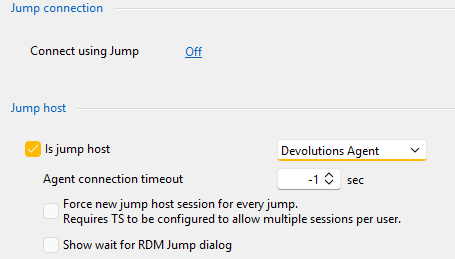 done...
connecting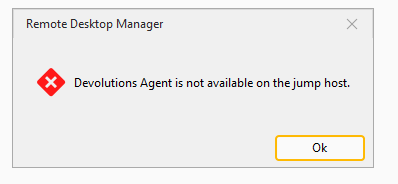
You will get the zips as PM
Jumphost-appdata-Session.zip
Jumphost-Progdata-Agent.zip
Nop the only starting with
Devolutions is
cheers
Matthias
8d3ae6d2-b5d8-4c7d-9f94-fe43459887d9.png
db2c2a53-6b09-4541-ad1e-6225a8110923.png
9fee3205-34b4-41ee-ad54-147a04209186.png
Hi @matthiasgruber
Thanks for sending that. I see that the Agent side is functioning normally. When you connect: RDM is supposed to open RDP session and create the virtual channel for the Agent. On the server side, the Agent launches the session process which opens the virtual channel and that is how communication happens.
In your case, RDM is opening the RDP session but not opening the virtual channel. Since it's not present, the Agent cannot continue.
Do you have something corresponding in the application logs (RDM side)?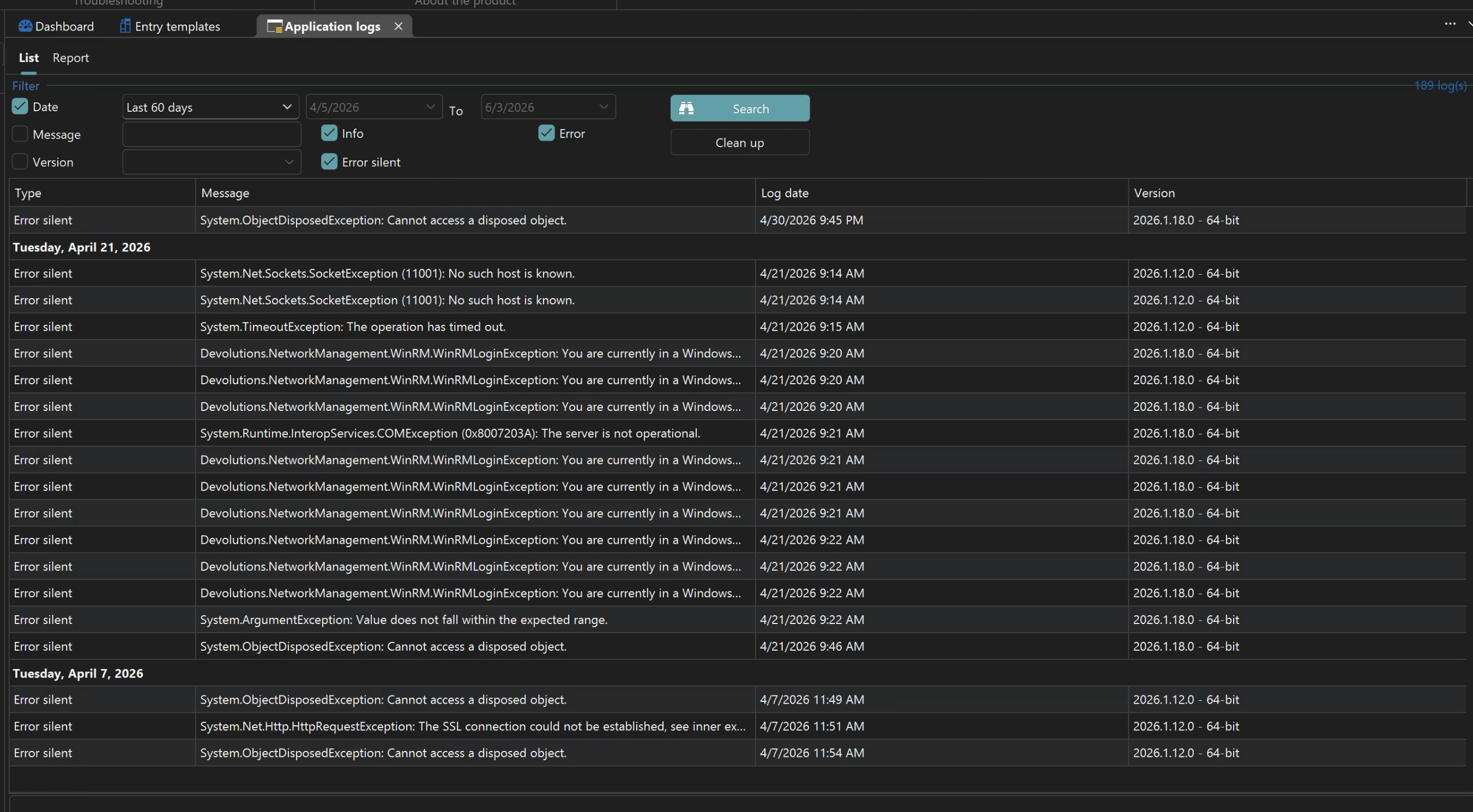
Or, if you open Help > Performance Profiling and switch to the "Debug Only" tab with level "131"; leave the window open and try your connection. is there some relevant output?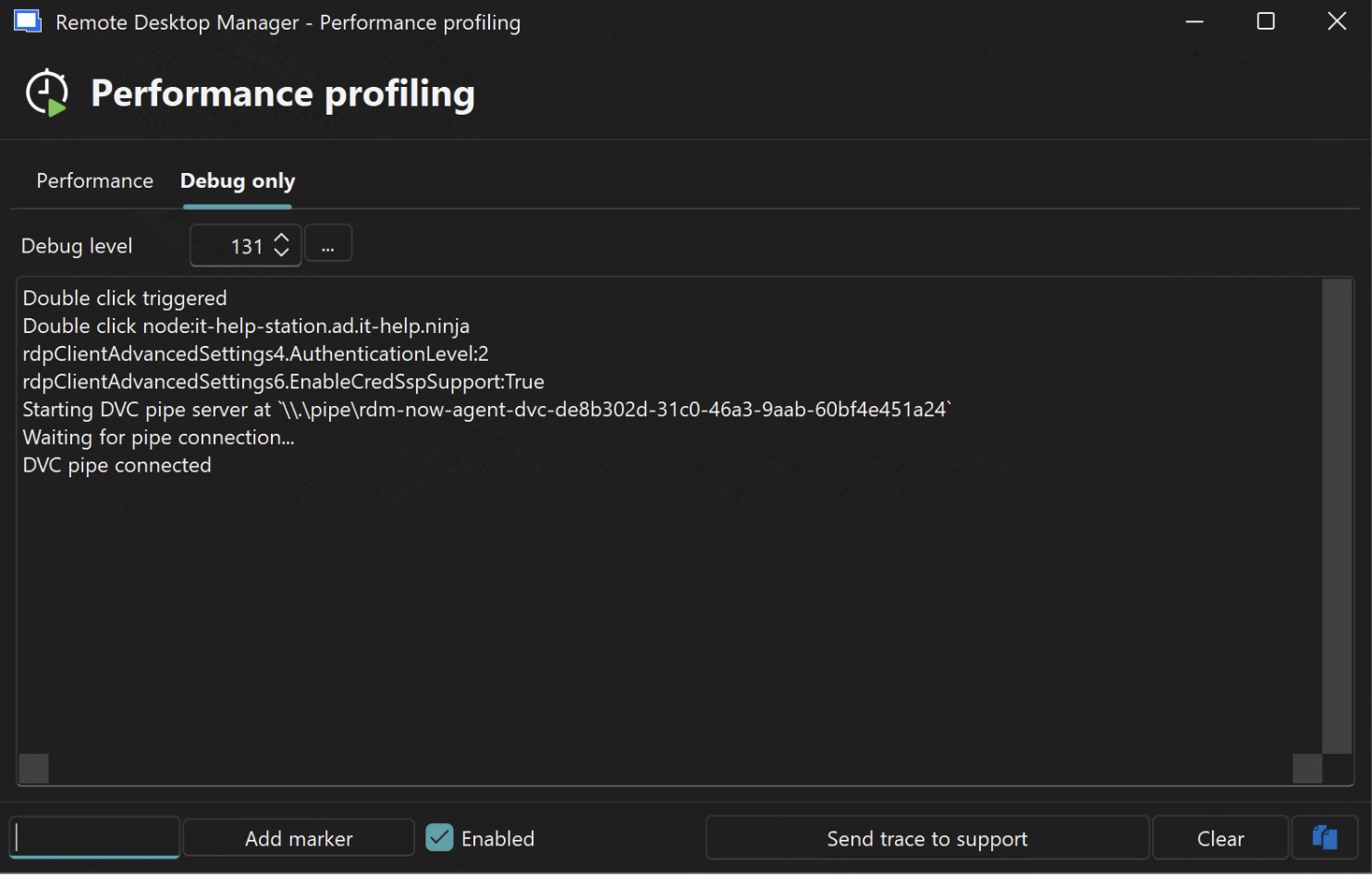
Please, let me know if something isn't clear. Thanks again for your help and patience.
Kind regards,
Richard Markievicz
Screenshot 2026-06-03 at 07.17.57.png
Screenshot 2026-06-03 at 07.17.34.png
Hello @Laspeed
Ok, thanks for the detailed explanation, although this is a bit weird. Because I can reproduce the problem in a similar way, although I do get the same issue with the old RDM Agent / Jump application as well.
I'm guessing that there is a race condition somewhere in the code that means this works inconsistently.
If you wouldn't mind sending me a .rdm export with credentials obfuscated or removed, that would be very helpful to ensure my reproduction is precise. You can .zip the file and send it to me by private message.
Thanks and kind regards,
Richard Markievicz
Hi, same issue here, i just upgraded to RDM version 2026.2.5.0 (on Client) and RDM 2026.2.5.0 / Devolutions Agent 2026.1.2.0 (on Jumphost).
- After that, no connection to any Jumphost was possible.
- legacy Jump "Agent" as well as Devolutions Agent not working
my workaround: Uninstall 2026.2.5.0 on CLIENT-side, install RDM 2026.1.23.0.
Works like before the update.
Hello @philipmarak
Sorry for the trouble. 2026.2.6 should be released imminently and contains a specific fix for your issue. If you still have a problem once the update is available and you've tried it, please let me know.
Thanks and kind regards,
Richard Markievicz
Hello @philipmarak
Sorry for the trouble. 2026.2.6 should be released imminently and contains a specific fix for your issue. If you still have a problem once the update is available and you've tried it, please let me know.
Thanks and kind regards,
@Richard Markiewicz
great news, thank you - will let you know if any issues persist after installing the new release.
best regards!
Hello @Laspeed
With the files you sent, I found and fixed that problem. The earliest that will be available is in 2026.2.9; I'm not sure exactly when that will be but I won't be surprised if it's as soon as next week. At this point I don't think they'll be any more releases for 2026.1.
Once that version is available, please try your scenario again with Devolutions Agent and let me know if you experience any problems.
(And to be really clear - this is a client-side issue, not a Jump Host one; so the piece that needs updating is the RDM running on your local workstation).
Let me know and questions or problems and thank you for your patience
Kind regards,
Richard Markievicz
Hello,
Thank you for being so patient!
I'm pleased to inform you that a new version of RDM (2026.2.9.0) has been released, featuring the fix for your issue.
Latest Version: Download RDM
Please let us know if this works or if you encounter any issues.
Best regards,
Maxim Robert
Hi, I can confirm that version 2026.2.9 (Agent 2026.2.2) is now working across all 3 of our jump servers. Thank you for your support and the quick fix.
Hello,
Thank you for being so patient!
I'm pleased to inform you that a new version of RDM (2026.2.9.0) has been released, featuring the fix for your issue.
Latest Version: Download RDM
Please let us know if this works or if you encounter any issues.
Best regards,
@Maxim Robert
Hi!
Sorry, was in vacation, however... tried 2.9.0 and following.. still tells me "no Agent"; 2.2-Agent is installed, and falls back to rdm jump.
cheers
Matthias
Hi @matthiasgruber
I'm eager to solve this problem. Did you get a chance to check what I wrote in my earlier post? https://forum.devolutions.net/topics/55060/rdm--jump-host--agent-not-recognized?message=236604#236604
Thanks and kind regards,
Richard Markievicz
Hi @matthiasgruber
I'm eager to solve this problem. Did you get a chance to check what I wrote in my earlier post? https://forum.devolutions.net/topics/55060/rdm--jump-host--agent-not-recognized?message=236604#236604
Thanks and kind regards,
Hi @Richard Markiewicz
Sorry, nop, couldnt react sooner... vacation :-)
However...
That is the Debug-Part of the JumpHost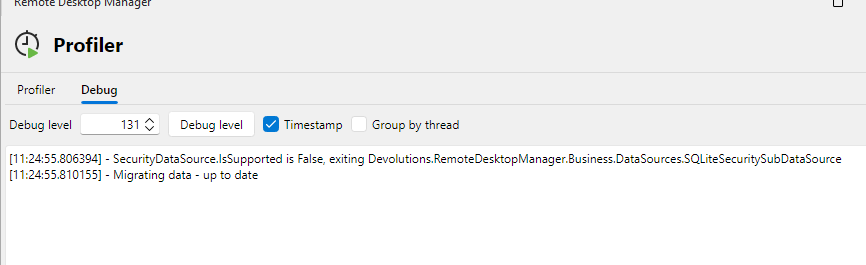 and this the part of the initiating
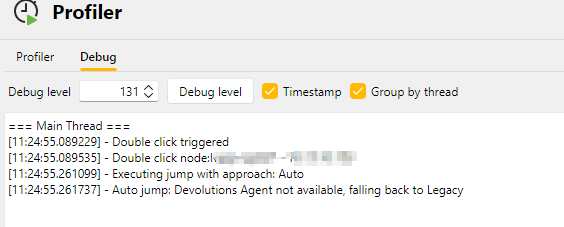 In the Application log I get only a "resizeerror", because, well.. resized a bit .-)
and on the jump-host only "old-stuff" btw. do you trie a http-connect somewhere? My jumphost isnt allowed to connect out to the internet or something like that.
cheers
Matthias
bde7fae4-066c-40d0-8e42-9cfc40277c99.png
1ed99754-132e-41ea-b03d-9f4d38778f6c.png
f02c3a23-79e8-4adc-8094-4bdadb2d3d82.png
Hi @matthiasgruber
This is really strange. I'm able to infer somethings from the information you've provided but the picture is not complete.
Before going further, can you confirm two things?
- The version of RDM running on the client (local Windows 11). I know you wrote 2026.1.22 in your original post but please double confirm this for me, if it's not accurate please let me know the version you currently have
- This is just a regular RDP environment, correct? You're not using Citrix or anything similar?
Thanks and kind regards,
Richard Markievicz
Hi @matthiasgruber
This is really strange. I'm able to infer somethings from the information you've provided but the picture is not complete.
Before going further, can you confirm two things?
- The version of RDM running on the client (local Windows 11). I know you wrote 2026.1.22 in your original post but please double confirm this for me, if it's not accurate please let me know the version you currently have
- This is just a regular RDP environment, correct? You're not using Citrix or anything similar?
Thanks and kind regards,
- a picture tells more than 1000 words
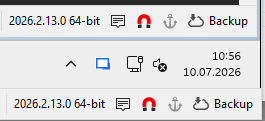
lower, my W11 host, upper the W11 Jumphost; actually, well original Post was correct 2026.1.22
and on the Jumpost 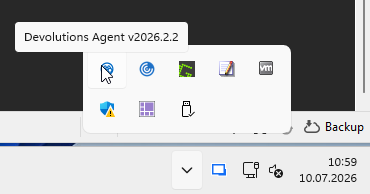 a 2026.2.2 Agent is running
your 2nd Question.
No its "stupid" RDP between them, only restriction, the Jumphost has no access to the internet and no initial way back to the network I am RDP-ing from, and both Installations are the "Portable"; you know "override.cfg"-Stuff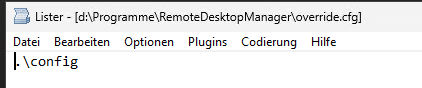
cheers
Matthias
138521f8-45c6-4fce-8f01-7173563a4785.png
ac015b66-84be-49bf-a1d1-88ed70ce7680.png
3ce2ee23-f5e7-4bbf-b599-92db0ad1487c.png
Hello. Just wanted to jump (no pun intended) on the train and asked if this fix was implemented in the Extended maintenance Version 2026.1.24.0 from June 29, 2026 as well. We had updated to this version recently and I get this error specifically when I reconnect to a Jumphost. Agent is on version 2026.2.2.0 Our infrastructure connections look something like this:
Main RDM (where all servers are saved) -> Infrastructure specific Jumphost Server with Agent and RDM -> End Server where you want to land
I perceived that the problem mainly happens, when you reconnect to the middle Jumphost (for example to resize the screen on a new monitor) and than try to open another end server.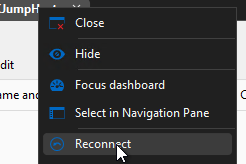
Disconnecting and reopening the middle jump server solves the issue.
Here are some screenshots that were asked previously.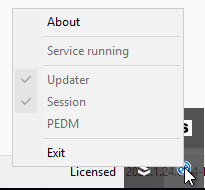
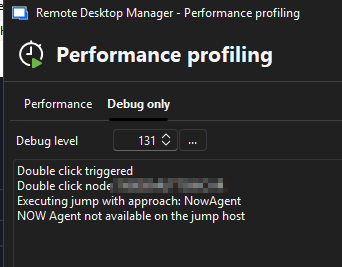
When trying to open a session with debug on, i get four times this message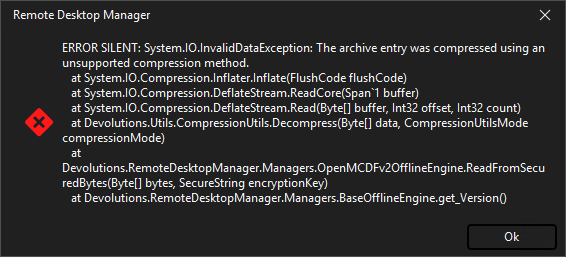
3cae7c21-0399-4330-91d7-e3769bcb63b6.png
ec269c32-d0b6-47a1-9955-42954dbe7976.png
2b789fc0-9ff8-428e-ae76-67255326b19d.png
24503920-36cd-4112-a960-7772ff29e529.png
Hello @matthiasgruber
Thanks for your patience. I'm still a little unsure of the problem, it seems to be an interaction with the environment specifics you mentioned in PM. I've made a "blind" fix on my side to make things more robust; please update to Devolutions Agent 2026.2.4 and let me know if the issue is fixed.
In either case - I'd appreciate your feedback and would like to see updated Agent and Session logs to understand the issue better. Please let me know if you have any questions.
Kind regards,
Richard Markievicz
Hello @penzmauricio
Sorry for the inconvenience. Actually what it sounds like is an Agent side issue, or at least I'd like to rule that out first - I'm hoping that a back port isn't needed for RDM (this thread has started to conflate a few different problems).
Can you please update to Devolutions Agent 2026.2.4; I think it has a fix that specifically covers your scenario.
Let me know if it doesn't help and I will be happy to troubleshoot further.
Kind regards,
Richard Markievicz
Hello @matthiasgruber
Thanks for your patience. I'm still a little unsure of the problem, it seems to be an interaction with the environment specifics you mentioned in PM. I've made a "blind" fix on my side to make things more robust; please update to Devolutions Agent 2026.2.4 and let me know if the issue is fixed.
In either case - I'd appreciate your feedback and would like to see updated Agent and Session logs to understand the issue better. Please let me know if you have any questions.
Kind regards,
@Richard Markiewicz
Hi!
Sorry, but same result.
If you like I would try a "more Debug version" if you send me one :-)
Will send you the Information as PM
cheers
Matthias
Hello @penzmauricio
Sorry for the inconvenience. Actually what it sounds like is an Agent side issue, or at least I'd like to rule that out first - I'm hoping that a back port isn't needed for RDM (this thread has started to conflate a few different problems).
Can you please update to Devolutions Agent 2026.2.4; I think it has a fix that specifically covers your scenario.
Let me know if it doesn't help and I will be happy to troubleshoot further.
Kind regards,
Hello @Richard Markiewicz unfortunately, it didn't solve the problem. But in order to preserve the original post in its fixed state, I'll open a new topic for us to analyze it further. Thanks for your help anyway.
@penzmauricio
Thanks for the feedback. That would be appreciated; please feel free to "@" me in the new post directly.
Thanks and kind regards,
Richard Markievicz
Hello,
I work in the same company as matthiasgruber and have the same problem as he has. I have installed the latest release of RDM (2026.2.18.0) and Agent (2026.2.4). I still run in the same Problem. Is there any way i can assist and push the topic?
Best Regards
Daniel
Hello Daniel
I will send you a PM.
Thanks and kind regards,
Richard Markievicz