local ssh session logging via jump host

Hello,
I would like to store ssh session logs locally on my workstation. The ssh connections run via a jump host and I have specified a directory for the logs in the global settings 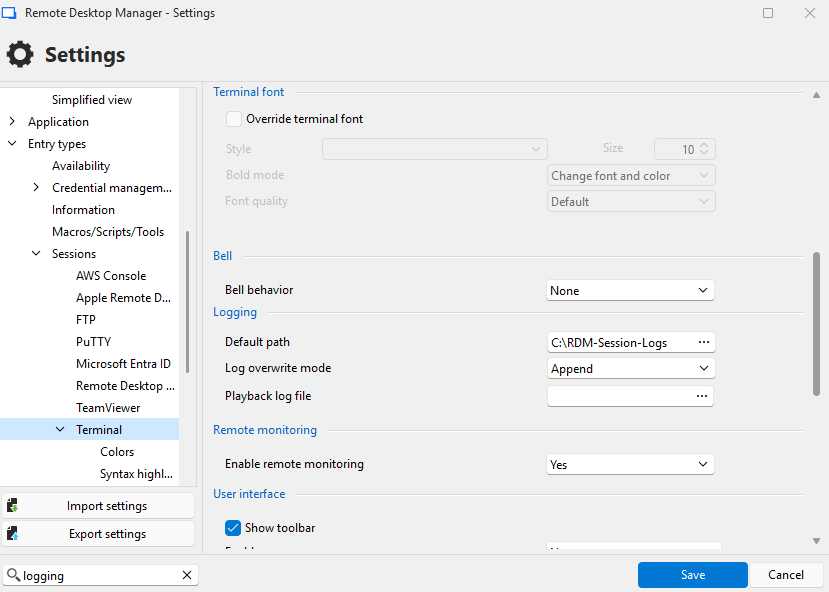
The following settings were made in the ssh session 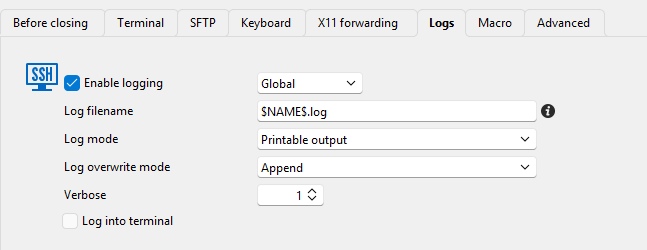
Unfortunately, I only get an error message
The directory exists on the jump host and on the local workstation.
When I change the setting from global to custom, logging works, but the log is stored on the jump host.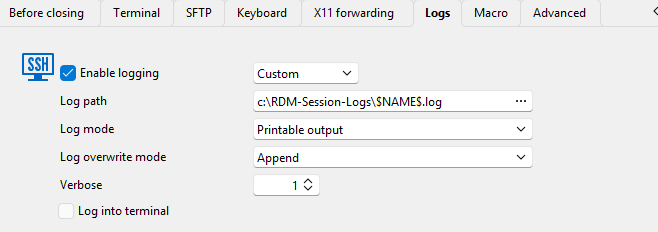
What am I doing wrong?
Best regards,
Daniel
034a5bf2-15cb-495f-b4a0-69a20a935d7e.png
9a4a8414-59e6-40e9-b3d6-2d06a8089598.png
d82b7fb1-5141-4181-9391-9a0425c9ea44.png
b8ba1c8d-18cc-41e7-ba3d-8fe9becd4f4d.png
All Comments (1)
Hello,
Thank you for reaching out on this matter.
I believe you’ll need to enable global logging directly in the local settings. For guidance, please refer to the following documentation article:
https://docs.devolutions.net/rdm/commands/file/options/sessions-settings/#connection-options
Please let me know if this resolves the issue or if you need further assistance.
I look forward to your reply.
Best regards,
Jacob Lafrenière