
ryanadams
ctrl + tab move to last active session
Thank you for pointing out the distinction - I was unaware of the two different ways to navigate tabs.
I would like to persist with my initial request however, that you can cycle through tabs with a single shortcut, CTRL + TAB:
The behavior would be to cycle between the last two opened tabs; Initially CTRL + TAB moves to next tab. Fully releasing then pressing CTRL + TAB again would cycle back to the previous tab regardless of tab order. Holding the CTRL key while repeatedly pressing the TAB key will continue to move through open tabs in order from first opened to last opened.
To see this behavior in action, you can look at SecureCRT, or VSCode.
ctrl + tab move to last active session
Please implement feature where CTRL + TAB switches to last recently used active session.
Currently: with multiple open sessions, CTRL + TAB keyboard shortcut will always switch (forward) to the next session in opened order. CTRL + SHIFT + TAB always switches (backward) to the previous session in opened order.
We are looking for common feature (SecureCRT, Remote Desktop Manager, Sublime Text, VSCode) where the CTRL + TAB keyboard shortcut will first switch to the most recently used active session tab first (regardless of the opened session tab order) for quick back and forth session navigation.
This is very helpful when you need to quickly move back and forth between two specific sessions when you have many sessions open.
Provide a button to toggle/enable logging on demand
Sure I have used this. It does work as intended, and saves the file to the global path as expected.
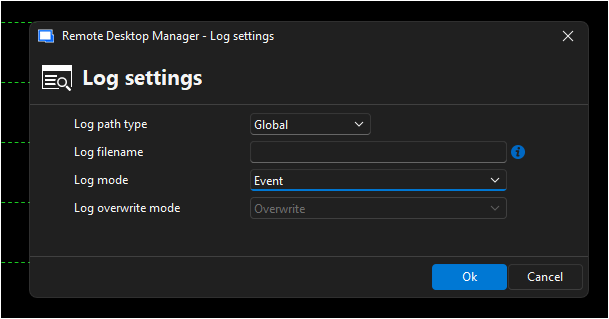
But it is not a *toggle*, you need to specify the filename (variables would be sufficient but I dont memorize them) then change the mode to "Printable output".
A lot of repeatable work to just selectively log session output.
Provide a button to toggle/enable logging on demand
I am interested in selectively logging the terminal output (printable output) in Telnet/SSH sessions.
I understand we can set the logging mode and path per session or using template. This works fine. But it logs all the time. There is no way to selectively turn on/off logging once it is configured.
Please provide a feature to toggle the logging on/off per session.
An example of this is in SecureCRT, there is a button "Log Session" to enable logging in an active session, which uses the pre-configured global path and filename that has been already set.
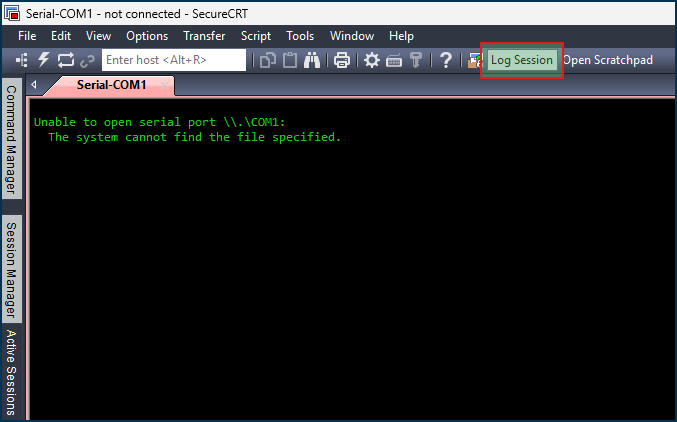
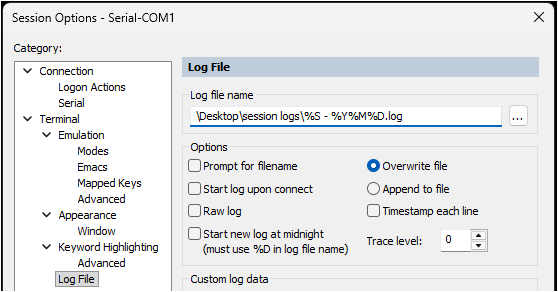
The use case is, most sessions are uninteresting and do not require logging. However when working a project, a priority change or maintenance upgrades, we log the critical parts of the session for improvement and backtracking any issues. It is not reasonable to exit the session, edit the logging settings, then reconnect to the session, then exit the session and put the logging settings back the way they were.
Telnet line send delay
A welcome addition, thank you Hubert!
RDP Authentication failure when using certificates
I found the resolution. Please see
https://learn.microsoft.com/en-us/windows/release-health/status-windows-11-24h2#3697msgdesc
Smart card authentication and other certificate operations might intentionally fail after installing Windows Updates released on or after October 14, 2025 (KB5066835) that contain protections for the security vulnerability, CVE-2024-30098. As part of this cryptography improvement, RSA-based smart card certificates are required to use KSP (Key Storage Provider) instead of CSP (Cryptographic Service Provider).
I used the process stated in the "Workaround" section and was able to successfully use certificate authentication again:
Workaround:
If you encounter this issue, you can temporarily resolve it by setting the DisableCapiOverrideForRSA registry key value to 0. This is documented in CVE-2024-30098. Detailed steps to modify the registry key are listed below. Note: This option will be removed in Windows updates, planned for release in April 2026.
Please forward the details in the "Resolution" section to the developers:
Resolution:
For a permanent resolution, developers should update their authenticating app to perform Key Storage Retrieval using Key Storage API documented at Key Storage and Retrieval. Developers should complete this change before Windows updates released in April 2026, at which time the DisableCapiOverrideForRSA workaround listed below is planned to be removed.
RDP Authentication failure when using certificates
Seeing this just recently on RDM.
RDP saved session is setup to use local vault credential pointed to certificate from user personal certificate store.
Same error happens with local vault credential using actual certificate file (.CER)
If I use plain username/password, the connection works fine.
If I use windows mstsc.exe RDP client and select the user certificate the connection works fine.
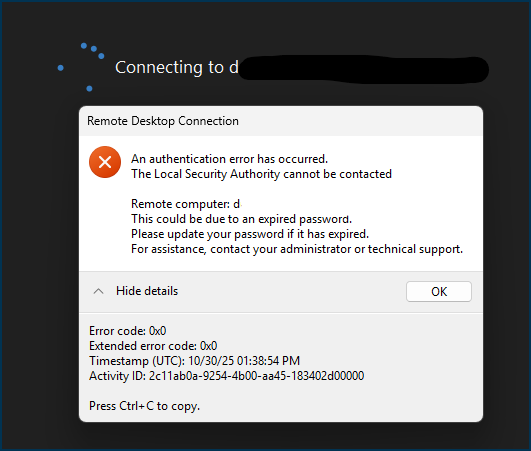
[Window Title]
Remote Desktop Connection
[Content]
An authentication error has occurred.
The Local Security Authority cannot be contacted
Remote computer: d
This could be due to an expired password.
Please update your password if it has expired.
For assistance, contact your administrator or technical support.
[Expanded Information]
Error code: 0x0
Extended error code: 0x0
Timestamp (UTC): 10/30/25 01:38:54 PM
Activity ID: 2c11ab0a-9254-4b00-aa45-183402d00000
Telnet line send delay


Please add the option to specify a delay between lines (line feed) when pasting multiple lines of text in a telnet session. Many older/legacy telnet systems input buffers or software seemingly overflow when sending long or multi-line strings and will not accept more than x lines at a time, resulting in errors on the receiving end.
This is a common feature on popular terminal applications (Tera Term, MobaXterm, SecureCRT).
This feature sends one line at a time, pausing between lines so the telnet server can process the stream.
Some relevant discussions
putty-nd / Discussion / Open Discussion: Pasting long pieces of text
Putty loses some configuration lines when pasting relatively large configuration text into Putty