RDP Authentication failure when using certificates

Seeing this just recently on RDM.
RDP saved session is setup to use local vault credential pointed to certificate from user personal certificate store.
Same error happens with local vault credential using actual certificate file (.CER)
If I use plain username/password, the connection works fine.
If I use windows mstsc.exe RDP client and select the user certificate the connection works fine.
[Window Title]
Remote Desktop Connection
[Content]
An authentication error has occurred.
The Local Security Authority cannot be contacted
Remote computer: d
This could be due to an expired password.
Please update your password if it has expired.
For assistance, contact your administrator or technical support.
[Expanded Information]
Error code: 0x0
Extended error code: 0x0
Timestamp (UTC): 10/30/25 01:38:54 PM
Activity ID: 2c11ab0a-9254-4b00-aa45-183402d00000
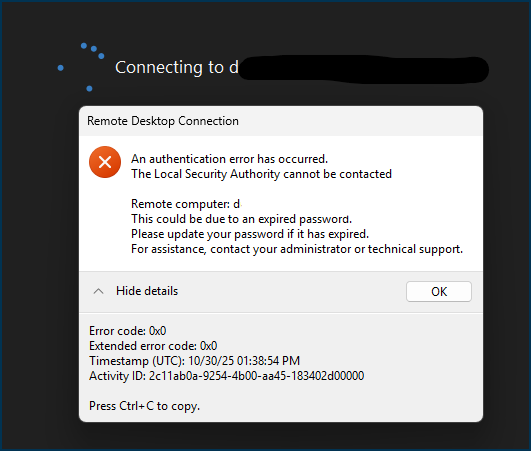
Screenshot 2025-10-30 093947.png
All Comments (8)
I found the resolution. Please see
https://learn.microsoft.com/en-us/windows/release-health/status-windows-11-24h2#3697msgdesc
Smart card authentication and other certificate operations might intentionally fail after installing Windows Updates released on or after October 14, 2025 (KB5066835) that contain protections for the security vulnerability, CVE-2024-30098. As part of this cryptography improvement, RSA-based smart card certificates are required to use KSP (Key Storage Provider) instead of CSP (Cryptographic Service Provider).
I used the process stated in the "Workaround" section and was able to successfully use certificate authentication again:
Workaround:
If you encounter this issue, you can temporarily resolve it by setting the DisableCapiOverrideForRSA registry key value to 0. This is documented in CVE-2024-30098. Detailed steps to modify the registry key are listed below. Note: This option will be removed in Windows updates, planned for release in April 2026.
Please forward the details in the "Resolution" section to the developers:
Resolution:
For a permanent resolution, developers should update their authenticating app to perform Key Storage Retrieval using Key Storage API documented at Key Storage and Retrieval. Developers should complete this change before Windows updates released in April 2026, at which time the DisableCapiOverrideForRSA workaround listed below is planned to be removed.
Hello
First, I'm glad you found a workaround for the problem, at least for the medium-term. And thank you for posting the details here.
I'm concerned about this, but also feel like I don't fully understand the issue - especially why you would have this problem in RDM but not mstsc. Can you describe your setup a little for me? Are you using an X.509 credential entry to hold the certificate? I'm wondering because you also mentioned using a .cer; which obviously has no private key (so where is the private key coming from in this case?). Are you using a smart card?
It seems like something we need to address before your workaround is removed by Microsoft next year. So I'd appreciate any extra information you can give.
Thanks and kind regards,
Richard Markievicz
Hey guys,
I'd like to add something to this issue as I think I am seeing this exact problem as well.
@ryanadams
Does your certificate have a PIN?
Because mine does. I have a smardcard certificate on a yubikey and I am using a PIN to open RDP connections with it.
I started to see this error that you described. What currently works for is this:
All I had to do was to go into the properties of my smardcard credential in my RDP Managers user vault and remove the PIN from there!
So now, when I double click a connection in RDP Manager the standard Windows login pop up comes up with my yubikey certificate already selected and "all" I have to do is enter my PIN manually.
I am a bit suprised that this maybe comes from these recent Microsoft changes that you posted and that I would have to temper with the registry which apparently is only a temporary fix.
I am surprised because as of right now my certificate on my yubikey still works fine. It works fine when I open an RDP connection manually through mstsc.exe. It is fine when I do it through Remote Desktop Manager. But only if I remove the PIN from being automatically used by the program.
Do you think removing the PIN from your RDP Manager credential would work as well? Without the registry changes?
I am kinda hoping it would as that would point toward what you posted under the "Resolution" section and that maybe all that needs to be done is a change "in the authenticating app" as Microsoft puts it.
BR,
Will
Hello @willenae0
This is the scenario I'm familiar with for certificate-based authentication.
Here's how it works: the RDP ActiveX control (the Microsoft component that provides integrated RDP inside RDM) doesn't accept a certificate for authentication, it only accepts username / password credentials. There is a Microsoft API that we use to workaround this: CredMarshalCredentialW. If you provide it with the certificate thumbprint, it converts it into a "magic" string that can be passed to another API that only accepts text credentials.
The marshaled credential should be passed as the user name string to any API that is currently passed credentials [...] For certificate credentials, the PIN of the certificate should be passed to that API as the password.
That's exactly what we do. So, all we provide is the string-marshalled certificate and (optionally) the smart card PIN to the RDP control; and then the Windows credential provider does what it will with that information.
(Separately - and this might be related to your specific problem - I've noted that this API can behave unexpectedly. We had another case where a user had trouble with it selecting the wrong certificate when a PIN was provided, leading to a similar error message; and it was not something we could get to the bottom of - our involvement here is very "thin")
It's the Windows Credential Provider that talks to cryptographic services in the kernel, so I'm not sure this is related. Because I would expect that component to be unaffected (one would assume it uses the modern KSP); however there's a different piece which is the smart card driver and/or middleware (in your case, the Yubikey mini driver if installed) that might also be affecting things here.
So, there are a lot of moving pieces here of which RDM is only the "middleman". Like I wrote, I'd be interested if @ryanadams can provide more context to their specific scenario. Perhaps it will shed further light.
Please, let me know if something isn't clear or you have further questions
Kind regards
Richard Markievicz
Hello
Just to provide an update; we've had multiple reports of this issue this week and we're investigating it. I've opened a ticket and linked it back to this thread so you can be notified once we have some more information. In the meantime, the registry workaround from the CVE can be used.
Thanks and kind regards,
Richard Markievicz
Hello
A quick update here that we didn't forget about this, we are still investigating.
In the meantime the deadline for the registry workaround has been extended by Microsoft to February 2027. I guess lots of vendors are struggling with this.
Thanks and kind regards,
Richard Markievicz
Hello
Thank you for your patience on this. We've finished our investigation into the issue, which was extremely challenging and that is why it has taken so long.
This is a Windows-side regression introduced by KB5066835, not a change in RDM. When a connection has both a smartcard certificate and its PIN saved, a Windows component involved in RDP authentication (tspkg, inside the LSASS process) now tries to load the card's private key without the flag required for modern (CNG/KSP-backed) smartcards, so the call fails before authentication even starts. Saving only the certificate (and typing the PIN when prompted) still works, because that goes through a different Windows code path that isn't affected.
Modern smartcard keys are exposed through Windows' newer CNG / Key Storage Provider (NCrypt) API rather than the legacy CryptoAPI (CSP). To load such a key, the caller must pass the flag CRYPT_ACQUIRE_ALLOW_NCRYPT_KEY_FLAG The failing call in tspkg does not pass that flag and notably, every other place in Windows that makes the same call (in the Kerberos and NegoExt modules) does pass it. tspkg has exactly one such call, and it's the one missing the flag. Our assessment is that KB5066835 updated tspkg and this flag was dropped, most likely an oversight on Microsoft's side but honestly who knows?
I'm working on a client-side workaround for this and hope to have it available soon. It works in my environment but still needs some testing and polish. I'll update this thread when I have some more news.
In the meantime, thanks for your patience and please don't hesitate with further questions or comments
Kind regards,
Richard Markievicz
Hello
I've added a workaround for this issue that should be available starting with 2026.2.14. Once that is available, please give it a try and let me know if things are working better.
I did notice a little bit of weirdness on my side when validating the workaround.
There are basically two cases:
In the first case where I had a PIN configured on my X.509 Credential:
- This is what got broken by KB5066793 and we were working around the issue using the DisableCapiOverrideForRSA registry setting
- When I tested again this week, this scenario wasn't working for me even with the registry workaround
- My fix in 2026.2.14 directly addresses this, with or without the registry key workaround being in place
In the second case where I have no PIN configured on my X.509 Credential, and expect RDM / mstsc to prompt for the PIN:
- This was previously working
- When I tested again last week, this scenario was not working for me any more, without any change on my side
- My fix in 2026.2.14 does not address this scenario
- It was necessary for me to remove the registry key workaround and then it started worked again
I can't explain the differences in behaviour from when I originally tested this; I'm now on a fully patched Windows 11 25H2 client and I don't see any changes in this area from Microsoft.
That all being said; the summary is: please update to 2026.2.14 when it's available and remove the DisableCapiOverrideForRSA workaround from the registry if you were using it. I'm hopeful that you'll find this now all works as expected, but if you do get any problems or questions, please don't hesitate to post back.
Thanks and kind regards,
Richard Markievicz