Provide a button to toggle/enable logging on demand
1 vote

I am interested in selectively logging the terminal output (printable output) in Telnet/SSH sessions.
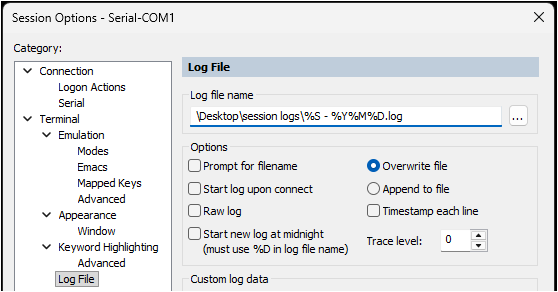
I understand we can set the logging mode and path per session or using template. This works fine. But it logs all the time. There is no way to selectively turn on/off logging once it is configured.
Please provide a feature to toggle the logging on/off per session.
An example of this is in SecureCRT, there is a button "Log Session" to enable logging in an active session, which uses the pre-configured global path and filename that has been already set.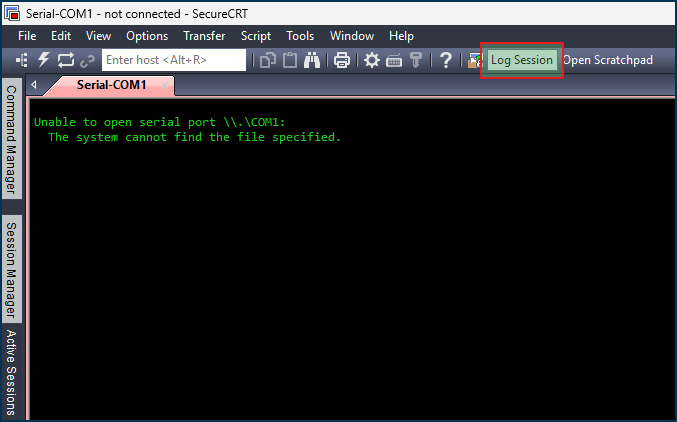
The use case is, most sessions are uninteresting and do not require logging. However when working a project, a priority change or maintenance upgrades, we log the critical parts of the session for improvement and backtracking any issues. It is not reasonable to exit the session, edit the logging settings, then reconnect to the session, then exit the session and put the logging settings back the way they were.
17ed3bf7-2545-4389-8d59-a148b8d46255.png
185334f2-dedf-4052-bd15-b81dc5cecd8c.png
All Comments (3)
Hello,
We already have something quite similar to this in the SSH terminal entry if you have the toolbar enabled. You can configure log settings here:
Could you try out this feature and see if it works well for your needs?
From your description, too, we could improve it by letting you configure the log information without actually turning on the logs, so you could more easily turn it on and off that way as well. Let me know what you think.
Regards,
Hubert Mireault
e40d6639-3d7d-44be-896e-32abcdbf3afb.png
Sure I have used this. It does work as intended, and saves the file to the global path as expected.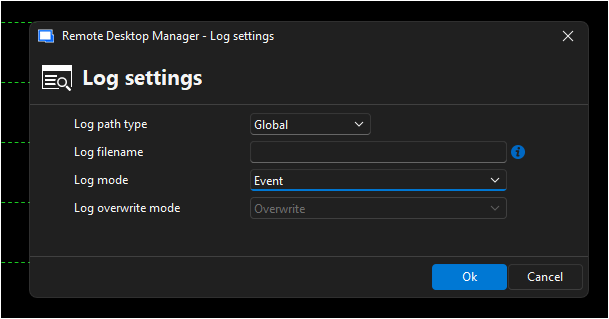
But it is not a *toggle*, you need to specify the filename (variables would be sufficient but I dont memorize them) then change the mode to "Printable output".
A lot of repeatable work to just selectively log session output.
f2f3dc4b-ef3a-4ebc-8473-130d33186c52.png
Thanks for getting back to me. So then, the suggestion I made of what we could improve should resolve the friction here:
From your description, too, we could improve it by letting you configure the log information without actually turning on the logs, so you could more easily turn it on and off that way as well. Let me know what you think.
We could allow you to configure the log settings in the entry and not enable the logs. Then, you could simply toggle it on/off with that button in the toolbar. The information would be pre-filled with what you entered in the entry.
We can open a ticket for this.
Regards,
Hubert Mireault