ctrl + tab move to last active session
1 vote

Please implement feature where CTRL + TAB switches to last recently used active session.
Currently: with multiple open sessions, CTRL + TAB keyboard shortcut will always switch (forward) to the next session in opened order. CTRL + SHIFT + TAB always switches (backward) to the previous session in opened order.
We are looking for common feature (SecureCRT, Remote Desktop Manager, Sublime Text, VSCode) where the CTRL + TAB keyboard shortcut will first switch to the most recently used active session tab first (regardless of the opened session tab order) for quick back and forth session navigation.
This is very helpful when you need to quickly move back and forth between two specific sessions when you have many sessions open.
All Comments (1)
Hello,
I believe you're interested in the "Back" and "Forward" keyboard shortcuts: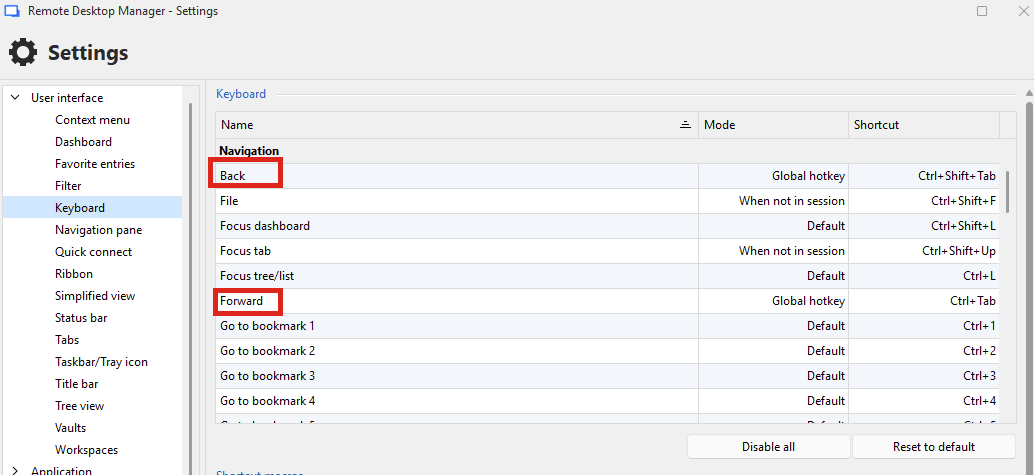
They aren't bound by default. Can you try binding them to the key bindings you prefer? You may want to have them in "Global hotkey" or "Default" mode as well, as otherwise when you're in a session, they will not work. I tried these shortcuts on my end in 2026.2, and they work how you describe. The other keyboard shortcuts are for previous/next tab, which are bound to Ctrl-Shift-left and Ctrl-Shift-Right by default respectively, I believe.
Let me know how these work for you.
Regards,
Hubert Mireault
ae29116f-b25d-4eed-ada6-31784604a0ca.png