
1geodar
Useful Complete Backup Please
I would like to be able to backup all my settings and connections to dropbox and have that all be reliably saved (and restored). Since drag and drop is not available for organizing connections, it would be helpful if all that work to number hundreds of connections could be saved reliably in a safe location. If this feature is behind a paywall please point it out for me.
Thanks!
Drag and drop reordering of connections (navigation menu)
I have learned that one needs to enter the properties of each connection and place a number that will set the connection's ordering in the navigation menu. This is easy if there are 10 or less but gets progressively harder to manage as the number of connection involved increases. Royal TS has this implemented so I don't think it can be difficult. Please see what can be done as my navigation is extremely scattered and disorganized as I don't have the time to mess around with each connection's properties. Additionally I'm always adding connections and every time I do that I have to reorder all the connections.
This would be very much appreciated.
Move DB to shared location
So I know where the locations are ... I'm just trying to change the default start up path so next time I open RDM it defaults to the new location where both my users/logins can open/access the exact same experience. How do I 'change' the paths? Should I do a backup then uninstall and restore from the backup? Would the backup include my settings or is that just the database(connections) that would be available? All my changes to ordering etc. would be lost?
Move DB to shared location
Hello,
Your configuration file for Remote Desktop Manager (RDM) will be under your local AppData folder. You can simply copy the RDM folder to your other profiles to keep the same configuration.
You can check under File > Settings > Advanced to find the full path:
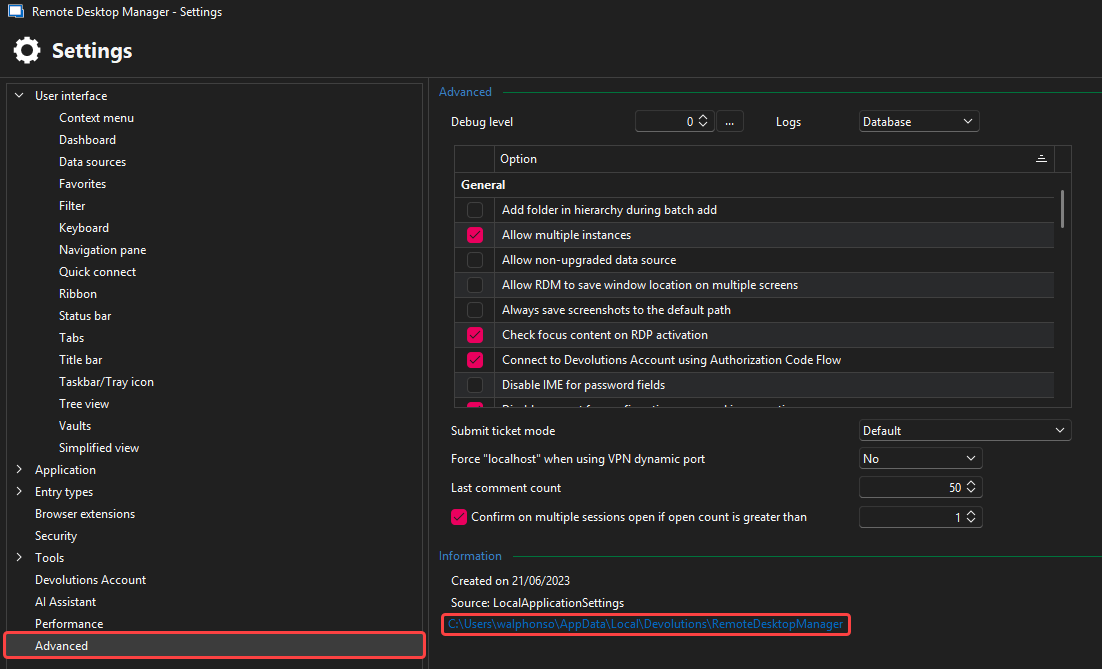
Feel free to reach out if you have any questions or need further clarification.
Best regards,
@William Alphonso
So I know where the locations are ... I'm just trying to change the default start up path so next time I open RDM it defaults to the new location where both my users/logins can open/access the exact same experience. How do I 'change' the paths? Should I do a backup then uninstall and restore from the backup? Would the backup include my settings or is that just the database(connections) that would be available? All my changes to ordering etc. would be lost?
Move DB to shared location
Hi William,
Thanks for that ...
Yes I'm aware I can copy the connections.db file over then change the path, but I also note there is a .cfg file and I don't see where that can be redirected. Again my use case is that I want to start RDM on the same computer (same computer all the time) with either of my credentials and see the exact same thing with any changes made being for applied to either session.
Move DB to shared location
Further, it appears on additional checking that not all data is in the database. my goal is to allow my standard user and domain admin contexts to both open and have the exact same config and data. I am opening both from my standard user login, but I use runas to launch RDM in domain admin context for certain connections that require this.
Move DB to shared location
I have a dropbox folder on root, I would like to point the rdm db to that location so when I run in domain admin context (runas), it will still use the same creds, folder structure, etc. Currently when I run as my elevated user it is loading an empty instance. BOTTOM LINE: how can I repoint the db to the new location "c:\dropbox\devolutions_rdm\database" for my existing user then connect my elevated user instance to that same db?
Ability To Change Folder Order/Hierarchy
Would like to be able to place frequently used folders higher up. Currently after hours of searching that does not appear an option. I don't like being locked into sorting only alphabetically.
LAPS Support
LAPS support is imperative for me. Please let me know if this is on the roadmap (or available behind a paywall) as I don't see it as a credential type in the free version I'm testing. I'm new to this tool and am testing for out IT department since LAPS was implemented and broke all our current RDM tools (RDCMan, Royal TS, etc.).