Move DB to shared location

I have a dropbox folder on root, I would like to point the rdm db to that location so when I run in domain admin context (runas), it will still use the same creds, folder structure, etc. Currently when I run as my elevated user it is loading an empty instance. BOTTOM LINE: how can I repoint the db to the new location "c:\dropbox\devolutions_rdm\database" for my existing user then connect my elevated user instance to that same db?
All Comments (7)
Further, it appears on additional checking that not all data is in the database. my goal is to allow my standard user and domain admin contexts to both open and have the exact same config and data. I am opening both from my standard user login, but I use runas to launch RDM in domain admin context for certain connections that require this.
Hello,
If you are using a SQLite or XML data source, you can move the file and set the path under File > Data source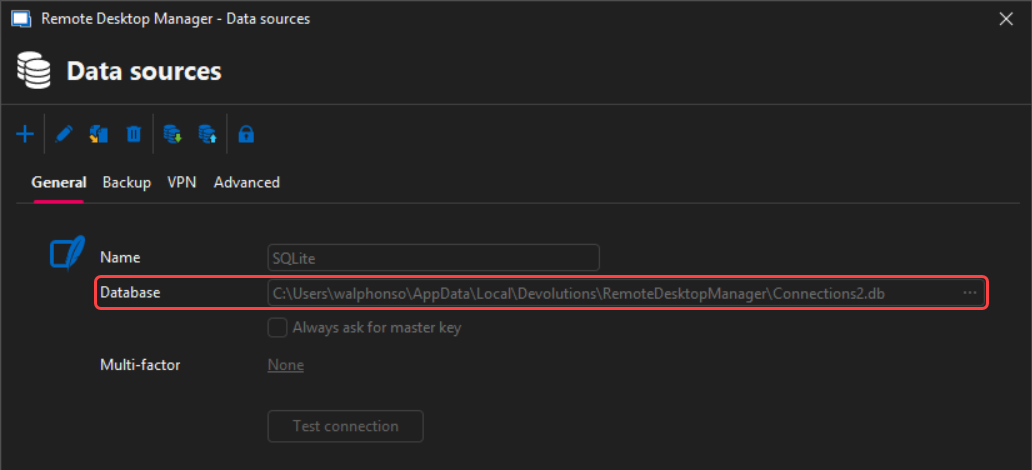
Best regards,
c153a13e-3a7e-40b8-8a32-a57dfb3702bb.png
Hi William,
Thanks for that ...
Yes I'm aware I can copy the connections.db file over then change the path, but I also note there is a .cfg file and I don't see where that can be redirected. Again my use case is that I want to start RDM on the same computer (same computer all the time) with either of my credentials and see the exact same thing with any changes made being for applied to either session.
Hello,
Your configuration file for Remote Desktop Manager (RDM) will be under your local AppData folder. You can simply copy the RDM folder to your other profiles to keep the same configuration.
You can check under File > Settings > Advanced to find the full path: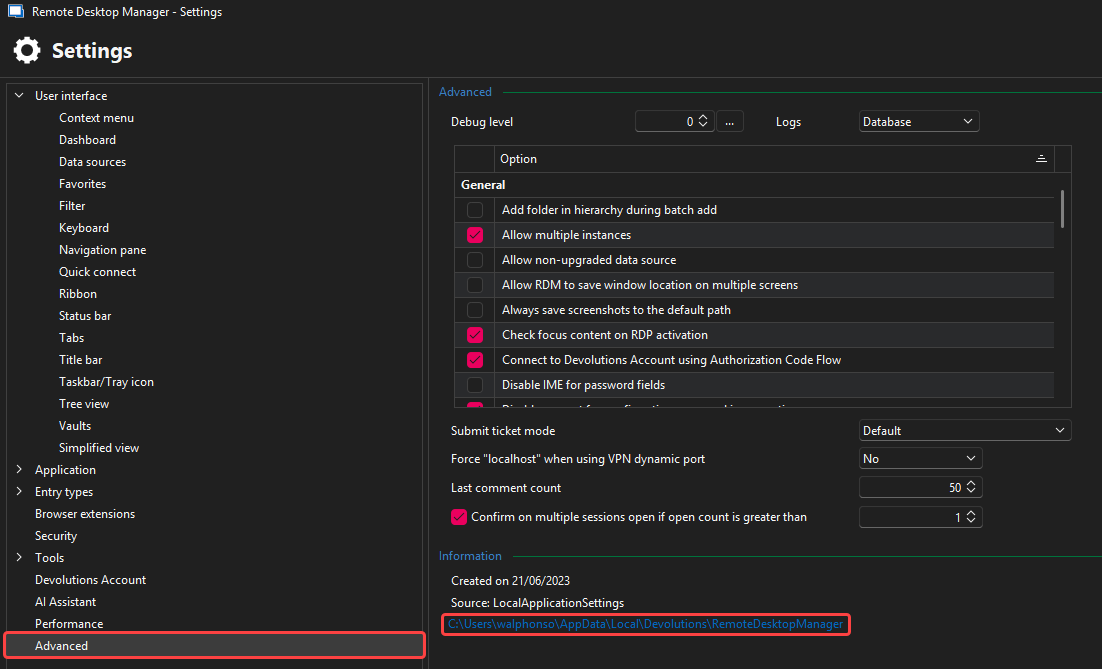
Feel free to reach out if you have any questions or need further clarification.
Best regards,
5f734d7b-9849-46ac-841a-9745249be155.png
Hello,
Your configuration file for Remote Desktop Manager (RDM) will be under your local AppData folder. You can simply copy the RDM folder to your other profiles to keep the same configuration.
You can check under File > Settings > Advanced to find the full path:
Feel free to reach out if you have any questions or need further clarification.
Best regards,
@William Alphonso
So I know where the locations are ... I'm just trying to change the default start up path so next time I open RDM it defaults to the new location where both my users/logins can open/access the exact same experience. How do I 'change' the paths? Should I do a backup then uninstall and restore from the backup? Would the backup include my settings or is that just the database(connections) that would be available? All my changes to ordering etc. would be lost?
So I know where the locations are ... I'm just trying to change the default start up path so next time I open RDM it defaults to the new location where both my users/logins can open/access the exact same experience. How do I 'change' the paths? Should I do a backup then uninstall and restore from the backup? Would the backup include my settings or is that just the database(connections) that would be available? All my changes to ordering etc. would be lost?
Hello,
To move your config file path, you can refer to this KB here: https://docs.devolutions.net/rdm/installation/client/configuration-file-location/
Let me know if this is what you were looking for.
Best regards,