
Guillaume
ISL Support
Hi David and Carl,
Thank you Carl, the path to ISL in the preference solved the problem.
After a restart of RDM all work fine. (First the entrie editing didn't looked like Davids printscreen)
Thousand thanks to everyone for your great support
ISL Support
Hi Maxim,
Unfortunately it doesn't work. I get a message that the ISL Light executable can't be find.
Beside that, I'm a bit confused as well in the entry editing, how do you define which host you would like to connect, or create a new session ID?
Documentation Template for all the vaults
Hi everyone,
Thanks a lot for the improvement. I'm glad you've voted for it and hope lot of users will enjoy it.
Big thanks for the whole Devolutions Team, you're doing an amazing job.
System permission - Different behavior and rights
Hi Carl,
It might have hust needed some holiday. Today everything work as expected ..I can create entries in the root of a Vault...
Some Update maybe... Anyway, it works fine and I thank you for your time.
Entries editing - Different behavior when not in focus
Thank you so much
Add/Edit Custom Variable
Hi Maxim,
Thank you so much, and thank to all the team for your incredible work and responsiveness.
System permission - Different behavior and rights
Hello @Carl Marien
Certainly:
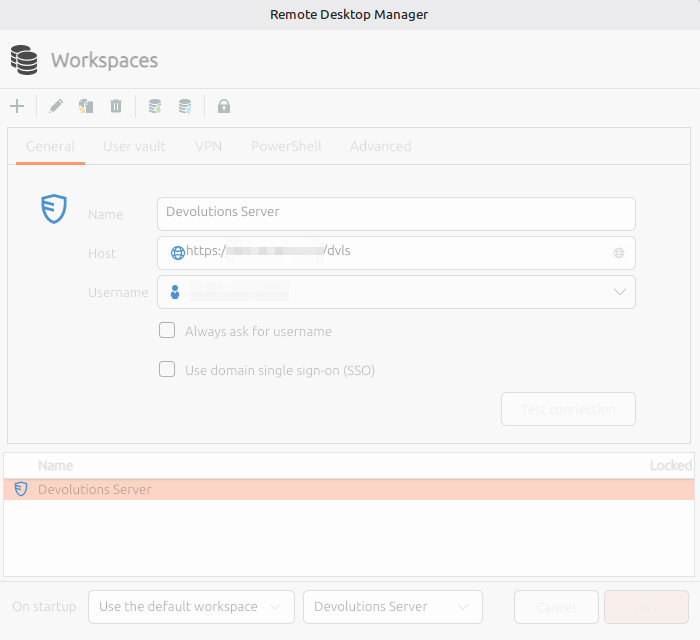
Linux:
Windows
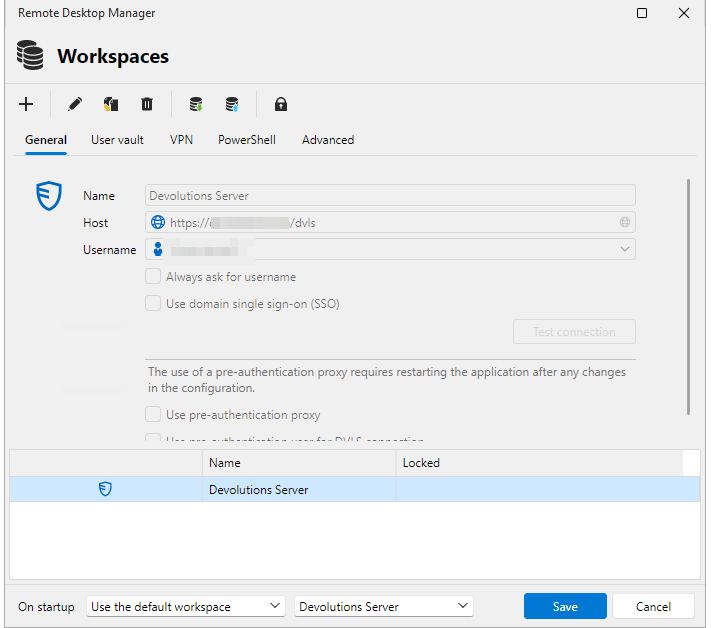
The only difference is, under Linux, my username is written, under Windows, it uses the variable %username% (what resolve the same username as the one entered on the linux configuration)
All Other configurations (User Vault, VPN, PowerShell, Advanced) are identical on both platforms.
Add/Edit Custom Variable
Hi @Nicolas Parr
Thank you very much for your help. I've already opened a thread on the bug section of the forum.
https://forum.devolutions.net/topics/55302/system-permission--different-behavior-and-rights#237463
System permission - Different behavior and rights
Hi Carl,
I don't want to confuse anyone. I've opend feature request about adding custom variable capabilities. As I wanted to make a printscreen of the "issue" I found out I could not go anymore into the properties of the vault. So your colleague David also asked about this diagnostic.
But the administrative permissions is a point: it says no, but in the windows Client, it says yes ..
========== DIAGNOSTIC ==========
LinuxMint 22.3
Kernel version [6.17.0.35]
Container [None]
Desktop environment [X-Cinnamon]
Display server [x11]
Architecture [X64]
Support local password saving [Ok]
Is administrator [Ok]
Is a system administrator [No]
Is a database administrator [No]
Is elevated privilege [No]
Workspace size [1517 / 922]
Is the Internet connected [Ok]
Allow multiple instances [No]
Allow drag and drop [Ok]
Auto-refresh [No]
Debug level [0]
Running since [Running since: 10 min]
========== DATA SOURCE ==========
Data source ID: xxxx
Server name: xxxxx
Description:
Server version: 2026.2.4.0
DB version: 1179
Data source type: Devolutions Server
Data source size: 13.7 MB
User specific settings count: 0
Data source settings size: 9.6 KB
User specific settings size: 231 Bytes
Connection protocol: https
Caching/Offline: ReadOnly (File, OpenMCDFv2)
Allow connection states: True
Add/Edit Custom Variable
========== DIAGNOSTIC ==========
LinuxMint 22.3
Kernel version [6.17.0.35]
Container [None]
Desktop environment [X-Cinnamon]
Display server [x11]
Architecture [X64]
Support local password saving [Ok]
Is administrator [Ok]
Is a system administrator [No]
Is a database administrator [No]
Is elevated privilege [No]
Workspace size [1517 / 922]
Is the Internet connected [Ok]
Allow multiple instances [No]
Allow drag and drop [Ok]
Auto-refresh [No]
Debug level [0]
Running since [Running since: 10 min]
========== DATA SOURCE ==========
Data source ID: xxx
Server name: xxxx
Description:
Server version: 2026.2.4.0
DB version: 1179
Data source type: Devolutions Server
Data source size: 13.7 MB
User specific settings count: 0
Data source settings size: 9.6 KB
User specific settings size: 231 Bytes
Connection protocol: https
Caching/Offline: ReadOnly (File, OpenMCDFv2)
Allow connection states: True
xxxxx
Cache mode: File
Cache type: IntelligentCaching
It's interresting. It says that I'm not a system administrator. Which I am.
I've checked the same on the Windows Client, there it says it is.
System permission - Different behavior and rights
Hi Everyone.
I'm facing a new behavior in the 2026.2.0.6. I'm not allowed to do anything into the root of a vault.
I can't see properties, more or add new entries...
On Windows client, connected with the same user, I have the permissions.
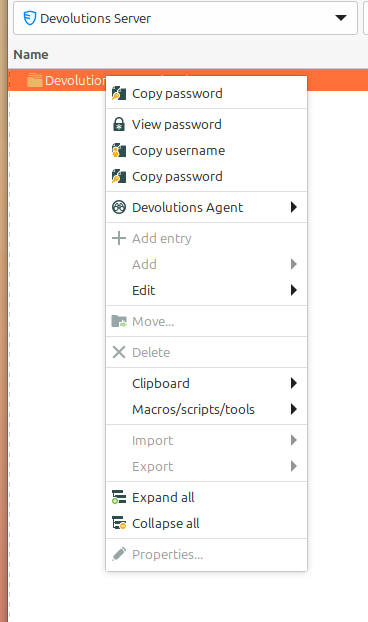
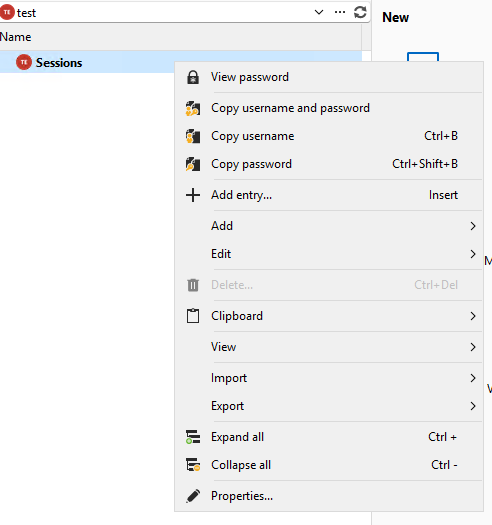
It seems like the system permissions aren't applied correctly.
Thank you in advanve.
Add/Edit Custom Variable
Hi Nicolas,
You're right, under Administration -> System Settings, Custom Variables menu can be found. But that doesn't seems to be the Vault variable.
Under the vault properties, I don't see the possibility to add/edit/delete the custome variables.
Sorry, I wanted to do a printscreen in a test vault but there is a thing in the linux version where I cannot Add entry, or view the properties of the vault. Everything is greyed out, but with the same use under windows, I can access everything. I'll try tomorrow again.
Entries editing - Different behavior when not in focus
Hello,
The last version (2026.2.0.4) ist really nice, however I've noticed a difference in behavior of the editing window, depending on which kind of entry it is.
For example:
Till now it was till now and still on entry type Website: when the window doesn't have the focus the fields stayed kind of active, or reachable, not grayed out. It allows to go copy something and paste it fastly directly in the right field.

Now, while editing an entry (seen on "username password" and RDP till now) and the window doesn't have the focus, the fields are kind of grayed out and not accessible until the window get the focus again. With a left clic it gives the focus on the window + put the cursor in the clicked field. But usind another buttung (right or middel for example), it just gives the focus to the window.

The second really bothering behavior in this new window, if you paste the password into the password field without "showing" the passwort, it will paste the password two times.
Thank you very much.
Add/Edit Custom Variable
Hello,
Could you please add the possibility of Add/Edit/Delete custom variables?
It is actually possible to visualise them, but for changes have to happend under another platform
Thank you very much
Documentation / Attachements Sign
Excellent!
Thanks a lot
URL Copy button doesn't work
Hi Maxim,
I confirm that is works fine.
Thank you all
URL Copy button doesn't work
Hi Guys,
On Entry type "Website", clicking on the copy button near the "website" doesn't work.

Copy of other fields does work.
I whish you a nice day.
Duplicate Entry doesn't duplicate subentry
Hi Simon,
This is exciting, so much things are coming in the 2026.1. I just can't wait.
Do you have an Idea when this version is going to be published?
Duplicate Entry doesn't duplicate subentry
Hi Carl,
I can only confirm the behavior facing by spiral6. And your colleague Gabriel also already confirmed the problem.
The number of more then 3 sub-entries is only a problem in the Linux version. Not to display them, only the create and manipulate them.
I've showed the problem to one of your college as well, you can reproduce the problem like this:
This simple structure. Now duplicate John Doe, you'll be asked if you'd like to duplicate sub-entries. Confirm you want. And that's the result, the sub-entries are not duplicated.

What we also found out, this behavior is only for entries type "entries" and not "folders". If you say I'd like to duplicate the Group1 for example, everything works as intended.

Add a button "Select" in quick Search
Hello Gabriel,
Thanks a lot for the update. I wish you a great day.
Edit/add Variable
Hi Gabriel,
Okay, that's for System settings. The same buttons, with Add/edit/delete, are missing by the entry variables in the properties of Entries and Vaults
By the Vault properties, if no custom variable exist, the "custom variable" section doesn't appear

If I add a custom variable (through a Windows Client), then the section appear, but the possibility of add/edit/delete aren't available
The same behavior exist under entries properties and their variables.
Duplicate Entry doesn't duplicate subentry
Hello Gabriel,
Thank you very much !
Hide or Show colums in Dashboard
Hello Gabriel,
Thanks a lot.
Add Search field for Images
Hi There,
Would it be possible to add a search field in the "Image List" similar to the windows version?
Thank you very much
Add a button "Select" in quick Search
Hi there,
In the Linux Client I'm missing the "Select" button in the quick search (Ctrl+Space).
Would it me possible to add a button to directly copy or show the TOTP Password in case on is configured in the entry?