
STGdb
RDM 14 Beta
@STGdb
Thank you, we found that the theme office 2013 along with the ribbon was causing this crash. Were working on the fix and should come up with a new beta release soon.
Thank you for the bug report!
Best regards,
Downloaded and installed 13.9.6.0 (BETA) and confirming that the new release resolves my issue. RDM isn't crashing any longer. Thanks for the quick fix!!
RDM 14 Beta
I rolled back to 13.9.4.0 (BETA) and RDM runs fine now. I got into the RDM application log:
9/19/2018 6:39:53 AM 13.9.5.0 - 64-bit Error System.Reflection.TargetInvocationException: Exception has been thrown by the target of an invocation. ---> System.NullReferenceException: Object reference not set to an instance of an object.
at Devolutions.RemoteDesktopManager.Managers.ThemeManager.ApplyDocumentManagerSkinElement(DefaultLookAndFeel lookAndFeel)
at Devolutions.RemoteDesktopManager.Forms.FrmMainDocumentManager.cd3ab56e6b166f4ed742b184d2b9b7aa1()
at Devolutions.RemoteDesktopManager.Forms.FrmMainDocumentManager.DoInitializeComponent()
at Devolutions.RemoteDesktopManager.Forms.FrmBaseRibbon.c2003f33b05659ffe7ea3546ebd6ce300()
at Devolutions.RemoteDesktopManager.Forms.FrmBaseRibbon..ctor()
at Devolutions.RemoteDesktopManager.Forms.FrmMainDocumentManager..ctor()
--- End of inner exception stack trace ---
at System.RuntimeTypeHandle.CreateInstance(RuntimeType type, Boolean publicOnly, Boolean noCheck, Boolean& canBeCached, RuntimeMethodHandleInternal& ctor, Boolean& bNeedSecurityCheck)
at System.RuntimeType.CreateInstanceSlow(Boolean publicOnly, Boolean skipCheckThis, Boolean fillCache, StackCrawlMark& stackMark)
at System.Activator.CreateInstance(Type type, Boolean nonPublic)
at System.Activator.CreateInstance(Type type)
at Devolutions.RemoteDesktopManager.Managers.UIManager.cd1336d51f5967743cc970d8c549f61e3()
at Devolutions.RemoteDesktopManager.Managers.UIManager.get_FrmMain()
at Devolutions.RemoteDesktopManager.Program.Main(String[] args)
9/19/2018 6:39:54 AM 13.9.5.0 - 64-bit Error Silent System.InvalidOperationException: Splash Form is not displayed
at DevExpress.XtraSplashScreen.SplashScreenManager.CloseForm(Boolean throwExceptionIfAlreadyClosed, Int32 closingDelay, Form parent, Boolean waitForSplashFormClose, Boolean allowUseInDT)
at Devolutions.RemoteDesktopManager.Managers.ApplicationManager.cb94ee7d02a7220c32d7ca1b34efcaafa()
at System.Threading.ExecutionContext.RunInternal(ExecutionContext executionContext, ContextCallback callback, Object state, Boolean preserveSyncCtx)
at System.Threading.ExecutionContext.Run(ExecutionContext executionContext, ContextCallback callback, Object state, Boolean preserveSyncCtx)
at System.Threading.ExecutionContext.Run(ExecutionContext executionContext, ContextCallback callback, Object state)
at System.Threading.ThreadHelper.ThreadStart()
RDM 14 Beta
What is your data source?
Regards
MSSQL datasource and a local datasource. MSSQL is the default
RDM 14 Beta
Could you send me the error report or show the details? Do you have .NET 4.7.2 installed?
Regards
I wish that I could. The popup screen image that I captured disappears before I can click on anything. I then have to kill the Remote Desktop Manager process. I've tried launching it several times and clicking on "Details" or "Send error report" but I am never able to. The popup disappears too quickly. Is there a command-line with debug that I can run?
Yes, I am using .NET Framework 4.7.2 - Windows 10 April 2018 Update (461808)
RDM 14 Beta
Just upgraded to 13.9.5.0 (BETA) from 13.9.4.0 (BETA) this morning and it crashes on me when I launch RDM (32-bit or 64-bit). Windows 10, 1803 and patched up-to-date. I've tried running RDM as a regular user and as an Administrator and same results. It crashes so fast that I can't even send an error report (the crash screen pops up and then disappears instantly). Nothing in Event Viewer. I managed to get a screen capture of it:
Sorry, tried to edit my post but wasn't able to save the changes with the image in the forum:

RDM 14 Beta
Just upgraded to 13.9.5.0 (BETA) from 13.9.4.0 (BETA) this morning and it crashes on me when I launch RDM (32-bit or 64-bit). Windows 10, 1803 and patched up-to-date. I've tried running RDM as a regular user and as an Administrator and same results. It crashes so fast that I can't even send an error report (the crash screen pops up and then disappears instantly). Nothing in Event Viewer. I managed to get a screen capture of it:
Error after upgrading to RDM 13.6.4.0
Thanks for all of the updates. What I did was downloaded 13.5.6.0 (RDM older versions) and did a fresh install on another PC and connected it to the same SQL DB (I had closed my original RDM). Then I upgraded to 13.6.4.0 on the fresh install and went in and removed the PV creds and verified that they were gone (the new ones that I had created with 13.6.4.0). Then I launched the my 13.6.5.0 install from my desktop (the RDM that I use daily) and the PV creds were still there (which would have been the original PV creds).
Duplicates gone, original PV creds available. Issue resolved.
Thanks again for all of the help!!
(comments updated - originally worded incorrectly)
Error after upgrading to RDM 13.6.4.0
Yes, everything is functioning fine (as far as I can tell). I recreated the PV entries in 13.6.4.0 using the same names (so that the existing searches would work as they did previously). If I remove RDM 13.6.5.0 and go back to 13.6.4.0, I should be able to remove the "new" PV entries that I recreate then I can upgrade to 13.6.5.0 and the "old" entries should still be there. Is that correct?
Error after upgrading to RDM 13.6.4.0
I can't test the update (but I did update to RDM 13.6.5.0 this morning) and didn't have any issues. Everyone who was impacted by this had already done the initial workaround (edit the datasource and save it again).
After the workaround, I recreated the Private Vault credentials. Would like to test to verify that the original credentials (or the recreated private vault credentials) are gone - basically checking that there is only one set of PV creds. I sent an email to ticket@devolutions.net
Thanks for the great (weekend) support!!
Error after upgrading to RDM 13.6.4.0
No, nothing similar. I added new entries back in
Error after upgrading to RDM 13.6.4.0
One thing that I just noticed is that my private vault entries are gone now. Are they (possibly) orphaned somewhere? They have my credentials stored in them.
Error after upgrading to RDM 13.6.4.0
Yes, I'm using integrated security. I edited the SQL datasource and selected OK and that resolved the issue. Thanks for the quick update.
Error after upgrading to RDM 13.6.4.0
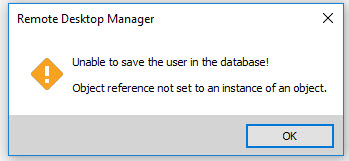
Just upgrade RDM from 13.6.2.0 to 13.6.4.0 and I've run into an issue. This morning, RDM 13.6.2.0 worked fine. I upgraded to 13.6.4.0 and once I launched RDM, I received an error "Unable to save the user in the database! Object reference not set to an instance of an object":
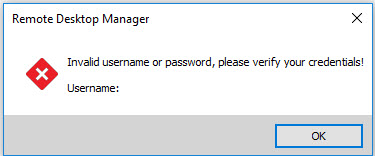
I click on "OK" and get a message "Invalid username or password, please verify your credentials! Username: ":
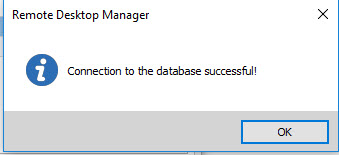
I click on "OK" again and the same popups come up again (I'm guessing one set of popups for my SQL datasource and once for my local datasource?). Anyway, it was fine this morning (prior to upgrading) and I had no errors while upgrading. I ran the 32-bit and 64-bit both normal and "Run As Administrator", same results. With RDM 13.6.4.0, I tested the database connection for my SQL datasource and have no issues:
Thanks
Problems editing Private Vault entries
Hello,
If anyone encounter this issue it is possible that an option collide with other RDM settings.
To fix the issue you have to go File > Options > User Interface > Navigation Pane and check the options *Show Personal Connections Tab (If available)*
Best regards,
Yes, I made the change in my RDM and everything works properly now. Thanks Alexandre for all of your help and effort!!
Much appreciated!!
Problems editing Private Vault entries
Thanks for the quick follow up. Yes, the option is unchecked already.
I don't have anything like the screenshot that you shared (or I've not found it yet). When I click to view the Private Vault, my Navigation Pane never changes. Could I be using a legacy UI or something (pre-Private Vault feature addition?)
"Check if host is online" option turned on - by itself
Yeah, it only happened once. I don't think it will be reproducable - but I posted it just as a FYI in case others report it also
Thanks
Problems editing Private Vault entries
Hello STG,
While selecting a folder in the tree view inside the private vault if you look at the bottom of the dashboard you can see an option saying *Show folder details/Desc. If you uncheck that editing entry though the dashboard should be made on the selected entry from then.
Best regards,
You have to help me with this one, I'm not sure where you are seeing this option? The only thing that I have is "View - My Vault (Private)" from the ribbon. I've been through every folder in my vault (i.e., Navigation Pane), changed the type from Detail, Tree and Large icons. I've looked at my Datasource settings (SQL) and only "Allow private vault" is checked (should I also check "Allow credential repository in private vault")?
When I go into my SQL data source, the Private Vault type is set to "Default" (I assume that is what it should be, I haven't changed it). I've also been through my local data source and I don't see my private vault entries anywhere (only in the SQL data source, which I gather is when the Private Vault is available?).
How do I get to the "tree view inside the private vault"?
Thanks
Problems editing Private Vault entries
Hello,
Just to be sure, have you tried CTRL+F5 in RDM to see if it's not a cache issue?
Are you the only one experiencing this or do you have other users seeing this as well?
Best regards,
Thanks, I've tried CTRL+F5 and clearing the cache in the data source (SQL), same issue occurs. I'm the only user on our team using the Private Vault feature.
Problems editing Private Vault entries
Just a quick follow up, I have 2 (two) Private Vault (PV) entries currently. I've found that when I am able to edit the Private Vault entry properties (by selecting properties of a Navigation Pane RDP session), I can only edit the PV entry that I created first and it doesn't seem to matter which one is selected in the "Entries" pane. However, when I click on the PV entry (either one) and select "View Password", it shows me the correct information for the correct entry.
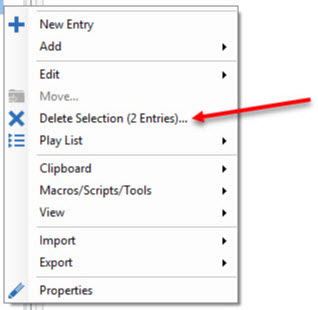
Also, even though one entry is selected in my PV "Entries" pane, when I select the Properties of a Navigation Pane session (see image below), in addition to RDM letting me edit the first entry only, I also noticed that RDM thinks that both PV entries are selected (and according to the menu, RDM offers to allow me to delete both PV entries, even though only 1 entry is selected). RDM isn't presenting the correct menu when I right-click on the Navigation Pane session entries after selecting to edit PV (but at least this menu lets me edit the properties of the first PV entry):

Thanks
Problems editing Private Vault entries
I am using RDM 13.6.2.0 (this happens in both 32-bit and 64-bit) and we have a central SQL server DB connection. I started using Private Vault entries about a month ago (nice feature BTW). And the private vault entries work (search) fine with the sessions they are set up for. However, when I try to edit them (i.e., to change the password) - selecting (View - My Vault (Private) then Properties to edit one of the credential entries):
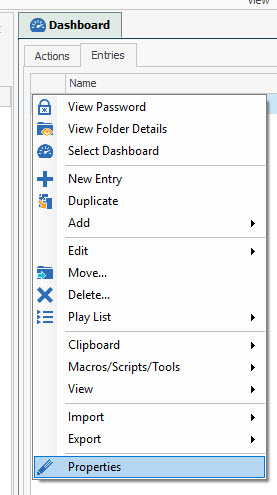
I am presented with a window that shows me this:
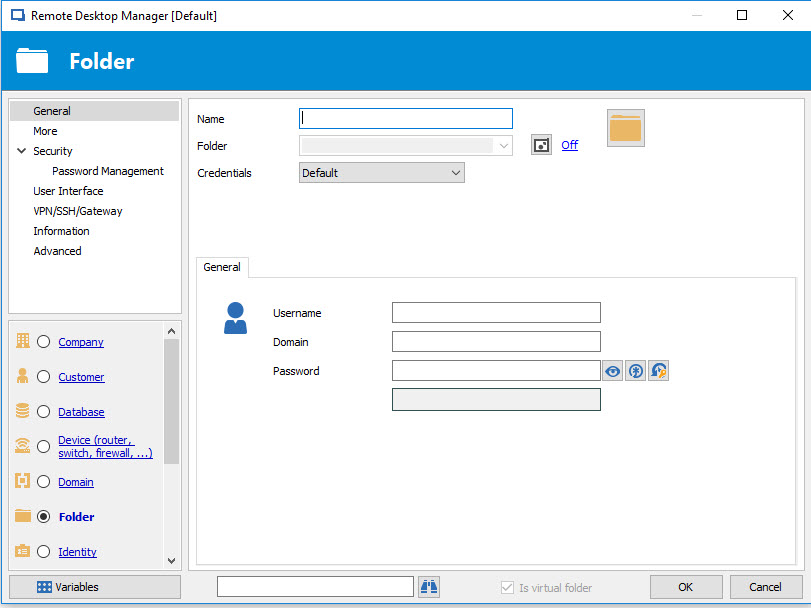
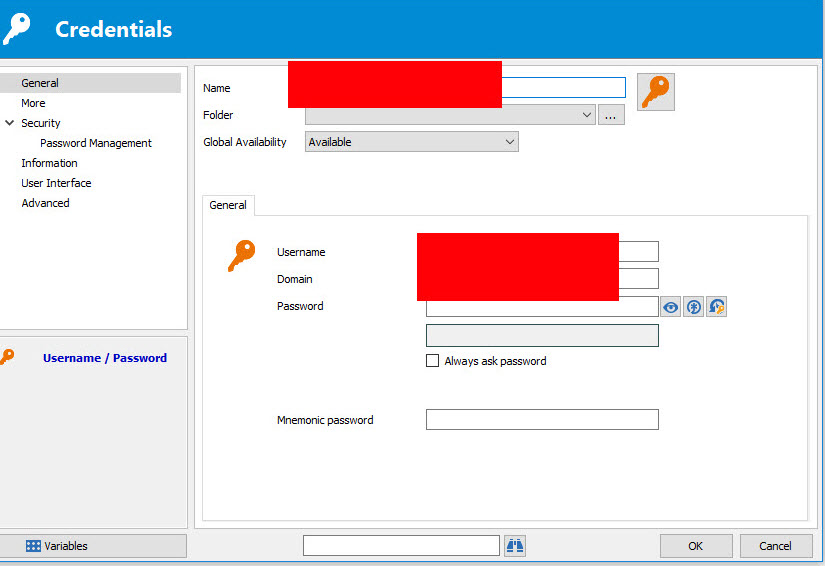
Even if I select "Identity" instead of "Folder" (Folder is the default that it selects), the information is still empty. However, if I select one of my session entries in the Navigation Pane and then select the "Properties" of a session entry (while the Private Vault credentials are still shown in the Dashboard), I am able to edit the Private Vault entry normally:
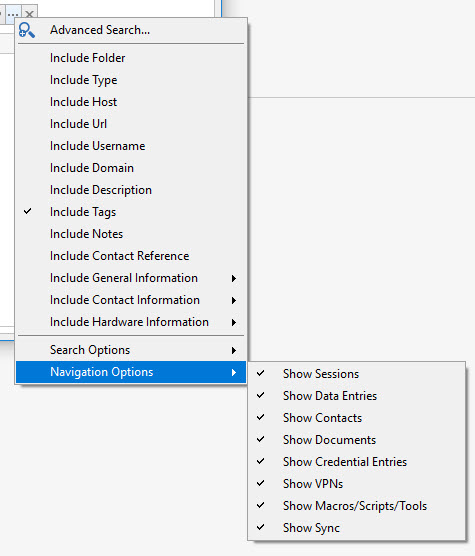
I can select a Private Vault credential entry and then select "View Password" and that works fine (it shows me the credential entry correctly) but I can't edit it there. My filter is set to show Credentials:
Not sure what's wrong.
Thanks
"Check if host is online" option turned on - by itself
This may not be reproduceable but I've been using RDM for a while now (currently on 13.6.2.0). I almost always using RDM 64-bit but I ran into a bug so I closed RDM 64-bit and opened RDM 32-bit (to see if it was reproduceable in the 32-bit version) and it was (the bug is a separate issue). Anyway, since it was reproduceable, I closed the 32-bit app and launched the 64-bit app again and when I did, several of my entries were RED. So I investigated it and found that the "Check if host is online" option was now checked (it wasn't previously checked/enabled). So I unchecked that option and the RED went away. I tried it again (launching thr 32-bit then the 64-bit) and it didn't happen any longer. Just an FYI...
How to remove (delete) a Favorites folder
Thanks Jeff, I didn't even see the "X" there. When I right-clicked on the folder, DELETE was greyed out and same on the ribbon (DELETE is greyed out). I tried to return to the legacy UI but that didn't help.
Looks like we're all good now - thanks again!!
How to remove (delete) a Favorites folder
I am using RDM 13.5.13.0 and I'm having an issue removing a folder from my Favorites tree. We are using a central SQL database for our RDM. I have a few hundred entries in RDM and maybe 50 or so listed in my Favorites. Those 50 are organized into folders (I had four folders but a 5th one appeared (I think recently but technically I'm not sure when it appeared because I don't use it - I just noticed it this morning). The folder is empty, my other folders are not. My folders in my Favorites have the same names as folders in my main vault (although they aren't linked to the folders in the vault but they do have the same name). This folder that is empty, I can't delete it, rename it or anything. How can I remove an empty folder from the Favorites list? Is there a configuration file or a SQL query for it? It looks like I can edit/delete the other folders, just not this one.
Thank you
RDM freezes again when losing focus while closing session
You're welcome - thanks for the follow up
RDM freezes again when losing focus while closing session
We are having an issue that occurred a couple of years back and RDM would freeze when RDM would lose focus while closing an open session. It's been fine since the fix but over the past few weeks, it has returned (not 100% sure when it started, probably when v13 was released). Currently, we are using RDM (v13.0.3.0). This occurs with both x86 and x64 flavors of RDM. Not sure if this is related to the same issue/fix that we had previously, but just FYI...
Thanks,
STGdb