How to remove (delete) a Favorites folder

I am using RDM 13.5.13.0 and I'm having an issue removing a folder from my Favorites tree. We are using a central SQL database for our RDM. I have a few hundred entries in RDM and maybe 50 or so listed in my Favorites. Those 50 are organized into folders (I had four folders but a 5th one appeared (I think recently but technically I'm not sure when it appeared because I don't use it - I just noticed it this morning). The folder is empty, my other folders are not. My folders in my Favorites have the same names as folders in my main vault (although they aren't linked to the folders in the vault but they do have the same name). This folder that is empty, I can't delete it, rename it or anything. How can I remove an empty folder from the Favorites list? Is there a configuration file or a SQL query for it? It looks like I can edit/delete the other folders, just not this one.
Thank you
All Comments (9)
Hello,
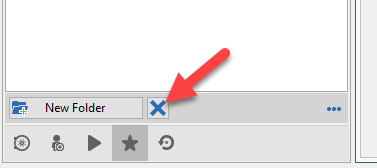
Have you tried to select the folder and press the X button at the bottom of the Navigation Pane to delete it?
Best regards,
Jeff Dagenais
2018-06-13_09-30-47.png
Thanks Jeff, I didn't even see the "X" there. When I right-clicked on the folder, DELETE was greyed out and same on the ribbon (DELETE is greyed out). I tried to return to the legacy UI but that didn't help.
Looks like we're all good now - thanks again!!
Wow. This still hasn't been fixed? Why is there an X button to click on at the bottom, but the actual Delete option from the context menu is grayed out? This thread has 1000+ views so obliviously people are looking for this. Can this be sent up as a Bug that the Delete option is grayed out when it shouldn't be?
Hello,
Just to confirm with you, do you mean the delete button for the "favorite folders", the ones used to sort entries in the favorites?
If so I will open a ticket to improve the context menu specifically for those.
Regards,
Hubert Mireault
Yes, Exactly that. On any other tab I can right-click on an entry and choose Delete. On the Favorites tab I can't do that on the actual entries because you just have to unfavorite them. But, for a folder that I created myself, I should be able to right-click and choose Delete like I can for everything else. I had to use search around for how to do it which brought me to this thread which has 1,088 views as of right now so it seems like it's a popular thing to not be able to figure out on our own. :)
Still hasn't been fixed. Had to create an account here to find the solution...
Hello,
We will increase the priority on this and try to make these changes for our 2023.3 release in late October.
Regards,
Hubert Mireault
Hello,
The context menu of favorite folders has been reworked internally, and will be included in beta version 2023.3.10.0.
It will now be possible to rename, delete, and move favorite folders.
Regards
Jonathan Del Signore
Thanks for the update!