
markusschulze
RDP via RD gateway with Entra MFA doesn't connect to RDP server after gw login
Hi Richard,
I don't get a second MFA request, neither when using RDM nor xfreerdp3, but in xfreerdp3 it works. I'll provide you with debug logs from a xfreerdp3 session as soon as possible.
Best regards,
Markus
RDP via RD gateway with Entra MFA doesn't connect to RDP server after gw login
Hi Richard,
Can I just confirm something? Because there are different workflows here, and Carl wrote that it's not supported, but I think there was a misunderstanding on your environment. Do I understand correctly that you connect via Gateway, then you get the MFA prompt inside the RDP session itself (i.e. not a web view or some other popup); and once you pass MFA your RDP session is "redirected" to the destination host?
Not exactly. I connect via gateway and get a MFA request in Microsoft Authenticator on my mobile phone, not in the RDP Session itself and yes, when I approve the MFA on my mobile, the RDP session should get forwarded to the destination host from the gateway.
Please allow me some time to grab the additional logs...
Best regards
Markus
RDP via RD gateway with Entra MFA doesn't connect to RDP server after gw login
Hi,
I tested tested this with RDM 2026.3.1.1 unfortunately with no success.
The connections auth properties look like this:
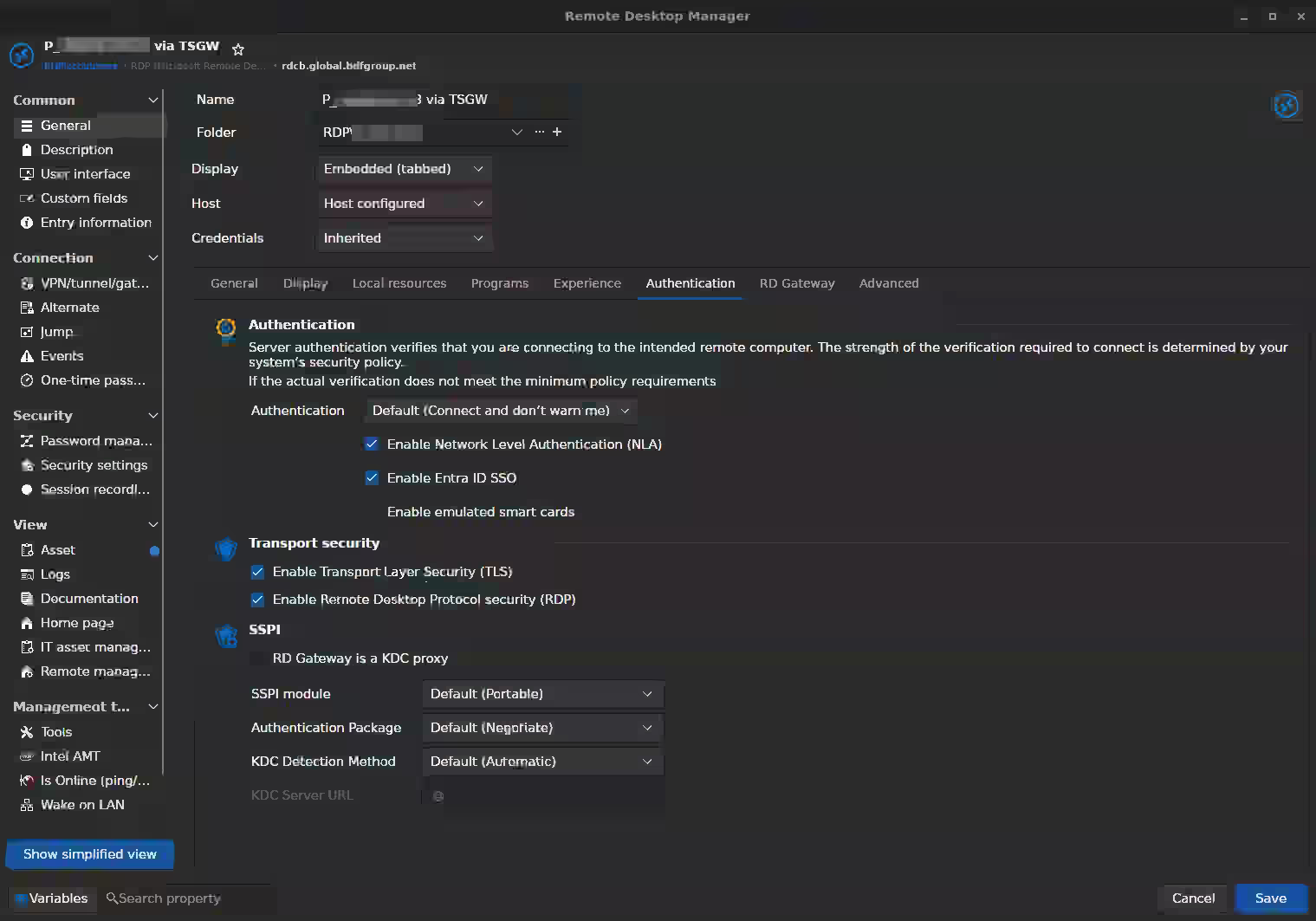
The log attached documents two connection attempts: The first one with SSPI module set to "Default (Portable)", the second one with set to "System".
Both attempts triggered the Entra MFA, but there doesn't come up a RDP connection.
Is that now a bug ?
Thanks,
Markus
RDM 2026.3.0.5 Linux - Application Startup minimized not working
Hi,
in RDM version 2026.3.0.5 on Linux with Gnome on Wayland the setting Application - Application Startup - Startup window state "minimized" "to the system tray" doesn't work right. When RDM is started, the system tray icon appears and after a few seconds, also the application window comes up.
I tried "To the system tray", "To the taskbar" and "Both" with no difference in regards of the application window coming up instead of being minimized.
Great work guys, RDM as improved a lot with the new surface.
Best regards
Markus
RDP via RD gateway with Entra MFA doesn't connect to RDP server after gw login
Thank you for providing the logs.
From what I can see, the gateway authentication itself appears to succeed.
The failure seems to occur afterward, when the client attempts to establish the redirected RDP connection.
Could you also test the same connection using the latest xfreerdp3 directly from the same Linux machine? That would help determine whether this is specific to RDM or an upstream FreeRDP issue. It would also be useful to know:
whether the issue reproduces with a non-MFA account (if available for testing),
the RD Gateway server version,
Based on the logs so far, the issue appears to occur after successful gateway authentication during the redirected RDP connection rather than during the Entra MFA process itself.
Best regard
@Carl Marien
Hi,
despite this has been changed to a feature request (which I appreciate), I tested the RDP connection through the gateway with Entra MFA successfully via pure freerdp.
Best regards
Markus
RDP via RD gateway with Entra MFA doesn't connect to RDP server after gw login
Attached please find the cli-output when the RDP session is started.
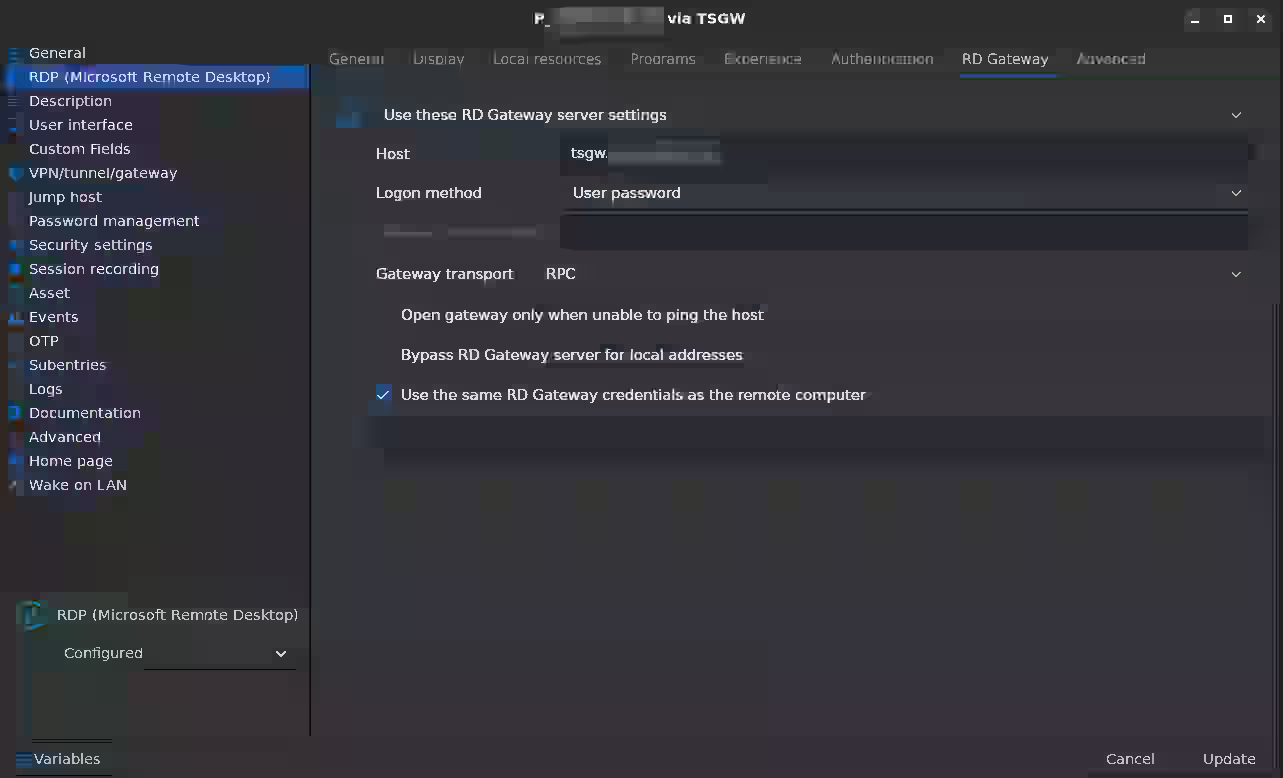
In the log I found the message: "RDGatewaydoesnotsupportHTTPtransport", so I set the gateway transport to RPC with no change in behavior.
RDP via RD gateway with Entra MFA doesn't connect to RDP server after gw login
My company uses an Entra MFA protected RD gateway.
You have to login at the gateway with domain\user and password and accept the login via Microsoft Authenticator.
On Windows, you're then forwarded to the RDP host and the desktop appears. On Linux, RDM is stuck with a blank session tab after the authentication.
[updated]
At the moment my problem is, that I have no clue where the setup process of the RDP connection stops. I need some information how to trace the setup of a RDP connection in RDM. The Application logs don't give any useful information.
Could anyone point out the way to troubleshoot RDP via RD gateway in RDM ?
Starting RDM in bash gives useful output, I'll provide it in the following posts.
My "feeling" is, RDM atm. cannot handle the connection setup via RD gateway, when an Entra MFA is needed. RDM seems not to proceed after the second factor has been prooven. I'd like to bring some evidence for that, but don't know how to setup the right logging / debugging.
I'm using Fedora 43 (Kernel 7.0.13) on Gnome 49.7 with wayland. RDM is on version 2026.2.0.7.
Best regards
Markus
Bulk edit websession settings
Hi,
No, not since I use RDM (for about 2 years now)
This is a single user instance with local db.
Best regards
Markus
Bulk edit websession settings
Hi Tommy,
thanks for the hint, I immediately tried that, unfortunately without success:
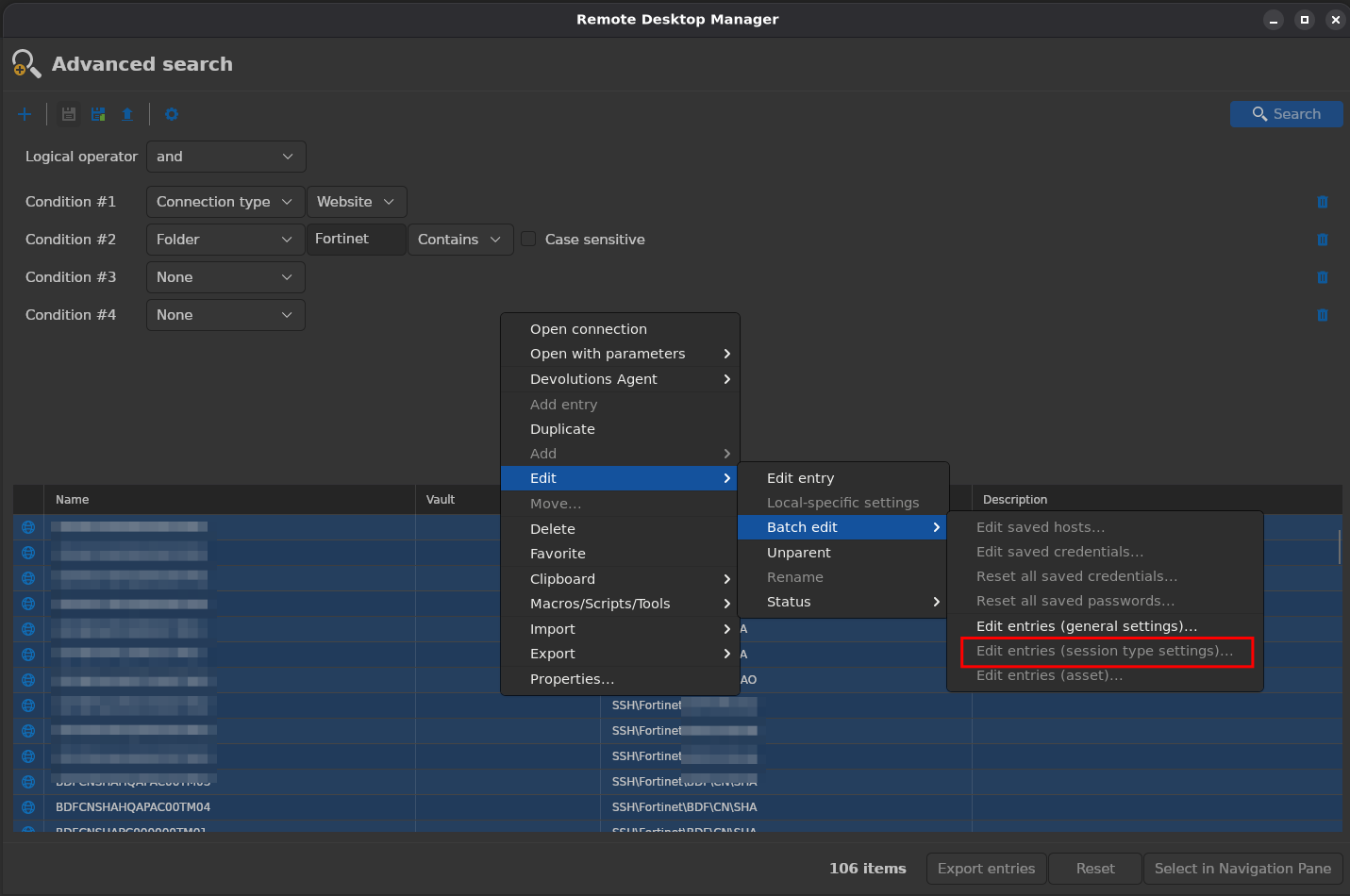
As you can see, session type settings are still greyed out on Linux.
Regarding your second question: no, the settings I need to adjust are in the session type area.
Bulk edit websession settings
Hi,
I have lots of configured websessions configured and want to adjust some settings for almost all of them.
I marked some in my connections tree and clicked "Batch Edit":
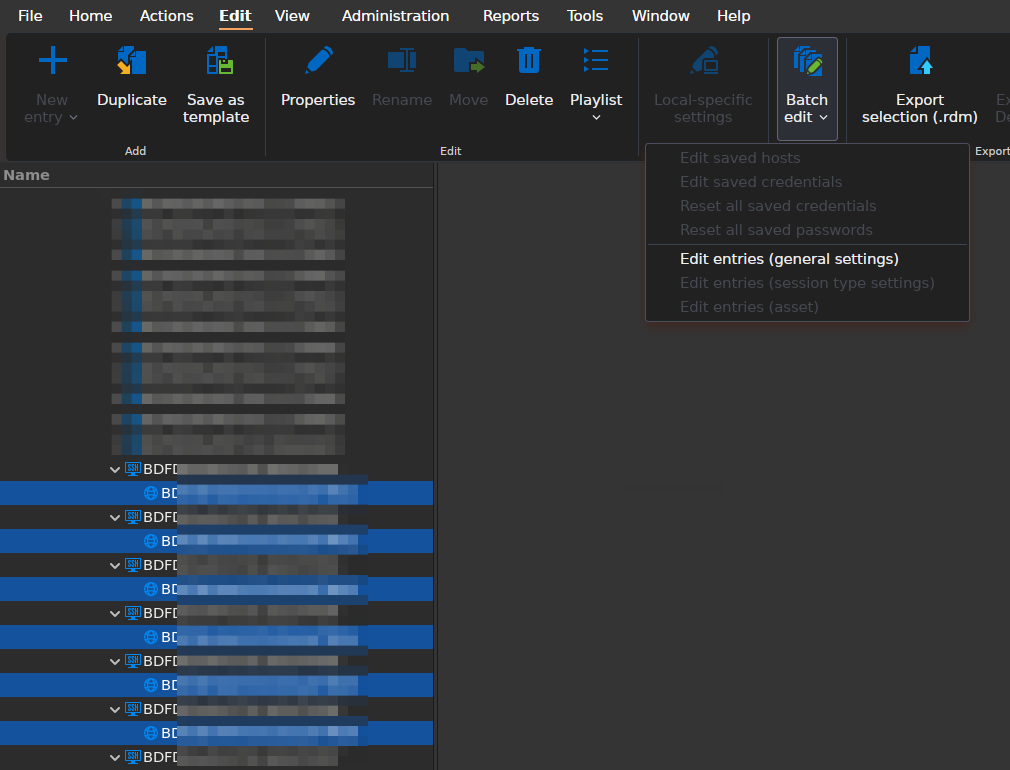
"Edit Entries (session type settings)" is greyed out. What is the right way to edit lots of those session entries at once ?
I'm on RDM 2026.1.2.3 64-bit on Fedora 43 Gnome Wayland.
Create Website entry and use a client certificate to connect
Hi,
the client certificate is imported into the browser and when I access the site, it is chosen automatically. In RDM I created a default website session:

As I'm pretty sure that RDM does not know about any certificate I use in my browser, I was search for an option to provide one, but with no success.
Create Website entry and use a client certificate to connect
Is there an option to configure a website entry with a client certificate to use for the connection ?
Issue connecting to RDP in fullscreen
Hi, I'm facing the same issue.
The display related settings are like this:

Right-click the entry and "open full screen" does not work too:

Right click the connected session tab and "Settings..." -> "Full screen" also doesn't work.
I'm on 2025.2.1.5 on Fedora 42, Gnome 48.4, Wayland
Do you need more information ?
BR
Markus
Clone and move sub-sessions not possible
I'm using web sub-sessions to ssh-sessions to have both kind of access attached to each other.
In general this works quite well, the problem comes in creating the sub-sessions.
On one hand, it is not possible to create the with batch-edit, on the other hand it is also not possible mark all ssh-sessions in one folder, click add -> add session -> new subentry, as this does the step only on the first marked item.
I also tried to duplicate an existing subentry and move it to another ssh-session, but "move" is grayed out.
I remember that I once did that in Windows, so could it be made available on Linux too ?
Linux Command Line
Hi Nicolas,
I can confirm that /Silent and /Help are working now. One minor thing to add is, when RDM is already running and RDM is again called with /Help to see the parameters on the cli again, this doesn't work and no parameters are shown.
Best regards
Markus
Sort of "Folder" List when Duplicating Entries
Hi, the same issue still exists fro Linux in 2025.2.0.9.
Should that stay in this thread or be moved into it's own for Linux ?
Edit: sorting order within folders seems to be random and cannot be adjusted from what I found out so far. Is that right ?
Add Batch Edit in RDM Linux
My post from other request for reference:
https://forum.devolutions.net/topics/44751/add-mouse-jiggler-support-in-rdp-sessions-on-linux#207845
Linux repositories for DEB and RPM packages
Got it,
I must have missed that in the doc, sorry for that.
Linux repositories for DEB and RPM packages
It would be greatly appreciated to have the packages for Linux available in repositories.
These can be integrated in the distributions packet manager, so updates will be downloaded and installed (depending on personal requirements, of course).
Linux Command Line
Hi Nicolas,
you're referencing the command-line-arguments article above. I just realized that this only works for windows.
How do I need to specify cli parameter like i.e. /Silent on Linux ?
I tried "--Silent", "-Silent" and other variations with no success. Also the Linux standard to get the valid parameters by calling "remotedesktopmanager [-?|--help]" does not work at all, unfortunately.
Is there some help available anywhere ?
Thx, best regards
Markus
Add Mouse Jiggler Support in RDP Sessions on Linux
Hello,
It appears there's an issue when using the "Global" logging mode — we'll work on resolving that.
What I now really miss is any kind of "mass edit" of my connections.
Would the batch edit feature available in our Windows version meet your needs?
Best regards,
I can choose batch edit only for general settings:
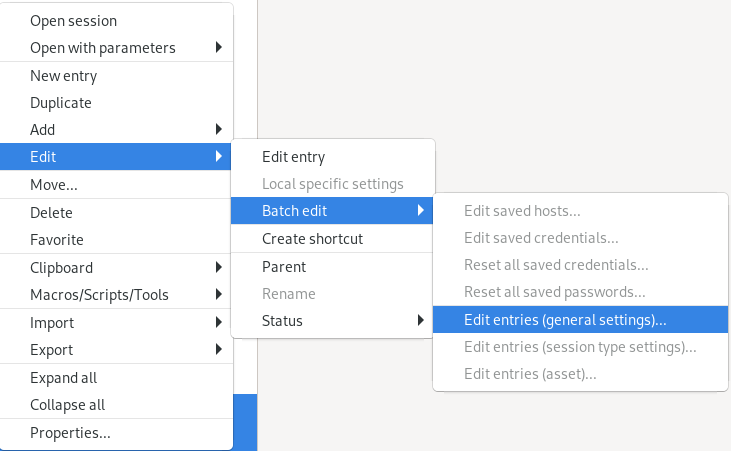
The settings for SSH sessions are not available:
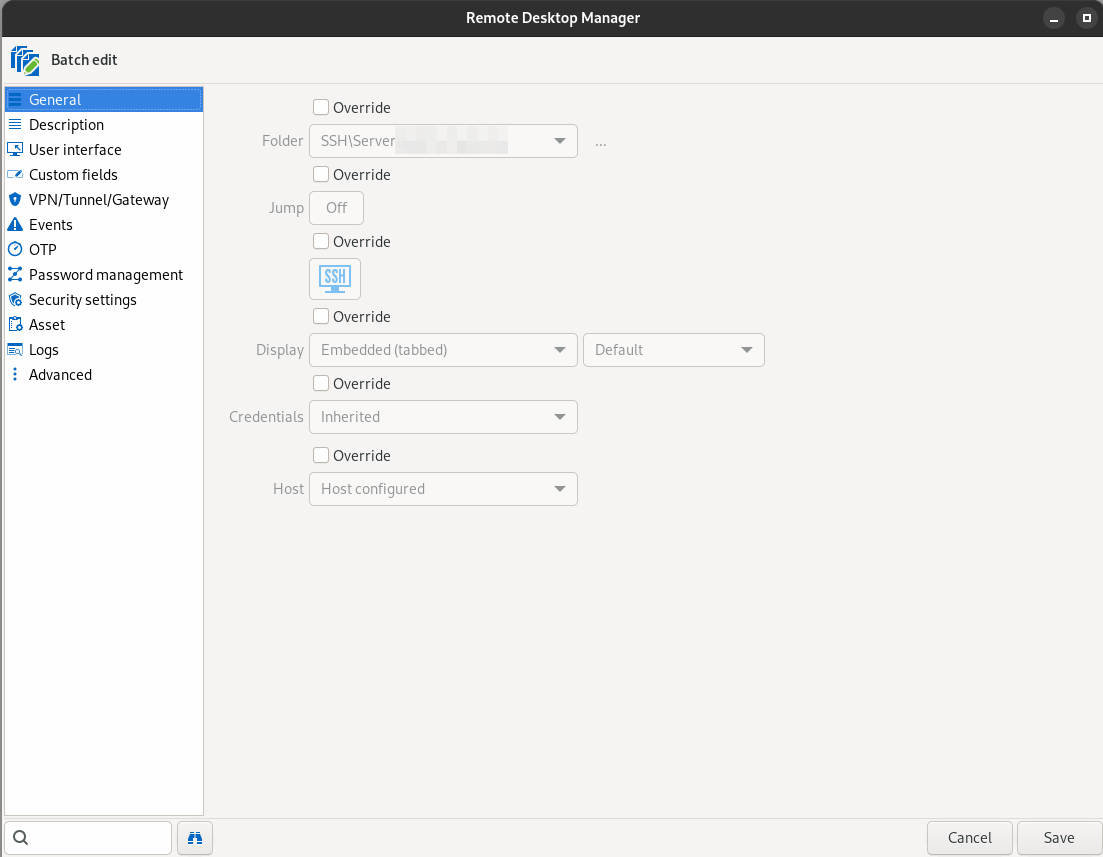
The settings I need to batch edit is located here:
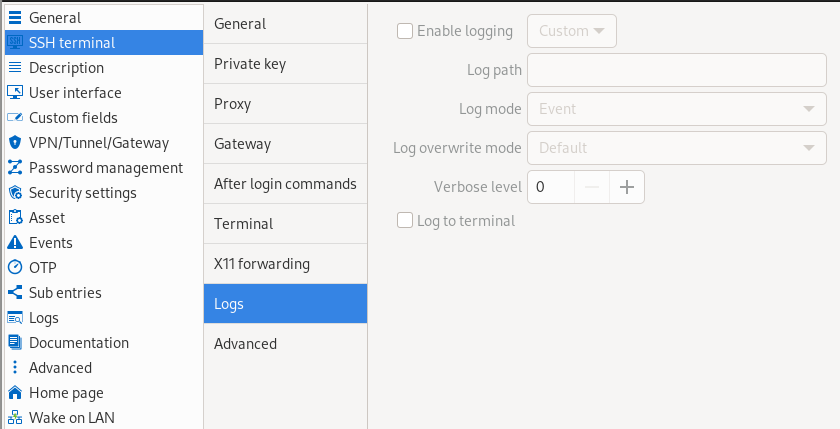
I do not have Windows, so I can't compare it.
Best regards
Markus
Add Mouse Jiggler Support in RDP Sessions on Linux
Hi all,
I started to use RDM a couple of day ago and imported all my connections from remmina.
What I now really miss is any kind of "mass edit" of my connections.
For example, I need to log all printable output to text files locally by default for all terminal sessions.
I tried to set the protocol path in global settings, as well as the mode to overwrite. In the session entry, I set logging to enable, use "Global" and "$HOST$_$DATE$-$TIME_TEXT$.log" as filename.
I also set to log all printable output.
It does not work at all.
So now I found out that I have to configure all sessions separately and set logging to "user defined" and protocol-path to the full path to the file incl. filename.
That's OK, but I have to edit ~200 sessions.
So it would be good to have a mass edit option, which I would like to request here.
Thx, best regards
Markus