
chrispoulter
RDM v2026.3.5 - Open Tabs Moving and Undocking on single mouse click
overall 2026.3.16 has been stable. I dont want to say its fully fixed but i have not seen any issues in the last couple days.
RDM v2026.3.5 - Open Tabs Moving and Undocking on single mouse click
@chrispoulter Hello,
Could you provide a video of the issue please?
Best regards,
@Alexis Beauparlant
I have been attempting to get a screen recording of the issue but everytime i active the screen recorder the issue doesn't happen. Correlation does not mean causation.
As @peterbartels1 stated, its very annoying and rolling back to 2026.2.x is definitely on the table at this point. Both the undocking issue and RDP session refreshing issue are driving me insane.
RDM v2026.3.5 - Open Tabs Moving and Undocking on single mouse click
2026.3.13 undocking issue has gotten worse. Anytime I change tabs and the RDS session has to refresh/rewrites the screen, the tab comes undocked on its own. Quite annoying.
@Alexis Beauparlant @Antoine Mauger @Hubert Mireault
RDM v2026.3.5 - Open Tabs Moving and Undocking on single mouse click
@chrispoulter Hello!
2026.3.10.0 just released. Could you update and let us know if everything works for you? https://devolutions.net/remote-desktop-manager/download
Best Regards,
@Alexis Beauparlant
Testing, will provide further feedback this week.
RDM v2026.3.5 - Open Tabs Moving and Undocking on single mouse click
@Phil 2026.3.9 installed, still getting random tab undocks, but its definitely less frequent.
RDM v2026.3.5 - Open Tabs Moving and Undocking on single mouse click
It is very rare that i want to undock a tab, but when i do I just want to right-click and select Undock.
Thank you Devs for listening to our feedback and reacting quickly when there are issues.
RDM GUI Issues
This issue is resolved. Sorry for the delayed response.
RDM v2026.3.5 - Open Tabs Moving and Undocking on single mouse click
Updated to RDM 2026.3.5 and open several tabs and if i single click a tab it with either select like normal, select and become draggable, or undock from the main RDM window. Results seem to be random.
I am also seeing RDP instability. Screen writes are not stable, switching between tabs (open RDP sessions) I will get blank screens, half written screens, slow response screens in a session, or a normal screen. Results are random.
I am on RDP'd into Windows Server 2025 in an Enterprise environment, running RDM on my jump box.
RDM GUI Issues
Thanks guys!!
RDM GUI Issues
since 2026.2.12 was released I have been seeing alot of GUI issues with RDM on Windows Server 2025 (currently running 2026.2.16)
When I open multiple SSH sessions the sessions tabs cant decide which one should be selected and keeps switching back and forth until i close all affected tabs/sessions.
Now I am also seeing the session list jumping up and down, this has been happening for 5+ min now. Again this only happens with SSH sessions.
Anyone else seeing these issues.
Windows 11 running RDM 2026.2.16 > Remoted into Windows Server 2025 running RDP 2026.2.16 > multiple SSH sessions open
EDIT: Had to force close RDM, ssh tabs/sessions would not close.
@chrispoulter
RDM GUI Issues
since 2026.2.12 was released I have been seeing alot of GUI issues with RDM on Windows Server 2025 (currently running 2026.2.16)
When I open multiple SSH sessions the sessions tabs cant decide which one should be selected and keeps switching back and forth until i close all affected tabs/sessions.
Now I am also seeing the session list jumping up and down, this has been happening for 5+ min now. Again this only happens with SSH sessions.
Anyone else seeing these issues.
Windows 11 running RDM 2026.2.16 > Remoted into Windows Server 2025 running RDP 2026.2.16 > multiple SSH sessions open
Devolutions Server Update Fails - devoltuions.dll access denied
thank you.
I took the instance Offline, then stopped the DVLS Server Serivices. Finally I stopped IIS.
Re-ran the upgrader, successfully.
Been fighting with this since 2024.3.4. We are good now.
Devolutions Server Update Fails - devoltuions.dll access denied
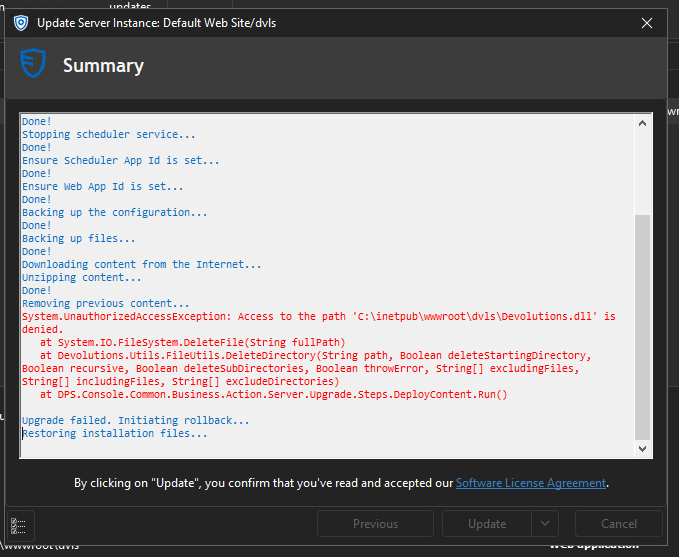
App Version 2024.3.9
Site Versions 2024.3.2
Permissions look correct, but the updater keeps failing on this single file C:\inetpub\wwwroot\dvls\Devolutions.dll
2024.3.20 Locks up with undocked RDP Sessions
Hello,
Thank you for contacting us on that matter,
Unfortunately, I've not been able to reproduce your issue.
Could you please let me know what is the datasource that you are using?
Could you please reset your local configuration?
To do so, please do the following:
1- Close RDM
2- Go under your %localappdata% -> Devolutions folder
3- Rename the "RemoteDesktopManager" folder into "RemoteDesktopManager.old"
4- Start RDM
5- Connect to your data source
Let me know if that helps, if not we can set up a remote session.
Best regards
Open up 2+ (id say 4 or more) RDP tabs on screen 1 in the primary RDM window
Grab a tab and move to screen 2 (or undock)
do some general navigation in the VMs
Reboot one of the sessions
This consistently happens to me and has consistently happened across multiple machines. Keeping everything in the primary RDP window does not seem to have this issue.
2024.3.20 Locks up with undocked RDP Sessions
I have not found a pattern yet, but when i grab a tab (or multiple tabs) and drag them to separate window and/or separate window on a different screen, RDM locks up "randomly".
I have seen this happen when trying to select a session on going from window1 (primary) to window 2 or vice versa. I have not tested using 3 windows yet.
I am forced to kill RDM and relaunch it again.