
stefanbrinskelle
Expired User & Passwort has no effect on RDP or Host
Hello,
If I summarize your two messages, the change you would like is for an entry referencing an expired credential to have a warning, but not block the copy/open actions, is this correct?
Yes
We'd have to think about how best to implement this as there's some challenges:
If we want to add a warning to the dashboard, there's a performance cost as we would need to resolve the credential link. It can be as simple as a direct link, or it could go through a full inherited structure, specific settings, etc.
This would be nice in the RDP or Other Entries:
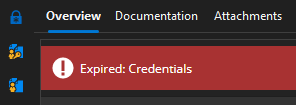
If we want to add a warning when running the entry that does not block the usage of it, we would have to add a separate system (since an expired status blocks execution), or a different status.
I'm not sure if just the first point is enough.
Regardless of these challenges, I think there's value to improving this as it's currently a bit contradictory, and not as informative as it could be.
Regards,
@Hubert Mireault
Task in Dashboard - Entry
It works,
Thank You !
Expired User & Passwort has no effect on RDP or Host
Edit:
Opening the session should still be possible, but the warning message should be displayed.
For example, I have a Website entry that I use to update an expired password. In this case, opening the entry and using Copy & paste or autofill in Browser should still work, even though the password has expired.
The logs contain a mixture of languages
Hi,
in our company, some colleagues use RDM in German, while others use it in English.
Depending on the selected language setting, the logs are permanently stored in that language.
It would be great if the logs were displayed according to the currently selected language setting.


Task in Dashboard - Entry
Hi,
Is it possible to add Tasks to the entry dashboard, similar to Documentation and the other sections?
Currently, I have to open the entry and use the context menu to open a separate Task page for this entry.
Or is there a reason, why there is a separate Task page ?

And also in the properties?

Task in Dashboard - Overview
Hi,
is it possible to add Tasks to the Dashboard, similar to the "Entries"?
When I click on a Task, the Task List should open.
I think the same option as for the Entries would work well.
By default, it could be set to "Never".

Expired User & Passwort has no effect on RDP or Host
Hi,
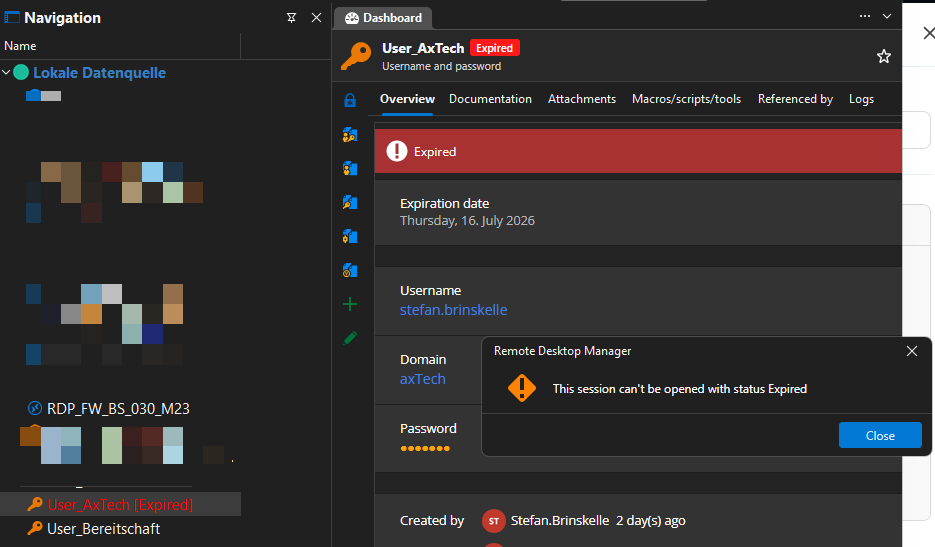
When the login credentials have expired, I can no longer view or copy the password. I think this behavior is correct.
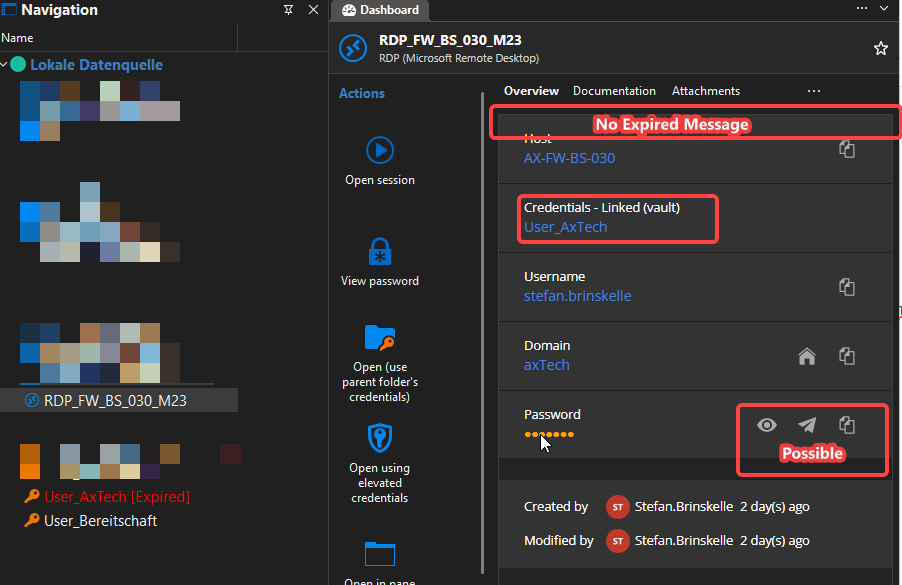
However, I can still copy the password from the RDP / Host entry (or any other entry that uses these credentials).
I would expect the RDP / Host entry to behave the same way as the login credentials entry:
Copying the password should display the same error message.
Starting a session should also be blocked with the same error dialog.
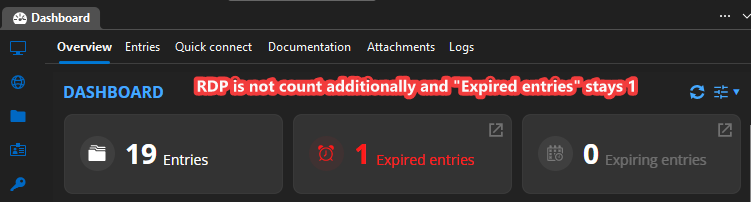
However, on the dashboard I would only like to see one notification about the expired credentials, not an additional notification for every RDP / Host (or other entry) that references those credentials.
Status Message - Custom input field
If I could choose, I would implement it like this:
On Top is the Status as a Dropdown-Box like the Mode in the picture.
Options: No Status, Locked, Warning, ...
Below that is the text input field, as shown in the screenshot, labeled "Message".
This way, you can see the text without having to click an extra button.
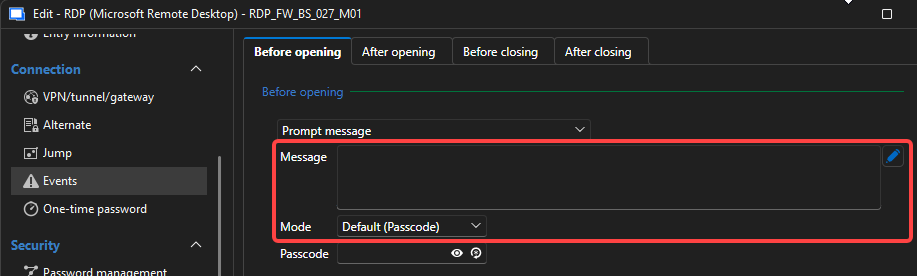
Regards Stefan
Status Message - Custom input field
I would like to have a dedicated input field for the status message.
Recently, I have had to customize the warning messages several times. This requires additional effort because I always have to select the status first before I can access the text field.


Solution:

I receive 4 warnings for a single entry.
I have one entry that is linked three times.
Since the entry is about to expire, I receive four separate warnings for it.
Is this an error or ok ?

Action Center - Entry expiring - differnent duration per Entry
Hello,
I have passwords that expire after a certain period of time.
However, some passwords can only be changed after they have expired.
Others must be changed before they expire.
I would now like to receive a warning in RDM.
For certain passwords, I would like to be warned 14 days before they expire, while for others, I would like to be warned only on the day they expire (0 days before expiration).
However, the settings currently only provide a single global expiration warning period.

I would like to have an additional "Entry Expiring" setting for each individual entry.
By default, this option should be set to "Default", so that the global setting is applied.
Alternatively, it should be possible to specify a custom warning period for that specific entry.

I only want to receive a warning when I actually need to take action.
Otherwise, I end up with many warnings that I cannot act on because I still have to wait a few more days before the password can be changed.
Kopie Data from linked Host ( Dashboard )
If a username and password are linked to an entry, you can copy that data. But you cannot copy the hostname of a linked Host.


If I nest the entries, nothing can be copied anymore.


Disable "Open Session"
Hello,
I didn't think about the permissions.
But these are all permanently assigned by our administrator.
They are all Inherited.
I'm already using the window with the messages.
It tells the user that the button does nothing...
I just thought that directly disabling it in the entry would be the best option, since your two methods are just workarounds.
Disable "Open Session"
Is it possible to deactivate the button "Open Session" ?
RDP, SQL Server Management Studio, Dameware, SSH terminal
Sometimes these entries are only used to provide login credentials.
For example, it only works via a JumpHost that doesn't have RDM installed.
Therefore, I would like to disable the "Open Session" button.
There might be a jump host in the future, so I want to create the entries correctly from the start.
Different behavior of the prompt message
The info window with the question mark opens variably.
That would also be the optimal solution for this window.
But I think around 12 lines would be quite good by default.
Unfortunately, 5 are too few for a bit more text.
Different behavior of the prompt message
If a passcode is entered in the prompt message, the window behaves differently.
The specified text will be highlighted.
The window does not display everything at once, but has a scrollbar.
No scrollbar for lines up to 5.
There's no limit without a passcode.
A scrollbar never appears here.
Perhaps it would be possible to configure how many lines are needed before a scrollbar appears.
Default 20 ?


Message in OTP
Is it possible to send a message to the OPT?
Reason:
I would like to specify in this window where the OTP can be found.
Which app?
Email?
Hardware token?
Etc.
So that my colleagues know exactly where to look.
I don't want to include this in the general description because it contains many other things...


Copy combined password in "User and Password"
I have a password consisting of 4 fixed characters and a 6-character OTP.
I saved both in the "User and Password" entry.
How can I copy the combined password? ( XXXXYYYYYY )
I can only copy them separately with this entry.
Alternatively, I can create an "RDP" entry and define the combination in it.
I can then copy the combination from this entry.

Is it possible to add this setting to the "User and Password" section?
So that a separate RDP entry isn't needed just to combine the password.
"View passwort" in "Host"/"RDP" Entry
Is it possible to also include the entries "Copy Host" and "Copy domain" ?
"View passwort" in "Host"/"RDP" Entry
I just noticed that the button I want already exists.
It's under "Home"
Is it possible to add this button to the Actions menu?
I would like to have this button in the Actions for the Host and RDP entries.

"View passwort" in "Host"/"RDP" Entry
I'm using the "Host" to provide all login information:
Host / Username / Password / Token
I need to enter all three of these into the Client.
If I use the "Copy Actions", I have to fill out the comment 3 times.
Currently, I'm using the eye icon. But if there's a very long description, I have to scroll...
I'd also like to have the option to "View password" in the Actions menu. "View password"
Because in the "View the Current password" window I can copy everything without having to fill in a comment.

"View passwort" in "Host"/"RDP" Entry
Unfortunately, we cannot use a jump host.
Therefore, we always have to copy the username and password.
A comment must be entered for all actions.
Therefore, I always have to enter a comment twice.
Except when I use this eye.

Can you also implement the "View password" Action for RDP and Host?
Currently, this action is only available for "Username and Password"


I'm already using this setting, but it only brings up the Copy action and not the "View password"
Perhaps the "View password" option could also be added as such a setting.
Events - Prompt message - The window size only allows space for 4 lines.
Yes, I would even prefer that.
This is what I'm currently doing:
With Notepad++
Events - Prompt message - The window size only allows space for 4 lines.
Important information is displayed here.
Often, more than four lines are used.
Unfortunately, this makes the overview in this window poor.

The window can be enlarged here.
I would like to see that here as well.

Order of the dropdown
The photo is from the German-language version.
But you can see that the order is not alphabetical.
Similar ticket
https://forum.devolutions.net/topics/51972/order-of-the-dropdown-under-one-time-password
