
pickwick81
"Unable to open the VPN connection" for RDM 2025.3.0.9 under Ubuntu 25.10
Once you have installed this version, please generate the logs with the steps mentioned by my colleague and provide them to us using the same secure link.
Done, thanks for your help. Though, looks like I still can't see the root cause of what's wrong with my settings. :-)
[...]
[VPNNativeSshOpener.Open] Calling ConnectionManager.OpenConnection()...
[VPNNativeSshOpener.Open] ConnectionManager.OpenConnection() returned: NULL
[VPNNativeSshOpener.Open] FAILED: ConnectionManager.OpenConnection returned NULL, returning null
[VPNNativeSshOpener.Open] === END (FAILED) ===
[VPNManager.OpenVPN] vpnOpener.Open() returned: NULL
[VPNManager.OpenVPN] Result is NULL - VPN opener failed!
[VPNManager.OpenVPN] === END === Returning: NULL"Unable to open the VPN connection" for RDM 2025.3.0.9 under Ubuntu 25.10
For logging in your Tunnel settings under the "Logs" section, you can enable the logging and set the Verbose to "2" it should provide us with some additional details
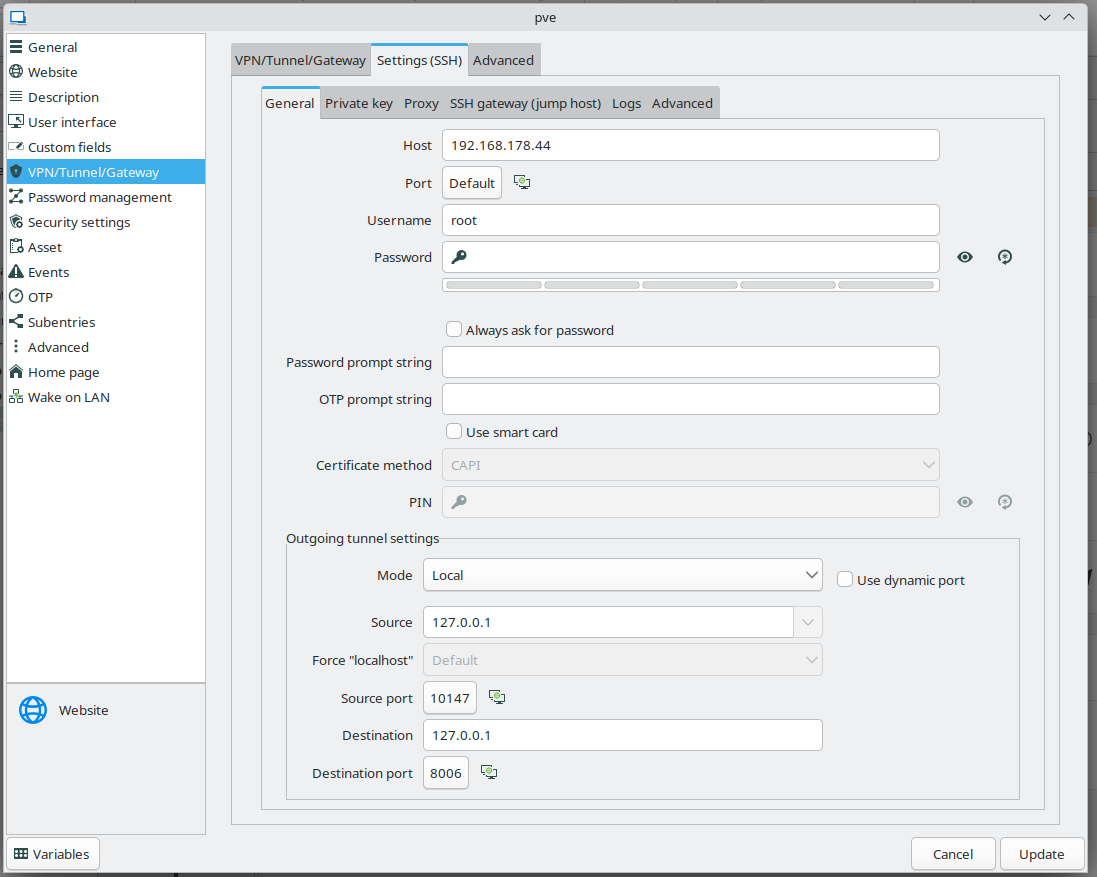
Tried that already, but the log file is empty. That makes me believe there's something wrong with the settings itself and RDM doesn't even start establishing the SSH tunnel for some reason. But I can't see the reason and things look OK to me, no wrong paths to private keys or something.
How to disable HTTPS checks for website entry?
Hi everyone,
I'm migrating from Windows 10 to Kubuntu 25.10 and would like to take RDM with me. When connecting to HTTPS secured websites using self-signed certificates, in Windows one was able to ignore HTTPS errors at least for the embedded browsers I was using. I can't see a similar setting with Linux, though still using the same XML file like with Windows.
Is that not supported with the embedded browser used here?
"Unable to open the VPN connection" for RDM 2025.3.0.9 under Ubuntu 25.10
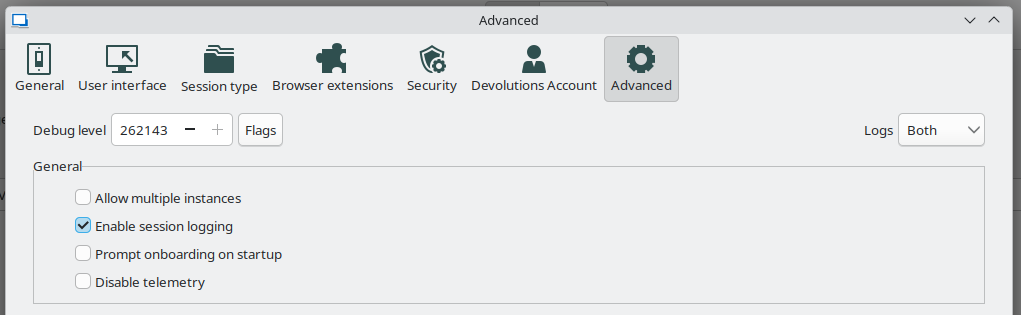
When enabling debugging in the settings, should I be able to see anything in the application logs window? Because for me it-'s always empty.
"Unable to open the VPN connection" for RDM 2025.3.0.9 under Ubuntu 25.10
Hi everyone,
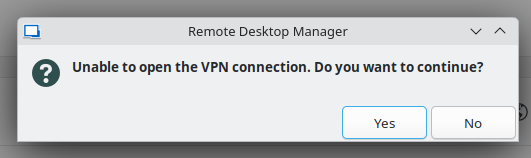
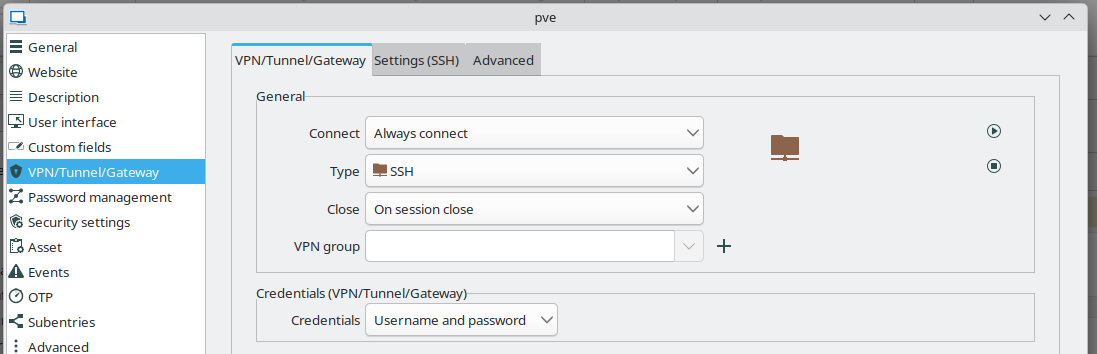
I'm trying to migrate from Windows 10 to Ubuntu 25.10 and am running into a problem when using my existing data source XML file. While I was able to import it properly, none of the connections work and I only get the following error message. But I don't see what the actual problem is when trying to create the VPN connection.
Any ideas on where I can get more details from? Thanks!
RDM 2024.2.20 terminates when using SSH Secure Gateway with MS Edge browser
Still crashes:
Application: RemoteDesktopManager_x64.exe
CoreCLR Version: 8.0.824.36612
.NET Version: 8.0.8
Description: The process was terminated due to an internal error in the .NET Runtime at IP 0x00007FFCF8541B5C (0x00007FFCF8530000) with exit code 0x80131506.
Name der fehlerhaften Anwendung: RemoteDesktopManager_x64.exe, Version: 2024.2.21.0, Zeitstempel: 0x66960000
Name des fehlerhaften Moduls: coreclr.dll, Version: 8.0.824.36612, Zeitstempel: 0x6696b815
Ausnahmecode: 0xc0000005
Fehleroffset: 0x0000000000011b5c
ID des fehlerhaften Prozesses: 0x40f4
Startzeit der fehlerhaften Anwendung: 0x01daffccf64bcc35
Pfad der fehlerhaften Anwendung: C:\Users\tschoening\Downloads\Devolutions.RemoteDesktopManager.Bin.2024.2.21.0\RemoteDesktopManager_x64.exe
Pfad des fehlerhaften Moduls: C:\Program Files\dotnet\shared\Microsoft.NETCore.App\8.0.8\coreclr.dll
Berichtskennung: 26aac117-ef70-4fe1-ae09-ec6ff4a01dde
Vollständiger Name des fehlerhaften Pakets:
Anwendungs-ID, die relativ zum fehlerhaften Paket ist:
Fehlerbucket 2288332117829734273, Typ 4
Ereignisname: APPCRASH
Antwort: Nicht verfügbar
CAB-Datei-ID: 0
Problemsignatur:
P1: RemoteDesktopManager_x64.exe
P2: 2024.2.21.0
P3: 66960000
P4: coreclr.dll
P5: 8.0.824.36612
P6: 6696b815
P7: c0000005
P8: 0000000000011b5c
P9:
P10:
Angefügte Dateien:
\\?\C:\ProgramData\Microsoft\Windows\WER\Temp\WER6736.tmp.dmp
\\?\C:\ProgramData\Microsoft\Windows\WER\Temp\WER77A2.tmp.WERInternalMetadata.xml
\\?\C:\ProgramData\Microsoft\Windows\WER\Temp\WER77E2.tmp.xml
\\?\C:\ProgramData\Microsoft\Windows\WER\Temp\WER77EF.tmp.csv
\\?\C:\ProgramData\Microsoft\Windows\WER\Temp\WER7800.tmp.txt
Diese Dateien befinden sich möglicherweise hier:
\\?\C:\ProgramData\Microsoft\Windows\WER\ReportArchive\AppCrash_RemoteDesktopMan_2fee298bb1d316cc29a35098ee44af7e3fc9e04d_05bfd4fa_6ec76ee9-83b7-4c2c-8137-2297005453f8
Analysesymbol:
Es wird erneut nach einer Lösung gesucht: 0
Berichts-ID: 26aac117-ef70-4fe1-ae09-ec6ff4a01dde
Berichtstatus: 268435456
Bucket mit Hash: 722b32423642c238cfc1c9efe35bcf81
CAB-Datei-Guid: 0
RDM 2024.2.20 terminates when using SSH Secure Gateway with MS Edge browser
Sorry for the confusion, but for me, it's the same issue.
It's not: MS Edge through SSH Secure Gateway crashes the app at some random point with the stacktrace I've posted. Google Chrome instead doesn't work at all through SSH Secure Gateway because of some internal setup issues and/or problems with proxy handling. What is done under the hood for MS Edge and works there isn't done for Google Chrome (anymore). The difference is that with Google Chrome there's no connection possible at all through SSH Secure Gateway/proxy and the app does not crash.-
Two totally different und totally unrelated problems.
Have you sent the minidump?
Yes, so I strongly suggest you focus on debugging that and the app crash in this thread.
RDM 2024.2.20 terminates when using SSH Secure Gateway with MS Edge browser
I don't get your point, the other thread is for totally different settings with Chrome instead of Edge, totally different problem. If you want to debug that one, then please answer in that thread, I don't see how your instructions here have anything to to with the crash. Here Edge + SSH Secure Gateway are working until the app crashes, no need to change any settings.
RDM 2024.2.20 terminates when using SSH Secure Gateway with MS Edge browser
Simply name your file “FRM-42759” to easily identify it.
Done. I've started RDM, opened a connection with MS Edge and SSH Secure Gateway and didn't do anything else, because I don't know when the app crashes. So no idea if you see anything useful without me triggering the actual issue, but In don't know what that is, so... :-)
Proxy with Web Browser session
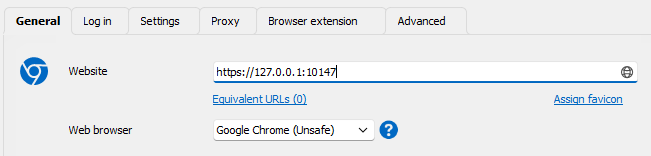
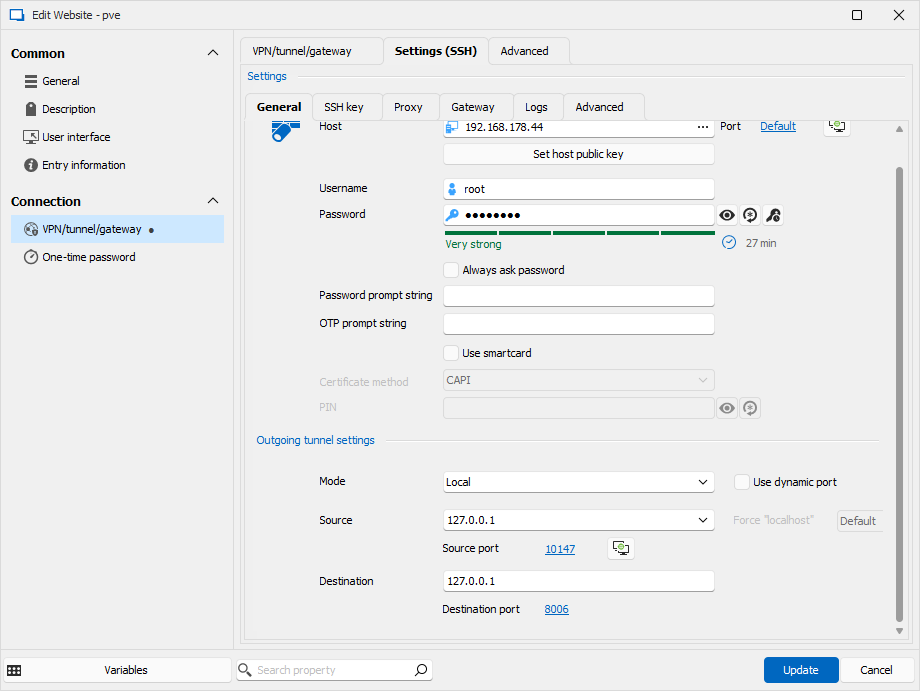
There's no global proxy configured there, I only use SSH Secure Gateway, therefore VPN settings per web-UI entry or proxy setting per web-UI entry. Like in my screenshots, the tab "proxy" to by-pass that Chrome doesn't use the SSH Secure Gateway automatically.
Proxy with Web Browser session
Can someone please confirm that socks5 proxy is still working with Chrome? Thanks.
I need to tunnel web-UIs through SSH, am following the Secure Gateway docs for that and those don't work with Chrome for me, only with MS Edge. The problem is that with Chrome, the port in the requested URL isn't changed to some random port listening locally to be passed through the implicitly created Socks5 proxy of the SSH Secure Gateway with its dynamic port forwarding. With MS Edge that is changed, so if I configure https://127.0.0.1:8006 to be requested, in the URL bar of MS Edge that is changed to https://127.0.0.1:12345, while actually 127.0.0.1:8006 is requested through the tunnel. The URL bar of Chrome contains 127.0.0.1:8006 always and it really tries to request that locally instead of through a tunnel.
Though, with MS Edge RDM is regularly crashing for me. So I tried to get Chrome to use the tunnel without explicitly configuring SSH Secure Gateway in the VPN settings and instead configuring the tunnel as proxy manually. But again, Chrome doesn't use the configured proxy to resolve anything, it always directly accesses the local machine. OTOH, when using cURL, things work instantly like expected:
C:\Users\tschoening>curl -k -x socks5://127.0.0.1:3390 https://127.0.0.1:8006
<!DOCTYPE html>
This looks to me like proxy support doesn't work anymore for Chrome. My current workaround is to use VPN settings in the web-UI entry and configure static ports to use there. But that requires to have the same SSH settings multiple times and stuff, that's what shouldn't be necessary when using SSH Secure Gateway.
RDM 2024.2.20 terminates when using SSH Secure Gateway with MS Edge browser
Yes, it still crashes regularly and the stacktrace makes pretty much clear that there's a memory corruption problem in the app which needs to be debugged.
RDM 2024.2.20 terminates when using SSH Secure Gateway with MS Edge browser
Hi everyone,
I'm trying to access multiple different web interfaces from e.g. Proxmox Virtual Environment and Portainer using RDM over a SSH Secure Gateway. While that works for MS Edge as chosen browser, that combination terminates the whole app pretty often. Either when browsing the sites after a few minutes or when closing the tab of the site or... I didn't find any one reliable trigger currently.
Changing to Chrome isn't that easy, because for some reason the SSH Secure Gateway setup doesn't work the same way. With Edge, the URLs seems to be automatically changed as necessary to pass the SSH tunnel. With Chrome that isn't the case and I need to manually create the and maintain the tunnels, which is a tedious work with multiple different web apps at the same host. Additionally, that shouldn't be necessary at all in theory, because Edge and Chrome share a lot of the same codebase. I've already tried multiple settings with Chrome and proxy as well, but nothing worked. The only thing working is creating a SSH tunnel manually for each endpoint of interest.
So, I would like to keep the MS Edge-setup as it's easier to maintain, but the app crashes are very annoying. Would be great if one could have a look at why they happen. Thanks!
Name der fehlerhaften Anwendung: RemoteDesktopManager.exe, Version: 2024.2.20.0, Zeitstempel: 0x66960000
Name des fehlerhaften Moduls: ntdll.dll, Version: 10.0.19041.4522, Zeitstempel: 0x8a1bb6f3
Ausnahmecode: 0xc0000374
Fehleroffset: 0x00000000000ff439
ID des fehlerhaften Prozesses: 0xbf4
Startzeit der fehlerhaften Anwendung: 0x01daf8866f7643d7
Pfad der fehlerhaften Anwendung: C:\Program Files\Devolutions\Remote Desktop Manager\RemoteDesktopManager.exe
Pfad des fehlerhaften Moduls: C:\WINDOWS\SYSTEM32\ntdll.dll
Berichtskennung: e022c9ef-f4f8-4295-b33d-672c3f34fd93
Vollständiger Name des fehlerhaften Pakets:
Anwendungs-ID, die relativ zum fehlerhaften Paket ist:
Fehlerbucket 1530581340542995482, Typ 4
Ereignisname: APPCRASH
Antwort: Nicht verfügbar
CAB-Datei-ID: 0
Problemsignatur:
P1: RemoteDesktopManager.exe
P2: 2024.2.20.0
P3: 66960000
P4: StackHash_aeac
P5: 10.0.19041.4522
P6: 8a1bb6f3
P7: c0000374
P8: PCH_8B_FROM_ntdll+0x000000000009E0B4
P9:
P10:
Angefügte Dateien:
\\?\C:\ProgramData\Microsoft\Windows\WER\Temp\WERAF10.tmp.dmp
\\?\C:\ProgramData\Microsoft\Windows\WER\Temp\WERB8F5.tmp.WERInternalMetadata.xml
\\?\C:\ProgramData\Microsoft\Windows\WER\Temp\WERB934.tmp.xml
\\?\C:\ProgramData\Microsoft\Windows\WER\Temp\WERB932.tmp.csv
\\?\C:\ProgramData\Microsoft\Windows\WER\Temp\WERB952.tmp.txt
Diese Dateien befinden sich möglicherweise hier:
\\?\C:\ProgramData\Microsoft\Windows\WER\ReportArchive\AppCrash_RemoteDesktopMan_fba09be9e6aa635cd62e12a7bb26ec9be36c68f_9fb652f9_40c58233-1cfa-407b-a8bb-a2d6af8f0a80
Analysesymbol:
Es wird erneut nach einer Lösung gesucht: 0
Berichts-ID: e022c9ef-f4f8-4295-b33d-672c3f34fd93
Berichtstatus: 268435456
Bucket mit Hash: 04ad82d68c882dbc853db79eaee80c1a
CAB-Datei-Guid: 0
The following stacktrace is available only sometimes:
Application: RemoteDesktopManager.exe
CoreCLR Version: 8.0.824.36612
.NET Version: 8.0.8
Description: The process was terminated due to an unhandled exception.
Exception Info: System.AccessViolationException: Attempted to read or write protected memory. This is often an indication that other memory is corrupt.
Stack:
at DevExpress.Utils.Taskbar.Core.ICustomDestinationList.BeginList(UInt32 ByRef, System.Guid ByRef, System.Object ByRef)
at DevExpress.Utils.Taskbar.Core.ICustomDestinationList.BeginList(UInt32 ByRef, System.Guid ByRef, System.Object ByRef)
at DevExpress.Utils.Taskbar.Core.JumpListInternal.Refresh(DevExpress.Utils.Taskbar.Core.JumpListKnownCategoryPosition)
at DevExpress.Utils.Taskbar.Core.JumpListInternal.Refresh()
at DevExpress.Utils.Taskbar.TaskbarAssistant.OnJumpListChanged(Boolean)
at DevExpress.Utils.Taskbar.TaskbarAssistant.OnParentControlActivated(System.Object, System.EventArgs)
at DevExpress.XtraBars.Ribbon.RibbonForm.OnActivated(System.EventArgs)
at Devolutions.RemoteDesktopManager.Forms.FrmMainDocumentManager.OnActivated(System.EventArgs)
at System.Windows.Forms.Form.set_Active(Boolean)
at System.Windows.Forms.Form.WmActivate(System.Windows.Forms.Message ByRef)
at System.Windows.Forms.Form.WndProc(System.Windows.Forms.Message ByRef)
at DevExpress.XtraEditors.XtraForm.WndProc(System.Windows.Forms.Message ByRef)
at DevExpress.XtraBars.Ribbon.RibbonForm.WndProc(System.Windows.Forms.Message ByRef)
at Devolutions.RemoteDesktopManager.Forms.FrmMainDocumentManager.WndProc(System.Windows.Forms.Message ByRef)
at System.Windows.Forms.NativeWindow.Callback(Windows.Win32.Foundation.HWND, Windows.Win32.MessageId, Windows.Win32.Foundation.WPARAM, Windows.Win32.Foundation.LPARAM)
at System.Windows.Forms.NativeWindow.DefWndProc(System.Windows.Forms.Message ByRef)
at DevExpress.Utils.Taskbar.Core.FilterWindow.WndProc(System.Windows.Forms.Message ByRef)
at System.Windows.Forms.NativeWindow.Callback(Windows.Win32.Foundation.HWND, Windows.Win32.MessageId, Windows.Win32.Foundation.WPARAM, Windows.Win32.Foundation.LPARAM)
at Windows.Win32.PInvoke.PeekMessage(Windows.Win32.UI.WindowsAndMessaging.MSG*, Windows.Win32.Foundation.HWND, UInt32, UInt32, Windows.Win32.UI.WindowsAndMessaging.PEEK_MESSAGE_REMOVE_TYPE)
at System.Windows.Forms.Application+ComponentManager.Microsoft.Office.IMsoComponentManager.FPushMessageLoop(UIntPtr, Microsoft.Office.msoloop, Void*)
at System.Windows.Forms.Application+ThreadContext.RunMessageLoopInner(Microsoft.Office.msoloop, System.Windows.Forms.ApplicationContext)
at System.Windows.Forms.Application+ThreadContext.RunMessageLoop(Microsoft.Office.msoloop, System.Windows.Forms.ApplicationContext)
at Devolutions.RemoteDesktopManager.Program.Main(System.String[])