Proxy with Web Browser session

Hi as far as I understood, a custom proxy for opening a website is (currently?) only possible with embedded FireFox. I usually prefer Chrome embedded, but I'm fine if I could get the website opening with FireFox.
Unfortunately it doesn't seem possible to specify the credentials to use for the proxy connection and it defaults to the logged on user who is running RDM. And this user is not allowed to connect to the proxy as it is a user meant for administrative puropses and cannot be altered.
It would be great if the user defined for this session can be used for authenticating to the proxy. A standalone installation of FireFox which I used to test was asking me for the proxy connection credentials and the website opened just fine.
RDM 12.0.8.0
-------------------
Remote Desktop Manager Enterprise Edition 12.6.6.0 64 Bit - Data Source: SQL Server
Running on Windows Server 2012R2 VMs with Remote Desktop Services feature, serving as common work environment for 30 Windows Server administrators
All Comments (16)
Hello Holger,
I will verify if we can add what you want with the Firefox third party we use. It's a good idea. We will also verify if this options is available for Chrome as well. Perhaps it's possible and we just missed it.
Regards
David Hervieux
Hello,
Good news, the third party we use for our embedded Google Chrome implementation supports proxies. We will try to add this as soon as possible.
Regards,
Hubert Mireault
Thanks to both you, that's great news!
Please keep in mind, most important for (selfish) me would be to be able to specify the credentials for connecting to the proxy.
As everyone in our company has to use an individual account for accessing internet websites through the proxy, I guess the only way possible to make this work, are referring to the sessions credentials that can also be overridden by using "User Specific Settings/Override Credentials". Though the website itself that is supposed to be opened requires different credentials than the proxy credentials, I rather prefer having to log on to that site manually instead of not being able to open the website at all.
Maybe you also have a way more intelligent solution on your mind which would allow different credentials for proxy than the actual website authentication and is working in a multi user envionment/RDM database - but I don't wanna put my hopes up too high. ;)
-------------------
Remote Desktop Manager Enterprise Edition 12.6.6.0 64 Bit - Data Source: SQL Server
Running on Windows Server 2012R2 VMs with Remote Desktop Services feature, serving as common work environment for 30 Windows Server administrators
The third party allows us to specify the following: proxy type (HTTP, HTTPS, Socks4, Socks4A, Socks5), host, port, username, password and the bypass list.
We could allow for the username+password to use the credential repository which would allow you to create a single credential entry for the proxy, which will then be overriden by the user to use their own credentials. This shouldn't affect the website's credential logon mechanic at all.
I haven't had time to look into it just yet but I think the proxy settings and credentials can be different on a per-entry basis.
Would this all work for your use case?
Regards,
Hubert Mireault
Hi Hubert,
if I got you right, I would create a dummy credential entry in the "All Items" section of RDM, which would be used by the proxy part of the web site session, hence not being in conflict with the session credentials at all.
I didn't even cross my mind that it would be possible to override a credentials entry. That'd be a really smart approach.
So yes - this would work for my use case. :)
One thing though: I've just created such a credential entry in the "All Items" section and wanted to override this with an entry from my Personal Vault. Unfortunately, I don't even get the option to choose one of my Personal Vault credentials entries to override this with but cam only directly type in a username/password (or choose another credential type).
If this would be a one time thing, I'd get my users to follow through that procedure. Thing is, the personal account password which is used for this credential changes every 30 days due to company security regulations. I've had a hard time to teach and convince everybody to keep their credentials stored in their Personal Vault section and use them to override session/folder entries in the "All Items" section.
So they know they only have to change their updated passwords in their Private Vault credential entries and they're good to go. Now telling them that they would have to additionally keep in mind to update an override entry in the "All Items" section (which is not even obvious or visible, hence easily forgotten) with the same username/password that's already in their Private Vault will definitely raise some eyebrowes and complaints.
Is there a special reason why there's no option to override credential entries with credentials from the Private Vault?
-------------------
Remote Desktop Manager Enterprise Edition 12.6.6.0 64 Bit - Data Source: SQL Server
Running on Windows Server 2012R2 VMs with Remote Desktop Services feature, serving as common work environment for 30 Windows Server administrators
Holger,
You're right, I see that we don't allow choosing private vault credentials in the override of a credential entry. I'm not sure why we currently don't allow this. I'll see if we can change it so that we can allow more options just like when overriding a non-credential entry.
Regards,
Hubert Mireault
Hello,
We should have the proxy settings available in google chrome embedded starting in the next beta version. We would appreciate your feedback.
Regards,
Hubert Mireault
A very delayed feedback: It works perfectly using embedded Chrome! Thanks a lot for implementing this.
And even more important, overriding an All Items credential entry with a Private vault credential entry works flawlessly and is a massive improvement for multi user environments where all users use the same "All Items" structure provided by a SQL database.
This way I was able to define the correct credential entry for individual session from a set of credential entries in the "All Users" section. All my users had to do now was to override these credential entries with their personal ones from the private vault.
Made life so much easier.
-------------------
Remote Desktop Manager Enterprise Edition 12.6.6.0 64 Bit - Data Source: SQL Server
Running on Windows Server 2012R2 VMs with Remote Desktop Services feature, serving as common work environment for 30 Windows Server administrators
Thank you for the feedback Holger; even if delayed, it's still very appreciated :)
Regards,
Hubert Mireault
Hi Hubert,
Is it a limitation that Proxy cannot be added to IE, The proxy tab disappears if I use Internet explorer.
Regards,
Mahendran M
Hello,
Indeed, it's unfortunately a limitation of the .NET IE control. Are you encountering issues with the Chrome or Firefox entries?
Regards,
Hubert Mireault
Hi Hubert,
Thanks for your response, I have certain API's which will work only in IE.
Anyways no issue, thanks for your answer.
Regards,
Mahendran M
Can someone please confirm that socks5 proxy is still working with Chrome? Thanks.
I need to tunnel web-UIs through SSH, am following the Secure Gateway docs for that and those don't work with Chrome for me, only with MS Edge. The problem is that with Chrome, the port in the requested URL isn't changed to some random port listening locally to be passed through the implicitly created Socks5 proxy of the SSH Secure Gateway with its dynamic port forwarding. With MS Edge that is changed, so if I configure https://127.0.0.1:8006 to be requested, in the URL bar of MS Edge that is changed to https://127.0.0.1:12345, while actually 127.0.0.1:8006 is requested through the tunnel. The URL bar of Chrome contains 127.0.0.1:8006 always and it really tries to request that locally instead of through a tunnel.
Though, with MS Edge RDM is regularly crashing for me. So I tried to get Chrome to use the tunnel without explicitly configuring SSH Secure Gateway in the VPN settings and instead configuring the tunnel as proxy manually. But again, Chrome doesn't use the configured proxy to resolve anything, it always directly accesses the local machine. OTOH, when using cURL, things work instantly like expected:
C:\Users\tschoening>curl -k -x socks5://127.0.0.1:3390 https://127.0.0.1:8006
<!DOCTYPE html>
This looks to me like proxy support doesn't work anymore for Chrome. My current workaround is to use VPN settings in the web-UI entry and configure static ports to use there. But that requires to have the same SSH settings multiple times and stuff, that's what shouldn't be necessary when using SSH Secure Gateway.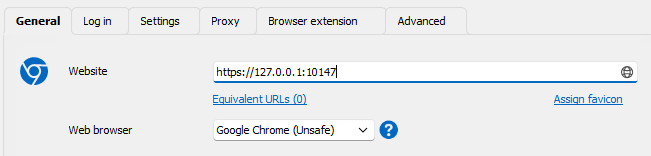
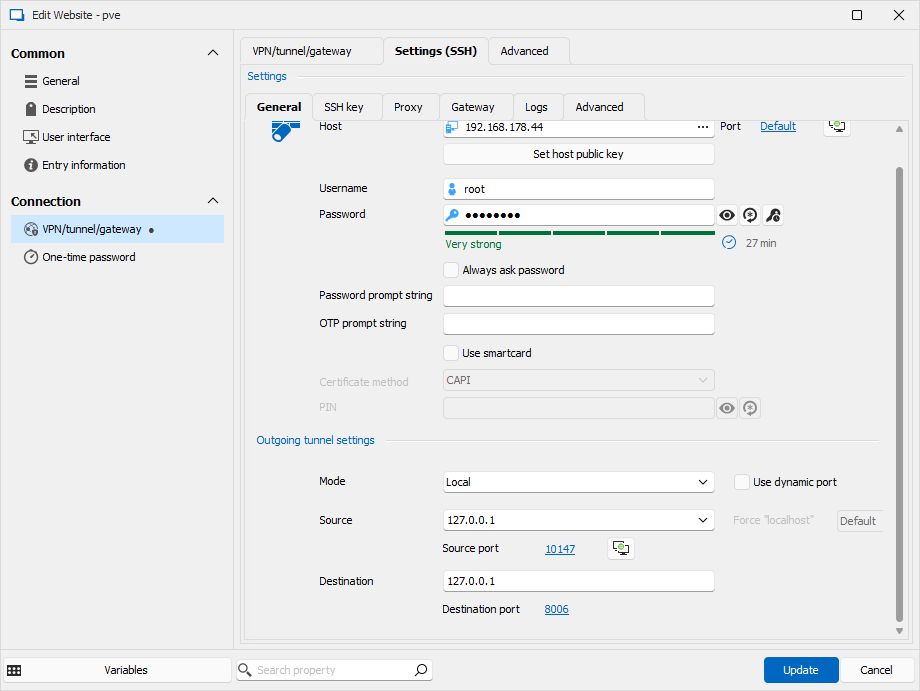
Bild_2024-08-28_101713824.png
Bild_2024-08-28_101648707.png
hello pickwick81,
Can you also send us the configuration of your proxy setting? (without any sensitive information)
This setting is under File-> Settings -> Application -> Proxy (web) -> Proxy settings.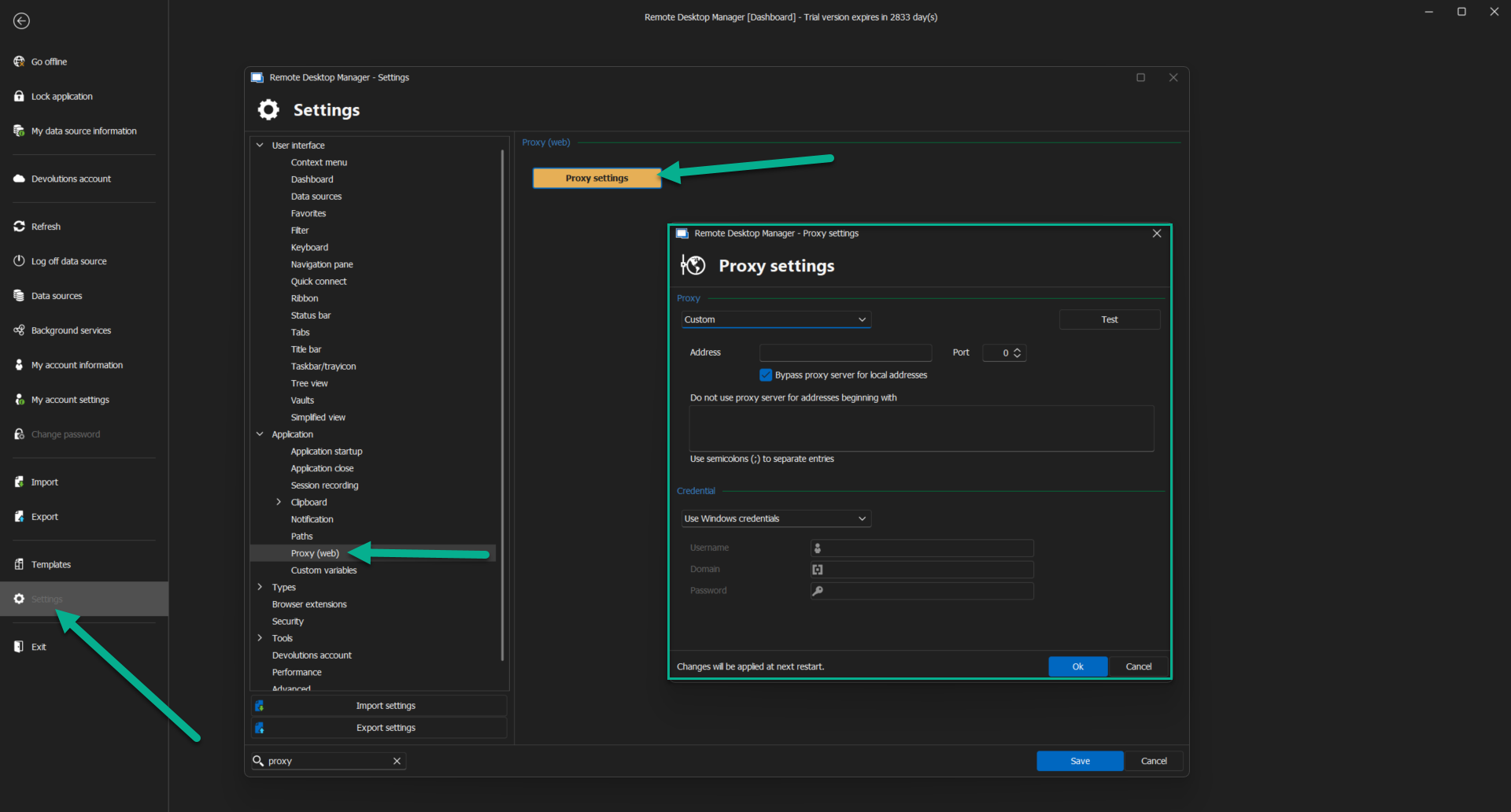
Can you also use the test connection to ensure you establish a connection?
Best regards,
Patrick Ouimet
proxy.png
There's no global proxy configured there, I only use SSH Secure Gateway, therefore VPN settings per web-UI entry or proxy setting per web-UI entry. Like in my screenshots, the tab "proxy" to by-pass that Chrome doesn't use the SSH Secure Gateway automatically.
Hello,
Sorry for the late response.
I'm working hard to reproduce this issue and investigate this behaviour.
I'll let you know when we will have an outcome.
Best regards,
Patrick Ouimet