
jitsersevenant
PAM all session close
To be clear we would like the following option from an RDP/windows viewpoint:
When you check-out a PAM account for x amount of time, then after x amount of time you need to be forced out of your windows rdp session.
We could let the user know trough RDM that the PAM session is about to expire and if they would like to extend this? (With approval if applicable.)
When the PAM sessions expires there should be a force close of your session / a force log-off from the server where you are working on.
The first one could be native to RDM and the second one could be a PowerShell script that is run from the devolutions server. The script could then force log-off the user from all known open / recent sessions within the RDM client.
It does not stop misuse from users who do not use RDM but that's something that could be mitigated by enforcing the use of the Devolutions Gateway as to connection point for RDP connections.
This is something that could be implemented native within devolutions PAM as a security policy on a PAM vault.
IP range object
Hello,
Do you think adding the fields you've listed to the existing IP Address List entry would be a good solution for your scenario? I feel like adding a new type of entry would make it more difficult for users to store their required information, as they would have to split it between two different entries.
If you can give me the option to customize the columns then I would also be content with that.
> This could then be auto filled with objects within a pre-defined folder? (like a customer or company site)
Could you describe what you're looking for with this? Maybe showing pictures of how you are currently organising your folders and entries, and how this would come into it, would help me understand.
Regards,
If we could fill the IP host list asset with all IP's found within folder es_santbois then it would satisfy our need for automation on site level.
It would create a good overview of what IP's are already assigned. (static)
Folder structure looks something like this:

IP range object
Hi,
Would it be possible to create a IP range list object based on the current IP address list object?

I would like to see the following collumns if possible:
Name
IP range/x
Subnet (calculated value?)
Vlan ID
Gateway
Firewall/Zone
DHCP-server
DHCP-Range
Comment/Description
We have allot of sites / ranges and for our support engineers this would be good information to have instead of opening a Excel. This object should coincide with the IP-List object. We could create a ip-list object for every defined range in the ip-range object?. This could then be auto filled with objects within a pre-defined folder? (like a customer or company site)
PAM accounts web objects
@Hubert,
Yes this was it. Checkbox for website enabled and it works.
Damnit didn't notice this.
Thanks for the solution.
PAM accounts web objects
The option is available. But the moment I want to open the site in rdm I get this:

Latest RDM and DVLS server setup.
PAM vault accounts username c/p
Hi,
Would it be possible to make the copy paste of usernames from pam vault accounts?
Now we can only copy paste the password.
PAM accounts web objects
Hi,
Are there plans to make it possible to add "my privileged account" option to a web entry within RDM?
We use allot of SSO/Azure apps and it would save is allot of clicks.
PAM vault access
Hi,
Is there already a feature request to implement PAM vault access within devolutions workspace.
We use DVLS server with PAM module and pam vaults are not available for selection right now.
PAM all session close
Could we solve it like this for now?
We as the customer create a local powershell script in a designated folder that can be used to kill remote sessions.
RDM/DVLS would then have an option to be linked to this script.
So every time the user is checked in - force check-in then dvls would just send a command to the server to run that specific script with x parameters?
1) check-in account
2) dvls runs script with x parameters that then runs another script with passed parameters?
3) account password is rotated
4) end
Local windows provider sync account
Oh for context: we are talking about local windows and NOT domain joined computers.
At the moment everything is working. But I have the option to import the local PAM_ADMIN account just as any other account from that windows machine.
I'll just try it tomorrow and let you know.
Local windows provider sync account
Hi,
I dont know if the server/workstation if joined to a domain...
If the asset is standalone, it means it is in itself and Identity Provider. You need to register it as such. Also, we need one administrative account to perform PAM capabilities (this one is static for now...). Lets call it PAM_ADMIN.
The PAM_ADMIN account is used to manage accounts on the asset, which you can discover using a SCAN configuration, then you can IMPORT it so it becomes managed, thereby being subject to rotation.
Is this how you had started?
Your scenario is how I would want to configure it. At the moment I assumed when I imported the PAM_ADMIN account and used rotation, I would brake the account link.
Visual BUG account import
We are using the Built in Windows local identity provider.
After the scan I went to the found account list for import. Did multiselect, pressed import, import screen to pam vault x.
Was suspecting to import 1 by 1 like all the other import buttons. But the import placed all the selected accounts within 1 pam vault.
Then I went to the pam vault and moved the accounts to the correct vaults.
After import and moving the accounts the only account that is marked imported, is the account that stayed in the original vault.
Visual BUG account import
Francois we use the latest and greatest version of DVLS server. Update was installed last Sunday.
Local windows provider sync account
At the moment I've created my first PAM local windows provider connection.
I had to create a local user on the server and add it to the Administrator group.
Now this password is static and in theory will never change. Is it possible to add this account to a pam rotation so it is not static?
I was thinking about creating a SYNC account pam-vault specific for provider accounts so I can have a set rotation schema for these.
Visual BUG account import
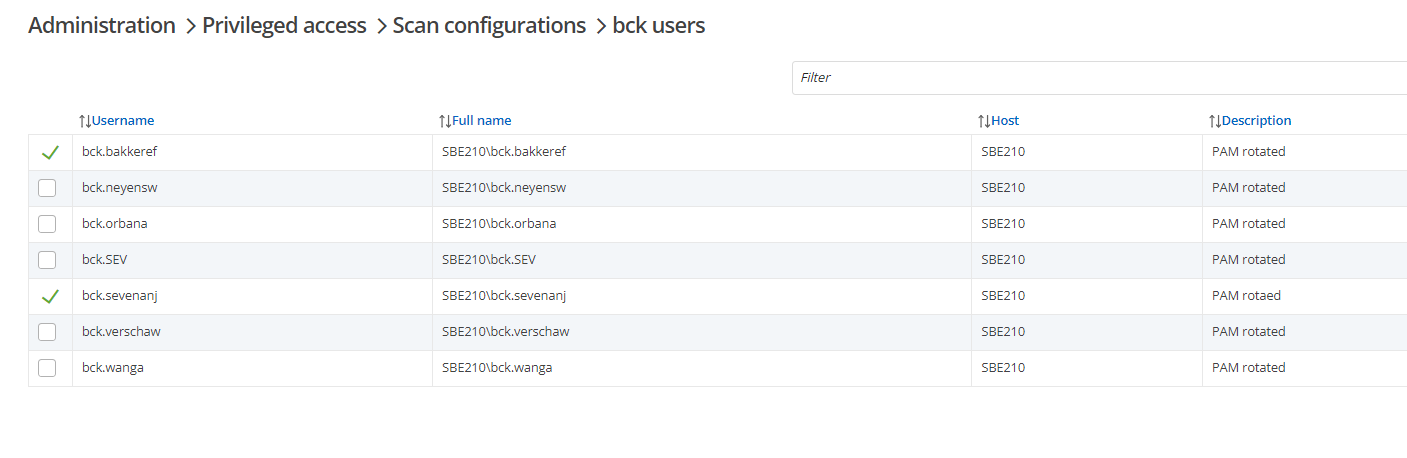
The above accounts are all imported and working withing their pam vaults. Now the visuals don't represent this.
The bug is caused because I've tried multi import the accounts, then I could only select one vault for all. After import I've moved them to the correct vault. So I think this page status is not linked correctly.
approval - email - 2fa stuck
Francois,
I can confirm that the provided patch resolved our issue.
approval - email - 2fa stuck
Hello Jitser Sevenant,
I'm happy to inform you that the isue has been fixed, and it will be available in DVLS 2024.2.8.0 version that will be released shortly.
Best regards.
Thanks for the update and bigger thanks for the upcoming fix.
approval - email - 2fa stuck
Hi Jitser Sevenant,
I'm currently working on trying to reproduce the issue, and i have a question if you dont mind. Does SSO combined with 2fa work if you try it via RDM or Workspace?
Regards.
Any updates because this problem is getting bigger as we are rolling out devolutions / rdm.
We noticed that LDAP with 2FA works for all users who have problems with the SSO option.
Strange this is that ldap and SSO with 2FA work without a problem for my account only.
PAM all session close
@francois,
Could we implement this with a powershell script for windows env. through RDM in the short term?
It would be high priority for us when users are checking out a account with domain administrator rights for example.
approval - email - 2fa stuck
Hi Jitser Sevenant,
I'm currently working on trying to reproduce the issue, and i have a question if you dont mind. Does SSO combined with 2fa work if you try it via RDM or Workspace?
Regards.
info:
DVLS Server2024.2.6.0
Databasev1.960
Version2024.2.13.0 64-bit
Remote Desktop10.0.22621.2506
.NET version.NET 8.0.6
And yes 2fa works for other SSO related activities.
PAM all session close
Though I like the idea of this, I would suggest to make it optional if it does not already exist.
Optional sounds good, as far as I know the feature doesn't exist. Maybe it's possible to script this with help from the dvls team.
approval - email - 2fa stuck
We are 100% certain this is not the problem. 2Fa works correct when logging in directly to rdm or web interface without using the approval link.
PAM all session close
Hi,
We have the following request:
When check-out forced or timer expiry for a privileged account happens then the user should be logged of or all sessions should be force closed.
At the moment all RDM sessions opened with the check-out account just stay open until closed by the end user.
We use
the following devolutions
setup:
Devolutions server
PAM module
Gateway module
Devolutions database is stored on external Windows SQL server.
Devolutions
RDM
approval on account/folder level
Hi,
We have
the following problem:
When implementing a approval process we noticed that the only option is to do this on pam-vault level.
This gives us allot of overhead when using named accounts. We need to create a 2 pam-vault for every user with his own named accounts.
One with his named accounts without approval and One with his named accounts with approval. This is allot of extra work.
Would it be possible to make approval request applicable on account or folder level within a pam vault?
We use
the following devolutions setup:
Devolutions server
PAM module
Gateway module
Devolutions database is stored on external Windows SQL server.
Devolutions RDM
approval - email - 2fa stuck
Hi,
We have the following problem:
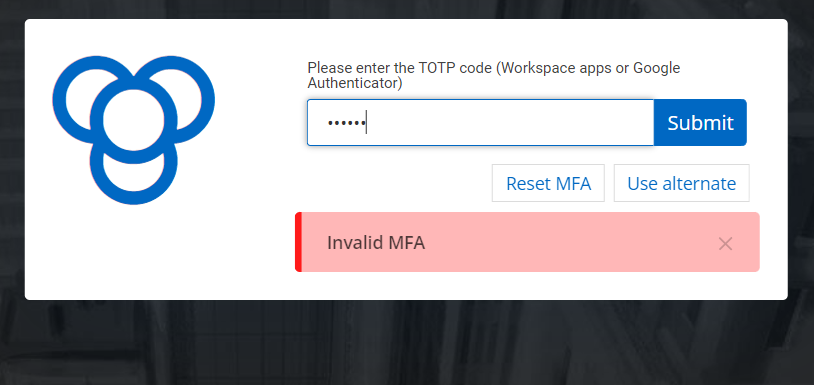
When receiving a pam approval email and using login with windows SSO account the screen gets stuck on 2FA error.
Note that 2FA for workplace and rdm login does work correctly. We also noticed in the dvls logs that the user attempting to open the approval screen already has a web and rdm session open.
We use the following devolutions setup:
Devolutions server
PAM module
Gateway module
Devolutions database is stored on external Windows SQL server.
Devolutions RDM