approval - email - 2fa stuck

Hi,
We have the following problem:
When receiving a pam approval email and using login with windows SSO account the screen gets stuck on 2FA error.
Note that 2FA for workplace and rdm login does work correctly. We also noticed in the dvls logs that the user attempting to open the approval screen already has a web and rdm session open.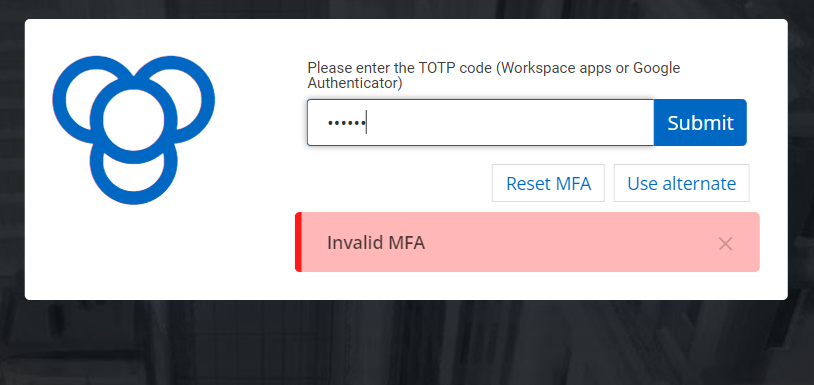
We use the following devolutions setup:
- Devolutions server
- PAM module
- Gateway module
- Devolutions database is stored on external Windows SQL server.
- Devolutions RDM
approvalmail-2fa-error.png
All Comments (11)
Hello,
Could you ensure that the time difference between your mobile device and your computer/server is not greater than 30 seconds? If it is, the code will indeed come back as invalid!
Best regards,
Etienne Lord
We are 100% certain this is not the problem. 2Fa works correct when logging in directly to rdm or web interface without using the approval link.
Hello,
Could you tell us what is your DVLS version ? Meanwhile, we will try to reproduce something like that on our side.
Best regards,
François Dubois
Hi Jitser Sevenant,
I'm currently working on trying to reproduce the issue, and i have a question if you dont mind. Does SSO combined with 2fa work if you try it via RDM or Workspace?
Regards.
Hi Jitser Sevenant,
I'm currently working on trying to reproduce the issue, and i have a question if you dont mind. Does SSO combined with 2fa work if you try it via RDM or Workspace?
Regards.
info:
DVLS Server2024.2.6.0
Databasev1.960
Version2024.2.13.0 64-bit
Remote Desktop10.0.22621.2506
.NET version.NET 8.0.6
And yes 2fa works for other SSO related activities.
Hi Jitser Sevenant,
I'm currently working on trying to reproduce the issue, and i have a question if you dont mind. Does SSO combined with 2fa work if you try it via RDM or Workspace?
Regards.
Any updates because this problem is getting bigger as we are rolling out devolutions / rdm.
We noticed that LDAP with 2FA works for all users who have problems with the SSO option.
Strange this is that ldap and SSO with 2FA work without a problem for my account only.
Hello Jitser Sevenant,
I'm happy to inform you that the isue has been fixed, and it will be available in DVLS 2024.2.8.0 version that will be released shortly.
Best regards.
Hello Jitser Sevenant,
I'm happy to inform you that the isue has been fixed, and it will be available in DVLS 2024.2.8.0 version that will be released shortly.
Best regards.
Thanks for the update and bigger thanks for the upcoming fix.
Hello,
Version 2024.2.8.0 is now available. Let us know if it works for you.
Best regards
François Dubois
Francois,
I can confirm that the provided patch resolved our issue.
Hello,
I'm glad to hear that. Don't hesitate if you have other questions or if we can help with something else.
Best regards,
François Dubois