Visual BUG account import

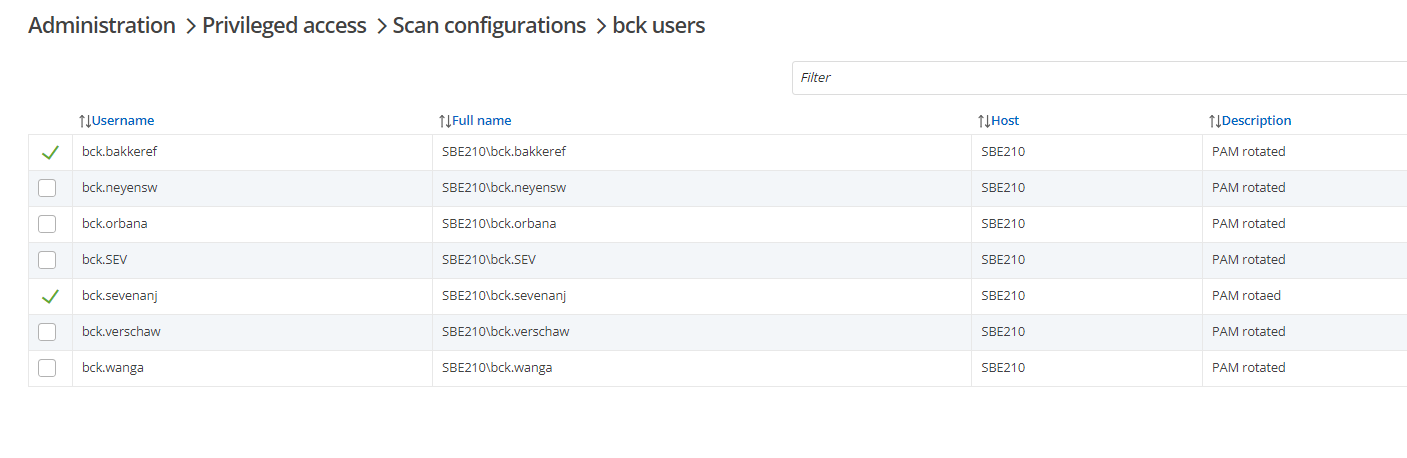
The above accounts are all imported and working withing their pam vaults. Now the visuals don't represent this.
The bug is caused because I've tried multi import the accounts, then I could only select one vault for all. After import I've moved them to the correct vault. So I think this page status is not linked correctly.
6a6efbd4-de83-4494-83d3-593cd3d7415a.png
All Comments (6)
Hello,
Thank you for bringing this to our attention. Could you let us know what version do you use ? We will try to replicate what you said and fix it if we can replicate. We will let you know if we need more information to replicate.
Best regards,
François Dubois
Francois we use the latest and greatest version of DVLS server. Update was installed last Sunday.
Hello,
Unfortunately, we are not able to replicate the issue. Everything seems to work correctly on our side. Could you confirm what kind of provider do you use ? Is it the windows local account built in with DVLS or the AnyIdentity provider ?
Best regards,
François Dubois
We are using the Built in Windows local identity provider.
After the scan I went to the found account list for import. Did multiselect, pressed import, import screen to pam vault x.
Was suspecting to import 1 by 1 like all the other import buttons. But the import placed all the selected accounts within 1 pam vault.
Then I went to the pam vault and moved the accounts to the correct vaults.
After import and moving the accounts the only account that is marked imported, is the account that stayed in the original vault.
Hello,
Thank you for information, we will try to reproduce with that information.
Best regards,
François Dubois
Hello,
Just to keep you posted, our QA team reproduced the issue. We created a ticket in our backlog. We will work on a fix as soon as possible. We will post back here once we have an update.
Best regards,
François Dubois